mirror of
https://github.com/tabler/tabler.git
synced 2025-12-21 17:34:25 +04:00
Compare commits
218 Commits
@tabler/co
...
dev-scss-i
| Author | SHA1 | Date | |
|---|---|---|---|

|
9f5748b683 | ||
|
|
612879c6a1 | ||
|
|
1ee0110205 | ||
|
|
ef23c7c1f6 | ||

|
8947d7c7b7 | ||
|
|
399a5c59f9 | ||

|
ad22d046c3 | ||
|
|
b8b63d7e94 | ||

|
ab8009b771 | ||
|
|
bd35fd39cf | ||
|
|
4b65380293 | ||

|
2c73788cd1 | ||
|
|
a967970419 | ||

|
64baa141e7 | ||
|
|
49ab9ea931 | ||
|
|
a8c41914c4 | ||
|
|
9951fe9b1d | ||

|
cfd4cb6624 | ||

|
6fec73a3c4 | ||

|
29cc0cd378 | ||

|
6c47b5f868 | ||
|
|
6c38a48af1 | ||
|
|
6c4dd3670d | ||
|
|
2a12f72b28 | ||
|
|
f91b0f7cfa | ||
|
|
af816227bc | ||
|
|
59b6f73a06 | ||
|
|
266d5ad773 | ||

|
db6200a998 | ||
|
|
70a41e4fc2 | ||
|
|
e96f055238 | ||
|
|
a200d30f04 | ||

|
666a296a62 | ||
|
|
545defc852 | ||
|
|
1b0f8206ee | ||
|
|
c2cb3d3255 | ||
|
|
a0377f9752 | ||
|
|
c914ecfb05 | ||
|
|
57afd0bb11 | ||
|
|
8db1c08744 | ||
|
|
08e4919ae1 | ||
|
|
ef9d75f32f | ||
|
|
3e35545edc | ||
|
|
446c34eceb | ||
|
|
90285704e4 | ||
|
|
a7f73d7f7e | ||
|
|
d66c6a70eb | ||
|
|
ad54f61429 | ||
|
|
9007e73cb6 | ||
|
|
0d106a89b7 | ||
|
|
0d59e2f13a | ||
|
|
8850f6128f | ||
|
|
a1af8014e8 | ||
|
|
c8fee60023 | ||
|
|
d8c70a8b94 | ||
|
|
b70cb48e0b | ||
|
|
5b8746c702 | ||
|
|
f2c0c65f98 | ||
|
|
06021fad99 | ||
|
|
bd67b3f82e | ||
|
|
8e2acc82e0 | ||
|
|
85f212293d | ||
|
|
72a1d67709 | ||
|
|
638f36c0c5 | ||
|
|
f769abd70b | ||
|
|
3a02ef9c55 | ||
|
|
38ea9aa4e7 | ||
|
|
acbe4ff35f | ||
|
|
b5e2f54bf8 | ||
|
|
e2411b3518 | ||
|
|
44a1979b78 | ||
|
|
bccdeee779 | ||
|
|
5cb041275d | ||
|
|
27c866b3c3 | ||

|
c127d65605 | ||
|
|
f15d2b97f8 | ||

|
1f4906cc40 | ||
|
|
f8075f69c0 | ||
|
|
fd0fd47bb2 | ||
|
|
a41c9565f1 | ||
|
|
7fc1d5c11c | ||
|
|
222ddd4b2f | ||
|
|
ddd3753cde | ||
|
|
b9d434dcd4 | ||
|
|
6a3513f8e9 | ||
|
|
21bf92608d | ||
|
|
bb617b8dd2 | ||
|
|
5fa662bfae | ||
|
|
467c529fdc | ||
|
|
7773ff22b9 | ||
|
|
1867e0e482 | ||

|
67c9400918 | ||
|
|
7917f868e9 | ||
|
|
5619b2d8be | ||
|
|
9b15b942cb | ||
|
|
5b3e201d06 | ||
|
|
8470c9b315 | ||
|
|
dce63db1e6 | ||
|
|
278967b028 | ||
|
|
7082ea1c56 | ||
|
|
c42b104fe5 | ||
|
|
e546706f4c | ||
|
|
6d5e950235 | ||
|
|
665472cf69 | ||
|
|
468b055005 | ||
|
|
895f943270 | ||
|
|
3eaa90203b | ||
|
|
79bd867db5 | ||
|
|
e265681a48 | ||
|
|
cac5d92c7d | ||
|
|
b6e9b18ce9 | ||
|
|
849e286df0 | ||
|
|
b6ce7b8feb | ||
|
|
7b7265347c | ||

|
e675389871 | ||
|
|
b548430688 | ||

|
b45d85089e | ||
|
|
8f701859ad | ||
|
|
78c9c71365 | ||
|
|
5d8752eea0 | ||
|
|
6452669803 | ||
|
|
bf750451f1 | ||
|
|
83b11a8b35 | ||
|
|
42da37e737 | ||
|
|
0f335cda27 | ||
|
|
a6c24bb44f | ||
|
|
e975ea7e74 | ||
|
|
92ec44cf4a | ||
|
|
8da9fa869f | ||
|
|
67f3571a4f | ||
|
|
8710940952 | ||
|
|
7295678c34 | ||
|
|
a037e8e429 | ||
|
|
3da4395d10 | ||
|
|
f9f9663b2a | ||
|
|
a922c1f226 | ||
|
|
9069dcba54 | ||
|
|
7fbe4b5bc9 | ||
|
|
9ebd9f1d24 | ||
|
|
88b9e87c6e | ||
|
|
d4886607f0 | ||
|
|
1546e9ccc4 | ||
|
|
f25da87043 | ||
|
|
2ac915cd93 | ||
|
|
fa89c6fa73 | ||
|
|
c4d21a4666 | ||
|
|
baa6056c4c | ||
|
|
dc24132a7d | ||
|
|
8abd2a8d20 | ||
|
|
226f9bd202 | ||
|
|
255bea88b1 | ||
|
|
8525276984 | ||
|
|
f3182c6538 | ||
|
|
6d6d1bde4c | ||
|
|
2b6d6b184b | ||
|
|
5b2ee97aa7 | ||
|
|
681f7a5fed | ||
|
|
9910dd0dde | ||
|
|
8d4f8d07c3 | ||
|
|
199f39a52e | ||

|
94bea005a4 | ||
|
|
0d501e9017 | ||
|
|
00e9c06f11 | ||
|
|
52710a339a | ||
|
|
6c566cf7b1 | ||
|
|
523f288c8f | ||
|
|
864619201e | ||
|
|
f9e4da2fb0 | ||
|
|
c70806a9db | ||
|
|
44250db908 | ||
|
|
137e5be8f2 | ||
|
|
ffdf712f8a | ||
|
|
4846828f39 | ||
|
|
e8e3857b00 | ||
|
|
91b026507b | ||
|
|
f9013873b9 | ||
|
|
ddcd3a79e1 | ||
|
|
c20d076b74 | ||
|
|
042e50f979 | ||
|
|
e14e4921b5 | ||
|
|
d61cddb3d6 | ||
|
|
0accf60a63 | ||
|
|
d3daf7a5db | ||
|
|
8ac0742cc7 | ||
|
|
f94b153f7f | ||
|
|
74e5d26c20 | ||
|
|
9a9dedf1b4 | ||
|
|
e704a5a946 | ||
|
|
dd26b62607 | ||
|
|
9fceadd422 | ||
|
|
9c368702b4 | ||
|
|
3fc7b84fc4 | ||
|
|
b17b488c96 | ||
|
|
9bbcb99b90 | ||
|
|
215eaa4acb | ||
|
|
92a3afe492 | ||
|
|
19a3d20fad | ||

|
8cd7b186b7 | ||
|
|
be1f3d1c1f | ||
|
|
2f8a37252d | ||
|
|
d73d78e76f | ||
|
|
f84e88116c | ||
|
|
473fa3850b | ||
|
|
f336275476 | ||
|
|
982bc5a09b | ||
|
|
5fe99e0510 | ||
|
|
1527157bfe | ||
|
|
922bb0346a | ||
|
|
e3d68d6aab | ||
|
|
aea3b0a614 | ||

|
cd592b4743 | ||
|
|
c59bc9d977 | ||
|
|
bc443ff4aa | ||
|
|
afd024f0b1 | ||
|
|
d29b6f5675 | ||
|
|
6b6617aae6 | ||
|
|
636fed5fe9 | ||
|
|
d7f4f50986 |
@@ -10,7 +10,7 @@ import * as prettier from "prettier";
|
||||
|
||||
const __dirname = dirname(fileURLToPath(import.meta.url))
|
||||
|
||||
const docs = sync(join(__dirname, '..', 'docs', '**', '*.mdx'))
|
||||
const docs = sync(join(__dirname, '..', 'docs', '**', '*.md'))
|
||||
|
||||
async function formatHTML(htmlString) {
|
||||
try {
|
||||
|
||||
30
.build/zip-package.mjs
Normal file
30
.build/zip-package.mjs
Normal file
@@ -0,0 +1,30 @@
|
||||
#!/usr/bin/env node
|
||||
|
||||
import AdmZip from 'adm-zip';
|
||||
import path from 'path';
|
||||
import { fileURLToPath } from 'url';
|
||||
import { readFileSync } from 'fs';
|
||||
|
||||
// Get __dirname in ESM
|
||||
const __dirname = path.dirname(fileURLToPath(import.meta.url))
|
||||
|
||||
const pkg = JSON.parse(
|
||||
readFileSync(path.join(__dirname, '../core', 'package.json'), 'utf8')
|
||||
)
|
||||
|
||||
// Create zip instance and add folder
|
||||
const zip = new AdmZip();
|
||||
zip.addLocalFolder(path.join(__dirname, '../preview/dist'), 'dashboard');
|
||||
|
||||
zip.addLocalFile(path.join(__dirname, '../preview/static', 'og.png'), '.', 'preview.png');
|
||||
|
||||
zip.addFile("documentation.url", Buffer.from("[InternetShortcut]\nURL = https://tabler.io/docs"));
|
||||
|
||||
|
||||
// Folder to zip and output path
|
||||
const outputZipPath = path.join(__dirname, '../packages-zip', `tabler-${pkg.version}.zip`);
|
||||
|
||||
// Write the zip file
|
||||
zip.writeZip(outputZipPath);
|
||||
|
||||
console.log(`Zipped folder to ${outputZipPath}`);
|
||||
5
.changeset/chilled-pans-cheer.md
Normal file
5
.changeset/chilled-pans-cheer.md
Normal file
@@ -0,0 +1,5 @@
|
||||
---
|
||||
"@tabler/preview": minor
|
||||
---
|
||||
|
||||
Add a color palette in the signing component
|
||||
@@ -3,8 +3,18 @@
|
||||
"changelog": "@changesets/cli/changelog",
|
||||
"commit": false,
|
||||
"fixed": [],
|
||||
"linked": [],
|
||||
"linked": [
|
||||
[
|
||||
"@tabler/core",
|
||||
"@tabler/preview",
|
||||
"@tabler/docs"
|
||||
]
|
||||
],
|
||||
"access": "public",
|
||||
"baseBranch": "main",
|
||||
"ignore": []
|
||||
"baseBranch": "dev",
|
||||
"ignore": [],
|
||||
"privatePackages": {
|
||||
"version": true,
|
||||
"tag": false
|
||||
}
|
||||
}
|
||||
|
||||
5
.changeset/fresh-rockets-retire.md
Normal file
5
.changeset/fresh-rockets-retire.md
Normal file
@@ -0,0 +1,5 @@
|
||||
---
|
||||
"@tabler/core": patch
|
||||
---
|
||||
|
||||
Fix mixed declarations in SCSS
|
||||
5
.changeset/light-cooks-hug.md
Normal file
5
.changeset/light-cooks-hug.md
Normal file
@@ -0,0 +1,5 @@
|
||||
---
|
||||
"@tabler/preview": patch
|
||||
---
|
||||
|
||||
Update icons to v3.34.1 (75 new icons)
|
||||
5
.changeset/modern-dots-bathe.md
Normal file
5
.changeset/modern-dots-bathe.md
Normal file
@@ -0,0 +1,5 @@
|
||||
---
|
||||
"@tabler/preview": patch
|
||||
---
|
||||
|
||||
Update activity messages
|
||||
5
.changeset/tricky-moons-laugh.md
Normal file
5
.changeset/tricky-moons-laugh.md
Normal file
@@ -0,0 +1,5 @@
|
||||
---
|
||||
"@tabler/docs": patch
|
||||
---
|
||||
|
||||
Fix Docs search in dark mode
|
||||
5
.changeset/twelve-tables-attack.md
Normal file
5
.changeset/twelve-tables-attack.md
Normal file
@@ -0,0 +1,5 @@
|
||||
---
|
||||
"@tabler/preview": patch
|
||||
---
|
||||
|
||||
Fix responsive layputs in 'Form Elements' page
|
||||
56
.cursor/rules/main.mdc
Normal file
56
.cursor/rules/main.mdc
Normal file
@@ -0,0 +1,56 @@
|
||||
---
|
||||
description: Tabler Project Rules
|
||||
globs:
|
||||
alwaysApply: true
|
||||
---
|
||||
|
||||
## Documentation Standards
|
||||
|
||||
- Always write documentation in English (not Polish) for technical content
|
||||
- Use clear, descriptive headings with proper hierarchy (##, ###)
|
||||
- Include practical examples with code snippets
|
||||
- Add explanations for each component's purpose and usage
|
||||
- Use consistent formatting for code blocks and examples
|
||||
|
||||
## CSS/SCSS Guidelines
|
||||
|
||||
- Follow Tabler's CSS custom properties pattern: `--#{$prefix}component-property`
|
||||
- Use semantic class names that describe purpose, not appearance
|
||||
- Maintain consistent spacing and indentation in SCSS files
|
||||
- Group related styles together with clear comments
|
||||
- Use Bootstrap-compatible class naming conventions
|
||||
|
||||
## Component Documentation Structure
|
||||
|
||||
- Start with a brief description of the component's purpose
|
||||
- Show basic usage examples first
|
||||
- Include variations and modifiers
|
||||
- Add accessibility considerations where relevant
|
||||
- Provide code examples that are copy-paste ready
|
||||
|
||||
## File Organization
|
||||
|
||||
- Keep documentation files in `docs/content/ui/components/`
|
||||
- Use consistent naming: lowercase with hyphens
|
||||
- Include frontmatter with title, summary, and description
|
||||
- Link to Bootstrap documentation when relevant
|
||||
|
||||
## Code Examples
|
||||
|
||||
- Use Liquid templating syntax for dynamic examples
|
||||
- Include both HTML and rendered output
|
||||
- Show responsive behavior where applicable
|
||||
- Demonstrate proper accessibility attributes
|
||||
|
||||
## Git Commit Messages
|
||||
|
||||
- Use English for commit messages
|
||||
- Follow conventional commit format when possible
|
||||
- Be descriptive about what was changed and why
|
||||
|
||||
## Project-Specific Conventions
|
||||
|
||||
- Tabler uses Bootstrap 5 as a foundation
|
||||
- Custom components extend Bootstrap functionality
|
||||
- Documentation should be comprehensive but concise
|
||||
- Examples should be practical and immediately usable
|
||||
3
.github/workflows/argos.yml
vendored
3
.github/workflows/argos.yml
vendored
@@ -22,7 +22,8 @@ jobs:
|
||||
test:
|
||||
timeout-minutes: 60
|
||||
runs-on: ubuntu-latest
|
||||
if: github.event.pull_request.draft == false
|
||||
# if: github.event.pull_request.draft == false
|
||||
if: false
|
||||
steps:
|
||||
- name: Clone repository
|
||||
uses: actions/checkout@v4
|
||||
|
||||
10
.github/workflows/lockfiles.yaml
vendored
10
.github/workflows/lockfiles.yaml
vendored
@@ -1,6 +1,7 @@
|
||||
name: Changed lock files
|
||||
on:
|
||||
pull_request: null
|
||||
pull_request_target:
|
||||
types: [opened, reopened]
|
||||
|
||||
permissions:
|
||||
pull-requests: read
|
||||
@@ -12,10 +13,9 @@ jobs:
|
||||
steps:
|
||||
- name: Clone Tabler
|
||||
uses: actions/checkout@v4
|
||||
|
||||
- name: Prevent lock file change
|
||||
uses: xalvarez/prevent-file-change-action@v1
|
||||
uses: xalvarez/prevent-file-change-action@v2
|
||||
with:
|
||||
githubToken: ${{ secrets.GITHUB_TOKEN }}
|
||||
pattern: Gemfile.lock|pnpm-lock.json
|
||||
trustedAuthors: codecalm, dependabot
|
||||
pattern: Gemfile.lock|pnpm-lock.json|pnpm-lock.yaml
|
||||
trustedAuthors: codecalm, BG-Software-BG, dependabot
|
||||
|
||||
3
.gitignore
vendored
3
.gitignore
vendored
@@ -35,4 +35,5 @@ package-lock.json
|
||||
|
||||
demo/
|
||||
dist/
|
||||
packages-zip/
|
||||
packages-zip/
|
||||
.env
|
||||
@@ -1,7 +1,7 @@
|
||||
{
|
||||
"bracketSpacing": true,
|
||||
"jsxSingleQuote": false,
|
||||
"printWidth": 240,
|
||||
"printWidth": 320,
|
||||
"proseWrap": "always",
|
||||
"semi": false,
|
||||
"singleQuote": false,
|
||||
|
||||
520
CHANGELOG.md
520
CHANGELOG.md
@@ -1,520 +0,0 @@
|
||||
# Changelog
|
||||
|
||||
## 1.0.0 - 2025-01-28
|
||||
|
||||
### Minor Changes
|
||||
|
||||
- c276a8b: Add new `Tag` component
|
||||
- d380224: Add customizable Star Ratings component using `star-rating.js` library
|
||||
- 47cd6c1: Add `flags.html` page with list of all flags
|
||||
- be67ab6: Update CSS class from `text-muted` to `text-secondary` for better Bootstrap compatibility
|
||||
- 080c746: Adding `alerts.html` page with example of alerts.
|
||||
- b381273: Change primary color value to new Tabler branding
|
||||
- 75619dd: Unify dark mode with latest Bootstrap API and improve dark mode elements
|
||||
- cc82dbf: New Chat component
|
||||
- 5a03643: Adjusting form element sizes for enhanced mobile devices compatibility
|
||||
- be14607: Add new color picker component using `coloris.js` library
|
||||
- d046570: Update Tabler Icons to version 2.23 with 18 new icons added
|
||||
- 5488c50: New page with payment providers: `payment-providers.html`
|
||||
- 5488c50: Add support for new payment providers: 2c2p, Adyen, Affirm, Alipay Plus, Allegro Pay, Amazon Pay, Apple Pay, Autopay, Binance USD, Bkash, Cash App, Chime, EasyPaisa, Ethereum, Google Pay, HubSpot, iDeal, Litecoin, Mercado Pago, MetaMask, MoneyGram, OpenSea, Payconiq, Payka, Payline, PayPo, Paysafe, Poli, Revolut Pay, Samsung Pay, Shop Pay, Solana, Spingo, Stax, Tether, True USD, Venmo, WeChat Pay, Wise, Zelle
|
||||
|
||||
### Patch Changes
|
||||
|
||||
- 293d0a4: Change Twitter to X brand
|
||||
- fd0935a: Updated link to icons documentation
|
||||
- 1cf27dc: Dependencies update
|
||||
- 041f4e4: Order menu items alphabetically
|
||||
- 20cad01: Automatically retrieve and display the changelog from the CHANGELOG.md file.
|
||||
- 34f3efc: Initialize Visual Studio Code config
|
||||
- 7ba7717: Make horizontal rule direction aware
|
||||
- 063ef58: Update Tabler Illustrations to v1.5
|
||||
- 5e2c975: Update Tabler Icons to v3.29.0
|
||||
- 9d5f7ca: Remove unused dependencies from `package.json`
|
||||
- be69fd6: Replace Jekyll with Eleventy
|
||||
- 2f5fad6: Dependencies update
|
||||
- dfd7c88: Update TinyMCE to v7.0
|
||||
- 056df18: Fix text color in dark version of navbar
|
||||
- 17327dc: Remove invalid `z-index` setting for dropdowns
|
||||
- 4ff077a: Update Tabler Icons to version 2.21 with 18 new icons added
|
||||
- 867c8dd: Update Tabler Emails to v2.0
|
||||
- d8605f2: Init changelog script
|
||||
- 89c6234: Adding Two-Step Verification Pages
|
||||
- f6e885b: Replace `.page-center` with `.my-auto` in single page layouts
|
||||
- 7aa216f: Add border-opacity variable for improved color utility
|
||||
- 88eb413: Fix icon display issues in the Star Ratings component
|
||||
- 78392b6: Fix `color` of disabled `dropdown-item` in Navbar component
|
||||
- 4deb8f4: Bump pnpm/action-setup from 2 to 3
|
||||
- 9015472: Add social icons plugin
|
||||
- 7fe30a1: `Dockerfile` fix
|
||||
- e53942f: Update Jekyll to version 4.3.4
|
||||
- 72f868b: Update Tabler Icons to version 2.20 with 37 new icons added
|
||||
- e0443c0: Add Tabler Illustrations
|
||||
- 5cca710: Update illustrations and enhance SVG handling in HTML
|
||||
- 3a4f10f: Fix ids of custom size star ratings
|
||||
- 7896562: Unify size of avatar, flag and payment components
|
||||
- 1587905: Update icons to v2.42.0
|
||||
- d9e00b2: Update Bootstrap to v5.3.0
|
||||
- bc1d1a3: Set `font-size` of an `i` element with `icon` class in a `button` element
|
||||
- 0195f9b: Dependencies update
|
||||
- a5bf5d3: Fix icons in `form-elements.html`
|
||||
- 736410c: Update Tabler Icons to v3.28.1
|
||||
- 3f516ea: Fix `rgba` color values in `_variables.scss`
|
||||
- e91884e: Fix description of alerts with a description
|
||||
- 90cc744: Fix colors of disabled `.ts-control`
|
||||
- 1801e41: Center content on error and single page layouts
|
||||
- 45c83ac: Resolve map page issues
|
||||
- faee63c: Improve base font family loading
|
||||
- 5e7e0dd: Introduce Docker Compose Config to build and run Ttabler locally
|
||||
- c293a66: Fix `@charset` CSS declaration in bundle.
|
||||
- cb4a681: Update `_navbar.scss` with disabled dropdown menu items color
|
||||
- af41fb3: Update Tabler Icons to v3.17.0
|
||||
- 6cbe888: Update `@tabler/icons` to v3.0
|
||||
- 0e4bf5f: Refactor data structure by converting YAML files to JSON
|
||||
- 82cf257: Increase `z-index` of `ts-dropdown` to prevent overlapping by buttons
|
||||
- 4b4b4f6: Adding punctuation to `SECURITY.md`
|
||||
- a0a2d52: Fix form controls bugs in dark mode
|
||||
- f45b697: Fix padding in code blocks
|
||||
- 4de166d: Unified Box Shadows with Bootstrap Compatibility
|
||||
- 87bf2f5: Remove duplicated setting of color in `th` element
|
||||
- 5dc45aa: Fix layout of search results for small and medium screens
|
||||
- 4ae0358: Remove `text-decoration` on hovering `a` element with class having `icon` class
|
||||
- e798eb6: Fix small typo in tables docs
|
||||
- 1c1d0c9: Improve documentation for alerts
|
||||
- 371ef84: Bump `pnpm/action-setup` from 3 to 4
|
||||
- 8421fc2: Update dependencies
|
||||
- 0625f5f: Update Tabler Icons to version 2.22 with 18 new icons added
|
||||
- ba65fc3: Update devDependencies
|
||||
- a43ded4: Add All Contributions package to project for easy contribution tracking
|
||||
- 2f622c9: Set value of `$font-family-monospace` as default
|
||||
- 2c7c448: Refactor Dockerfile and package.json
|
||||
- 5ec7f05: Resolved light dropdown issue on dark theme
|
||||
- b0b07b9: Enhance documentation
|
||||
- 0f129b1: Update Tabler Icons to version 2.19 with 18 new icons added
|
||||
- 507df7b: Fix cells with inline icons
|
||||
- 0e5b44a: Fix `color` of disabled `nav-link` in `nav-bordered`
|
||||
- 65c1300: Fix the `z-index` value of the `nav-tab` inside `card-tab` #1933
|
||||
- 8552a46: Switch from `npm` to `pnpm` for faster package installation
|
||||
- 4a9e40d: Increase contrast of active `dropdown-item` in vertical layout
|
||||
- 17ebdf4: Update documentation for Tabler components
|
||||
- 4c88481: Add variable to configure `avatar-list` spacing
|
||||
- df46ee7: Do not display empty `fieldset` element
|
||||
- 875cafa: Refactor SCSS variables to use `color.adjust` for improved color manipulation
|
||||
- eb28546: Add Tabler Illustrations
|
||||
- 650d84c: Update required Node.js version to 18 and add `.nvmrc` file
|
||||
- fb659d4: Fix table default background color
|
||||
- f77c712: Avoid SCSS color dependency on `:focus`
|
||||
- 71c68ce: Update changelog configuration and release scripts
|
||||
- 34d124d: Update Tabler Icons to v3.26.0
|
||||
- 4cd9215: Updated Tabler Icons to v3.24.0
|
||||
- 7bb947b: Update Tabler Icons to version 2.18 with 18 new icons added
|
||||
- c75cf55: Update Node.js engine requirement to allow versions >=20
|
||||
- 1c34e8e: Update Tabler Icons to v3.14.0
|
||||
- 289dd3b: Add Prettier to project for consistent code formatting
|
||||
- f83e36c: Upgrade Node.js from version 18 to version 20 for improved performance, security, and feature updates.
|
||||
- b885852: Update Tabler Icons to version 2.25 with 48 new icons added
|
||||
- 53a5117: Fix responsiveness issue in Settings menu
|
||||
- 38504e5: Added 3 new payments from Nepal: Esewa, FonePay, Khalti and Imepay
|
||||
- 35ee14d: Add new Filled section to Icons page
|
||||
- d32f242: Update `bootstrap` to v5.3.1
|
||||
- d82f94e: Update package dependencies to latest versions
|
||||
- 54c5ad0: Fix link to webfont version of Tabler Icons
|
||||
- 94b83d4: Add support for changeset tool for more efficient and organized code changes
|
||||
- c51ff28: Fix colors in date range datepicker
|
||||
|
||||
## `1.0.0-beta24` - 2025-01-11
|
||||
|
||||
- Enhanced documentation.
|
||||
- Updated illustrations and improved SVG handling in HTML.
|
||||
- Updated copyright year in LICENSE file to 2025.
|
||||
- Added marketing pages plugin.
|
||||
|
||||
## `1.0.0-beta23` - 2025-01-07
|
||||
|
||||
- Documentation improvements.
|
||||
- Added countup functionality and updated documentation example.
|
||||
- Do not display empty `<fieldset>`.
|
||||
- Set font-size of webfont icon inside a button.
|
||||
- Ordered menu items alphabetically.
|
||||
- Marked value of `$font-family-monospace` as `!default`.
|
||||
- Fixed unpkg links to static-files icons.
|
||||
- Fixed description of alerts with a description.
|
||||
- Fixed layout of search results for small and medium screens.
|
||||
- Removed invalid z-index setting for dropdown.
|
||||
- Fixed IDs of custom size star ratings.
|
||||
- Removed text-decoration on hover for elements with child icons.
|
||||
- Fixed link to webfont icons.
|
||||
- Updated color reference links in UI component documentation.
|
||||
- Fixed typo in browser support documentation summary.
|
||||
- Enhanced Figma plugin documentation with detailed usage instructions.
|
||||
- Added documentation for Tabler Illustrations and updated index with a link.
|
||||
- Enhanced documentation for various UI and icon sections.
|
||||
- Added new documentation files for icons and UI components; restructured existing files.
|
||||
- Updated documentation structure and content for icons and UI components.
|
||||
- Removed outdated `menu.json` and added `index.mdx` files for UI documentation structure.
|
||||
- General docs update.
|
||||
- Increased contrast of active dropdown-item in vertical layout.
|
||||
- Removed duplicated color setting in table headers.
|
||||
- Increased `z-index` of `ts-dropdown`.
|
||||
- Added social icons plugin.
|
||||
- Described variables for datagrid in docs.
|
||||
- Fixed multiple documentation issues.
|
||||
- Removed unused config from the code.
|
||||
- Fixed links to Tabler Icons.
|
||||
- Updated dark image.
|
||||
- Updated screenshot.
|
||||
- Fixed icon issues.
|
||||
- Fixed URL in documentation.
|
||||
|
||||
## `1.0.0-beta22` - 2025-01-02
|
||||
|
||||
- Fixed `@charset` CSS declaration in bundle.
|
||||
- Fixed cells with inline icons.
|
||||
- Fixed padding in code blocks.
|
||||
- Fixed colors in date range datepicker.
|
||||
- Fixed icon display issues in the Star Ratings component.
|
||||
- Fixed `z-index` value of the `nav-tab` inside `card-tab`.
|
||||
- Fixed wrong gray colors.
|
||||
- Fixed incorrect CDN URL in `webfont.mdx`.
|
||||
- Ensured border color works in dark mode.
|
||||
- Replaced `.page-center` with `.my-auto` in single-page layouts.
|
||||
- Updated Tabler Emails to v2.0.
|
||||
- Updated Tabler Icons to v3.26.0.
|
||||
- Updated docs structure.
|
||||
- Updated `download.mdx`.
|
||||
- Updated Node.js to version 20.
|
||||
- Improved base font family.
|
||||
- Made horizontal rule direction-aware.
|
||||
- Added new payment providers.
|
||||
- Read changelog from `CHANGELOG.md` file.
|
||||
- Initialized VS Code configuration.
|
||||
|
||||
## `1.0.0-beta21` - 2024-09-8
|
||||
|
||||
- Updated dependencies.
|
||||
- Updated Tabler Icons to v3.14.0 and the import script.
|
||||
- Fixed invisible scrollbar in dark mode when navigating the preview.
|
||||
- Styled `btn-close` specifically for `.modal-header`.
|
||||
- Added proper borders to the ribbon start class.
|
||||
- Changed brand color.
|
||||
- Included `docs` in the `npm` package.
|
||||
- Added Tabler Illustrations.
|
||||
- Fixed use of the secondary color in specific form elements.
|
||||
- Introduced Docker Compose Config for local Tabler builds.
|
||||
- Allowed usage of `tinymce` v7.x as a peer dependency.
|
||||
- Updated TinyMCE to v7.0.
|
||||
- Rebranded Twitter to X.
|
||||
- Replaced undraw illustrations with Tabler Illustrations.
|
||||
- Added punctuation to `SECURITY.md`.
|
||||
- Updated `_navbar.scss` to correct disabled dropdown menu item colors.
|
||||
- Removed unused packages.
|
||||
- Fixed map pages.
|
||||
- Resolved issues with toasts in dark mode.
|
||||
- Fixed alert background prefix.
|
||||
- Corrected a typo in CHANGELOG.md.
|
||||
- Fixed radial chart issue.
|
||||
- Added documentation on running the site locally in Site README.
|
||||
- Updated colors in `colors.mdx`.
|
||||
- Fixed dynamic SCSS prefix in mixins.
|
||||
- Changed `<h1>` to `<div>` in `navbar-logo.html`.
|
||||
- Resolved vertical centering on error pages.
|
||||
- Fixed navbar menu issues.
|
||||
- Added `background-clip: border-box` to `.dropdown-menu` class.
|
||||
- Replaced `href="#"` with `href="javascript:void(0)"`.
|
||||
- Fixed disabled CSS class for links.
|
||||
- Addressed missing variables and minor color adjustments.
|
||||
- Improved heights, scrolls, and layouts in Docs examples.
|
||||
- Fixed flags display in preview.
|
||||
|
||||
## `1.0.0-beta20` - 2023-08-24
|
||||
|
||||
- Update `bootstrap` to v5.3.1
|
||||
- Add new `Chat` component
|
||||
- Add new `Tag` component
|
||||
- Add customizable Star Ratings component using `star-rating.js` library
|
||||
- Add new color picker component using `coloris.js` library
|
||||
- Add `alerts.html` page with example of alerts.
|
||||
- Add `flags.html` page with list of all flags
|
||||
- Add Two-Step Verification Pages
|
||||
- Add variable to configure `avatar-list` spacing
|
||||
- Unify dark mode with latest Bootstrap API and improve dark mode elements
|
||||
- Unify Box Shadows with Bootstrap Compatibility
|
||||
- Avoid SCSS color dependency on `:focus`
|
||||
- Update CSS class from `text-muted` to `text-secondary` for better Bootstrap compatibility
|
||||
- Fix text color in dark version of navbar
|
||||
- Adjusting form element sizes for enhanced mobile devices compatibility
|
||||
- Resolved light dropdown issue on dark theme
|
||||
- Update Tabler Icons to version 2.32 with 48 new icons added
|
||||
- Fix table default background color
|
||||
- Fix responsiveness issue in Settings menu
|
||||
- Update required Node.js version to 18 and add `.nvmrc` file
|
||||
- Add support for changeset tool for more efficient and organized code changes
|
||||
- `Dockerfile` fix
|
||||
- Switch from `npm` to `pnpm` for faster package installation
|
||||
|
||||
## `1.0.0-beta19` - 2023-05-15
|
||||
|
||||
- Add customizable Star Ratings component using `star-rating.js` library (#1571)
|
||||
- Add new "Filled" section to Icons page (#1574)
|
||||
- Fix form controls bugs in dark mode (#1573)
|
||||
- Fix text color in dark version of navbar (#1569)
|
||||
- Changelog update
|
||||
|
||||
## `1.0.0-beta18` - 2023-05-14
|
||||
|
||||
- new page: Cookie banner
|
||||
- Unify dark mode with latest Bootstrap API and improve dark mode elements (#1561)
|
||||
- Update Tabler Icons to version 2.18 with 18 new icons added (#1560)
|
||||
- Switch from `npm` to `pnpm` for faster package installation (#1559)
|
||||
- Add Prettier to project for consistent code formatting (#1558)
|
||||
- Update required Node.js version to 18 and add `.nvmrc` file (#1555)
|
||||
- Add All Contributions package to project for easy contribution tracking (#1556)
|
||||
- Add support for changeset tool for more efficient and organized code changes (#1553)
|
||||
- Fix bug where `border-1`, `border-2`, etc don't work (#1526)
|
||||
- Fix indeterminate input background color (#1536)
|
||||
- Update Bootstrap to `5.3.0-alpha3` (#1543)
|
||||
- `tom-select` dark mode styling fixes
|
||||
- Advanced udage of `tom-select` (#1480)
|
||||
- Fix Dropdown menu in rtl mode (#801)
|
||||
- Fix `tom-select` dropdown will be shaded in table-responsive (#1409)
|
||||
- Remove overflow scroll from body
|
||||
- Fix avatars overlap transparently (#1464)
|
||||
- Fix TinyMCE dropdown icon list transparent (#1426)
|
||||
- Dark mode lite colors improvement
|
||||
- Fix non full width selects (#1392)
|
||||
|
||||
## `1.0.0-beta17` - 2023-01-28
|
||||
|
||||
- update `bootstrap` to v5.3.0
|
||||
- update icons to v2.1.2
|
||||
- add 72 new brands, browsers logos update
|
||||
- new `Trial ended` page
|
||||
- new `Page loader` page
|
||||
- new `Profile` page
|
||||
- headings fix
|
||||
- dropdown background color fix
|
||||
- fix rgba conversion bug
|
||||
- fix autofill text color, not matching in dark mode
|
||||
- update license
|
||||
- header html5 tags
|
||||
- add input with appended `<kbd>`
|
||||
- `bootstrap` import fix
|
||||
- font improvements
|
||||
- change `$body-color` to CSS variable
|
||||
- scrollbars improvements
|
||||
- move `@tabler/icons` to `dev-dependencies`
|
||||
- fix #1370: avatar stacked list is not stacked anymore
|
||||
|
||||
## `1.0.0-beta16` - 2022-11-12
|
||||
|
||||
- new `Photogrid` page
|
||||
- `Steps` component improvements
|
||||
- fix #1348: Make job listing responsive for smaller devices
|
||||
- fix #1357: buttons group not active
|
||||
- fix #1352: fix deprecation warning
|
||||
- fix #1180: number input with `form-control-sm` looks weird
|
||||
- fix #1328: color input should show different color for inner check symbol on white ellipse
|
||||
- fix #1355 - missing font sizes
|
||||
- update icons to v1.111.0
|
||||
- homepage navbar fix
|
||||
- fix #1262 - `.bg-opacity-xx` class is not functioning properly
|
||||
|
||||
## `1.0.0-beta15` - 2022-11-01
|
||||
|
||||
- new `badges` page
|
||||
- `<kbd>` styling
|
||||
- update icons to v1.109.0
|
||||
- `tom-select` border fix
|
||||
- exclude `playgrounds` from build
|
||||
- update jekyll to v4.3.1
|
||||
- fix: facebook color update
|
||||
- navbar aria atributes fixes
|
||||
- fix #808 - `navbar-menu` and `sidebar-menu` has the same `id`
|
||||
- fix #1335 - missing color variables usage in `alert` and `btn-ghost-*`
|
||||
- move border style to CSS variables
|
||||
- add missing forms
|
||||
- `btn-actions` fixes
|
||||
- replace `$text-muted` to css variable
|
||||
|
||||
## `1.0.0-beta14` - 2022-10-21
|
||||
|
||||
- fix active items in dark mode
|
||||
- update Jekyll to newest version
|
||||
|
||||
## `1.0.0-beta13` - 2022-10-18
|
||||
|
||||
- update Bootstrap to 5.2.1, update dependencies
|
||||
- new `tracking` component
|
||||
- new radio button version of `form-imagecheck`
|
||||
- update icons to v1.105.0
|
||||
- dark mode improvements
|
||||
- corrects the spelling of New Zealand (#1318)
|
||||
- remove `$border-color-dark`
|
||||
- fix #1301 - code snippets in docs look bad in dark mode
|
||||
- fix #1305 - different default link color for dark mode
|
||||
- fix popover background in dark mode
|
||||
- fix button default border color
|
||||
- fix `form-imagecheck` bg in dark mode
|
||||
- navbar logo fix
|
||||
- move card ribbons config to variables
|
||||
- navbar border fix
|
||||
- dark mode active fix
|
||||
- using globalThis instead of window (#1315)
|
||||
- fix #1210 - lastmod not generated for pages in `sitemap.xml`
|
||||
- fix card border in dark mode
|
||||
- fix #895 - background color overwrites background image
|
||||
- fix #1302 - wrong card header in dark mode
|
||||
- fix #1303 - wrong color when hovering over `selectgroup` in dark mode
|
||||
- fix #1308 - bad coloring in table in dark mode
|
||||
- fix #1273 - datepicker background color broken
|
||||
- fix `$prefix` hard coded `layout/_dark.scss`
|
||||
- fix #1275 - remove last border-right on progress bar
|
||||
- fix #1261 - broken offcanvas bg
|
||||
|
||||
## `1.0.0-beta12` - 2022-09-19
|
||||
|
||||
- new "Job listing" page
|
||||
- new "Sign in with cover" page
|
||||
- new "Logs" page
|
||||
- new `progressbg` component
|
||||
- add a lot of CSS variables
|
||||
- add Dockerfile with alpine base
|
||||
- add icon pulse/tada/rotate animations
|
||||
- use `:host` in selectors to support Web Components
|
||||
- use dark table variant colors in dark mode (#1200)
|
||||
- update Tabler Icons to v1.96
|
||||
- change `space-y` component
|
||||
- headings, shadows and borders unify
|
||||
- toggle TinyMCE dark mode and skin based on the set Tabler theme
|
||||
- fix `card-footer` background
|
||||
- fix headers weight
|
||||
- fix transparent hover background in pagination
|
||||
- fix dark mode card text color
|
||||
- fix `--#{$prefix}card-bg` is undefined
|
||||
- fix global variable for `.card` and `.btn`
|
||||
- fix code sample in the customize tabler docs
|
||||
- fix form elements demo page radio buttons
|
||||
- replace `gulp-minify` with `gulp-terser`
|
||||
|
||||
## `1.0.0-beta11` - 2022-07-05
|
||||
|
||||
- new `Dropzone` component
|
||||
- new `Lightbox` component
|
||||
- new `TinyMCS` component
|
||||
- new `Inline Player` component
|
||||
- new `Pricing table` component
|
||||
- new `Datagrid` component
|
||||
- new optgroup form examples
|
||||
- new settings page
|
||||
- update Tabler Icons to v1.78
|
||||
- added popover docs page
|
||||
- fix: #1125 incorrect chart display in the mobile version
|
||||
- update Bootstrap to 5.2.0
|
||||
|
||||
## `1.0.0-beta10` - 2022-04-29
|
||||
|
||||
- new `datatable` component
|
||||
- update Tabler Icons to v1.67
|
||||
- fix: #1024 - fix Tom-select in dark mode
|
||||
- new carousel indicators: dots, vertical, thumbs (#1101)
|
||||
- replace !important modifier with more specific selectors (#1100)
|
||||
- new `FAQ` page
|
||||
|
||||
## `1.0.0-beta9` - 2022-02-26
|
||||
|
||||
- fix: #1061 - list group item colors in light and dark modes
|
||||
- new `tasks` dashboard
|
||||
- fix: #1059 - upload button in form element in dark view has problem
|
||||
- fix: #1052 - card background icon is practically invisible
|
||||
- remove Inter font and use default font system stack
|
||||
- fix: #1018 - vector map not working
|
||||
- fix: #1035 - wrong background color of hovered list group items in dark mode
|
||||
- dependencies update
|
||||
- add `font-display: swap;` to improve font loading
|
||||
- new `Boxed` layout
|
||||
|
||||
## `1.0.0-beta8` - 2022-02-05
|
||||
|
||||
- update dependencies
|
||||
- new vector maps demos
|
||||
- fixes update map on resize
|
||||
- docs improvement
|
||||
- replace `badge` with `status-dot` in `navbar-notifications.html`
|
||||
- map tooltip fixes
|
||||
|
||||
## `1.0.0-beta7` - 2022-02-05
|
||||
|
||||
- fix: #1019 - project-overview.html link not working
|
||||
- fix: #1010 - card with bottom tabs has incorrect border radius
|
||||
- uptime monitor mobile fixes
|
||||
- navbar dark button fix
|
||||
- `tabler-icons` link
|
||||
- autoloading webfonts
|
||||
- cards fixes, new cards demos
|
||||
- ruby dependencies update
|
||||
- RTL stylesheet fixes
|
||||
- new card action demos
|
||||
|
||||
## `1.0.0-beta6` - 2022-01-18
|
||||
|
||||
- pricing cards fix
|
||||
- fix bug `fw-...`, `.fs-...` is missed (#987)
|
||||
- avatar class fix
|
||||
- fix bug #903 `litepicker` with date range not having correct border
|
||||
- page wrapper fix
|
||||
- fix #900 `is-invalid-lite` class is not working under `was-validated` form class
|
||||
- update `@tabler/icons` to version 1.48
|
||||
- fix #960 - Badges not honoring font sizes
|
||||
- fix #959 - `node-sass` does not properly compile nested media queries
|
||||
- update package dependencies to newest version
|
||||
|
||||
## `1.0.0-beta5` - 2021-12-07
|
||||
|
||||
**Tabler has finally lived to see dark mode! 🌝🌚**
|
||||
|
||||
- **Dark mode enabled!**
|
||||
- add more cursors (#947)
|
||||
- fix #892 - media queries need to be nested when negating
|
||||
- update `@tabler/icons` to newest version
|
||||
- move optional dependencies to peerDependencies (#924)
|
||||
- move deployment to Github Actions (#934)
|
||||
- table border fixes
|
||||
- antialiased fix
|
||||
- update `@tabler/icons` to version 1.42
|
||||
- change default font to 'Inter'
|
||||
- colors unify
|
||||
- add `tom-select` and remove `choices.js`
|
||||
|
||||
## `1.0.0-beta4` - 2021-10-24
|
||||
|
||||
- upgrade required node.js version to 14
|
||||
- upgrade Bootstrap to 5.1
|
||||
- upgrade dependencies
|
||||
- fix #775 - litepicker not initializing
|
||||
- fix `nouislider` import in dev
|
||||
|
||||
## `1.0.0-beta3` - 2021-05-08
|
||||
|
||||
- upgrade Bootstrap to 5.0
|
||||
- upgrade dependencies
|
||||
- change `$border-radius-pill` variable
|
||||
- badge vertical align fix
|
||||
|
||||
## `1.0.0-beta2` - 2021-03-29
|
||||
|
||||
- update dependencies
|
||||
- `li` marker fix
|
||||
- page wrapper, nav fixes
|
||||
- scripts optimize, remove `capture_once`
|
||||
- `page-body` fixes
|
||||
- layout navbar fix
|
||||
- typography fix
|
||||
- ribbon fix
|
||||
- charts label fixes
|
||||
- charts docs
|
||||
|
||||
## `1.0.0-beta` - 2021-02-17
|
||||
|
||||
**Initial beta release of Tabler v1.0! Lots more coming soon though 😁**
|
||||
|
||||
- update Bootstrap to 5.0.0-beta2
|
||||
- update other dependencies.
|
||||
192
README.md
192
README.md
@@ -1,5 +1,5 @@
|
||||
<p align="center">
|
||||
<a href="https://github.com/tabler/tabler"><img src="https://raw.githubusercontent.com/tabler/tabler/refs/heads/dev/preview/static/logo.svg" alt="A premium and open source dashboard template with a responsive and high-quality UI." width="300"></a><br><br>
|
||||
<a href="https://github.com/tabler/tabler"><img src="https://raw.githubusercontent.com/tabler/tabler/refs/heads/dev/shared/static/logo.svg" alt="A premium and open source dashboard template with a responsive and high-quality UI." width="300"></a><br><br>
|
||||
A premium and open source dashboard template with a responsive and high-quality UI.
|
||||
</p>
|
||||
|
||||
@@ -15,7 +15,7 @@ A premium and open source dashboard template with a responsive and high-quality
|
||||
|
||||
## Sponsors
|
||||
|
||||
**If you want to support our project and help me grow it, you can [become a sponsor on GitHub](https://github.com/sponsors/codecalm) or just [donate on PayPal](https://paypal.me/codecalm) :)**
|
||||
**If you want to support our project and help us grow it, you can [become a sponsor on GitHub](https://github.com/sponsors/codecalm) or just [donate on PayPal](https://paypal.me/codecalm) :)**
|
||||
|
||||
<p align="center">
|
||||
<a href="https://github.com/sponsors/codecalm">
|
||||
@@ -32,7 +32,7 @@ A premium and open source dashboard template with a responsive and high-quality
|
||||
<picture>
|
||||
<source media="(prefers-color-scheme: dark)" srcset="https://github.com/user-attachments/assets/14dd2a0a-bafe-436e-a6cb-29636278c781">
|
||||
<source media="(prefers-color-scheme: light)" srcset="https://github.com/user-attachments/assets/d3dede5a-d702-47c3-bb66-4d887948ed83">
|
||||
<img src="https://github.com/user-attachments/assets/d3dede5a-d702-47c3-bb66-4d887948ed83" alt="Tabler Icons preview" width="296">
|
||||
<img src="https://github.com/user-attachments/assets/d3dede5a-d702-47c3-bb66-4d887948ed83" alt="labmdatest" width="296">
|
||||
</picture>
|
||||
</a>
|
||||
</p>
|
||||
@@ -43,7 +43,7 @@ Tabler is fully responsive and compatible with all modern browsers. Thanks to it
|
||||
|
||||
<p align="center">
|
||||
<a href="https://preview.tabler.io" target="_blank">
|
||||
<img src="https://raw.githubusercontent.com/tabler/tabler/dev/preview/static/tabler-preview.png" alt="Tabler Preview">
|
||||
<img src="https://raw.githubusercontent.com/tabler/tabler/dev/shared/static/tabler-preview.png" alt="Tabler Preview">
|
||||
</a>
|
||||
</p>
|
||||
|
||||
@@ -56,116 +56,30 @@ We've created this admin panel for everyone who wants to create templates based
|
||||
* **HTML5 & CSS3:** We use only modern web technologies, such as HTML5 and CSS3. Our theme includes some subtle CSS3 animations, which will help you attract attention.
|
||||
* **Clean Code:** We followed Bootstrap’s guidelines carefully to make your integration as easy as possible. All code is handwritten and W3C valid.
|
||||
* **Demo pages**: Tabler features over 20 individual pages using various components, which gives you the freedom to choose and combine. All components can vary in color and styling that you can easily modify using Sass. Sky is the limit!
|
||||
* **Single Page Application versions:** [Tabler React](https://github.com/tabler/tabler-react) has React components for Tabler.
|
||||
|
||||
## 📖 Documentation
|
||||
|
||||
Documentation is available as a part of Tabler preview: https://tabler.io/docs/
|
||||
|
||||
To run the documentation site locally, follow instructions in the [Documentation README](https://github.com/tabler/tabler/blob/dev/site/README.md).
|
||||
The documentation is available at https://docs.tabler.io/
|
||||
|
||||
## 🪴 Project Activity
|
||||
|
||||
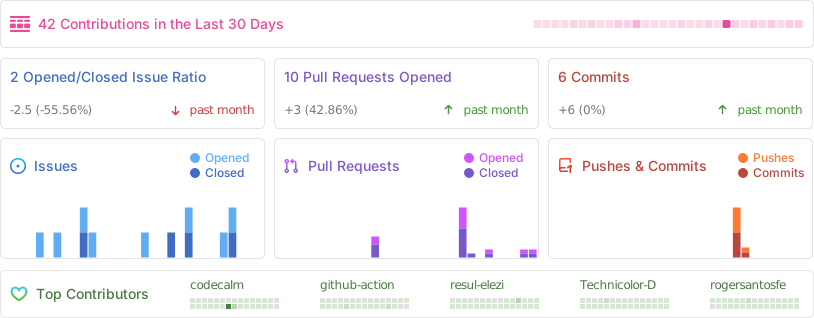
|
||||
|
||||
## 💕 Sponsor Tabler
|
||||
|
||||
<p align="center">
|
||||
<a href="https://github.com/sponsors/codecalm" target="_blank">
|
||||
<img src="https://raw.githubusercontent.com/tabler/tabler/dev/preview/static/sponsor-banner-homepage.svg" alt="Sponsor Banner">
|
||||
</a>
|
||||
<img src="https://repobeats.axiom.co/api/embed/61d1db34446967b0848af68198a392067e0f5870.svg" alt="Repobeats analytics image" />
|
||||
</p>
|
||||
|
||||
### Sponsors
|
||||
|
||||
Support this project by becoming a sponsor. Your logo will show up in this README with a link to your website. [Become a sponsor!](https://opencollective.com/tabler#sponsor)
|
||||
|
||||
<a href="https://opencollective.com/tabler/tiers/sponsor/0/website" target="_blank"><img src="https://opencollective.com/tabler/tiers/sponsor/0/avatar.svg" /></a>
|
||||
<a href="https://opencollective.com/tabler/tiers/sponsor/1/website" target="_blank"><img src="https://opencollective.com/tabler/tiers/sponsor/1/avatar.svg" /></a>
|
||||
<a href="https://opencollective.com/tabler/tiers/sponsor/2/website" target="_blank"><img src="https://opencollective.com/tabler/tiers/sponsor/2/avatar.svg" /></a>
|
||||
<a href="https://opencollective.com/tabler/tiers/sponsor/3/website" target="_blank"><img src="https://opencollective.com/tabler/tiers/sponsor/3/avatar.svg" /></a>
|
||||
<a href="https://opencollective.com/tabler/tiers/sponsor/4/website" target="_blank"><img src="https://opencollective.com/tabler/tiers/sponsor/4/avatar.svg" /></a>
|
||||
<a href="https://opencollective.com/tabler/tiers/sponsor/5/website" target="_blank"><img src="https://opencollective.com/tabler/tiers/sponsor/5/avatar.svg" /></a>
|
||||
<a href="https://opencollective.com/tabler/tiers/sponsor/6/website" target="_blank"><img src="https://opencollective.com/tabler/tiers/sponsor/6/avatar.svg" /></a>
|
||||
<a href="https://opencollective.com/tabler/tiers/sponsor/7/website" target="_blank"><img src="https://opencollective.com/tabler/tiers/sponsor/7/avatar.svg" /></a>
|
||||
<a href="https://opencollective.com/tabler/tiers/sponsor/8/website" target="_blank"><img src="https://opencollective.com/tabler/tiers/sponsor/8/avatar.svg" /></a>
|
||||
<a href="https://opencollective.com/tabler/tiers/sponsor/9/website" target="_blank"><img src="https://opencollective.com/tabler/tiers/sponsor/9/avatar.svg" /></a>
|
||||
|
||||
## 📦 Setup environment
|
||||
|
||||
To use our build system and run our documentation locally, you'll need a copy of Tabler's source files. Follow the steps below:
|
||||
|
||||
1. [Install Node.js](https://nodejs.org/download/), which we use to manage our dependencies.
|
||||
2. Navigate to the root `/tabler` directory and run `pnpm install` to install our local dependencies listed in `package.json`.
|
||||
|
||||
**OSX users**:
|
||||
|
||||
```sh
|
||||
pnpm install
|
||||
```
|
||||
|
||||
and then
|
||||
|
||||
```sh
|
||||
npm run start
|
||||
```
|
||||
|
||||
**Windows users**:
|
||||
|
||||
[Install Git](https://git-scm.com/download/win) in `C:\Program Files\git\bin` directory and run `npm config set script-shell "C:\\Program Files\\git\\bin\\bash.exe"` to change the default shell.
|
||||
|
||||
Once you complete the setup, you'll be able to run the various commands provided from the command line.
|
||||
|
||||
|
||||
## Build locally
|
||||
|
||||
You need to have `pnpm` installed.
|
||||
|
||||
1. From the root `/tabler` directory, run installation in the command line: `pnpm install`
|
||||
2. Then execute `pnpm run start` to start up the application stack.
|
||||
3. Open [http://localhost:3000](http://localhost:3000) in your browser, and voilà.
|
||||
4. Any change in the `/src` directory will build the application and refresh the page.
|
||||
|
||||
**Note**:
|
||||
Run `pnpm run build` for reforms a one off build application without refresh.
|
||||
Open [http://localhost:3001](http://localhost:3001) to configure the Web server.
|
||||
|
||||
## Installation
|
||||
|
||||
Tabler is distributed via npm.
|
||||
### Package Managers
|
||||
|
||||
Tabler is distributed via npm. You can install it with this or your preferred JavaScript package manager:
|
||||
|
||||
```sh
|
||||
npm install --save @tabler/core
|
||||
```
|
||||
|
||||
## Running with Docker
|
||||
|
||||
**Plain Docker**
|
||||
|
||||
If you don't want to install node/npm and the dependencies on your local environment, you can use the provided Dockerfile to build a docker image.
|
||||
This Dockerfile is provided as an example to spin-up a container running Tabler.
|
||||
|
||||
Example of how to use this image:
|
||||
|
||||
1. Build the tabler image : `docker build -t tabler .`
|
||||
2. Run the tabler image while mounting the `src` directory as well as the `_config.yml` file into the container.
|
||||
|
||||
Don't forget to expose the port 3000 so you can browse the website locally.
|
||||
You can also expose the port 3001 to have access to BrowserSync
|
||||
|
||||
```sh
|
||||
docker run -p 3000:3000 -p 3001:3001 -v $(pwd)/src:/app/src -v $(pwd)/_config.yml:/app/_config.yml tabler
|
||||
```
|
||||
|
||||
Now open your browser to [http://localhost:3000](http://localhost:3000). Edit anything in the `src/` folder and watch your browser refresh the page after it has been rebuilt.
|
||||
|
||||
**Docker Compose**
|
||||
|
||||
You can also use the docker compose config from this repo. Use `docker compose build && docker compose up` or `docker compose up --build` to build and start the container. Edit anything in the `src/` folder the same way as with plain docker and access the same URLs and ports in your browser.
|
||||
|
||||
### CDN support
|
||||
|
||||
All files included in `@tabler/core` npm package are available over a CDN.
|
||||
All files included in `@tabler/core` npm package are also available over a CDN.
|
||||
|
||||
#### Javascript
|
||||
|
||||
@@ -179,24 +93,84 @@ All files included in `@tabler/core` npm package are available over a CDN.
|
||||
<link rel="stylesheet" href="https://cdn.jsdelivr.net/npm/@tabler/core@latest/dist/css/tabler.min.css">
|
||||
```
|
||||
|
||||
## Feature requests
|
||||
## Building locally
|
||||
|
||||
https://tabler.canny.io/feature-requests
|
||||
To build a copy of Tabler locally, you have two options. You can either set up your device directly with the development tools required to build Tabler, or if you would prefer not to install all the development dependencies directly onto your device, you can use a Dockerfile that Tabler provides to build a docker image. Instructions follow below.
|
||||
|
||||
### First steps: Downloading the Tabler source files
|
||||
|
||||
With either method, the first thing you'll want to do is download a copy of the Tabler source files to your device.
|
||||
|
||||
#### From the Tabler GitHub releases page
|
||||
|
||||
If you don't want to edit the source code once you've downloaded it, and aren't interested in merging future project updates into your copy, you can just download the source files straight from the [Tabler releases on GitHub](https://github.com/tabler/tabler/releases) and extract the contents to a directory called `tabler`.
|
||||
|
||||
#### Cloning with Git
|
||||
|
||||
If you **do** wish to edit the source code after downloading it, for example to contribute changes back to the Tabler project, you'll want to do this by cloning it with Git:
|
||||
1. If you don't have Git installed on your device, download and install it. You can find instructions at [https://git-scm.com/downloads](https://git-scm.com/downloads).
|
||||
2. (Optional) **Windows users:** you could optionally install Git in the `C:\Program Files\git\bin` directory and run `npm config set script-shell "C:\\Program Files\\git\\bin\\bash.exe"` to change the default shell.
|
||||
3. Clone the Tabler project into a folder on your device. Instructions can be found at [cloning a repository](https://docs.github.com/en/repositories/creating-and-managing-repositories/cloning-a-repository).
|
||||
|
||||
### Installing and running development tools directly
|
||||
|
||||
1. [Install Node.js](https://nodejs.org/download/), which we use to manage our dependencies.
|
||||
2. [Install pnpm](https://pnpm.io/installation) (We recommend either by [Using Corepack](https://pnpm.io/installation#using-corepack) or by [Using npm](https://pnpm.io/installation#using-npm))
|
||||
3. From the root `/tabler` directory where you downloaded the Tabler source files, run installation on the command line:
|
||||
```sh
|
||||
pnpm install
|
||||
```
|
||||
4. Then execute the following to start up the application stack:
|
||||
```sh
|
||||
pnpm run start
|
||||
```
|
||||
5. Open [http://localhost:3000](http://localhost:3000) to view the preview website in your browser, or [http://localhost:3010](http://localhost:3010) to view the documentation website - and voilà.
|
||||
Changes to most of the source files of Tabler core, preview and docs will rebuild the application and refresh the page.
|
||||
|
||||
**Note**:
|
||||
If you wish to perform a one-off build without auto-refresh on any changes, you can run:
|
||||
```sh
|
||||
pnpm run build
|
||||
```
|
||||
You can open [http://localhost:3001](http://localhost:3001) to configure the Web server.
|
||||
|
||||
|
||||
### Installing and running development tools with Docker
|
||||
|
||||
**Plain Docker**
|
||||
|
||||
Here is an example of how to use this image:
|
||||
|
||||
1. From the root `/tabler` directory where you downloaded the Tabler source files, build the tabler image:
|
||||
```sh
|
||||
docker build -t tabler .
|
||||
```
|
||||
2. Run the tabler image. The following command mounts the `src` directory into the container, exposes port 3000 to browse the website locally, and exposes port 3001 to automatically sync changes:
|
||||
```sh
|
||||
docker run -p 3000:3000 -p 3001:3001 -v $(pwd)/src:/app/src tabler
|
||||
```
|
||||
3. Open your browser to [http://localhost:3000](http://localhost:3000). Edit anything in the `src/` folder and watch your browser refresh the page after it has been rebuilt.
|
||||
|
||||
**Docker Compose**
|
||||
|
||||
You can also use the docker compose config from this repo. From the root `/tabler` directory where you downloaded the Tabler source files, use `docker compose build && docker compose up` or `docker compose up --build` to build and start the container. Edit anything in the `src/` folder the same way as with plain docker and access the same URLs and ports in your browser.
|
||||
|
||||
## Bugs and feature requests
|
||||
|
||||
Found a bug or have a feature request? [Please open a new issue](https://github.com/tabler/tabler/issues/new).
|
||||
|
||||
|
||||
## 🤓 Creators
|
||||
|
||||
**Paweł Kuna**
|
||||
|
||||
- <https://twitter.com/codecalm>
|
||||
- <https://x.com/codecalm>
|
||||
- <https://github.com/codecalm>
|
||||
- <https://codecalm.net>
|
||||
|
||||
**Bartłomiej Gawęda**
|
||||
|
||||
- <https://x.com/B_Gaweda>
|
||||
- <https://github.com/BG-Software-BG>
|
||||
|
||||
## 👨🚀 Contributors
|
||||
|
||||
@@ -204,25 +178,11 @@ This project exists thanks to all the people who contribute.
|
||||
|
||||
<img src="https://opencollective.com/tabler/contributors.svg?width=890&button=false" />
|
||||
|
||||
## 🌸 Backers
|
||||
## Social media
|
||||
|
||||
Thank you to all our backers! 🙏 [Become a backer](https://opencollective.com/tabler#backer)
|
||||
|
||||
<a href="https://opencollective.com/tabler#backers" target="_blank"><img src="https://opencollective.com/tabler/tiers/backer.svg?width=890&button=false" /></a>
|
||||
Stay up to date by joining our community on <a href="https://x.com/tabler_io" >X</a> and <a href="https://www.facebook.com/tabler.io">Facebook</a>
|
||||
|
||||
## License
|
||||
|
||||
See the [LICENSE](https://github.com/tabler/tabler/blob/master/LICENSE) file.
|
||||
|
||||
## Contributors ✨
|
||||
|
||||
Thanks goes to these wonderful people ([emoji key](https://allcontributors.org/docs/en/emoji-key)):
|
||||
|
||||
<!-- ALL-CONTRIBUTORS-LIST:START - Do not remove or modify this section -->
|
||||
<!-- prettier-ignore-start -->
|
||||
<!-- markdownlint-disable -->
|
||||
<!-- markdownlint-restore -->
|
||||
<!-- prettier-ignore-end -->
|
||||
<!-- ALL-CONTRIBUTORS-LIST:END -->
|
||||
|
||||
This project follows the [all-contributors](https://github.com/all-contributors/all-contributors) specification. Contributions of any kind welcome!
|
||||
@@ -6,7 +6,7 @@ import { readFileSync, writeFileSync } from 'node:fs';
|
||||
import { join, dirname, basename } from 'node:path';
|
||||
import { fileURLToPath } from 'node:url'
|
||||
import { sync } from 'glob';
|
||||
import banner from '@repo/banner';
|
||||
import banner from '../../shared/banner/index.mjs';
|
||||
|
||||
const __dirname = dirname(fileURLToPath(import.meta.url))
|
||||
|
||||
|
||||
33
core/.build/copy-libs.mjs
Normal file
33
core/.build/copy-libs.mjs
Normal file
@@ -0,0 +1,33 @@
|
||||
#!/usr/bin/env node
|
||||
|
||||
'use strict'
|
||||
|
||||
import { existsSync, mkdirSync, lstatSync } from 'fs'
|
||||
import { emptyDirSync, copySync } from 'fs-extra/esm'
|
||||
import libs from '../libs.json' with { type: 'json' }
|
||||
import { fileURLToPath } from 'url'
|
||||
import { join, dirname } from 'node:path';
|
||||
|
||||
const __dirname = dirname(fileURLToPath(import.meta.url))
|
||||
|
||||
emptyDirSync(join(__dirname, '..', 'dist/libs'))
|
||||
|
||||
for(const name in libs) {
|
||||
const { npm } = libs[name]
|
||||
|
||||
if (npm) {
|
||||
const from = join(__dirname, '..', `node_modules/${npm}`)
|
||||
const to = join(__dirname, '..', `dist/libs/${npm}`)
|
||||
|
||||
// create dir in dist/libs
|
||||
if (!existsSync(to)) {
|
||||
mkdirSync(to, { recursive: true })
|
||||
}
|
||||
|
||||
copySync(from, to, {
|
||||
dereference: true,
|
||||
})
|
||||
|
||||
console.log(`Successfully copied ${npm}`)
|
||||
}
|
||||
}
|
||||
107
core/.build/generate-sri.js
Normal file
107
core/.build/generate-sri.js
Normal file
@@ -0,0 +1,107 @@
|
||||
const crypto = require('node:crypto');
|
||||
const fs = require('node:fs');
|
||||
const path = require('node:path');
|
||||
const sh = require('shelljs');
|
||||
|
||||
sh.config.fatal = true
|
||||
|
||||
const configFile = path.join(__dirname, '../../shared/data/sri.json')
|
||||
|
||||
const files = [
|
||||
{
|
||||
file: 'dist/css/tabler.min.css',
|
||||
configPropertyName: 'css'
|
||||
},
|
||||
{
|
||||
file: 'dist/css/tabler.rtl.min.css',
|
||||
configPropertyName: 'css-rtl'
|
||||
},
|
||||
{
|
||||
file: 'dist/css/tabler-flags.min.css',
|
||||
configPropertyName: 'css-flags'
|
||||
},
|
||||
{
|
||||
file: 'dist/css/tabler-flags.rtl.min.css',
|
||||
configPropertyName: 'css-flags-rtl'
|
||||
},
|
||||
{
|
||||
file: 'dist/css/tabler-marketing.min.css',
|
||||
configPropertyName: 'css-marketing'
|
||||
},
|
||||
{
|
||||
file: 'dist/css/tabler-marketing.rtl.min.css',
|
||||
configPropertyName: 'css-marketing-rtl'
|
||||
},
|
||||
{
|
||||
file: 'dist/css/tabler-payments.min.css',
|
||||
configPropertyName: 'css-payments'
|
||||
},
|
||||
{
|
||||
file: 'dist/css/tabler-payments.rtl.min.css',
|
||||
configPropertyName: 'css-payments-rtl'
|
||||
},
|
||||
{
|
||||
file: 'dist/css/tabler-props.min.css',
|
||||
configPropertyName: 'css-props'
|
||||
},
|
||||
{
|
||||
file: 'dist/css/tabler-props.rtl.min.css',
|
||||
configPropertyName: 'css-props-rtl'
|
||||
},
|
||||
{
|
||||
file: 'dist/css/tabler-themes.min.css',
|
||||
configPropertyName: 'css-themes'
|
||||
},
|
||||
{
|
||||
file: 'dist/css/tabler-themes.rtl.min.css',
|
||||
configPropertyName: 'css-themes-rtl'
|
||||
},
|
||||
{
|
||||
file: 'dist/css/tabler-socials.min.css',
|
||||
configPropertyName: 'css-socials'
|
||||
},
|
||||
{
|
||||
file: 'dist/css/tabler-socials.rtl.min.css',
|
||||
configPropertyName: 'css-socials-rtl'
|
||||
},
|
||||
{
|
||||
file: 'dist/css/tabler-vendors.min.css',
|
||||
configPropertyName: 'css-vendors'
|
||||
},
|
||||
{
|
||||
file: 'dist/css/tabler-vendors.rtl.min.css',
|
||||
configPropertyName: 'css-vendors-rtl'
|
||||
},
|
||||
{
|
||||
file: 'dist/js/tabler.min.js',
|
||||
configPropertyName: 'js'
|
||||
},
|
||||
{
|
||||
file: 'dist/js/tabler-theme.min.js',
|
||||
configPropertyName: 'js-theme'
|
||||
},
|
||||
// {
|
||||
// file: 'dist/preview/css/demo.min.css',
|
||||
// configPropertyName: 'demo-css'
|
||||
// },
|
||||
// {
|
||||
// file: 'dist/preview/js/demo.min.js',
|
||||
// configPropertyName: 'demo-js'
|
||||
// },
|
||||
]
|
||||
|
||||
for (const { file, configPropertyName } of files) {
|
||||
fs.readFile(path.join(__dirname, '..', file), 'utf8', (error, data) => {
|
||||
if (error) {
|
||||
throw error
|
||||
}
|
||||
|
||||
const algorithm = 'sha384'
|
||||
const hash = crypto.createHash(algorithm).update(data, 'utf8').digest('base64')
|
||||
const integrity = `${algorithm}-${hash}`
|
||||
|
||||
console.log(`${configPropertyName}: ${integrity}`)
|
||||
|
||||
sh.sed('-i', new RegExp(`^(\\s+"${configPropertyName}":\\s+["'])\\S*(["'])`), `$1${integrity}$2`, configFile)
|
||||
})
|
||||
}
|
||||
@@ -9,7 +9,10 @@ export default context => {
|
||||
autoprefixer: {
|
||||
cascade: false
|
||||
},
|
||||
rtlcss: context.env === 'RTL'
|
||||
rtlcss: context.env === 'RTL',
|
||||
'postcss-discard-comments': {
|
||||
removeAll: true
|
||||
},
|
||||
}
|
||||
}
|
||||
}
|
||||
@@ -4,13 +4,13 @@ import { fileURLToPath } from 'node:url'
|
||||
import { babel } from '@rollup/plugin-babel'
|
||||
import { nodeResolve } from '@rollup/plugin-node-resolve'
|
||||
import replace from '@rollup/plugin-replace'
|
||||
import banner from '@repo/banner'
|
||||
import banner from '../../shared/banner/index.mjs'
|
||||
|
||||
const __dirname = path.dirname(fileURLToPath(import.meta.url))
|
||||
|
||||
const ESM = process.env.ESM === 'true'
|
||||
const THEME = process.env.THEME === 'true'
|
||||
|
||||
let destinationFile = `tabler${ESM ? '.esm' : ''}`
|
||||
const external = []
|
||||
const plugins = [
|
||||
babel({
|
||||
@@ -27,8 +27,9 @@ plugins.push(
|
||||
nodeResolve()
|
||||
)
|
||||
|
||||
const destinationFile = `tabler${THEME ? '-theme' : ''}${ESM ? '.esm' : ''}`
|
||||
const rollupConfig = {
|
||||
input: path.resolve(__dirname, `../js/tabler.${ESM ? 'esm' : 'umd'}.js`),
|
||||
input: path.resolve(__dirname, `../js/tabler${THEME ? '-theme' : ''}.js`),
|
||||
output: {
|
||||
banner: banner(),
|
||||
file: path.resolve(__dirname, `../dist/js/${destinationFile}.js`),
|
||||
@@ -40,7 +41,7 @@ const rollupConfig = {
|
||||
}
|
||||
|
||||
if (!ESM) {
|
||||
rollupConfig.output.name = 'tabler'
|
||||
rollupConfig.output.name = `tabler${THEME ? '-theme' : ''}`
|
||||
}
|
||||
|
||||
export default rollupConfig
|
||||
@@ -1,5 +1,101 @@
|
||||
# @tabler/core
|
||||
|
||||
## 1.4.0
|
||||
|
||||
### Minor Changes
|
||||
|
||||
- 9951fe9: Enhance button and hover animations
|
||||
- a200d30: Improve breadcrumb styles
|
||||
- 49ab9ea: Add new Tabler Illustrations
|
||||
|
||||
### Patch Changes
|
||||
|
||||
- 6c4dd36: Update class names from `*-left`, `*-right` to `*-start`, `*-end`
|
||||
- 6fec73a: Fix relative line heights in buttons
|
||||
- db6200a: Remove `license_key` option from HugeRTE init object
|
||||
- e96f055: Add different favicon to development environment
|
||||
- 6c38a48: Update Bootstrap to v5.3.7
|
||||
- 2a12f72: Update CSS calculations to use `calc()`
|
||||
- 666a296: Fix list group item hoverable only with `.list-group-hoverable` class
|
||||
- cfd4cb6: Fix `.pagination-link` hover styles to non-active items
|
||||
|
||||
## 1.3.2
|
||||
|
||||
### Patch Changes
|
||||
|
||||
- 446c34e: Fix README file in core package
|
||||
|
||||
## 1.3.1
|
||||
|
||||
### Patch Changes
|
||||
|
||||
- a7f73d7: Fix README file in core package
|
||||
|
||||
## 1.3.0
|
||||
|
||||
### Minor Changes
|
||||
|
||||
- a1af801: Add FullCalendar integration
|
||||
- b9d434d: Add new charts to dashboard pages
|
||||
- 79bd867: Add new form layout page
|
||||
|
||||
### Patch Changes
|
||||
|
||||
- cac5d92: Update illustrations to v1.7
|
||||
- f94b153: Add SRI hashes to scripts and styles
|
||||
- c127d65: Fix colour picker preview page not displaying correctly
|
||||
- b6e9b18: Update icons to v3.31.0
|
||||
- 8850f61: Enhance pagination component with new styles
|
||||
- 9910dd0: Add "text features" menu item
|
||||
- 638f36c: Refactor SCSS variable names for shadows
|
||||
- 0d501e9: Correct `aria-label` of app menu link
|
||||
- 3a02ef9: Fix some marketing site rows overflowing on mobile
|
||||
- fd0fd47: Improve card footer layout and enhance entry display format in invoices
|
||||
- 74e5d26: Fix color badge in navbar menu
|
||||
- 72a1d67: Add clipboard functionality to Tabler documentation
|
||||
- bb617b8: Fix colour swatches on small screens
|
||||
- d73d78e: Add missing `tw` entry in `flags.json`
|
||||
- 19a3d20: Delete missing demo RTL style
|
||||
- b5e2f54: Enhance dropdown components for better accessibility
|
||||
- a41c956: Remove unnecessary `!important` from body padding
|
||||
- e675389: Fix missing border-radius to `.card-header-tabs`
|
||||
- 9007e73: Fix FAQ accordion structure
|
||||
|
||||
## 1.2.0
|
||||
|
||||
### Minor Changes
|
||||
|
||||
- c59bc9d: Add gradient background utilities
|
||||
- f9e4da2: Add new apps card with brand icons in navbar
|
||||
- 92a3afe: Replaced TinyMCE with HugeRTE to address license violation
|
||||
- 199f39a: Update Bootstrap to version 5.3.5
|
||||
- 9bbcb99: Add theme settings wizard
|
||||
- b17b488: Add steps light colors
|
||||
- 215eaa4: Add Turbo library integration
|
||||
|
||||
### Patch Changes
|
||||
|
||||
- aea3b0a: Rollback accordion component structure
|
||||
- 3fc7b84: Add space between page numbers in pagination
|
||||
- 2f8a372: Add Bootstrap components to Tabler JS
|
||||
- 9fceadd: Fix tooltip colors in vector maps
|
||||
- 44250db: Update avatar size variable to support list size configuration
|
||||
- be1f3d1: Fix broken shape in South Korea flag
|
||||
- c20d076: Refactor `border-radius` in components to use CSS variables
|
||||
- 042e50f: Update disabled color variables in navbars
|
||||
- 473fa38: Apply border radius to `tom-select` on focus
|
||||
- 8646192: Add avatars page with various demos of avatars
|
||||
- 922bb03: Minor spelling and grammar improvements to emails docs
|
||||
- 44250db: Update avatar size variable to support list size configuration
|
||||
- ddcd3a7: Refactor SCSS for alerts and close button styles
|
||||
- e3d68d6: Fix `autosize` and `input mask` plugins to use window scope
|
||||
- 4846828: Fix scrollbar color mixin to use body color variable
|
||||
- 6b6617a: Improve README
|
||||
- 94bea00: Make scrollbar track transparent
|
||||
- e14e492: Fix scrollbar jumps when content is higher than screen
|
||||
- 6d6d1bd: Add responsive font size for form controls on mobile devices
|
||||
- 6c566cf: Add new advanced table example
|
||||
|
||||
## 1.1.1
|
||||
|
||||
### Patch Changes
|
||||
@@ -37,3 +133,523 @@
|
||||
- b28ce9f: Fix vertical alignment in single page and error layouts
|
||||
- 24b944c: Fix `.avatar-upload` double borders
|
||||
- ca4ba14: Fixes navbar styles with new hover effects and color variables
|
||||
|
||||
## 1.0.0 - 2025-01-28
|
||||
|
||||
### Minor Changes
|
||||
|
||||
- c276a8b: Add new `Tag` component
|
||||
- d380224: Add customizable Star Ratings component using `star-rating.js` library
|
||||
- 47cd6c1: Add `flags.html` page with list of all flags
|
||||
- be67ab6: Update CSS class from `text-muted` to `text-secondary` for better Bootstrap compatibility
|
||||
- 080c746: Adding `alerts.html` page with example of alerts.
|
||||
- b381273: Change primary color value to new Tabler branding
|
||||
- 75619dd: Unify dark mode with latest Bootstrap API and improve dark mode elements
|
||||
- cc82dbf: New Chat component
|
||||
- 5a03643: Adjusting form element sizes for enhanced mobile devices compatibility
|
||||
- be14607: Add new color picker component using `coloris.js` library
|
||||
- d046570: Update Tabler Icons to version 2.23 with 18 new icons added
|
||||
- 5488c50: New page with payment providers: `payment-providers.html`
|
||||
- 5488c50: Add support for new payment providers: 2c2p, Adyen, Affirm, Alipay Plus, Allegro Pay, Amazon Pay, Apple Pay, Autopay, Binance USD, Bkash, Cash App, Chime, EasyPaisa, Ethereum, Google Pay, HubSpot, iDeal, Litecoin, Mercado Pago, MetaMask, MoneyGram, OpenSea, Payconiq, Payka, Payline, PayPo, Paysafe, Poli,
|
||||
Revolut Pay, Samsung Pay, Shop Pay, Solana, Spingo, Stax, Tether, True USD, Venmo, WeChat Pay, Wise, Zelle
|
||||
|
||||
### Patch Changes
|
||||
|
||||
- 293d0a4: Change Twitter to X brand
|
||||
- fd0935a: Updated link to icons documentation
|
||||
- 1cf27dc: Dependencies update
|
||||
- 041f4e4: Order menu items alphabetically
|
||||
- 20cad01: Automatically retrieve and display the changelog from the CHANGELOG.md file.
|
||||
- 34f3efc: Initialize Visual Studio Code config
|
||||
- 7ba7717: Make horizontal rule direction aware
|
||||
- 063ef58: Update Tabler Illustrations to v1.5
|
||||
- 5e2c975: Update Tabler Icons to v3.29.0
|
||||
- 9d5f7ca: Remove unused dependencies from `package.json`
|
||||
- be69fd6: Replace Jekyll with Eleventy
|
||||
- 2f5fad6: Dependencies update
|
||||
- dfd7c88: Update TinyMCE to v7.0
|
||||
- 056df18: Fix text color in dark version of navbar
|
||||
- 17327dc: Remove invalid `z-index` setting for dropdowns
|
||||
- 4ff077a: Update Tabler Icons to version 2.21 with 18 new icons added
|
||||
- 867c8dd: Update Tabler Emails to v2.0
|
||||
- d8605f2: Init changelog script
|
||||
- 89c6234: Adding Two-Step Verification Pages
|
||||
- f6e885b: Replace `.page-center` with `.my-auto` in single page layouts
|
||||
- 7aa216f: Add border-opacity variable for improved color utility
|
||||
- 88eb413: Fix icon display issues in the Star Ratings component
|
||||
- 78392b6: Fix `color` of disabled `dropdown-item` in Navbar component
|
||||
- 4deb8f4: Bump pnpm/action-setup from 2 to 3
|
||||
- 9015472: Add social icons plugin
|
||||
- 7fe30a1: `Dockerfile` fix
|
||||
- e53942f: Update Jekyll to version 4.3.4
|
||||
- 72f868b: Update Tabler Icons to version 2.20 with 37 new icons added
|
||||
- e0443c0: Add Tabler Illustrations
|
||||
- 5cca710: Update illustrations and enhance SVG handling in HTML
|
||||
- 3a4f10f: Fix ids of custom size star ratings
|
||||
- 7896562: Unify size of avatar, flag and payment components
|
||||
- 1587905: Update icons to v2.42.0
|
||||
- d9e00b2: Update Bootstrap to v5.3.0
|
||||
- bc1d1a3: Set `font-size` of an `i` element with `icon` class in a `button` element
|
||||
- 0195f9b: Dependencies update
|
||||
- a5bf5d3: Fix icons in `form-elements.html`
|
||||
- 736410c: Update Tabler Icons to v3.28.1
|
||||
- 3f516ea: Fix `rgba` color values in `_variables.scss`
|
||||
- e91884e: Fix description of alerts with a description
|
||||
- 90cc744: Fix colors of disabled `.ts-control`
|
||||
- 1801e41: Center content on error and single page layouts
|
||||
- 45c83ac: Resolve map page issues
|
||||
- faee63c: Improve base font family loading
|
||||
- 5e7e0dd: Introduce Docker Compose Config to build and run Ttabler locally
|
||||
- c293a66: Fix `@charset` CSS declaration in bundle.
|
||||
- cb4a681: Update `_navbar.scss` with disabled dropdown menu items color
|
||||
- af41fb3: Update Tabler Icons to v3.17.0
|
||||
- 6cbe888: Update `@tabler/icons` to v3.0
|
||||
- 0e4bf5f: Refactor data structure by converting YAML files to JSON
|
||||
- 82cf257: Increase `z-index` of `ts-dropdown` to prevent overlapping by buttons
|
||||
- 4b4b4f6: Adding punctuation to `SECURITY.md`
|
||||
- a0a2d52: Fix form controls bugs in dark mode
|
||||
- f45b697: Fix padding in code blocks
|
||||
- 4de166d: Unified Box Shadows with Bootstrap Compatibility
|
||||
- 87bf2f5: Remove duplicated setting of color in `th` element
|
||||
- 5dc45aa: Fix layout of search results for small and medium screens
|
||||
- 4ae0358: Remove `text-decoration` on hovering `a` element with class having `icon` class
|
||||
- e798eb6: Fix small typo in tables docs
|
||||
- 1c1d0c9: Improve documentation for alerts
|
||||
- 371ef84: Bump `pnpm/action-setup` from 3 to 4
|
||||
- 8421fc2: Update dependencies
|
||||
- 0625f5f: Update Tabler Icons to version 2.22 with 18 new icons added
|
||||
- ba65fc3: Update devDependencies
|
||||
- a43ded4: Add All Contributions package to project for easy contribution tracking
|
||||
- 2f622c9: Set value of `$font-family-monospace` as default
|
||||
- 2c7c448: Refactor Dockerfile and package.json
|
||||
- 5ec7f05: Resolved light dropdown issue on dark theme
|
||||
- b0b07b9: Enhance documentation
|
||||
- 0f129b1: Update Tabler Icons to version 2.19 with 18 new icons added
|
||||
- 507df7b: Fix cells with inline icons
|
||||
- 0e5b44a: Fix `color` of disabled `nav-link` in `nav-bordered`
|
||||
- 65c1300: Fix the `z-index` value of the `nav-tab` inside `card-tab` #1933
|
||||
- 8552a46: Switch from `npm` to `pnpm` for faster package installation
|
||||
- 4a9e40d: Increase contrast of active `dropdown-item` in vertical layout
|
||||
- 17ebdf4: Update documentation for Tabler components
|
||||
- 4c88481: Add variable to configure `avatar-list` spacing
|
||||
- df46ee7: Do not display empty `fieldset` element
|
||||
- 875cafa: Refactor SCSS variables to use `color.adjust` for improved color manipulation
|
||||
- eb28546: Add Tabler Illustrations
|
||||
- 650d84c: Update required Node.js version to 18 and add `.nvmrc` file
|
||||
- fb659d4: Fix table default background color
|
||||
- f77c712: Avoid SCSS color dependency on `:focus`
|
||||
- 71c68ce: Update changelog configuration and release scripts
|
||||
- 34d124d: Update Tabler Icons to v3.26.0
|
||||
- 4cd9215: Updated Tabler Icons to v3.24.0
|
||||
- 7bb947b: Update Tabler Icons to version 2.18 with 18 new icons added
|
||||
- c75cf55: Update Node.js engine requirement to allow versions >=20
|
||||
- 1c34e8e: Update Tabler Icons to v3.14.0
|
||||
- 289dd3b: Add Prettier to project for consistent code formatting
|
||||
- f83e36c: Upgrade Node.js from version 18 to version 20 for improved performance, security, and feature updates.
|
||||
- b885852: Update Tabler Icons to version 2.25 with 48 new icons added
|
||||
- 53a5117: Fix responsiveness issue in Settings menu
|
||||
- 38504e5: Added 3 new payments from Nepal: Esewa, FonePay, Khalti and Imepay
|
||||
- 35ee14d: Add new Filled section to Icons page
|
||||
- d32f242: Update `bootstrap` to v5.3.1
|
||||
- d82f94e: Update package dependencies to latest versions
|
||||
- 54c5ad0: Fix link to webfont version of Tabler Icons
|
||||
- 94b83d4: Add support for changeset tool for more efficient and organized code changes
|
||||
- c51ff28: Fix colors in date range datepicker
|
||||
|
||||
## `1.0.0-beta24` - 2025-01-11
|
||||
|
||||
- Enhanced documentation.
|
||||
- Updated illustrations and improved SVG handling in HTML.
|
||||
- Updated copyright year in LICENSE file to 2025.
|
||||
- Added marketing pages plugin.
|
||||
|
||||
## `1.0.0-beta23` - 2025-01-07
|
||||
|
||||
- Documentation improvements.
|
||||
- Added countup functionality and updated documentation example.
|
||||
- Do not display empty `<fieldset>`.
|
||||
- Set font-size of webfont icon inside a button.
|
||||
- Ordered menu items alphabetically.
|
||||
- Marked value of `$font-family-monospace` as `!default`.
|
||||
- Fixed unpkg links to static-files icons.
|
||||
- Fixed description of alerts with a description.
|
||||
- Fixed layout of search results for small and medium screens.
|
||||
- Removed invalid z-index setting for dropdown.
|
||||
- Fixed IDs of custom size star ratings.
|
||||
- Removed text-decoration on hover for elements with child icons.
|
||||
- Fixed link to webfont icons.
|
||||
- Updated color reference links in UI component documentation.
|
||||
- Fixed typo in browser support documentation summary.
|
||||
- Enhanced Figma plugin documentation with detailed usage instructions.
|
||||
- Added documentation for Tabler Illustrations and updated index with a link.
|
||||
- Enhanced documentation for various UI and icon sections.
|
||||
- Added new documentation files for icons and UI components; restructured existing files.
|
||||
- Updated documentation structure and content for icons and UI components.
|
||||
- Removed outdated `menu.json` and added `index.mdx` files for UI documentation structure.
|
||||
- General docs update.
|
||||
- Increased contrast of active dropdown-item in vertical layout.
|
||||
- Removed duplicated color setting in table headers.
|
||||
- Increased `z-index` of `ts-dropdown`.
|
||||
- Added social icons plugin.
|
||||
- Described variables for datagrid in docs.
|
||||
- Fixed multiple documentation issues.
|
||||
- Removed unused config from the code.
|
||||
- Fixed links to Tabler Icons.
|
||||
- Updated dark image.
|
||||
- Updated screenshot.
|
||||
- Fixed icon issues.
|
||||
- Fixed URL in documentation.
|
||||
|
||||
## `1.0.0-beta22` - 2025-01-02
|
||||
|
||||
- Fixed `@charset` CSS declaration in bundle.
|
||||
- Fixed cells with inline icons.
|
||||
- Fixed padding in code blocks.
|
||||
- Fixed colors in date range datepicker.
|
||||
- Fixed icon display issues in the Star Ratings component.
|
||||
- Fixed `z-index` value of the `nav-tab` inside `card-tab`.
|
||||
- Fixed wrong gray colors.
|
||||
- Fixed incorrect CDN URL in `webfont.mdx`.
|
||||
- Ensured border color works in dark mode.
|
||||
- Replaced `.page-center` with `.my-auto` in single-page layouts.
|
||||
- Updated Tabler Emails to v2.0.
|
||||
- Updated Tabler Icons to v3.26.0.
|
||||
- Updated docs structure.
|
||||
- Updated `download.mdx`.
|
||||
- Updated Node.js to version 20.
|
||||
- Improved base font family.
|
||||
- Made horizontal rule direction-aware.
|
||||
- Added new payment providers.
|
||||
- Read changelog from `CHANGELOG.md` file.
|
||||
- Initialized VS Code configuration.
|
||||
|
||||
## `1.0.0-beta21` - 2024-09-8
|
||||
|
||||
- Updated dependencies.
|
||||
- Updated Tabler Icons to v3.14.0 and the import script.
|
||||
- Fixed invisible scrollbar in dark mode when navigating the preview.
|
||||
- Styled `btn-close` specifically for `.modal-header`.
|
||||
- Added proper borders to the ribbon start class.
|
||||
- Changed brand color.
|
||||
- Included `docs` in the `npm` package.
|
||||
- Added Tabler Illustrations.
|
||||
- Fixed use of the secondary color in specific form elements.
|
||||
- Introduced Docker Compose Config for local Tabler builds.
|
||||
- Allowed usage of `tinymce` v7.x as a peer dependency.
|
||||
- Updated TinyMCE to v7.0.
|
||||
- Rebranded Twitter to X.
|
||||
- Replaced undraw illustrations with Tabler Illustrations.
|
||||
- Added punctuation to `SECURITY.md`.
|
||||
- Updated `_navbar.scss` to correct disabled dropdown menu item colors.
|
||||
- Removed unused packages.
|
||||
- Fixed map pages.
|
||||
- Resolved issues with toasts in dark mode.
|
||||
- Fixed alert background prefix.
|
||||
- Corrected a typo in CHANGELOG.md.
|
||||
- Fixed radial chart issue.
|
||||
- Added documentation on running the site locally in Site README.
|
||||
- Updated colors in `colors.mdx`.
|
||||
- Fixed dynamic SCSS prefix in mixins.
|
||||
- Changed `<h1>` to `<div>` in `navbar-logo.html`.
|
||||
- Resolved vertical centering on error pages.
|
||||
- Fixed navbar menu issues.
|
||||
- Added `background-clip: border-box` to `.dropdown-menu` class.
|
||||
- Replaced `href="#"` with `href="javascript:void(0)"`.
|
||||
- Fixed disabled CSS class for links.
|
||||
- Addressed missing variables and minor color adjustments.
|
||||
- Improved heights, scrolls, and layouts in Docs examples.
|
||||
- Fixed flags display in preview.
|
||||
|
||||
## `1.0.0-beta20` - 2023-08-24
|
||||
|
||||
- Update `bootstrap` to v5.3.1
|
||||
- Add new `Chat` component
|
||||
- Add new `Tag` component
|
||||
- Add customizable Star Ratings component using `star-rating.js` library
|
||||
- Add new color picker component using `coloris.js` library
|
||||
- Add `alerts.html` page with example of alerts.
|
||||
- Add `flags.html` page with list of all flags
|
||||
- Add Two-Step Verification Pages
|
||||
- Add variable to configure `avatar-list` spacing
|
||||
- Unify dark mode with latest Bootstrap API and improve dark mode elements
|
||||
- Unify Box Shadows with Bootstrap Compatibility
|
||||
- Avoid SCSS color dependency on `:focus`
|
||||
- Update CSS class from `text-muted` to `text-secondary` for better Bootstrap compatibility
|
||||
- Fix text color in dark version of navbar
|
||||
- Adjusting form element sizes for enhanced mobile devices compatibility
|
||||
- Resolved light dropdown issue on dark theme
|
||||
- Update Tabler Icons to version 2.32 with 48 new icons added
|
||||
- Fix table default background color
|
||||
- Fix responsiveness issue in Settings menu
|
||||
- Update required Node.js version to 18 and add `.nvmrc` file
|
||||
- Add support for changeset tool for more efficient and organized code changes
|
||||
- `Dockerfile` fix
|
||||
- Switch from `npm` to `pnpm` for faster package installation
|
||||
|
||||
## `1.0.0-beta19` - 2023-05-15
|
||||
|
||||
- Add customizable Star Ratings component using `star-rating.js` library (#1571)
|
||||
- Add new "Filled" section to Icons page (#1574)
|
||||
- Fix form controls bugs in dark mode (#1573)
|
||||
- Fix text color in dark version of navbar (#1569)
|
||||
- Changelog update
|
||||
|
||||
## `1.0.0-beta18` - 2023-05-14
|
||||
|
||||
- new page: Cookie banner
|
||||
- Unify dark mode with latest Bootstrap API and improve dark mode elements (#1561)
|
||||
- Update Tabler Icons to version 2.18 with 18 new icons added (#1560)
|
||||
- Switch from `npm` to `pnpm` for faster package installation (#1559)
|
||||
- Add Prettier to project for consistent code formatting (#1558)
|
||||
- Update required Node.js version to 18 and add `.nvmrc` file (#1555)
|
||||
- Add All Contributions package to project for easy contribution tracking (#1556)
|
||||
- Add support for changeset tool for more efficient and organized code changes (#1553)
|
||||
- Fix bug where `border-1`, `border-2`, etc don't work (#1526)
|
||||
- Fix indeterminate input background color (#1536)
|
||||
- Update Bootstrap to `5.3.0-alpha3` (#1543)
|
||||
- `tom-select` dark mode styling fixes
|
||||
- Advanced udage of `tom-select` (#1480)
|
||||
- Fix Dropdown menu in rtl mode (#801)
|
||||
- Fix `tom-select` dropdown will be shaded in table-responsive (#1409)
|
||||
- Remove overflow scroll from body
|
||||
- Fix avatars overlap transparently (#1464)
|
||||
- Fix TinyMCE dropdown icon list transparent (#1426)
|
||||
- Dark mode lite colors improvement
|
||||
- Fix non full width selects (#1392)
|
||||
|
||||
## `1.0.0-beta17` - 2023-01-28
|
||||
|
||||
- update `bootstrap` to v5.3.0
|
||||
- update icons to v2.1.2
|
||||
- add 72 new brands, browsers logos update
|
||||
- new `Trial ended` page
|
||||
- new `Page loader` page
|
||||
- new `Profile` page
|
||||
- headings fix
|
||||
- dropdown background color fix
|
||||
- fix rgba conversion bug
|
||||
- fix autofill text color, not matching in dark mode
|
||||
- update license
|
||||
- header html5 tags
|
||||
- add input with appended `<kbd>`
|
||||
- `bootstrap` import fix
|
||||
- font improvements
|
||||
- change `$body-color` to CSS variable
|
||||
- scrollbars improvements
|
||||
- move `@tabler/icons` to `dev-dependencies`
|
||||
- fix #1370: avatar stacked list is not stacked anymore
|
||||
|
||||
## `1.0.0-beta16` - 2022-11-12
|
||||
|
||||
- new `Photogrid` page
|
||||
- `Steps` component improvements
|
||||
- fix #1348: Make job listing responsive for smaller devices
|
||||
- fix #1357: buttons group not active
|
||||
- fix #1352: fix deprecation warning
|
||||
- fix #1180: number input with `form-control-sm` looks weird
|
||||
- fix #1328: color input should show different color for inner check symbol on white ellipse
|
||||
- fix #1355 - missing font sizes
|
||||
- update icons to v1.111.0
|
||||
- homepage navbar fix
|
||||
- fix #1262 - `.bg-opacity-xx` class is not functioning properly
|
||||
|
||||
## `1.0.0-beta15` - 2022-11-01
|
||||
|
||||
- new `badges` page
|
||||
- `<kbd>` styling
|
||||
- update icons to v1.109.0
|
||||
- `tom-select` border fix
|
||||
- exclude `playgrounds` from build
|
||||
- update jekyll to v4.3.1
|
||||
- fix: facebook color update
|
||||
- navbar aria atributes fixes
|
||||
- fix #808 - `navbar-menu` and `sidebar-menu` has the same `id`
|
||||
- fix #1335 - missing color variables usage in `alert` and `btn-ghost-*`
|
||||
- move border style to CSS variables
|
||||
- add missing forms
|
||||
- `btn-actions` fixes
|
||||
- replace `$text-muted` to css variable
|
||||
|
||||
## `1.0.0-beta14` - 2022-10-21
|
||||
|
||||
- fix active items in dark mode
|
||||
- update Jekyll to newest version
|
||||
|
||||
## `1.0.0-beta13` - 2022-10-18
|
||||
|
||||
- update Bootstrap to 5.2.1, update dependencies
|
||||
- new `tracking` component
|
||||
- new radio button version of `form-imagecheck`
|
||||
- update icons to v1.105.0
|
||||
- dark mode improvements
|
||||
- corrects the spelling of New Zealand (#1318)
|
||||
- remove `$border-color-dark`
|
||||
- fix #1301 - code snippets in docs look bad in dark mode
|
||||
- fix #1305 - different default link color for dark mode
|
||||
- fix popover background in dark mode
|
||||
- fix button default border color
|
||||
- fix `form-imagecheck` bg in dark mode
|
||||
- navbar logo fix
|
||||
- move card ribbons config to variables
|
||||
- navbar border fix
|
||||
- dark mode active fix
|
||||
- using globalThis instead of window (#1315)
|
||||
- fix #1210 - lastmod not generated for pages in `sitemap.xml`
|
||||
- fix card border in dark mode
|
||||
- fix #895 - background color overwrites background image
|
||||
- fix #1302 - wrong card header in dark mode
|
||||
- fix #1303 - wrong color when hovering over `selectgroup` in dark mode
|
||||
- fix #1308 - bad coloring in table in dark mode
|
||||
- fix #1273 - datepicker background color broken
|
||||
- fix `$prefix` hard coded `layout/_dark.scss`
|
||||
- fix #1275 - remove last border-right on progress bar
|
||||
- fix #1261 - broken offcanvas bg
|
||||
|
||||
## `1.0.0-beta12` - 2022-09-19
|
||||
|
||||
- new "Job listing" page
|
||||
- new "Sign in with cover" page
|
||||
- new "Logs" page
|
||||
- new `progressbg` component
|
||||
- add a lot of CSS variables
|
||||
- add Dockerfile with alpine base
|
||||
- add icon pulse/tada/rotate animations
|
||||
- use `:host` in selectors to support Web Components
|
||||
- use dark table variant colors in dark mode (#1200)
|
||||
- update Tabler Icons to v1.96
|
||||
- change `space-y` component
|
||||
- headings, shadows and borders unify
|
||||
- toggle TinyMCE dark mode and skin based on the set Tabler theme
|
||||
- fix `card-footer` background
|
||||
- fix headers weight
|
||||
- fix transparent hover background in pagination
|
||||
- fix dark mode card text color
|
||||
- fix `--#{$prefix}card-bg` is undefined
|
||||
- fix global variable for `.card` and `.btn`
|
||||
- fix code sample in the customize tabler docs
|
||||
- fix form elements demo page radio buttons
|
||||
- replace `gulp-minify` with `gulp-terser`
|
||||
|
||||
## `1.0.0-beta11` - 2022-07-05
|
||||
|
||||
- new `Dropzone` component
|
||||
- new `Lightbox` component
|
||||
- new `TinyMCS` component
|
||||
- new `Inline Player` component
|
||||
- new `Pricing table` component
|
||||
- new `Datagrid` component
|
||||
- new optgroup form examples
|
||||
- new settings page
|
||||
- update Tabler Icons to v1.78
|
||||
- added popover docs page
|
||||
- fix: #1125 incorrect chart display in the mobile version
|
||||
- update Bootstrap to 5.2.0
|
||||
|
||||
## `1.0.0-beta10` - 2022-04-29
|
||||
|
||||
- new `datatable` component
|
||||
- update Tabler Icons to v1.67
|
||||
- fix: #1024 - fix Tom-select in dark mode
|
||||
- new carousel indicators: dots, vertical, thumbs (#1101)
|
||||
- replace !important modifier with more specific selectors (#1100)
|
||||
- new `FAQ` page
|
||||
|
||||
## `1.0.0-beta9` - 2022-02-26
|
||||
|
||||
- fix: #1061 - list group item colors in light and dark modes
|
||||
- new `tasks` dashboard
|
||||
- fix: #1059 - upload button in form element in dark view has problem
|
||||
- fix: #1052 - card background icon is practically invisible
|
||||
- remove Inter font and use default font system stack
|
||||
- fix: #1018 - vector map not working
|
||||
- fix: #1035 - wrong background color of hovered list group items in dark mode
|
||||
- dependencies update
|
||||
- add `font-display: swap;` to improve font loading
|
||||
- new `Boxed` layout
|
||||
|
||||
## `1.0.0-beta8` - 2022-02-05
|
||||
|
||||
- update dependencies
|
||||
- new vector maps demos
|
||||
- fixes update map on resize
|
||||
- docs improvement
|
||||
- replace `badge` with `status-dot` in `navbar-notifications.html`
|
||||
- map tooltip fixes
|
||||
|
||||
## `1.0.0-beta7` - 2022-02-05
|
||||
|
||||
- fix: #1019 - project-overview.html link not working
|
||||
- fix: #1010 - card with bottom tabs has incorrect border radius
|
||||
- uptime monitor mobile fixes
|
||||
- navbar dark button fix
|
||||
- `tabler-icons` link
|
||||
- autoloading webfonts
|
||||
- cards fixes, new cards demos
|
||||
- ruby dependencies update
|
||||
- RTL stylesheet fixes
|
||||
- new card action demos
|
||||
|
||||
## `1.0.0-beta6` - 2022-01-18
|
||||
|
||||
- pricing cards fix
|
||||
- fix bug `fw-...`, `.fs-...` is missed (#987)
|
||||
- avatar class fix
|
||||
- fix bug #903 `litepicker` with date range not having correct border
|
||||
- page wrapper fix
|
||||
- fix #900 `is-invalid-lite` class is not working under `was-validated` form class
|
||||
- update `@tabler/icons` to version 1.48
|
||||
- fix #960 - Badges not honoring font sizes
|
||||
- fix #959 - `node-sass` does not properly compile nested media queries
|
||||
- update package dependencies to newest version
|
||||
|
||||
## `1.0.0-beta5` - 2021-12-07
|
||||
|
||||
**Tabler has finally lived to see dark mode! 🌝🌚**
|
||||
|
||||
- **Dark mode enabled!**
|
||||
- add more cursors (#947)
|
||||
- fix #892 - media queries need to be nested when negating
|
||||
- update `@tabler/icons` to newest version
|
||||
- move optional dependencies to peerDependencies (#924)
|
||||
- move deployment to Github Actions (#934)
|
||||
- table border fixes
|
||||
- antialiased fix
|
||||
- update `@tabler/icons` to version 1.42
|
||||
- change default font to 'Inter'
|
||||
- colors unify
|
||||
- add `tom-select` and remove `choices.js`
|
||||
|
||||
## `1.0.0-beta4` - 2021-10-24
|
||||
|
||||
- upgrade required node.js version to 14
|
||||
- upgrade Bootstrap to 5.1
|
||||
- upgrade dependencies
|
||||
- fix #775 - litepicker not initializing
|
||||
- fix `nouislider` import in dev
|
||||
|
||||
## `1.0.0-beta3` - 2021-05-08
|
||||
|
||||
- upgrade Bootstrap to 5.0
|
||||
- upgrade dependencies
|
||||
- change `$border-radius-pill` variable
|
||||
- badge vertical align fix
|
||||
|
||||
## `1.0.0-beta2` - 2021-03-29
|
||||
|
||||
- update dependencies
|
||||
- `li` marker fix
|
||||
- page wrapper, nav fixes
|
||||
- scripts optimize, remove `capture_once`
|
||||
- `page-body` fixes
|
||||
- layout navbar fix
|
||||
- typography fix
|
||||
- ribbon fix
|
||||
- charts label fixes
|
||||
- charts docs
|
||||
|
||||
## `1.0.0-beta` - 2021-02-17
|
||||
|
||||
**Initial beta release of Tabler v1.0! Lots more coming soon though 😁**
|
||||
|
||||
- update Bootstrap to 5.0.0-beta2
|
||||
- update other dependencies.
|
||||
|
||||
42
core/README.md
Normal file
42
core/README.md
Normal file
@@ -0,0 +1,42 @@
|
||||
# Tabler Core
|
||||
|
||||
Tabler Core is a set of components and utilities for building web applications. It provides a collection of pre-designed components, such as buttons, forms, modals, and more, that can be easily customized and integrated into your projects.
|
||||
|
||||
## 🔎 Preview
|
||||
|
||||
Tabler is fully responsive and compatible with all modern browsers. Thanks to its modern and user-friendly design you can create a fully functional interface that users will love! Choose the layouts and components you need and customize them to make your design consistent and eye-catching. Every component has been created with attention to detail to make your interface beautiful!
|
||||
|
||||
<p align="center">
|
||||
<a href="https://preview.tabler.io" target="_blank">
|
||||
<img src="https://raw.githubusercontent.com/tabler/tabler/dev/shared/static/tabler-preview.png" alt="Tabler Preview">
|
||||
</a>
|
||||
</p>
|
||||
|
||||
## Installation
|
||||
|
||||
To install Tabler Core, you can use npm or yarn. Run one of the following commands in your terminal:
|
||||
|
||||
```bash
|
||||
npm install @tabler/core
|
||||
```
|
||||
|
||||
or
|
||||
|
||||
```bash
|
||||
pnpm add @tabler/core
|
||||
```
|
||||
|
||||
## Sponsors
|
||||
|
||||
**If you want to support our project and help us grow it, you can [become a sponsor on GitHub](https://github.com/sponsors/codecalm) or just [donate on PayPal](https://paypal.me/codecalm) :)**
|
||||
|
||||
<p align="center">
|
||||
<a href="https://github.com/sponsors/codecalm">
|
||||
<img src="https://cdn.jsdelivr.net/gh/tabler/sponsors@latest/sponsors.svg" alt="Tabler sponsors">
|
||||
</a>
|
||||
</p>
|
||||
|
||||
|
||||
## License
|
||||
|
||||
See the [LICENSE](https://github.com/tabler/tabler/blob/master/LICENSE) file.
|
||||
@@ -1,16 +0,0 @@
|
||||
---
|
||||
title: Welcome to Tabler Documentation
|
||||
summary: Tabler Docs provides a comprehensive guide to help you get started with the Tabler ecosystem, including its UI components, plugins, and icons. Explore detailed documentation to understand and leverage the full potential of Tabler in your projects.
|
||||
---
|
||||
|
||||
<ResponsiveImage src="/docs/tabler.png" src-dark="/docs/tabler-dark.png" alt="Tabler" width="816" height="620" className="mb-4" />
|
||||
|
||||
Find all the guides and resources you need to develop with Tabler and our other tools. Explore our UI components, icons, illustrations, and email templates to enhance your web development experience. Our tools are designed to be easy to use, customizable, and fully responsive, ensuring that your projects look great on any device.
|
||||
|
||||
<Cards>
|
||||
<Card title="UI Components" href="/docs/ui" icon="paint">Free and open source web application UI kit based on Bootstrap</Card>
|
||||
<Card title="Icons" href="/docs/icons" icon="ghost"><IconsCount /> pixel-perfect icons for web design and development</Card>
|
||||
<Card title="Illustrations" href="/docs/illustrations" icon="brand-figma"><IllustrationsCount /> customizable SVG illustrations for your web project</Card>
|
||||
<Card title="Email Templates" href="/docs/emails" icon="mail"><EmailsCount /> responsive email templates ready to use in your marketing campaigns</Card>
|
||||
<Card title="Avatars" icon="user-circle" disabled badge="Comming soon">Package of over 100 avatars for your next web project</Card>
|
||||
</Cards>
|
||||
@@ -1,83 +0,0 @@
|
||||
---
|
||||
title: Colors
|
||||
summary: The choice of colors for a website or app interface has a big influence on how users interact with the product and what decisions they make. Harmonious colors can contribute to a nice first impression and encourage users to engage with your product, so it's a very important aspect of a successful design, which needs to be well thought out.
|
||||
bootstrapLink: utilities/colors/
|
||||
description: Impact of colors on user interface design.
|
||||
---
|
||||
|
||||
## Base colors
|
||||
|
||||
Choose one of the available colors from the basic color palette and make your design attractive for users. You can use the colors to customize the design of components, indicate different states or suggest actions you want users to take.
|
||||
|
||||
<ColorsTable colors={[
|
||||
{ name: "blue", value: "#066fd1" },
|
||||
{ name: "azure", value: "#4299e1" },
|
||||
{ name: "indigo", value: "#4263eb" },
|
||||
{ name: "purple", value: "#ae3ec9" },
|
||||
{ name: "pink", value: "#d6336c" },
|
||||
{ name: "red", value: "#d63939" },
|
||||
{ name: "orange", value: "#f76707" },
|
||||
{ name: "yellow", value: "#f59f00" },
|
||||
{ name: "lime", value: "#74b816" },
|
||||
{ name: "green", value: "#2fb344" },
|
||||
{ name: "teal", value: "#0ca678" },
|
||||
{ name: "cyan", value: "#17a2b8" },
|
||||
]}/>
|
||||
|
||||
## Light colors
|
||||
|
||||
All available colors can come in pastel shades, which are perfect for more subtle designs and can be easily combined with the basic palette to create eye-catching designs.
|
||||
|
||||
<ColorsTable colors={[
|
||||
{ name: "blue-lt", value: "#e9f0f9" },
|
||||
{ name: "azure-lt", value: "#ecf5fc" },
|
||||
{ name: "indigo-lt", value: "#eceffd" },
|
||||
{ name: "purple-lt", value: "#f7ecfa" },
|
||||
{ name: "pink-lt", value: "#fbebf0" },
|
||||
{ name: "red-lt", value: "#fbebeb" },
|
||||
{ name: "orange-lt", value: "#fef0e6" },
|
||||
{ name: "yellow-lt", value: "#fef5e6" },
|
||||
{ name: "lime-lt", value: "#f1f8e8" },
|
||||
{ name: "green-lt", value: "#eaf7ec" },
|
||||
{ name: "teal-lt", value: "#e7f6f2" },
|
||||
{ name: "cyan-lt", value: "#e8f6f8" }
|
||||
]}/>
|
||||
|
||||
## Gray palette
|
||||
|
||||
The gray palette is a great choice for creating a neutral background for your design. It can be used to create a clean and professional look, and can be combined with other colors to create a harmonious design.
|
||||
|
||||
<ColorsTable colors={[
|
||||
{ name: "gray-50", value: "#f8fafc" },
|
||||
{ name: "gray-100", value: "#f1f5f9" },
|
||||
{ name: "gray-200", value: "#e2e8f0" },
|
||||
{ name: "gray-300", value: "#c8d3e1" },
|
||||
{ name: "gray-400", value: "#9ba9be" },
|
||||
{ name: "gray-500", value: "#6c7a91" },
|
||||
{ name: "gray-600", value: "#49566c" },
|
||||
{ name: "gray-700", value: "#313c52" },
|
||||
{ name: "gray-800", value: "#1d273b" },
|
||||
{ name: "gray-900", value: "#0f172a" }
|
||||
]} />
|
||||
|
||||
## Social colors
|
||||
|
||||
Use the colors of popular social networks to create a recognizable design and make it easier for users to interact with your product.
|
||||
|
||||
<ColorsTable colors={[
|
||||
{ name: "facebook", value: "#1877F2" },
|
||||
{ name: "twitter", value: "#1da1f2" },
|
||||
{ name: "linkedin", value: "#0a66c2" },
|
||||
{ name: "google", value: "#dc4e41" },
|
||||
{ name: "youtube", value: "#ff0000" },
|
||||
{ name: "vimeo", value: "#1ab7ea" },
|
||||
{ name: "dribbble", value: "#ea4c89" },
|
||||
{ name: "github", value: "#181717" },
|
||||
{ name: "instagram", value: "#e4405f" },
|
||||
{ name: "pinterest", value: "#bd081c" },
|
||||
{ name: "vk", value: "#6383a8" },
|
||||
{ name: "rss", value: "#ffa500" },
|
||||
{ name: "flickr", value: "#0063dc" },
|
||||
{ name: "bitbucket", value: "#0052cc" },
|
||||
{ name: "tabler", value: "#066fd1" }
|
||||
]} />
|
||||
@@ -1,227 +0,0 @@
|
||||
---
|
||||
title: Avatars
|
||||
summary: Avatars help customize various elements of a user interface and make the product experience more personalized. They are often used in communication apps, collaboration tools and social media.
|
||||
description: Personalize UI with user avatars.
|
||||
---
|
||||
|
||||
## Default markup
|
||||
|
||||
Use the `avatar` class to add an avatar to your interface design for greater customization.
|
||||
|
||||
```html example centered separated code
|
||||
<span class="avatar" style="background-image: url(/samples/avatars/002f.jpg)"></span>
|
||||
<span class="avatar">JL</span>
|
||||
<span class="avatar" style="background-image: url(/samples/avatars/004f.jpg)"></span>
|
||||
```
|
||||
|
||||
## Avatar image
|
||||
|
||||
Set an image as the background to make users easy to indentify and create a personalized experience.
|
||||
|
||||
```html example centered separated code
|
||||
<span class="avatar" style="background-image: url(/samples/avatars/016f.jpg)"></span>
|
||||
<span class="avatar" style="background-image: url(/samples/avatars/022m.jpg)"></span>
|
||||
<span class="avatar" style="background-image: url(/samples/avatars/036m.jpg)"></span>
|
||||
```
|
||||
|
||||
## Initials
|
||||
|
||||
You can also use initials instead of pictures.
|
||||
|
||||
```html example centered separated code
|
||||
<span class="avatar">AB</span>
|
||||
<span class="avatar">CD</span>
|
||||
<span class="avatar">EF</span>
|
||||
<span class="avatar">GH</span>
|
||||
<span class="avatar">IJ</span>
|
||||
```
|
||||
|
||||
## Avatar icons
|
||||
|
||||
Besides pictures and initials, you can also use icons to make the avatars more universal.
|
||||
|
||||
```html example centered separated
|
||||
<span class="avatar">
|
||||
<svg
|
||||
xmlns="http://www.w3.org/2000/svg"
|
||||
class="icon avatar-icon"
|
||||
width="24"
|
||||
height="24"
|
||||
viewBox="0 0 24 24"
|
||||
stroke-width="2"
|
||||
stroke="currentColor"
|
||||
fill="none"
|
||||
stroke-linecap="round"
|
||||
stroke-linejoin="round"
|
||||
>
|
||||
<path stroke="none" d="M0 0h24v24H0z" fill="none" />
|
||||
<circle cx="12" cy="7" r="4" />
|
||||
<path d="M6 21v-2a4 4 0 0 1 4 -4h4a4 4 0 0 1 4 4v2" />
|
||||
</svg>
|
||||
</span>
|
||||
<span class="avatar">
|
||||
<svg
|
||||
xmlns="http://www.w3.org/2000/svg"
|
||||
class="icon avatar-icon"
|
||||
width="24"
|
||||
height="24"
|
||||
viewBox="0 0 24 24"
|
||||
stroke-width="2"
|
||||
stroke="currentColor"
|
||||
fill="none"
|
||||
stroke-linecap="round"
|
||||
stroke-linejoin="round"
|
||||
>
|
||||
<path stroke="none" d="M0 0h24v24H0z" fill="none" />
|
||||
<line x1="12" y1="5" x2="12" y2="19" />
|
||||
<line x1="5" y1="12" x2="19" y2="12" />
|
||||
</svg>
|
||||
</span>
|
||||
<span class="avatar">
|
||||
<svg
|
||||
xmlns="http://www.w3.org/2000/svg"
|
||||
class="icon avatar-icon"
|
||||
width="24"
|
||||
height="24"
|
||||
viewBox="0 0 24 24"
|
||||
stroke-width="2"
|
||||
stroke="currentColor"
|
||||
fill="none"
|
||||
stroke-linecap="round"
|
||||
stroke-linejoin="round"
|
||||
>
|
||||
<path stroke="none" d="M0 0h24v24H0z" fill="none" />
|
||||
<circle cx="9" cy="7" r="4" />
|
||||
<path d="M3 21v-2a4 4 0 0 1 4 -4h4a4 4 0 0 1 4 4v2" />
|
||||
<path d="M16 11h6m-3 -3v6" />
|
||||
</svg>
|
||||
</span>
|
||||
```
|
||||
|
||||
```html
|
||||
<span class="avatar">
|
||||
<!-- SVG icon from http://tabler.io/icons/icon/user -->
|
||||
<svg>...</svg>
|
||||
</span>
|
||||
```
|
||||
|
||||
## Avatar initials color
|
||||
|
||||
Customize the color of the avatars' background. You can click [here](/docs/ui/base/colors) to see the list of available colors.
|
||||
|
||||
```html example centered separated code
|
||||
<span class="avatar bg-green-lt">AB</span>
|
||||
<span class="avatar bg-red-lt">CD</span>
|
||||
<span class="avatar bg-yellow-lt">EF</span>
|
||||
<span class="avatar bg-primary-lt">GH</span>
|
||||
<span class="avatar bg-purple-lt">IJ</span>
|
||||
```
|
||||
|
||||
## Avatar size
|
||||
|
||||
Using Bootstrap’s typical naming structure, you can create a standard avatar or scale it up or down to different sizes based on what you need.
|
||||
|
||||
```html example centered separated code
|
||||
<span class="avatar avatar-xl" style="background-image: url(/samples/avatars/000m.jpg)"></span>
|
||||
<span class="avatar avatar-lg" style="background-image: url(/samples/avatars/000m.jpg)"></span>
|
||||
<span class="avatar avatar-md" style="background-image: url(/samples/avatars/000m.jpg)"></span>
|
||||
<span class="avatar" style="background-image: url(/samples/avatars/000m.jpg)"></span>
|
||||
<span class="avatar avatar-sm" style="background-image: url(/samples/avatars/000m.jpg)"></span>
|
||||
<span class="avatar avatar-xs" style="background-image: url(/samples/avatars/000m.jpg)"></span>
|
||||
```
|
||||
|
||||
## Avatar status
|
||||
|
||||
Add a status indicator to your avatar to show, for instance, if a user is online or offline or indicate the number of messages they have received.
|
||||
|
||||
```html example centered separated code
|
||||
<span class="avatar" style="background-image: url(/samples/avatars/018m.jpg)"></span>
|
||||
<span class="avatar" style="background-image: url(/samples/avatars/015m.jpg)">
|
||||
<span class="badge bg-danger"></span>
|
||||
</span>
|
||||
<span class="avatar" style="background-image: url(/samples/avatars/022m.jpg)">
|
||||
<span class="badge bg-success"></span>
|
||||
</span>
|
||||
<span class="avatar"> <span class="badge bg-warning"></span>SA </span>
|
||||
<span class="avatar" style="background-image: url(/samples/avatars/022m.jpg)">
|
||||
<span class="badge bg-info"></span>
|
||||
</span>
|
||||
<span class="avatar" style="background-image: url(/samples/avatars/048m.jpg)">
|
||||
<span class="badge bg-gray">5</span>
|
||||
</span>
|
||||
```
|
||||
|
||||
## Avatar shape
|
||||
|
||||
Change the shape of an avatar with the default Bootstrap image classes. You can make them round or square and change their border radius.
|
||||
|
||||
```html example centered separated
|
||||
<span class="avatar" style="background-image: url(/samples/avatars/019m.jpg)"></span>
|
||||
<span class="avatar rounded" style="background-image: url(/samples/avatars/039f.jpg)"></span>
|
||||
<span class="avatar rounded-circle">AA</span>
|
||||
<span class="avatar rounded-0" style="background-image: url(/samples/avatars/043f.jpg)"></span>
|
||||
<span class="avatar rounded-3" style="background-image: url(/samples/avatars/044f.jpg)"></span>
|
||||
```
|
||||
|
||||
## Avatars list
|
||||
|
||||
Create a list of avatars within one parent container.
|
||||
|
||||
```html example centered separated code
|
||||
<div class="avatar-list">
|
||||
<span class="avatar rounded" style="background-image: url(/samples/avatars/031f.jpg)"></span>
|
||||
<span class="avatar rounded">JL</span>
|
||||
<span class="avatar rounded" style="background-image: url(/samples/avatars/033f.jpg)"></span>
|
||||
<span class="avatar rounded" style="background-image: url(/samples/avatars/017m.jpg)"></span>
|
||||
<span class="avatar rounded" style="background-image: url(/samples/avatars/024m.jpg)"></span>
|
||||
</div>
|
||||
```
|
||||
|
||||
## Stacked list
|
||||
|
||||
Make the list stack once a certain number of avatars is reached to make it look clear and display well regardless of the screen size.
|
||||
|
||||
```html example centered separated code
|
||||
<div class="avatar-list avatar-list-stacked">
|
||||
<span class="avatar">EB</span>
|
||||
<span class="avatar" style="background-image: url(/samples/avatars/026m.jpg)"></span>
|
||||
<span class="avatar" style="background-image: url(/samples/avatars/016f.jpg)"></span>
|
||||
<span class="avatar" style="background-image: url(/samples/avatars/028m.jpg)"></span>
|
||||
<span class="avatar" style="background-image: url(/samples/avatars/030m.jpg)"></span>
|
||||
<span class="avatar">+8</span>
|
||||
</div>
|
||||
```
|
||||
|
||||
```html example centered separated code
|
||||
<div class="avatar-list avatar-list-stacked">
|
||||
<span
|
||||
class="avatar avatar-sm rounded-circle"
|
||||
style="background-image: url(/samples/avatars/035m.jpg)"
|
||||
></span>
|
||||
<span
|
||||
class="avatar avatar-sm rounded-circle"
|
||||
style="background-image: url(/samples/avatars/027f.jpg)"
|
||||
></span>
|
||||
<span
|
||||
class="avatar avatar-sm rounded-circle"
|
||||
style="background-image: url(/samples/avatars/036f.jpg)"
|
||||
></span>
|
||||
<span class="avatar avatar-sm rounded-circle">SA</span>
|
||||
<span
|
||||
class="avatar avatar-sm rounded-circle"
|
||||
style="background-image: url(/samples/avatars/034f.jpg)"
|
||||
></span>
|
||||
<span
|
||||
class="avatar avatar-sm rounded-circle"
|
||||
style="background-image: url(/samples/avatars/043f.jpg)"
|
||||
></span>
|
||||
<span
|
||||
class="avatar avatar-sm rounded-circle"
|
||||
style="background-image: url(/samples/avatars/039f.jpg)"
|
||||
></span>
|
||||
<span
|
||||
class="avatar avatar-sm rounded-circle"
|
||||
style="background-image: url(/samples/avatars/020m.jpg)"
|
||||
></span>
|
||||
</div>
|
||||
```
|
||||
@@ -1,112 +0,0 @@
|
||||
---
|
||||
title: Badges
|
||||
summary: Badges are small count and labeling components, which are used to add extra information to an interface element. You can use them to draw users' attention to a new element, notify about unread messages or provide any kind of additional info.
|
||||
description: Add extra information with badges.
|
||||
bootstrapLink: components/badge/
|
||||
---
|
||||
|
||||
## Default markup
|
||||
|
||||
The default badges are square and come in the basic set of colors.
|
||||
|
||||
```html example centered separated
|
||||
<span class="badge bg-blue-lt">Blue</span>
|
||||
<span class="badge bg-azure-lt">Azure</span>
|
||||
<span class="badge bg-indigo-lt">Indigo</span>
|
||||
<span class="badge bg-purple-lt">Purple</span>
|
||||
<span class="badge bg-pink-lt">Pink</span>
|
||||
<span class="badge bg-red-lt">Red</span>
|
||||
<span class="badge bg-orange-lt">Orange</span>
|
||||
<span class="badge bg-yellow-lt">Yellow</span>
|
||||
<span class="badge bg-lime-lt">Lime</span>
|
||||
<span class="badge bg-green-lt">Green</span>
|
||||
<span class="badge bg-teal-lt">Teal</span>
|
||||
<span class="badge bg-cyan-lt">Cyan</span>
|
||||
```
|
||||
|
||||
## Headings
|
||||
|
||||
```html example columns={1} height="20rem" centered
|
||||
<h1>Example heading <span class="badge">New</span></h1>
|
||||
<h2>Example heading <span class="badge">New</span></h2>
|
||||
<h3>Example heading <span class="badge">New</span></h3>
|
||||
<h4>Example heading <span class="badge">New</span></h4>
|
||||
<h5>Example heading <span class="badge">New</span></h5>
|
||||
<h6>Example heading <span class="badge">New</span></h6>
|
||||
```
|
||||
|
||||
## Outline badges
|
||||
|
||||
|
||||
|
||||
```html example centered separated
|
||||
<span class="badge badge-outline text-blue">blue</span>
|
||||
<span class="badge badge-outline text-azure">azure</span>
|
||||
<span class="badge badge-outline text-indigo">indigo</span>
|
||||
<span class="badge badge-outline text-purple">purple</span>
|
||||
<span class="badge badge-outline text-pink">pink</span>
|
||||
<span class="badge badge-outline text-red">red</span>
|
||||
<span class="badge badge-outline text-orange">orange</span>
|
||||
<span class="badge badge-outline text-yellow">yellow</span>
|
||||
<span class="badge badge-outline text-lime">lime</span>
|
||||
<span class="badge badge-outline text-green">green</span>
|
||||
<span class="badge badge-outline text-teal">teal</span>
|
||||
<span class="badge badge-outline text-cyan">cyan</span>
|
||||
```
|
||||
|
||||
## Pill badges
|
||||
|
||||
Use the `.badge-pill` class if you want to create a badge with rounded corners. Its width will adjust to the label text.
|
||||
|
||||
```html example centered separated
|
||||
<span class="badge badge-pill bg-blue-lt">1</span>
|
||||
<span class="badge badge-pill bg-azure-lt">2</span>
|
||||
<span class="badge badge-pill bg-indigo-lt">3</span>
|
||||
<span class="badge badge-pill bg-purple-lt">4</span>
|
||||
<span class="badge badge-pill bg-pink-lt">5</span>
|
||||
<span class="badge badge-pill bg-red-lt">6</span>
|
||||
<span class="badge badge-pill bg-orange-lt">7</span>
|
||||
<span class="badge badge-pill bg-yellow-lt">8</span>
|
||||
<span class="badge badge-pill bg-lime-lt">9</span>
|
||||
<span class="badge badge-pill bg-green-lt">10</span>
|
||||
<span class="badge badge-pill bg-teal-lt">11</span>
|
||||
<span class="badge badge-pill bg-cyan-lt">12</span>
|
||||
```
|
||||
|
||||
## Links
|
||||
|
||||
Place the badge within an `<a>` element if you want it to perform the function of a link and make it clickable.
|
||||
|
||||
```html example centered separated
|
||||
<a href="#" class="badge bg-blue-lt">Blue</a>
|
||||
<a href="#" class="badge bg-azure-lt">Azure</a>
|
||||
<a href="#" class="badge bg-indigo-lt">Indigo</a>
|
||||
<a href="#" class="badge bg-purple-lt">Purple</a>
|
||||
<a href="#" class="badge bg-pink-lt">Pink</a>
|
||||
<a href="#" class="badge bg-red-lt">Red</a>
|
||||
<a href="#" class="badge bg-orange-lt">Orange</a>
|
||||
<a href="#" class="badge bg-yellow-lt">Yellow</a>
|
||||
<a href="#" class="badge bg-lime-lt">Lime</a>
|
||||
<a href="#" class="badge bg-green-lt">Green</a>
|
||||
<a href="#" class="badge bg-teal-lt">Teal</a>
|
||||
<a href="#" class="badge bg-cyan-lt">Cyan</a>
|
||||
```
|
||||
|
||||
## Button with badge
|
||||
|
||||
Badges can be used as part of links or buttons to provide a counter.
|
||||
|
||||
```
|
||||
<button type="button" class="btn">
|
||||
Notifications <span class="badge bg-red-lt ms-2">4</span>
|
||||
</button>
|
||||
```
|
||||
|
||||
The results can be seen in the example below.
|
||||
|
||||
```html example centered separated
|
||||
<button type="button" class="btn">Notifications <span class="badge bg-red-lt ms-2">4</span></button>
|
||||
<button type="button" class="btn">
|
||||
Notifications <span class="badge bg-green-lt ms-2">4</span>
|
||||
</button>
|
||||
```
|
||||
@@ -1,199 +0,0 @@
|
||||
---
|
||||
title: Breadcrumb
|
||||
summary: Breadcrumbs are used to show the current website or app location and reduce the number of actions users have to take. Thanks to breadcrumbs, they can easily navigate within the website hierarchy and better understand its structure.
|
||||
bootstrapLink: components/breadcrumb/
|
||||
description: Navigation aid for better structure.
|
||||
---
|
||||
|
||||
## Default markup
|
||||
|
||||
Use the `breadcrumb` class to add a breadcrumb to your interface design for better navigation. The `active` modifier in a `li` tag will help you indicate the current page location and facilitate navigation within your website or app.
|
||||
|
||||
```html
|
||||
<ol class="breadcrumb">
|
||||
<li class="breadcrumb-item">
|
||||
<a href="#">...</a>
|
||||
</li>
|
||||
<li class="breadcrumb-item active">
|
||||
<a href="#">...</a>
|
||||
</li>
|
||||
</ol>
|
||||
```
|
||||
|
||||
Look at the example below to see how breadcrumbs work in practice.
|
||||
|
||||
```html example centered
|
||||
<ol class="breadcrumb">
|
||||
<li class="breadcrumb-item">
|
||||
<a href="#">Home</a>
|
||||
</li>
|
||||
<li class="breadcrumb-item">
|
||||
<a href="#">Library</a>
|
||||
</li>
|
||||
<li class="breadcrumb-item active">
|
||||
<a href="#">Data</a>
|
||||
</li>
|
||||
</ol>
|
||||
```
|
||||
|
||||
## Different separators
|
||||
|
||||
You can use different breadcrumb styles to match your website or app design. Choose between `breadcrumb-dots`, `breadcrumb-arrows`, and `breadcrumb-bullets` to create a unique look.
|
||||
|
||||
```html
|
||||
<ol class="breadcrumb breadcrumb-dots">
|
||||
...
|
||||
</ol>
|
||||
```
|
||||
|
||||
This example shows how to use different breadcrumb styles.
|
||||
|
||||
```html example centered separated vertical
|
||||
<ol class="breadcrumb breadcrumb-dots">
|
||||
<li class="breadcrumb-item">
|
||||
<a href="#">Home</a>
|
||||
</li>
|
||||
<li class="breadcrumb-item">
|
||||
<a href="#">Library</a>
|
||||
</li>
|
||||
<li class="breadcrumb-item active">
|
||||
<a href="#">Data</a>
|
||||
</li>
|
||||
</ol>
|
||||
<ol class="breadcrumb breadcrumb-arrows">
|
||||
<li class="breadcrumb-item">
|
||||
<a href="#">Home</a>
|
||||
</li>
|
||||
<li class="breadcrumb-item">
|
||||
<a href="#">Library</a>
|
||||
</li>
|
||||
<li class="breadcrumb-item active">
|
||||
<a href="#">Data</a>
|
||||
</li>
|
||||
</ol>
|
||||
<ol class="breadcrumb breadcrumb-bullets">
|
||||
<li class="breadcrumb-item">
|
||||
<a href="#">Home</a>
|
||||
</li>
|
||||
<li class="breadcrumb-item">
|
||||
<a href="#">Library</a>
|
||||
</li>
|
||||
<li class="breadcrumb-item active">
|
||||
<a href="#">Data</a>
|
||||
</li>
|
||||
</ol>
|
||||
```
|
||||
|
||||
## With icon
|
||||
|
||||
You can use icons in breadcrumbs to make them more visually appealing. The example below demonstrates how to use icons in breadcrumbs.
|
||||
|
||||
```html example centered
|
||||
<ol class="breadcrumb">
|
||||
<li class="breadcrumb-item">
|
||||
<a href="#">
|
||||
<svg
|
||||
xmlns="http://www.w3.org/2000/svg"
|
||||
class="icon"
|
||||
width="24"
|
||||
height="24"
|
||||
viewBox="0 0 24 24"
|
||||
stroke-width="2"
|
||||
stroke="currentColor"
|
||||
fill="none"
|
||||
stroke-linecap="round"
|
||||
stroke-linejoin="round"
|
||||
>
|
||||
<path stroke="none" d="M0 0h24v24H0z" fill="none" />
|
||||
<polyline points="5 12 3 12 12 3 21 12 19 12" />
|
||||
<path d="M5 12v8a2 2 0 0 0 2 2h10a2 2 0 0 0 2 -2v-8" />
|
||||
<rect x="10" y="12" width="4" height="4" />
|
||||
</svg>
|
||||
</a>
|
||||
</li>
|
||||
<li class="breadcrumb-item">
|
||||
<a href="#">Library</a>
|
||||
</li>
|
||||
<li class="breadcrumb-item active">
|
||||
<a href="#">Data</a>
|
||||
</li>
|
||||
</ol>
|
||||
```
|
||||
|
||||
## Muted breadcrumbs
|
||||
|
||||
You can use the `breadcrumb-muted` class to create a muted breadcrumb style. This style is perfect for breadcrumbs that are not the main focus of your website or app.
|
||||
|
||||
```html example centered
|
||||
<nav aria-label="breadcrumb">
|
||||
<ol class="breadcrumb breadcrumb-muted">
|
||||
<li class="breadcrumb-item">
|
||||
<a href="#">Home</a>
|
||||
</li>
|
||||
<li class="breadcrumb-item">
|
||||
<a href="#">Library</a>
|
||||
</li>
|
||||
<li class="breadcrumb-item active">
|
||||
<a href="#">Data</a>
|
||||
</li>
|
||||
</ol>
|
||||
</nav>
|
||||
```
|
||||
|
||||
## Breadcrumb in headers
|
||||
|
||||
You can use breadcrumbs in headers to show the current page location and provide a better navigation experience. The example below demonstrates how to use breadcrumbs in headers.
|
||||
|
||||
```html example vertical centered columns={3}
|
||||
<div class="page-header">
|
||||
<div class="row align-items-center mw-100">
|
||||
<div class="col">
|
||||
<div class="mb-1">
|
||||
<ol class="breadcrumb">
|
||||
<li class="breadcrumb-item">
|
||||
<a href="#">Home</a>
|
||||
</li>
|
||||
<li class="breadcrumb-item">
|
||||
<a href="#">Library</a>
|
||||
</li>
|
||||
<li class="breadcrumb-item active">
|
||||
<a href="#">Articles</a>
|
||||
</li>
|
||||
</ol>
|
||||
</div>
|
||||
<h2 class="page-title">
|
||||
<span class="text-truncate"
|
||||
>Knights of Ni, we are but simple travelers who seek the enchanter who lives beyond these
|
||||
woods.</span
|
||||
>
|
||||
</h2>
|
||||
</div>
|
||||
<div class="col-auto">
|
||||
<div class="btn-list">
|
||||
<a href="#" class="btn d-none d-md-inline-flex">
|
||||
<svg
|
||||
xmlns="http://www.w3.org/2000/svg"
|
||||
class="icon"
|
||||
width="24"
|
||||
height="24"
|
||||
viewBox="0 0 24 24"
|
||||
stroke-width="2"
|
||||
stroke="currentColor"
|
||||
fill="none"
|
||||
stroke-linecap="round"
|
||||
stroke-linejoin="round"
|
||||
>
|
||||
<path stroke="none" d="M0 0h24v24H0z" fill="none" />
|
||||
<path d="M7 7h-1a2 2 0 0 0 -2 2v9a2 2 0 0 0 2 2h9a2 2 0 0 0 2 -2v-1" />
|
||||
<path d="M20.385 6.585a2.1 2.1 0 0 0 -2.97 -2.97l-8.415 8.385v3h3l8.385 -8.415z" />
|
||||
<path d="M16 5l3 3" />
|
||||
</svg>
|
||||
Edit
|
||||
</a>
|
||||
<a href="#" class="btn btn-primary">Publish</a>
|
||||
</div>
|
||||
</div>
|
||||
</div>
|
||||
</div>
|
||||
```
|
||||
|
||||
File diff suppressed because it is too large
Load Diff
@@ -1,697 +0,0 @@
|
||||
---
|
||||
title: Charts
|
||||
libs: apexcharts
|
||||
summary: Tabler uses ApexCharts - a free and open-source modern charting library that helps developers to create beautiful and interactive visualizations for web pages.
|
||||
description: Interactive data visualizations with ApexCharts.
|
||||
---
|
||||
|
||||
To be able to use the charts in your application you will need to install the apexcharts dependency with `npm install apexcharts`.
|
||||
|
||||
See also the [ApexCharts](https://apexcharts.com/) documentation.
|
||||
|
||||
## Line Chart
|
||||
|
||||
Line charts are an essential tool for visualizing data trends over time. They are particularly useful for representing continuous data, such as stock prices, website traffic, or user activity. Below is an example of a line chart showcasing session duration, page views, and total visits:
|
||||
|
||||
```html example centered columns={2} height="25rem" libs="apexcharts"
|
||||
<div class="card">
|
||||
<div class="card-body">
|
||||
<div id="chart-demo-line" class="chart-lg"></div>
|
||||
</div>
|
||||
</div>
|
||||
<script>
|
||||
document.addEventListener("DOMContentLoaded", function () {
|
||||
window.ApexCharts &&
|
||||
new ApexCharts(document.getElementById("chart-demo-line"), {
|
||||
chart: {
|
||||
type: "line",
|
||||
fontFamily: "inherit",
|
||||
height: 240,
|
||||
parentHeightOffset: 0,
|
||||
toolbar: {
|
||||
show: false,
|
||||
},
|
||||
animations: {
|
||||
enabled: false,
|
||||
},
|
||||
},
|
||||
fill: {
|
||||
opacity: 1,
|
||||
},
|
||||
stroke: {
|
||||
width: 2,
|
||||
lineCap: "round",
|
||||
curve: "straight",
|
||||
},
|
||||
series: [
|
||||
{
|
||||
name: "Session Duration",
|
||||
data: [117, 92, 94, 98, 75, 110, 69, 80, 109, 113, 115, 95],
|
||||
},
|
||||
{
|
||||
name: "Page Views",
|
||||
data: [59, 80, 61, 66, 70, 84, 87, 64, 94, 56, 55, 67],
|
||||
},
|
||||
{
|
||||
name: "Total Visits",
|
||||
data: [53, 51, 52, 41, 46, 60, 45, 43, 30, 50, 58, 59],
|
||||
},
|
||||
],
|
||||
tooltip: {
|
||||
theme: "dark",
|
||||
},
|
||||
grid: {
|
||||
padding: {
|
||||
top: -20,
|
||||
right: 0,
|
||||
left: -4,
|
||||
bottom: -4,
|
||||
},
|
||||
strokeDashArray: 4,
|
||||
},
|
||||
xaxis: {
|
||||
labels: {
|
||||
padding: 0,
|
||||
},
|
||||
tooltip: {
|
||||
enabled: false,
|
||||
},
|
||||
type: "datetime",
|
||||
},
|
||||
yaxis: {
|
||||
labels: {
|
||||
padding: 4,
|
||||
},
|
||||
},
|
||||
labels: [
|
||||
"2020-06-21",
|
||||
"2020-06-22",
|
||||
"2020-06-23",
|
||||
"2020-06-24",
|
||||
"2020-06-25",
|
||||
"2020-06-26",
|
||||
"2020-06-27",
|
||||
"2020-06-28",
|
||||
"2020-06-29",
|
||||
"2020-06-30",
|
||||
"2020-07-01",
|
||||
"2020-07-02",
|
||||
],
|
||||
colors: [tabler.getColor("yellow"), tabler.getColor("green"), tabler.getColor("primary")],
|
||||
legend: {
|
||||
show: true,
|
||||
position: "bottom",
|
||||
offsetY: 12,
|
||||
markers: {
|
||||
width: 10,
|
||||
height: 10,
|
||||
radius: 100,
|
||||
},
|
||||
itemMargin: {
|
||||
horizontal: 8,
|
||||
vertical: 8,
|
||||
},
|
||||
},
|
||||
}).render();
|
||||
});
|
||||
</script>
|
||||
```
|
||||
|
||||
## Area Chart
|
||||
|
||||
Area charts are ideal for representing cumulative data over time. They add visual emphasis to trends by filling the space under the line, making it easier to compare values. Here's an example of an area chart with smooth transitions and data from two series:
|
||||
|
||||
```html example centered columns={2} height="25rem" libs="apexcharts"
|
||||
<div class="card">
|
||||
<div class="card-body">
|
||||
<div id="chart-demo-area" class="chart-lg"></div>
|
||||
</div>
|
||||
</div>
|
||||
<script>
|
||||
document.addEventListener("DOMContentLoaded", function () {
|
||||
window.ApexCharts &&
|
||||
new ApexCharts(document.getElementById("chart-demo-area"), {
|
||||
chart: {
|
||||
type: "area",
|
||||
fontFamily: "inherit",
|
||||
height: 240,
|
||||
parentHeightOffset: 0,
|
||||
toolbar: {
|
||||
show: false,
|
||||
},
|
||||
animations: {
|
||||
enabled: false,
|
||||
},
|
||||
},
|
||||
dataLabels: {
|
||||
enabled: false,
|
||||
},
|
||||
fill: {
|
||||
opacity: 0.16,
|
||||
type: "solid",
|
||||
},
|
||||
stroke: {
|
||||
width: 2,
|
||||
lineCap: "round",
|
||||
curve: "smooth",
|
||||
},
|
||||
series: [
|
||||
{
|
||||
name: "series1",
|
||||
data: [56, 40, 39, 47, 34, 48, 44],
|
||||
},
|
||||
{
|
||||
name: "series2",
|
||||
data: [45, 43, 30, 23, 38, 39, 54],
|
||||
},
|
||||
],
|
||||
tooltip: {
|
||||
theme: "dark",
|
||||
},
|
||||
grid: {
|
||||
padding: {
|
||||
top: -20,
|
||||
right: 0,
|
||||
left: -4,
|
||||
bottom: -4,
|
||||
},
|
||||
strokeDashArray: 4,
|
||||
},
|
||||
xaxis: {
|
||||
labels: {
|
||||
padding: 0,
|
||||
},
|
||||
tooltip: {
|
||||
enabled: false,
|
||||
},
|
||||
axisBorder: {
|
||||
show: false,
|
||||
},
|
||||
type: "datetime",
|
||||
},
|
||||
yaxis: {
|
||||
labels: {
|
||||
padding: 4,
|
||||
},
|
||||
},
|
||||
labels: [
|
||||
"2020-06-21",
|
||||
"2020-06-22",
|
||||
"2020-06-23",
|
||||
"2020-06-24",
|
||||
"2020-06-25",
|
||||
"2020-06-26",
|
||||
"2020-06-27",
|
||||
],
|
||||
colors: [tabler.getColor("primary"), tabler.getColor("purple")],
|
||||
legend: {
|
||||
show: true,
|
||||
position: "bottom",
|
||||
offsetY: 12,
|
||||
markers: {
|
||||
width: 10,
|
||||
height: 10,
|
||||
radius: 100,
|
||||
},
|
||||
itemMargin: {
|
||||
horizontal: 8,
|
||||
vertical: 8,
|
||||
},
|
||||
},
|
||||
}).render();
|
||||
});
|
||||
</script>
|
||||
```
|
||||
|
||||
## Bar Chart
|
||||
|
||||
Bar charts are highly effective for comparing data across different categories. They provide a clear and concise way to visualize differences in values, making them perfect for analyzing categorical data. Here's an example of a bar chart with stacked bars for enhanced readability:
|
||||
|
||||
```html example centered columns={2} height="25rem" libs="apexcharts"
|
||||
<div class="card">
|
||||
<div class="card-body">
|
||||
<div id="chart-demo-bar" class="chart-lg"></div>
|
||||
</div>
|
||||
</div>
|
||||
<script>
|
||||
document.addEventListener("DOMContentLoaded", function () {
|
||||
window.ApexCharts &&
|
||||
new ApexCharts(document.getElementById("chart-demo-bar"), {
|
||||
chart: {
|
||||
type: "bar",
|
||||
fontFamily: "inherit",
|
||||
height: 240,
|
||||
parentHeightOffset: 0,
|
||||
toolbar: {
|
||||
show: false,
|
||||
},
|
||||
animations: {
|
||||
enabled: false,
|
||||
},
|
||||
stacked: true,
|
||||
},
|
||||
plotOptions: {
|
||||
bar: {
|
||||
barHeight: "50%",
|
||||
horizontal: true,
|
||||
},
|
||||
},
|
||||
dataLabels: {
|
||||
enabled: false,
|
||||
},
|
||||
fill: {
|
||||
opacity: 1,
|
||||
},
|
||||
series: [
|
||||
{
|
||||
name: "Container for a Fanta",
|
||||
data: [44, 55, 41, 37, 22, 43, 21],
|
||||
},
|
||||
{
|
||||
name: "Strange sunglasses",
|
||||
data: [53, 32, 33, 52, 13, 43, 32],
|
||||
},
|
||||
{
|
||||
name: "Pen Pineapple Apple Pen",
|
||||
data: [12, 17, 11, 9, 15, 11, 20],
|
||||
},
|
||||
{
|
||||
name: "Binoculars",
|
||||
data: [9, 7, 5, 8, 6, 9, 4],
|
||||
},
|
||||
{
|
||||
name: "Magical notebook",
|
||||
data: [25, 12, 19, 32, 25, 24, 10],
|
||||
},
|
||||
],
|
||||
tooltip: {
|
||||
theme: "dark",
|
||||
},
|
||||
grid: {
|
||||
padding: {
|
||||
top: -20,
|
||||
right: 0,
|
||||
left: -4,
|
||||
bottom: -4,
|
||||
},
|
||||
strokeDashArray: 4,
|
||||
},
|
||||
xaxis: {
|
||||
labels: {
|
||||
padding: 0,
|
||||
formatter: function (val) {
|
||||
return val + "K";
|
||||
},
|
||||
},
|
||||
tooltip: {
|
||||
enabled: false,
|
||||
},
|
||||
axisBorder: {
|
||||
show: false,
|
||||
},
|
||||
categories: ["2008", "2009", "2010", "2011", "2012", "2013", "2014"],
|
||||
},
|
||||
yaxis: {
|
||||
labels: {
|
||||
padding: 4,
|
||||
},
|
||||
},
|
||||
colors: [
|
||||
tabler.getColor("purple"),
|
||||
tabler.getColor("green"),
|
||||
tabler.getColor("yellow"),
|
||||
tabler.getColor("red"),
|
||||
tabler.getColor("primary"),
|
||||
],
|
||||
legend: {
|
||||
show: true,
|
||||
position: "bottom",
|
||||
offsetY: 12,
|
||||
markers: {
|
||||
width: 10,
|
||||
height: 10,
|
||||
radius: 100,
|
||||
},
|
||||
itemMargin: {
|
||||
horizontal: 8,
|
||||
vertical: 8,
|
||||
},
|
||||
},
|
||||
}).render();
|
||||
});
|
||||
</script>
|
||||
```
|
||||
|
||||
## Pie Chart
|
||||
|
||||
Pie charts are a simple and effective way to visualize proportions and ratios. They are commonly used to represent data as percentages of a whole, making them ideal for displaying parts of a dataset. Below is an example of a pie chart showcasing distribution across categories:
|
||||
|
||||
```html example centered columns={2} height="25rem" libs="apexcharts"
|
||||
<div class="card">
|
||||
<div class="card-body">
|
||||
<div id="chart-demo-pie" class="chart-lg"></div>
|
||||
</div>
|
||||
</div>
|
||||
<script>
|
||||
document.addEventListener("DOMContentLoaded", function () {
|
||||
window.ApexCharts &&
|
||||
new ApexCharts(document.getElementById("chart-demo-pie"), {
|
||||
chart: {
|
||||
type: "donut",
|
||||
fontFamily: "inherit",
|
||||
height: 240,
|
||||
sparkline: {
|
||||
enabled: true,
|
||||
},
|
||||
animations: {
|
||||
enabled: false,
|
||||
},
|
||||
},
|
||||
fill: {
|
||||
opacity: 1,
|
||||
},
|
||||
series: [44, 55, 12, 2],
|
||||
labels: ["Direct", "Affilliate", "E-mail", "Other"],
|
||||
tooltip: {
|
||||
theme: "dark",
|
||||
},
|
||||
grid: {
|
||||
strokeDashArray: 4,
|
||||
},
|
||||
colors: [
|
||||
tabler.getColor("primary"),
|
||||
tabler.getColor("primary", 0.8),
|
||||
tabler.getColor("primary", 0.6),
|
||||
tabler.getColor("gray-300"),
|
||||
],
|
||||
legend: {
|
||||
show: true,
|
||||
position: "bottom",
|
||||
offsetY: 12,
|
||||
markers: {
|
||||
width: 10,
|
||||
height: 10,
|
||||
radius: 100,
|
||||
},
|
||||
itemMargin: {
|
||||
horizontal: 8,
|
||||
vertical: 8,
|
||||
},
|
||||
},
|
||||
}).render();
|
||||
});
|
||||
</script>
|
||||
```
|
||||
|
||||
## Heatmap Chart
|
||||
|
||||
Heatmaps provide a graphical representation of data where individual values are represented by color intensity. They are particularly useful for identifying patterns or anomalies within large datasets. Here's an example of a heatmap chart to visualize data distributions:
|
||||
|
||||
```html example centered columns={2} height="25rem" libs="apexcharts"
|
||||
<div class="card">
|
||||
<div class="card-body">
|
||||
<div id="chart-demo-heatmap" class="chart-lg"></div>
|
||||
</div>
|
||||
</div>
|
||||
<script>
|
||||
document.addEventListener("DOMContentLoaded", function () {
|
||||
window.ApexCharts &&
|
||||
new ApexCharts(document.getElementById("chart-demo-heatmap"), {
|
||||
chart: {
|
||||
type: "heatmap",
|
||||
fontFamily: "inherit",
|
||||
height: 240,
|
||||
animations: {
|
||||
enabled: false,
|
||||
},
|
||||
toolbar: {
|
||||
show: false,
|
||||
},
|
||||
},
|
||||
tooltip: {
|
||||
theme: "dark",
|
||||
},
|
||||
fill: {
|
||||
opacity: 1,
|
||||
},
|
||||
series: [
|
||||
{
|
||||
name: "New York",
|
||||
data: [
|
||||
{ x: "Monday", y: 22 },
|
||||
{ x: "Tuesday", y: 24 },
|
||||
{ x: "Wednesday", y: 19 },
|
||||
{ x: "Thursday", y: 23 },
|
||||
{ x: "Friday", y: 25 },
|
||||
{ x: "Saturday", y: 27 },
|
||||
{ x: "Sunday", y: 26 },
|
||||
],
|
||||
},
|
||||
{
|
||||
name: "Los Angeles",
|
||||
data: [
|
||||
{ x: "Monday", y: 28 },
|
||||
{ x: "Tuesday", y: 30 },
|
||||
{ x: "Wednesday", y: 27 },
|
||||
{ x: "Thursday", y: 29 },
|
||||
{ x: "Friday", y: 31 },
|
||||
{ x: "Saturday", y: 32 },
|
||||
{ x: "Sunday", y: 33 },
|
||||
],
|
||||
},
|
||||
{
|
||||
name: "Chicago",
|
||||
data: [
|
||||
{ x: "Monday", y: 18 },
|
||||
{ x: "Tuesday", y: 20 },
|
||||
{ x: "Wednesday", y: 17 },
|
||||
{ x: "Thursday", y: 19 },
|
||||
{ x: "Friday", y: 21 },
|
||||
{ x: "Saturday", y: 22 },
|
||||
{ x: "Sunday", y: 23 },
|
||||
],
|
||||
},
|
||||
{
|
||||
name: "Houston",
|
||||
data: [
|
||||
{ x: "Monday", y: 25 },
|
||||
{ x: "Tuesday", y: 27 },
|
||||
{ x: "Wednesday", y: 24 },
|
||||
{ x: "Thursday", y: 26 },
|
||||
{ x: "Friday", y: 28 },
|
||||
{ x: "Saturday", y: 29 },
|
||||
{ x: "Sunday", y: 30 },
|
||||
],
|
||||
},
|
||||
{
|
||||
name: "Phoenix",
|
||||
data: [
|
||||
{ x: "Monday", y: 33 },
|
||||
{ x: "Tuesday", y: 35 },
|
||||
{ x: "Wednesday", y: 32 },
|
||||
{ x: "Thursday", y: 34 },
|
||||
{ x: "Friday", y: 36 },
|
||||
{ x: "Saturday", y: 37 },
|
||||
{ x: "Sunday", y: 38 },
|
||||
],
|
||||
},
|
||||
{
|
||||
name: "Philadelphia",
|
||||
data: [
|
||||
{ x: "Monday", y: 20 },
|
||||
{ x: "Tuesday", y: 22 },
|
||||
{ x: "Wednesday", y: 19 },
|
||||
{ x: "Thursday", y: 21 },
|
||||
{ x: "Friday", y: 23 },
|
||||
{ x: "Saturday", y: 24 },
|
||||
{ x: "Sunday", y: 25 },
|
||||
],
|
||||
},
|
||||
],
|
||||
colors: [tabler.getColor("primary")],
|
||||
dataLabels: {
|
||||
enabled: false,
|
||||
},
|
||||
xaxis: {
|
||||
tooltip: {
|
||||
enabled: false,
|
||||
},
|
||||
},
|
||||
title: {
|
||||
text: "Average Temperature by Day and City",
|
||||
},
|
||||
}).render();
|
||||
});
|
||||
</script>
|
||||
```
|
||||
|
||||
## Advanced example
|
||||
|
||||
For more complex data visualizations, you can create advanced charts with multiple series and custom configurations. Below is an example of a social media referrals chart combining data from Facebook, Twitter, and Dribbble:
|
||||
|
||||
```html example centered columns={2} height="25rem" libs="apexcharts"
|
||||
<div class="card">
|
||||
<div class="card-body">
|
||||
<div id="chart-social-referrals" class="chart-lg"></div>
|
||||
</div>
|
||||
</div>
|
||||
<script>
|
||||
document.addEventListener("DOMContentLoaded", function () {
|
||||
window.ApexCharts &&
|
||||
new ApexCharts(document.getElementById("chart-social-referrals"), {
|
||||
chart: {
|
||||
type: "line",
|
||||
fontFamily: "inherit",
|
||||
height: 240,
|
||||
parentHeightOffset: 0,
|
||||
toolbar: {
|
||||
show: false,
|
||||
},
|
||||
animations: {
|
||||
enabled: false,
|
||||
},
|
||||
},
|
||||
fill: {
|
||||
opacity: 1,
|
||||
},
|
||||
stroke: {
|
||||
width: 2,
|
||||
lineCap: "round",
|
||||
curve: "smooth",
|
||||
},
|
||||
series: [
|
||||
{
|
||||
name: "Facebook",
|
||||
data: [
|
||||
13281, 8521, 15038, 9983, 15417, 8888, 7052, 14270, 5214, 9587, 5950, 16852, 17836,
|
||||
12217, 17406, 12262, 9147, 14961, 18292, 15230, 13435, 10649, 5140, 13680, 4508,
|
||||
13271, 13413, 5543, 18727, 18238, 18175, 6246, 5864, 17847, 9170, 6445, 12945, 8142,
|
||||
8980, 10422, 15535, 11569, 10114, 17621, 16138, 13046, 6652, 9906, 14100, 16495, 6749,
|
||||
],
|
||||
},
|
||||
{
|
||||
name: "Twitter",
|
||||
data: [
|
||||
3680, 1862, 3070, 2252, 5348, 3091, 3000, 3984, 5176, 5325, 2420, 5474, 3098, 1893,
|
||||
3748, 2879, 4197, 5186, 4213, 4334, 2807, 1594, 4863, 2030, 3752, 4856, 5341, 3954,
|
||||
3461, 3097, 3404, 4949, 2283, 3227, 3630, 2360, 3477, 4675, 1901, 2252, 3347, 2954,
|
||||
5029, 2079, 2830, 3292, 4578, 3401, 4104, 3749, 4457, 3734,
|
||||
],
|
||||
},
|
||||
{
|
||||
name: "Dribbble",
|
||||
data: [
|
||||
722, 1866, 961, 1108, 1110, 561, 1753, 1815, 1985, 776, 859, 547, 1488, 766, 702, 621,
|
||||
1599, 1372, 1620, 963, 759, 764, 739, 789, 1696, 1454, 1842, 734, 551, 1689, 1924,
|
||||
1875, 908, 1675, 1541, 1953, 534, 502, 1524, 1867, 719, 1472, 1608, 1025, 889, 1150,
|
||||
654, 1695, 1662, 1285, 1787,
|
||||
],
|
||||
},
|
||||
],
|
||||
tooltip: {
|
||||
theme: "dark",
|
||||
},
|
||||
grid: {
|
||||
padding: {
|
||||
top: -20,
|
||||
right: 0,
|
||||
left: -4,
|
||||
bottom: -4,
|
||||
},
|
||||
strokeDashArray: 4,
|
||||
xaxis: {
|
||||
lines: {
|
||||
show: true,
|
||||
},
|
||||
},
|
||||
},
|
||||
xaxis: {
|
||||
labels: {
|
||||
padding: 0,
|
||||
},
|
||||
tooltip: {
|
||||
enabled: false,
|
||||
},
|
||||
type: "datetime",
|
||||
},
|
||||
yaxis: {
|
||||
labels: {
|
||||
padding: 4,
|
||||
},
|
||||
},
|
||||
labels: [
|
||||
"2020-06-21",
|
||||
"2020-06-22",
|
||||
"2020-06-23",
|
||||
"2020-06-24",
|
||||
"2020-06-25",
|
||||
"2020-06-26",
|
||||
"2020-06-27",
|
||||
"2020-06-28",
|
||||
"2020-06-29",
|
||||
"2020-06-30",
|
||||
"2020-07-01",
|
||||
"2020-07-02",
|
||||
"2020-07-03",
|
||||
"2020-07-04",
|
||||
"2020-07-05",
|
||||
"2020-07-06",
|
||||
"2020-07-07",
|
||||
"2020-07-08",
|
||||
"2020-07-09",
|
||||
"2020-07-10",
|
||||
"2020-07-11",
|
||||
"2020-07-12",
|
||||
"2020-07-13",
|
||||
"2020-07-14",
|
||||
"2020-07-15",
|
||||
"2020-07-16",
|
||||
"2020-07-17",
|
||||
"2020-07-18",
|
||||
"2020-07-19",
|
||||
"2020-07-20",
|
||||
"2020-07-21",
|
||||
"2020-07-22",
|
||||
"2020-07-23",
|
||||
"2020-07-24",
|
||||
"2020-07-25",
|
||||
"2020-07-26",
|
||||
"2020-07-27",
|
||||
"2020-07-28",
|
||||
"2020-07-29",
|
||||
"2020-07-30",
|
||||
"2020-07-31",
|
||||
"2020-08-01",
|
||||
"2020-08-02",
|
||||
"2020-08-03",
|
||||
"2020-08-04",
|
||||
"2020-08-05",
|
||||
"2020-08-06",
|
||||
"2020-08-07",
|
||||
"2020-08-08",
|
||||
"2020-08-09",
|
||||
"2020-08-10",
|
||||
],
|
||||
colors: [
|
||||
tabler.getColor("facebook"),
|
||||
tabler.getColor("twitter"),
|
||||
tabler.getColor("dribbble"),
|
||||
],
|
||||
legend: {
|
||||
show: true,
|
||||
position: "bottom",
|
||||
offsetY: 12,
|
||||
markers: {
|
||||
width: 10,
|
||||
height: 10,
|
||||
radius: 100,
|
||||
},
|
||||
itemMargin: {
|
||||
horizontal: 8,
|
||||
vertical: 8,
|
||||
},
|
||||
},
|
||||
}).render();
|
||||
});
|
||||
</script>
|
||||
```
|
||||
@@ -1,392 +0,0 @@
|
||||
---
|
||||
title: Icons
|
||||
summary: Use any of over 5000 icons created specifically for Tabler and make your dashboard look even more attractive. All icons are under MIT license, so you can use them without any problem both in private and commercial projects.
|
||||
banner: icons
|
||||
description: Enhance dashboards with custom icons.
|
||||
---
|
||||
|
||||
If you need to add icons to your website, you can use the Tabler Icons library. It contains over 5000 icons that you can use in your projects. All icons are under the MIT license, so you can use them without any problem both in private and commercial projects. You can find the Tabler Icons library [here](https://tabler-icons.io/).
|
||||
|
||||
## Base icon
|
||||
|
||||
To add an icon to your code copy the SVG code from the Tabler Icons website and paste it into your HTML file.
|
||||
|
||||
```html
|
||||
<svg
|
||||
xmlns="http://www.w3.org/2000/svg"
|
||||
class="icon icon-tabler icon-tabler-heart"
|
||||
width="24"
|
||||
height="24"
|
||||
viewBox="0 0 24 24"
|
||||
stroke-width="2"
|
||||
stroke="currentColor"
|
||||
fill="none"
|
||||
stroke-linecap="round"
|
||||
stroke-linejoin="round"
|
||||
>
|
||||
<path stroke="none" d="M0 0h24v24H0z" fill="none"></path>
|
||||
<path d="M19.5 12.572l-7.5 7.428l-7.5 -7.428a5 5 0 1 1 7.5 -6.566a5 5 0 1 1 7.5 6.572"></path>
|
||||
</svg>
|
||||
```
|
||||
|
||||
Results can be seen in the example below.
|
||||
|
||||
```html example centered separated
|
||||
<svg
|
||||
xmlns="http://www.w3.org/2000/svg"
|
||||
class="icon icon-tabler icon-tabler-heart"
|
||||
width="24"
|
||||
height="24"
|
||||
viewBox="0 0 24 24"
|
||||
stroke-width="2"
|
||||
stroke="currentColor"
|
||||
fill="none"
|
||||
stroke-linecap="round"
|
||||
stroke-linejoin="round"
|
||||
>
|
||||
<path stroke="none" d="M0 0h24v24H0z" fill="none"></path>
|
||||
<path d="M19.5 12.572l-7.5 7.428l-7.5 -7.428a5 5 0 1 1 7.5 -6.566a5 5 0 1 1 7.5 6.572"></path>
|
||||
</svg>
|
||||
<svg
|
||||
xmlns="http://www.w3.org/2000/svg"
|
||||
class="icon icon-tabler icon-tabler-ghost-2"
|
||||
width="24"
|
||||
height="24"
|
||||
viewBox="0 0 24 24"
|
||||
stroke-width="2"
|
||||
stroke="currentColor"
|
||||
fill="none"
|
||||
stroke-linecap="round"
|
||||
stroke-linejoin="round"
|
||||
>
|
||||
<path stroke="none" d="M0 0h24v24H0z" fill="none"></path>
|
||||
<path d="M10 9h.01"></path>
|
||||
<path d="M14 9h.01"></path>
|
||||
<path
|
||||
d="M12 3a7 7 0 0 1 7 7v1l1 0a2 2 0 1 1 0 4l-1 0v3l2 3h-10a6 6 0 0 1 -6 -5.775l0 -.226l-1 0a2 2 0 0 1 0 -4l1 0v-1a7 7 0 0 1 7 -7z"
|
||||
></path>
|
||||
<path d="M11 14h2a1 1 0 0 0 -2 0z"></path>
|
||||
</svg>
|
||||
<svg
|
||||
xmlns="http://www.w3.org/2000/svg"
|
||||
class="icon icon-tabler icon-tabler-lego"
|
||||
width="24"
|
||||
height="24"
|
||||
viewBox="0 0 24 24"
|
||||
stroke-width="2"
|
||||
stroke="currentColor"
|
||||
fill="none"
|
||||
stroke-linecap="round"
|
||||
stroke-linejoin="round"
|
||||
>
|
||||
<path stroke="none" d="M0 0h24v24H0z" fill="none"></path>
|
||||
<path d="M9.5 11l.01 0"></path>
|
||||
<path d="M14.5 11l.01 0"></path>
|
||||
<path d="M9.5 15a3.5 3.5 0 0 0 5 0"></path>
|
||||
<path
|
||||
d="M7 5h1v-2h8v2h1a3 3 0 0 1 3 3v9a3 3 0 0 1 -3 3v1h-10v-1a3 3 0 0 1 -3 -3v-9a3 3 0 0 1 3 -3"
|
||||
></path>
|
||||
</svg>
|
||||
<svg
|
||||
xmlns="http://www.w3.org/2000/svg"
|
||||
class="icon icon-tabler icon-tabler-building-carousel"
|
||||
width="24"
|
||||
height="24"
|
||||
viewBox="0 0 24 24"
|
||||
stroke-width="2"
|
||||
stroke="currentColor"
|
||||
fill="none"
|
||||
stroke-linecap="round"
|
||||
stroke-linejoin="round"
|
||||
>
|
||||
<path stroke="none" d="M0 0h24v24H0z" fill="none"></path>
|
||||
<path d="M12 12m-6 0a6 6 0 1 0 12 0a6 6 0 1 0 -12 0"></path>
|
||||
<path d="M5 8m-2 0a2 2 0 1 0 4 0a2 2 0 1 0 -4 0"></path>
|
||||
<path d="M12 4m-2 0a2 2 0 1 0 4 0a2 2 0 1 0 -4 0"></path>
|
||||
<path d="M19 8m-2 0a2 2 0 1 0 4 0a2 2 0 1 0 -4 0"></path>
|
||||
<path d="M5 16m-2 0a2 2 0 1 0 4 0a2 2 0 1 0 -4 0"></path>
|
||||
<path d="M19 16m-2 0a2 2 0 1 0 4 0a2 2 0 1 0 -4 0"></path>
|
||||
<path d="M8 22l4 -10l4 10"></path>
|
||||
</svg>
|
||||
```
|
||||
|
||||
## Filled icons
|
||||
|
||||
To use filled icons, you need to copy the SVG code from the Tabler Icons website and paste it into your HTML file.
|
||||
|
||||
```html
|
||||
<svg
|
||||
xmlns="http://www.w3.org/2000/svg"
|
||||
class="icon icon-tabler icon-tabler-heart-filled"
|
||||
width="24"
|
||||
height="24"
|
||||
viewBox="0 0 24 24"
|
||||
stroke-width="2"
|
||||
stroke="currentColor"
|
||||
fill="none"
|
||||
stroke-linecap="round"
|
||||
stroke-linejoin="round"
|
||||
>
|
||||
<path stroke="none" d="M0 0h24v24H0z" fill="none"></path>
|
||||
<path
|
||||
d="M6.979 3.074a6 6 0 0 1 4.988 1.425l.037 .033l.034 -.03a6 6 0 0 1 4.733 -1.44l.246 .036a6 6 0 0 1 3.364 10.008l-.18 .185l-.048 .041l-7.45 7.379a1 1 0 0 1 -1.313 .082l-.094 -.082l-7.493 -7.422a6 6 0 0 1 3.176 -10.215z"
|
||||
stroke-width="0"
|
||||
fill="currentColor"
|
||||
></path>
|
||||
</svg>
|
||||
```
|
||||
|
||||
Look at the example below to see the filled icons.
|
||||
|
||||
```html example centered separated
|
||||
<svg
|
||||
xmlns="http://www.w3.org/2000/svg"
|
||||
class="icon icon-tabler icon-tabler-heart-filled"
|
||||
width="24"
|
||||
height="24"
|
||||
viewBox="0 0 24 24"
|
||||
stroke-width="2"
|
||||
stroke="currentColor"
|
||||
fill="none"
|
||||
stroke-linecap="round"
|
||||
stroke-linejoin="round"
|
||||
>
|
||||
<path stroke="none" d="M0 0h24v24H0z" fill="none"></path>
|
||||
<path
|
||||
d="M6.979 3.074a6 6 0 0 1 4.988 1.425l.037 .033l.034 -.03a6 6 0 0 1 4.733 -1.44l.246 .036a6 6 0 0 1 3.364 10.008l-.18 .185l-.048 .041l-7.45 7.379a1 1 0 0 1 -1.313 .082l-.094 -.082l-7.493 -7.422a6 6 0 0 1 3.176 -10.215z"
|
||||
stroke-width="0"
|
||||
fill="currentColor"
|
||||
></path>
|
||||
</svg>
|
||||
<svg
|
||||
xmlns="http://www.w3.org/2000/svg"
|
||||
class="icon icon-tabler icon-tabler-bell-ringing-filled"
|
||||
width="24"
|
||||
height="24"
|
||||
viewBox="0 0 24 24"
|
||||
stroke-width="2"
|
||||
stroke="currentColor"
|
||||
fill="none"
|
||||
stroke-linecap="round"
|
||||
stroke-linejoin="round"
|
||||
>
|
||||
<path stroke="none" d="M0 0h24v24H0z" fill="none"></path>
|
||||
<path
|
||||
d="M17.451 2.344a1 1 0 0 1 1.41 -.099a12.05 12.05 0 0 1 3.048 4.064a1 1 0 1 1 -1.818 .836a10.05 10.05 0 0 0 -2.54 -3.39a1 1 0 0 1 -.1 -1.41z"
|
||||
stroke-width="0"
|
||||
fill="currentColor"
|
||||
></path>
|
||||
<path
|
||||
d="M5.136 2.245a1 1 0 0 1 1.312 1.51a10.05 10.05 0 0 0 -2.54 3.39a1 1 0 1 1 -1.817 -.835a12.05 12.05 0 0 1 3.045 -4.065z"
|
||||
stroke-width="0"
|
||||
fill="currentColor"
|
||||
></path>
|
||||
<path
|
||||
d="M14.235 19c.865 0 1.322 1.024 .745 1.668a3.992 3.992 0 0 1 -2.98 1.332a3.992 3.992 0 0 1 -2.98 -1.332c-.552 -.616 -.158 -1.579 .634 -1.661l.11 -.006h4.471z"
|
||||
stroke-width="0"
|
||||
fill="currentColor"
|
||||
></path>
|
||||
<path
|
||||
d="M12 2c1.358 0 2.506 .903 2.875 2.141l.046 .171l.008 .043a8.013 8.013 0 0 1 4.024 6.069l.028 .287l.019 .289v2.931l.021 .136a3 3 0 0 0 1.143 1.847l.167 .117l.162 .099c.86 .487 .56 1.766 -.377 1.864l-.116 .006h-16c-1.028 0 -1.387 -1.364 -.493 -1.87a3 3 0 0 0 1.472 -2.063l.021 -.143l.001 -2.97a8 8 0 0 1 3.821 -6.454l.248 -.146l.01 -.043a3.003 3.003 0 0 1 2.562 -2.29l.182 -.017l.176 -.004z"
|
||||
stroke-width="0"
|
||||
fill="currentColor"
|
||||
></path>
|
||||
</svg>
|
||||
<svg
|
||||
xmlns="http://www.w3.org/2000/svg"
|
||||
class="icon icon-tabler icon-tabler-cherry-filled"
|
||||
width="24"
|
||||
height="24"
|
||||
viewBox="0 0 24 24"
|
||||
stroke-width="2"
|
||||
stroke="currentColor"
|
||||
fill="none"
|
||||
stroke-linecap="round"
|
||||
stroke-linejoin="round"
|
||||
>
|
||||
<path stroke="none" d="M0 0h24v24H0z" fill="none"></path>
|
||||
<path
|
||||
d="M16.588 5.191l.058 .045l.078 .074l.072 .084l.013 .018a.998 .998 0 0 1 .182 .727l-.022 .111l-.03 .092c-.99 2.725 -.666 5.158 .679 7.706a4 4 0 1 1 -4.613 4.152l-.005 -.2l.005 -.2a4.002 4.002 0 0 1 2.5 -3.511c-.947 -2.03 -1.342 -4.065 -1.052 -6.207c-.166 .077 -.332 .15 -.499 .218l.094 -.064c-2.243 1.47 -3.552 3.004 -3.98 4.57a4.5 4.5 0 1 1 -7.064 3.906l-.004 -.212l.005 -.212a4.5 4.5 0 0 1 5.2 -4.233c.332 -1.073 .945 -2.096 1.83 -3.069c-1.794 -.096 -3.586 -.759 -5.355 -1.986l-.268 -.19l-.051 -.04l-.046 -.04l-.044 -.044l-.04 -.046l-.04 -.05l-.032 -.047l-.035 -.06l-.053 -.11l-.038 -.116l-.023 -.117l-.005 -.042l-.005 -.118l.01 -.118l.023 -.117l.038 -.115l.03 -.066l.023 -.045l.035 -.06l.032 -.046l.04 -.051l.04 -.046l.044 -.044l.046 -.04l.05 -.04c4.018 -2.922 8.16 -2.922 12.177 0z"
|
||||
stroke-width="0"
|
||||
fill="currentColor"
|
||||
></path>
|
||||
</svg>
|
||||
<svg
|
||||
xmlns="http://www.w3.org/2000/svg"
|
||||
class="icon icon-tabler icon-tabler-circle-key-filled"
|
||||
width="24"
|
||||
height="24"
|
||||
viewBox="0 0 24 24"
|
||||
stroke-width="2"
|
||||
stroke="currentColor"
|
||||
fill="none"
|
||||
stroke-linecap="round"
|
||||
stroke-linejoin="round"
|
||||
>
|
||||
<path stroke="none" d="M0 0h24v24H0z" fill="none"></path>
|
||||
<path
|
||||
d="M12 2c5.523 0 10 4.477 10 10a10 10 0 0 1 -20 0c0 -5.523 4.477 -10 10 -10zm2 5a3 3 0 0 0 -2.98 2.65l-.015 .174l-.005 .176l.005 .176c.019 .319 .087 .624 .197 .908l.09 .209l-3.5 3.5l-.082 .094a1 1 0 0 0 0 1.226l.083 .094l1.5 1.5l.094 .083a1 1 0 0 0 1.226 0l.094 -.083l.083 -.094a1 1 0 0 0 0 -1.226l-.083 -.094l-.792 -.793l.585 -.585l.793 .792l.094 .083a1 1 0 0 0 1.403 -1.403l-.083 -.094l-.792 -.793l.792 -.792a3 3 0 1 0 1.293 -5.708zm0 2a1 1 0 1 1 0 2a1 1 0 0 1 0 -2z"
|
||||
stroke-width="0"
|
||||
fill="currentColor"
|
||||
></path>
|
||||
</svg>
|
||||
```
|
||||
|
||||
## Icon colors
|
||||
|
||||
To change the color of the icon, you need to add the `text-` class to the parent element of the icon. Full list of available colors can be found [here](/docs/ui/colors). Color classes can be used with any HTML element.
|
||||
|
||||
```html
|
||||
<span class="text-red">
|
||||
<!-- SVG icon from http://tabler.io/icons/icon/heart -->
|
||||
<svg>...</svg>
|
||||
</span>
|
||||
```
|
||||
|
||||
Look at the example below to see how the color of the icon changes.
|
||||
|
||||
```html example centered separated
|
||||
<span class="text-red">
|
||||
<svg
|
||||
xmlns="http://www.w3.org/2000/svg"
|
||||
class="icon icon-tabler icon-tabler-heart-filled"
|
||||
width="24"
|
||||
height="24"
|
||||
viewBox="0 0 24 24"
|
||||
stroke-width="2"
|
||||
stroke="currentColor"
|
||||
fill="none"
|
||||
stroke-linecap="round"
|
||||
stroke-linejoin="round"
|
||||
>
|
||||
<path stroke="none" d="M0 0h24v24H0z" fill="none"></path>
|
||||
<path
|
||||
d="M6.979 3.074a6 6 0 0 1 4.988 1.425l.037 .033l.034 -.03a6 6 0 0 1 4.733 -1.44l.246 .036a6 6 0 0 1 3.364 10.008l-.18 .185l-.048 .041l-7.45 7.379a1 1 0 0 1 -1.313 .082l-.094 -.082l-7.493 -7.422a6 6 0 0 1 3.176 -10.215z"
|
||||
stroke-width="0"
|
||||
fill="currentColor"
|
||||
></path>
|
||||
</svg>
|
||||
</span>
|
||||
<span class="text-yellow">
|
||||
<svg
|
||||
xmlns="http://www.w3.org/2000/svg"
|
||||
class="icon icon-tabler icon-tabler-star-filled"
|
||||
width="24"
|
||||
height="24"
|
||||
viewBox="0 0 24 24"
|
||||
stroke-width="2"
|
||||
stroke="currentColor"
|
||||
fill="none"
|
||||
stroke-linecap="round"
|
||||
stroke-linejoin="round"
|
||||
>
|
||||
<path stroke="none" d="M0 0h24v24H0z" fill="none"></path>
|
||||
<path
|
||||
d="M8.243 7.34l-6.38 .925l-.113 .023a1 1 0 0 0 -.44 1.684l4.622 4.499l-1.09 6.355l-.013 .11a1 1 0 0 0 1.464 .944l5.706 -3l5.693 3l.1 .046a1 1 0 0 0 1.352 -1.1l-1.091 -6.355l4.624 -4.5l.078 -.085a1 1 0 0 0 -.633 -1.62l-6.38 -.926l-2.852 -5.78a1 1 0 0 0 -1.794 0l-2.853 5.78z"
|
||||
stroke-width="0"
|
||||
fill="currentColor"
|
||||
></path>
|
||||
</svg>
|
||||
</span>
|
||||
<span class="text-blue">
|
||||
<svg
|
||||
xmlns="http://www.w3.org/2000/svg"
|
||||
class="icon icon-tabler icon-tabler-circle"
|
||||
width="24"
|
||||
height="24"
|
||||
viewBox="0 0 24 24"
|
||||
stroke-width="2"
|
||||
stroke="currentColor"
|
||||
fill="none"
|
||||
stroke-linecap="round"
|
||||
stroke-linejoin="round"
|
||||
>
|
||||
<path stroke="none" d="M0 0h24v24H0z" fill="none"></path>
|
||||
<path d="M12 12m-9 0a9 9 0 1 0 18 0a9 9 0 1 0 -18 0"></path>
|
||||
</svg>
|
||||
</span>
|
||||
<span class="text-green">
|
||||
<svg
|
||||
xmlns="http://www.w3.org/2000/svg"
|
||||
class="icon icon-tabler icon-tabler-square-rounded"
|
||||
width="24"
|
||||
height="24"
|
||||
viewBox="0 0 24 24"
|
||||
stroke-width="2"
|
||||
stroke="currentColor"
|
||||
fill="none"
|
||||
stroke-linecap="round"
|
||||
stroke-linejoin="round"
|
||||
>
|
||||
<path stroke="none" d="M0 0h24v24H0z" fill="none"></path>
|
||||
<path d="M12 3c7.2 0 9 1.8 9 9s-1.8 9 -9 9s-9 -1.8 -9 -9s1.8 -9 9 -9z"></path>
|
||||
</svg>
|
||||
</span>
|
||||
```
|
||||
|
||||
## Icon animations
|
||||
|
||||
To add an animation to the icon, you need to add the `icon-pulse`, `icon-tada`, or `icon-rotate` class to the SVG element.
|
||||
|
||||
```html
|
||||
<!-- SVG icon from http://tabler.io/icons/icon/heart -->
|
||||
<svg class="icon-pulse" ...>...</svg>
|
||||
<!-- SVG icon from http://tabler.io/icons/icon/bell -->
|
||||
<svg class="icon-tada" ...>...</svg>
|
||||
<!-- SVG icon from http://tabler.io/icons/icon/rotate-clockwise -->
|
||||
<svg class="icon-rotate" ...>...</svg>
|
||||
```
|
||||
|
||||
Look at the example below to see the animated icons.
|
||||
|
||||
```html example centered separated
|
||||
<svg
|
||||
xmlns="http://www.w3.org/2000/svg"
|
||||
class="icon icon-pulse"
|
||||
width="24"
|
||||
height="24"
|
||||
viewBox="0 0 24 24"
|
||||
stroke-width="2"
|
||||
stroke="currentColor"
|
||||
fill="none"
|
||||
stroke-linecap="round"
|
||||
stroke-linejoin="round"
|
||||
>
|
||||
<path stroke="none" d="M0 0h24v24H0z" fill="none" />
|
||||
<path d="M19.5 12.572l-7.5 7.428l-7.5 -7.428m0 0a5 5 0 1 1 7.5 -6.566a5 5 0 1 1 7.5 6.572" />
|
||||
</svg>
|
||||
<svg
|
||||
xmlns="http://www.w3.org/2000/svg"
|
||||
class="icon icon-tada"
|
||||
width="24"
|
||||
height="24"
|
||||
viewBox="0 0 24 24"
|
||||
stroke-width="2"
|
||||
stroke="currentColor"
|
||||
fill="none"
|
||||
stroke-linecap="round"
|
||||
stroke-linejoin="round"
|
||||
>
|
||||
<path stroke="none" d="M0 0h24v24H0z" fill="none" />
|
||||
<path
|
||||
d="M10 5a2 2 0 0 1 4 0a7 7 0 0 1 4 6v3a4 4 0 0 0 2 3h-16a4 4 0 0 0 2 -3v-3a7 7 0 0 1 4 -6"
|
||||
/>
|
||||
<path d="M9 17v1a3 3 0 0 0 6 0v-1" />
|
||||
</svg>
|
||||
<svg
|
||||
xmlns="http://www.w3.org/2000/svg"
|
||||
class="icon icon-rotate"
|
||||
width="24"
|
||||
height="24"
|
||||
viewBox="0 0 24 24"
|
||||
stroke-width="2"
|
||||
stroke="currentColor"
|
||||
fill="none"
|
||||
stroke-linecap="round"
|
||||
stroke-linejoin="round"
|
||||
>
|
||||
<path stroke="none" d="M0 0h24v24H0z" fill="none" />
|
||||
<path d="M4.05 11a8 8 0 1 1 .5 4m-.5 5v-5h5" />
|
||||
</svg>
|
||||
```
|
||||
|
||||
@@ -1,207 +0,0 @@
|
||||
---
|
||||
title: Ribbons
|
||||
summary: Ribbons are graphical elements which attract users' attention to a given element of an interface and make it stand out.
|
||||
description: Highlight elements with graphical ribbons.
|
||||
---
|
||||
|
||||
## Default markup
|
||||
|
||||
Use the `ribbon` class to add the default ribbon to any section of your interface.
|
||||
|
||||
```html example columns={1} centered background="base"
|
||||
<div class="card">
|
||||
<div class="card-body" style="height: 5rem"></div>
|
||||
<div class="ribbon">
|
||||
<svg
|
||||
xmlns="http://www.w3.org/2000/svg"
|
||||
class="icon"
|
||||
width="24"
|
||||
height="24"
|
||||
viewBox="0 0 24 24"
|
||||
stroke-width="2"
|
||||
stroke="currentColor"
|
||||
fill="none"
|
||||
stroke-linecap="round"
|
||||
stroke-linejoin="round"
|
||||
>
|
||||
<path stroke="none" d="M0 0h24v24H0z" fill="none" />
|
||||
<path
|
||||
d="M12 17.75l-6.172 3.245l1.179 -6.873l-5 -4.867l6.9 -1l3.086 -6.253l3.086 6.253l6.9 1l-5 4.867l1.179 6.873z"
|
||||
/>
|
||||
</svg>
|
||||
</div>
|
||||
</div>
|
||||
```
|
||||
|
||||
```html
|
||||
<div class="card">
|
||||
<div class="card-body"></div>
|
||||
<div class="ribbon">
|
||||
<!-- SVG icon from http://tabler.io/icons/icon/star -->
|
||||
<svg>...</svg>
|
||||
</div>
|
||||
</div>
|
||||
```
|
||||
|
||||
## Ribbon position
|
||||
|
||||
You can change the position of a ribbon by adding one of the following classes to the element:
|
||||
|
||||
- `ribbon-top` - moves it to the top
|
||||
- `ribbon-end` - moves it to the right
|
||||
- `ribbon-bottom` - moves it to the bottom
|
||||
- `ribbon-start` - moves it to the left
|
||||
|
||||
Using multiple classes at once will give you more position options. For example, the following class: `.ribbon.ribbon-top.ribbon-left` will move the ribbon to the top left corner.
|
||||
|
||||
```html example columns={1} centered background="base"
|
||||
<div class="card">
|
||||
<div class="card-body" style="height: 5rem"></div>
|
||||
<div class="ribbon ribbon-top ribbon-start">
|
||||
<svg
|
||||
xmlns="http://www.w3.org/2000/svg"
|
||||
class="icon"
|
||||
width="24"
|
||||
height="24"
|
||||
viewBox="0 0 24 24"
|
||||
stroke-width="2"
|
||||
stroke="currentColor"
|
||||
fill="none"
|
||||
stroke-linecap="round"
|
||||
stroke-linejoin="round"
|
||||
>
|
||||
<path stroke="none" d="M0 0h24v24H0z" fill="none" />
|
||||
<path
|
||||
d="M12 17.75l-6.172 3.245l1.179 -6.873l-5 -4.867l6.9 -1l3.086 -6.253l3.086 6.253l6.9 1l-5 4.867l1.179 6.873z"
|
||||
/>
|
||||
</svg>
|
||||
</div>
|
||||
</div>
|
||||
```
|
||||
|
||||
```html
|
||||
<div class="card">
|
||||
<div class="card-body"></div>
|
||||
<div class="ribbon ribbon-top ribbon-start">
|
||||
<!-- SVG icon from http://tabler.io/icons/icon/star -->
|
||||
<svg>...</svg>
|
||||
</div>
|
||||
</div>
|
||||
```
|
||||
|
||||
## Ribbon color
|
||||
|
||||
Customize the ribbon's background color. You can click [here](/docs/ui/base/colors) to see the list of available colors.
|
||||
|
||||
```html example columns={1} centered background="base"
|
||||
<div class="card">
|
||||
<div class="card-body" style="height: 5rem"></div>
|
||||
<div class="ribbon bg-red">
|
||||
<svg
|
||||
xmlns="http://www.w3.org/2000/svg"
|
||||
class="icon"
|
||||
width="24"
|
||||
height="24"
|
||||
viewBox="0 0 24 24"
|
||||
stroke-width="2"
|
||||
stroke="currentColor"
|
||||
fill="none"
|
||||
stroke-linecap="round"
|
||||
stroke-linejoin="round"
|
||||
>
|
||||
<path stroke="none" d="M0 0h24v24H0z" fill="none" />
|
||||
<path
|
||||
d="M12 17.75l-6.172 3.245l1.179 -6.873l-5 -4.867l6.9 -1l3.086 -6.253l3.086 6.253l6.9 1l-5 4.867l1.179 6.873z"
|
||||
/>
|
||||
</svg>
|
||||
</div>
|
||||
</div>
|
||||
```
|
||||
|
||||
```html
|
||||
<div class="card">
|
||||
<div class="card-body"></div>
|
||||
<div class="ribbon bg-red">
|
||||
<!-- SVG icon from http://tabler.io/icons/icon/star -->
|
||||
<svg>...</svg>
|
||||
</div>
|
||||
</div>
|
||||
```
|
||||
|
||||
## Ribbon text
|
||||
|
||||
Add your own text to a ribbon to display any additional information and make it easy to spot for users.
|
||||
|
||||
```html example columns={1} centered background="base"
|
||||
<div class="card">
|
||||
<div class="card-body" style="height: 5rem"></div>
|
||||
<div class="ribbon bg-green">
|
||||
<svg
|
||||
xmlns="http://www.w3.org/2000/svg"
|
||||
class="icon"
|
||||
width="24"
|
||||
height="24"
|
||||
viewBox="0 0 24 24"
|
||||
stroke-width="2"
|
||||
stroke="currentColor"
|
||||
fill="none"
|
||||
stroke-linecap="round"
|
||||
stroke-linejoin="round"
|
||||
>
|
||||
<path stroke="none" d="M0 0h24v24H0z" fill="none" />
|
||||
<path
|
||||
d="M12 17.75l-6.172 3.245l1.179 -6.873l-5 -4.867l6.9 -1l3.086 -6.253l3.086 6.253l6.9 1l-5 4.867l1.179 6.873z"
|
||||
/>
|
||||
</svg>
|
||||
</div>
|
||||
</div>
|
||||
```
|
||||
|
||||
```html
|
||||
<div class="card">
|
||||
<div class="card-body"></div>
|
||||
<div class="ribbon bg-green">
|
||||
<!-- SVG icon from http://tabler.io/icons/icon/star -->
|
||||
<svg>...</svg>
|
||||
</div>
|
||||
</div>
|
||||
```
|
||||
|
||||
## Ribbon style
|
||||
|
||||
Change the style of a ribbon to make it go well with your interface design.
|
||||
|
||||
```html example columns={1} centered background="base"
|
||||
<div class="card w-100">
|
||||
<div class="card-body" style="height: 5rem"></div>
|
||||
<div class="ribbon ribbon-bookmark bg-orange">
|
||||
<svg
|
||||
xmlns="http://www.w3.org/2000/svg"
|
||||
class="icon"
|
||||
width="24"
|
||||
height="24"
|
||||
viewBox="0 0 24 24"
|
||||
stroke-width="2"
|
||||
stroke="currentColor"
|
||||
fill="none"
|
||||
stroke-linecap="round"
|
||||
stroke-linejoin="round"
|
||||
>
|
||||
<path stroke="none" d="M0 0h24v24H0z" fill="none" />
|
||||
<path
|
||||
d="M12 17.75l-6.172 3.245l1.179 -6.873l-5 -4.867l6.9 -1l3.086 -6.253l3.086 6.253l6.9 1l-5 4.867l1.179 6.873z"
|
||||
/>
|
||||
</svg>
|
||||
</div>
|
||||
</div>
|
||||
```
|
||||
|
||||
```html
|
||||
<div class="card">
|
||||
<div class="card-body"></div>
|
||||
<div class="ribbon ribbon-bookmark bg-orange">
|
||||
<!-- SVG icon from http://tabler.io/icons/icon/star -->
|
||||
<svg>...</svg>
|
||||
</div>
|
||||
</div>
|
||||
```
|
||||
@@ -1,386 +0,0 @@
|
||||
---
|
||||
title: Switch icon
|
||||
summary: The Switch Icon component is used to create a transition between two icons. You can use any icon, both line and filled version.
|
||||
banner: icons
|
||||
description: Transition between two icons smoothly.
|
||||
---
|
||||
|
||||
## Default markup
|
||||
|
||||
The icon transition is triggered by adding an `.active` class to the `switch-icon` component.
|
||||
|
||||
```html example centered
|
||||
<button class="switch-icon" data-bs-toggle="switch-icon">
|
||||
<span class="switch-icon-a text-secondary">
|
||||
<svg
|
||||
xmlns="http://www.w3.org/2000/svg"
|
||||
class="icon icon-tabler icon-tabler-heart"
|
||||
width="24"
|
||||
height="24"
|
||||
viewBox="0 0 24 24"
|
||||
stroke-width="2"
|
||||
stroke="currentColor"
|
||||
fill="none"
|
||||
stroke-linecap="round"
|
||||
stroke-linejoin="round"
|
||||
>
|
||||
<path stroke="none" d="M0 0h24v24H0z" fill="none"></path>
|
||||
<path d="M19.5 12.572l-7.5 7.428l-7.5 -7.428a5 5 0 1 1 7.5 -6.566a5 5 0 1 1 7.5 6.572"></path>
|
||||
</svg>
|
||||
</span>
|
||||
<span class="switch-icon-b text-red">
|
||||
<svg
|
||||
xmlns="http://www.w3.org/2000/svg"
|
||||
class="icon icon-tabler icon-tabler-heart-filled"
|
||||
width="24"
|
||||
height="24"
|
||||
viewBox="0 0 24 24"
|
||||
stroke-width="2"
|
||||
stroke="currentColor"
|
||||
fill="none"
|
||||
stroke-linecap="round"
|
||||
stroke-linejoin="round"
|
||||
>
|
||||
<path stroke="none" d="M0 0h24v24H0z" fill="none"></path>
|
||||
<path
|
||||
d="M6.979 3.074a6 6 0 0 1 4.988 1.425l.037 .033l.034 -.03a6 6 0 0 1 4.733 -1.44l.246 .036a6 6 0 0 1 3.364 10.008l-.18 .185l-.048 .041l-7.45 7.379a1 1 0 0 1 -1.313 .082l-.094 -.082l-7.493 -7.422a6 6 0 0 1 3.176 -10.215z"
|
||||
stroke-width="0"
|
||||
fill="currentColor"
|
||||
></path>
|
||||
</svg>
|
||||
</span>
|
||||
</button>
|
||||
```
|
||||
|
||||
## Switch animations
|
||||
|
||||
You can also add a fancy animation to add variety to your button. See demo below:
|
||||
|
||||
```html example centered separated
|
||||
<button class="switch-icon" data-bs-toggle="switch-icon">
|
||||
<span class="switch-icon-a text-secondary">
|
||||
<svg
|
||||
xmlns="http://www.w3.org/2000/svg"
|
||||
class="icon icon-tabler icon-tabler-circle"
|
||||
width="24"
|
||||
height="24"
|
||||
viewBox="0 0 24 24"
|
||||
stroke-width="2"
|
||||
stroke="currentColor"
|
||||
fill="none"
|
||||
stroke-linecap="round"
|
||||
stroke-linejoin="round"
|
||||
>
|
||||
<path stroke="none" d="M0 0h24v24H0z" fill="none"></path>
|
||||
<path d="M12 12m-9 0a9 9 0 1 0 18 0a9 9 0 1 0 -18 0"></path>
|
||||
</svg>
|
||||
</span>
|
||||
<span class="switch-icon-b text-primary">
|
||||
<svg
|
||||
xmlns="http://www.w3.org/2000/svg"
|
||||
class="icon icon-tabler icon-tabler-circle-filled"
|
||||
width="24"
|
||||
height="24"
|
||||
viewBox="0 0 24 24"
|
||||
stroke-width="2"
|
||||
stroke="currentColor"
|
||||
fill="none"
|
||||
stroke-linecap="round"
|
||||
stroke-linejoin="round"
|
||||
>
|
||||
<path stroke="none" d="M0 0h24v24H0z" fill="none"></path>
|
||||
<path
|
||||
d="M7 3.34a10 10 0 1 1 -4.995 8.984l-.005 -.324l.005 -.324a10 10 0 0 1 4.995 -8.336z"
|
||||
stroke-width="0"
|
||||
fill="currentColor"
|
||||
></path>
|
||||
</svg>
|
||||
</span>
|
||||
</button>
|
||||
<button class="switch-icon switch-icon-fade" data-bs-toggle="switch-icon">
|
||||
<span class="switch-icon-a text-secondary">
|
||||
<svg
|
||||
xmlns="http://www.w3.org/2000/svg"
|
||||
class="icon icon-tabler icon-tabler-heart"
|
||||
width="24"
|
||||
height="24"
|
||||
viewBox="0 0 24 24"
|
||||
stroke-width="2"
|
||||
stroke="currentColor"
|
||||
fill="none"
|
||||
stroke-linecap="round"
|
||||
stroke-linejoin="round"
|
||||
>
|
||||
<path stroke="none" d="M0 0h24v24H0z" fill="none"></path>
|
||||
<path d="M19.5 12.572l-7.5 7.428l-7.5 -7.428a5 5 0 1 1 7.5 -6.566a5 5 0 1 1 7.5 6.572"></path>
|
||||
</svg>
|
||||
</span>
|
||||
<span class="switch-icon-b text-red">
|
||||
<svg
|
||||
xmlns="http://www.w3.org/2000/svg"
|
||||
class="icon icon-tabler icon-tabler-heart-filled"
|
||||
width="24"
|
||||
height="24"
|
||||
viewBox="0 0 24 24"
|
||||
stroke-width="2"
|
||||
stroke="currentColor"
|
||||
fill="none"
|
||||
stroke-linecap="round"
|
||||
stroke-linejoin="round"
|
||||
>
|
||||
<path stroke="none" d="M0 0h24v24H0z" fill="none"></path>
|
||||
<path
|
||||
d="M6.979 3.074a6 6 0 0 1 4.988 1.425l.037 .033l.034 -.03a6 6 0 0 1 4.733 -1.44l.246 .036a6 6 0 0 1 3.364 10.008l-.18 .185l-.048 .041l-7.45 7.379a1 1 0 0 1 -1.313 .082l-.094 -.082l-7.493 -7.422a6 6 0 0 1 3.176 -10.215z"
|
||||
stroke-width="0"
|
||||
fill="currentColor"
|
||||
></path>
|
||||
</svg>
|
||||
</span>
|
||||
</button>
|
||||
<button class="switch-icon switch-icon-scale" data-bs-toggle="switch-icon">
|
||||
<span class="switch-icon-a text-secondary">
|
||||
<svg
|
||||
xmlns="http://www.w3.org/2000/svg"
|
||||
class="icon icon-tabler icon-tabler-star"
|
||||
width="24"
|
||||
height="24"
|
||||
viewBox="0 0 24 24"
|
||||
stroke-width="2"
|
||||
stroke="currentColor"
|
||||
fill="none"
|
||||
stroke-linecap="round"
|
||||
stroke-linejoin="round"
|
||||
>
|
||||
<path stroke="none" d="M0 0h24v24H0z" fill="none"></path>
|
||||
<path
|
||||
d="M12 17.75l-6.172 3.245l1.179 -6.873l-5 -4.867l6.9 -1l3.086 -6.253l3.086 6.253l6.9 1l-5 4.867l1.179 6.873z"
|
||||
></path>
|
||||
</svg>
|
||||
</span>
|
||||
<span class="switch-icon-b text-yellow">
|
||||
<svg
|
||||
xmlns="http://www.w3.org/2000/svg"
|
||||
class="icon icon-tabler icon-tabler-star-filled"
|
||||
width="24"
|
||||
height="24"
|
||||
viewBox="0 0 24 24"
|
||||
stroke-width="2"
|
||||
stroke="currentColor"
|
||||
fill="none"
|
||||
stroke-linecap="round"
|
||||
stroke-linejoin="round"
|
||||
>
|
||||
<path stroke="none" d="M0 0h24v24H0z" fill="none"></path>
|
||||
<path
|
||||
d="M8.243 7.34l-6.38 .925l-.113 .023a1 1 0 0 0 -.44 1.684l4.622 4.499l-1.09 6.355l-.013 .11a1 1 0 0 0 1.464 .944l5.706 -3l5.693 3l.1 .046a1 1 0 0 0 1.352 -1.1l-1.091 -6.355l4.624 -4.5l.078 -.085a1 1 0 0 0 -.633 -1.62l-6.38 -.926l-2.852 -5.78a1 1 0 0 0 -1.794 0l-2.853 5.78z"
|
||||
stroke-width="0"
|
||||
fill="currentColor"
|
||||
></path>
|
||||
</svg>
|
||||
</span>
|
||||
</button>
|
||||
<button class="switch-icon switch-icon-flip" data-bs-toggle="switch-icon">
|
||||
<span class="switch-icon-a text-secondary">
|
||||
<svg
|
||||
xmlns="http://www.w3.org/2000/svg"
|
||||
class="icon icon-tabler icon-tabler-thumb-up"
|
||||
width="24"
|
||||
height="24"
|
||||
viewBox="0 0 24 24"
|
||||
stroke-width="2"
|
||||
stroke="currentColor"
|
||||
fill="none"
|
||||
stroke-linecap="round"
|
||||
stroke-linejoin="round"
|
||||
>
|
||||
<path stroke="none" d="M0 0h24v24H0z" fill="none"></path>
|
||||
<path
|
||||
d="M7 11v8a1 1 0 0 1 -1 1h-2a1 1 0 0 1 -1 -1v-7a1 1 0 0 1 1 -1h3a4 4 0 0 0 4 -4v-1a2 2 0 0 1 4 0v5h3a2 2 0 0 1 2 2l-1 5a2 3 0 0 1 -2 2h-7a3 3 0 0 1 -3 -3"
|
||||
></path>
|
||||
</svg>
|
||||
</span>
|
||||
<span class="switch-icon-b text-facebook">
|
||||
<svg
|
||||
xmlns="http://www.w3.org/2000/svg"
|
||||
class="icon icon-tabler icon-tabler-thumb-up-filled"
|
||||
width="24"
|
||||
height="24"
|
||||
viewBox="0 0 24 24"
|
||||
stroke-width="2"
|
||||
stroke="currentColor"
|
||||
fill="none"
|
||||
stroke-linecap="round"
|
||||
stroke-linejoin="round"
|
||||
>
|
||||
<path stroke="none" d="M0 0h24v24H0z" fill="none"></path>
|
||||
<path
|
||||
d="M13 3a3 3 0 0 1 2.995 2.824l.005 .176v4h2a3 3 0 0 1 2.98 2.65l.015 .174l.005 .176l-.02 .196l-1.006 5.032c-.381 1.626 -1.502 2.796 -2.81 2.78l-.164 -.008h-8a1 1 0 0 1 -.993 -.883l-.007 -.117l.001 -9.536a1 1 0 0 1 .5 -.865a2.998 2.998 0 0 0 1.492 -2.397l.007 -.202v-1a3 3 0 0 1 3 -3z"
|
||||
stroke-width="0"
|
||||
fill="currentColor"
|
||||
></path>
|
||||
<path
|
||||
d="M5 10a1 1 0 0 1 .993 .883l.007 .117v9a1 1 0 0 1 -.883 .993l-.117 .007h-1a2 2 0 0 1 -1.995 -1.85l-.005 -.15v-7a2 2 0 0 1 1.85 -1.995l.15 -.005h1z"
|
||||
stroke-width="0"
|
||||
fill="currentColor"
|
||||
></path>
|
||||
</svg>
|
||||
</span>
|
||||
</button>
|
||||
<button class="switch-icon switch-icon-slide-up" data-bs-toggle="switch-icon">
|
||||
<span class="switch-icon-a text-secondary">
|
||||
<svg
|
||||
xmlns="http://www.w3.org/2000/svg"
|
||||
class="icon"
|
||||
width="24"
|
||||
height="24"
|
||||
viewBox="0 0 24 24"
|
||||
stroke-width="2"
|
||||
stroke="currentColor"
|
||||
fill="none"
|
||||
stroke-linecap="round"
|
||||
stroke-linejoin="round"
|
||||
>
|
||||
<path stroke="none" d="M0 0h24v24H0z" fill="none" />
|
||||
<path
|
||||
d="M22 4.01c-1 .49 -1.98 .689 -3 .99c-1.121 -1.265 -2.783 -1.335 -4.38 -.737s-2.643 2.06 -2.62 3.737v1c-3.245 .083 -6.135 -1.395 -8 -4c0 0 -4.182 7.433 4 11c-1.872 1.247 -3.739 2.088 -6 2c3.308 1.803 6.913 2.423 10.034 1.517c3.58 -1.04 6.522 -3.723 7.651 -7.742a13.84 13.84 0 0 0 .497 -3.753c-.002 -.249 1.51 -2.772 1.818 -4.013z"
|
||||
/>
|
||||
</svg>
|
||||
</span>
|
||||
<span class="switch-icon-b text-twitter">
|
||||
<svg
|
||||
xmlns="http://www.w3.org/2000/svg"
|
||||
class="icon"
|
||||
width="24"
|
||||
height="24"
|
||||
viewBox="0 0 24 24"
|
||||
stroke-width="2"
|
||||
stroke="currentColor"
|
||||
fill="none"
|
||||
stroke-linecap="round"
|
||||
stroke-linejoin="round"
|
||||
>
|
||||
<path stroke="none" d="M0 0h24v24H0z" fill="none" />
|
||||
<path
|
||||
d="M22 4.01c-1 .49 -1.98 .689 -3 .99c-1.121 -1.265 -2.783 -1.335 -4.38 -.737s-2.643 2.06 -2.62 3.737v1c-3.245 .083 -6.135 -1.395 -8 -4c0 0 -4.182 7.433 4 11c-1.872 1.247 -3.739 2.088 -6 2c3.308 1.803 6.913 2.423 10.034 1.517c3.58 -1.04 6.522 -3.723 7.651 -7.742a13.84 13.84 0 0 0 .497 -3.753c-.002 -.249 1.51 -2.772 1.818 -4.013z"
|
||||
/>
|
||||
</svg>
|
||||
</span>
|
||||
</button>
|
||||
<button class="switch-icon switch-icon-slide-left" data-bs-toggle="switch-icon">
|
||||
<span class="switch-icon-a text-secondary">
|
||||
<svg
|
||||
xmlns="http://www.w3.org/2000/svg"
|
||||
class="icon"
|
||||
width="24"
|
||||
height="24"
|
||||
viewBox="0 0 24 24"
|
||||
stroke-width="2"
|
||||
stroke="currentColor"
|
||||
fill="none"
|
||||
stroke-linecap="round"
|
||||
stroke-linejoin="round"
|
||||
>
|
||||
<path stroke="none" d="M0 0h24v24H0z" fill="none" />
|
||||
<path d="M5 12l5 5l10 -10" />
|
||||
</svg>
|
||||
</span>
|
||||
<span class="switch-icon-b text-red">
|
||||
<svg
|
||||
xmlns="http://www.w3.org/2000/svg"
|
||||
class="icon"
|
||||
width="24"
|
||||
height="24"
|
||||
viewBox="0 0 24 24"
|
||||
stroke-width="2"
|
||||
stroke="currentColor"
|
||||
fill="none"
|
||||
stroke-linecap="round"
|
||||
stroke-linejoin="round"
|
||||
>
|
||||
<path stroke="none" d="M0 0h24v24H0z" fill="none" />
|
||||
<line x1="18" y1="6" x2="6" y2="18" />
|
||||
<line x1="6" y1="6" x2="18" y2="18" />
|
||||
</svg>
|
||||
</span>
|
||||
</button>
|
||||
<button class="switch-icon switch-icon-slide-down" data-bs-toggle="switch-icon">
|
||||
<span class="switch-icon-a text-secondary">
|
||||
<svg
|
||||
xmlns="http://www.w3.org/2000/svg"
|
||||
class="icon"
|
||||
width="24"
|
||||
height="24"
|
||||
viewBox="0 0 24 24"
|
||||
stroke-width="2"
|
||||
stroke="currentColor"
|
||||
fill="none"
|
||||
stroke-linecap="round"
|
||||
stroke-linejoin="round"
|
||||
>
|
||||
<path stroke="none" d="M0 0h24v24H0z" fill="none" />
|
||||
<line x1="12" y1="5" x2="12" y2="19" />
|
||||
<line x1="18" y1="13" x2="12" y2="19" />
|
||||
<line x1="6" y1="13" x2="12" y2="19" />
|
||||
</svg>
|
||||
</span>
|
||||
<span class="switch-icon-b text-secondary">
|
||||
<svg
|
||||
xmlns="http://www.w3.org/2000/svg"
|
||||
class="icon"
|
||||
width="24"
|
||||
height="24"
|
||||
viewBox="0 0 24 24"
|
||||
stroke-width="2"
|
||||
stroke="currentColor"
|
||||
fill="none"
|
||||
stroke-linecap="round"
|
||||
stroke-linejoin="round"
|
||||
>
|
||||
<path stroke="none" d="M0 0h24v24H0z" fill="none" />
|
||||
<line x1="12" y1="5" x2="12" y2="19" />
|
||||
<line x1="18" y1="11" x2="12" y2="5" />
|
||||
<line x1="6" y1="11" x2="12" y2="5" />
|
||||
</svg>
|
||||
</span>
|
||||
</button>
|
||||
<button class="switch-icon switch-icon-slide-right" data-bs-toggle="switch-icon">
|
||||
<span class="switch-icon-a text-secondary">
|
||||
<svg
|
||||
xmlns="http://www.w3.org/2000/svg"
|
||||
class="icon"
|
||||
width="24"
|
||||
height="24"
|
||||
viewBox="0 0 24 24"
|
||||
stroke-width="2"
|
||||
stroke="currentColor"
|
||||
fill="none"
|
||||
stroke-linecap="round"
|
||||
stroke-linejoin="round"
|
||||
>
|
||||
<path stroke="none" d="M0 0h24v24H0z" fill="none" />
|
||||
<circle cx="7" cy="17" r="2" />
|
||||
<circle cx="17" cy="17" r="2" />
|
||||
<path d="M5 17h-2v-6l2 -5h9l4 5h1a2 2 0 0 1 2 2v4h-2m-4 0h-6m-6 -6h15m-6 0v-5" />
|
||||
</svg>
|
||||
</span>
|
||||
<span class="switch-icon-b text-secondary">
|
||||
<svg
|
||||
xmlns="http://www.w3.org/2000/svg"
|
||||
class="icon"
|
||||
width="24"
|
||||
height="24"
|
||||
viewBox="0 0 24 24"
|
||||
stroke-width="2"
|
||||
stroke="currentColor"
|
||||
fill="none"
|
||||
stroke-linecap="round"
|
||||
stroke-linejoin="round"
|
||||
>
|
||||
<path stroke="none" d="M0 0h24v24H0z" fill="none" />
|
||||
<circle cx="18" cy="17" r="2" />
|
||||
<circle cx="6" cy="17" r="2" />
|
||||
<path d="M8 17h5a6 6 0 0 1 5 -5v-5a2 2 0 0 0 -2 -2h-1" />
|
||||
</svg>
|
||||
</span>
|
||||
</button>
|
||||
```
|
||||
@@ -1,697 +0,0 @@
|
||||
---
|
||||
title: Timelines
|
||||
summary: A timeline is a perfect way to visualize processes and projects, as it's easy to read and attractive for users. You can use it to give an overview of events, present an agenda or point out important points in time.
|
||||
description: Visualize events and processes clearly.
|
||||
---
|
||||
|
||||
## Timeline
|
||||
|
||||
The available timeline design is composed of many components that will help you visualize a process or show an outline of events. Thanks to the possibility of adding icons, avatars and links and the way of presenting the elements of content, your timeline will be clear for users and will make your website or app more attractive.
|
||||
|
||||
```html example height="400px" scrollable background="base"
|
||||
<ul class="timeline">
|
||||
<li class="timeline-event">
|
||||
<div class="timeline-event-icon bg-twitter-lt">
|
||||
<svg
|
||||
xmlns="http://www.w3.org/2000/svg"
|
||||
class="icon"
|
||||
width="24"
|
||||
height="24"
|
||||
viewBox="0 0 24 24"
|
||||
stroke-width="2"
|
||||
stroke="currentColor"
|
||||
fill="none"
|
||||
stroke-linecap="round"
|
||||
stroke-linejoin="round"
|
||||
>
|
||||
<path stroke="none" d="M0 0h24v24H0z" fill="none" />
|
||||
<path
|
||||
d="M22 4.01c-1 .49 -1.98 .689 -3 .99c-1.121 -1.265 -2.783 -1.335 -4.38 -.737s-2.643 2.06 -2.62 3.737v1c-3.245 .083 -6.135 -1.395 -8 -4c0 0 -4.182 7.433 4 11c-1.872 1.247 -3.739 2.088 -6 2c3.308 1.803 6.913 2.423 10.034 1.517c3.58 -1.04 6.522 -3.723 7.651 -7.742a13.84 13.84 0 0 0 .497 -3.753c-.002 -.249 1.51 -2.772 1.818 -4.013z"
|
||||
/>
|
||||
</svg>
|
||||
</div>
|
||||
<div class="card timeline-event-card">
|
||||
<div class="card-body">
|
||||
<div class="text-secondary float-end">10 hrs ago</div>
|
||||
<h4>+1150 Followers</h4>
|
||||
<p class="text-secondary">You’re getting more and more followers, keep it up!</p>
|
||||
</div>
|
||||
</div>
|
||||
</li>
|
||||
<li class="timeline-event">
|
||||
<div class="timeline-event-icon">
|
||||
<svg
|
||||
xmlns="http://www.w3.org/2000/svg"
|
||||
class="icon"
|
||||
width="24"
|
||||
height="24"
|
||||
viewBox="0 0 24 24"
|
||||
stroke-width="2"
|
||||
stroke="currentColor"
|
||||
fill="none"
|
||||
stroke-linecap="round"
|
||||
stroke-linejoin="round"
|
||||
>
|
||||
<path stroke="none" d="M0 0h24v24H0z" fill="none" />
|
||||
<rect x="3" y="7" width="18" height="13" rx="2" />
|
||||
<path d="M8 7v-2a2 2 0 0 1 2 -2h4a2 2 0 0 1 2 2v2" />
|
||||
<line x1="12" y1="12" x2="12" y2="12.01" />
|
||||
<path d="M3 13a20 20 0 0 0 18 0" />
|
||||
</svg>
|
||||
</div>
|
||||
<div class="card timeline-event-card">
|
||||
<div class="card-body">
|
||||
<div class="text-secondary float-end">2 hrs ago</div>
|
||||
<h4>+3 New Products were added!</h4>
|
||||
<p class="text-secondary">Congratulations!</p>
|
||||
</div>
|
||||
</div>
|
||||
</li>
|
||||
<li class="timeline-event">
|
||||
<div class="timeline-event-icon">
|
||||
<svg
|
||||
xmlns="http://www.w3.org/2000/svg"
|
||||
class="icon"
|
||||
width="24"
|
||||
height="24"
|
||||
viewBox="0 0 24 24"
|
||||
stroke-width="2"
|
||||
stroke="currentColor"
|
||||
fill="none"
|
||||
stroke-linecap="round"
|
||||
stroke-linejoin="round"
|
||||
>
|
||||
<path stroke="none" d="M0 0h24v24H0z" fill="none" />
|
||||
<path d="M5 12l5 5l10 -10" />
|
||||
</svg>
|
||||
</div>
|
||||
<div class="card timeline-event-card">
|
||||
<div class="card-body">
|
||||
<div class="text-secondary float-end">1 day ago</div>
|
||||
<h4>Database backup completed!</h4>
|
||||
<p class="text-secondary">Download the <a href="#">latest backup</a>.</p>
|
||||
</div>
|
||||
</div>
|
||||
</li>
|
||||
<li class="timeline-event">
|
||||
<div class="timeline-event-icon bg-facebook-lt">
|
||||
<svg
|
||||
xmlns="http://www.w3.org/2000/svg"
|
||||
class="icon"
|
||||
width="24"
|
||||
height="24"
|
||||
viewBox="0 0 24 24"
|
||||
stroke-width="2"
|
||||
stroke="currentColor"
|
||||
fill="none"
|
||||
stroke-linecap="round"
|
||||
stroke-linejoin="round"
|
||||
>
|
||||
<path stroke="none" d="M0 0h24v24H0z" fill="none" />
|
||||
<path d="M7 10v4h3v7h4v-7h3l1 -4h-4v-2a1 1 0 0 1 1 -1h3v-4h-3a5 5 0 0 0 -5 5v2h-3" />
|
||||
</svg>
|
||||
</div>
|
||||
<div class="card timeline-event-card">
|
||||
<div class="card-body">
|
||||
<div class="text-secondary float-end">1 day ago</div>
|
||||
<h4>+290 Page Likes</h4>
|
||||
<p class="text-secondary">This is great, keep it up!</p>
|
||||
</div>
|
||||
</div>
|
||||
</li>
|
||||
<li class="timeline-event">
|
||||
<div class="timeline-event-icon">
|
||||
<svg
|
||||
xmlns="http://www.w3.org/2000/svg"
|
||||
class="icon"
|
||||
width="24"
|
||||
height="24"
|
||||
viewBox="0 0 24 24"
|
||||
stroke-width="2"
|
||||
stroke="currentColor"
|
||||
fill="none"
|
||||
stroke-linecap="round"
|
||||
stroke-linejoin="round"
|
||||
>
|
||||
<path stroke="none" d="M0 0h24v24H0z" fill="none" />
|
||||
<circle cx="9" cy="7" r="4" />
|
||||
<path d="M3 21v-2a4 4 0 0 1 4 -4h4a4 4 0 0 1 4 4v2" />
|
||||
<path d="M16 11h6m-3 -3v6" />
|
||||
</svg>
|
||||
</div>
|
||||
<div class="card timeline-event-card">
|
||||
<div class="card-body">
|
||||
<div class="text-secondary float-end">2 days ago</div>
|
||||
<h4>+3 Friend Requests</h4>
|
||||
<div class="avatar-list mt-3">
|
||||
<span class="avatar" style="background-image: url(...)">
|
||||
<span class="badge bg-success"></span>
|
||||
</span>
|
||||
<span class="avatar"> <span class="badge bg-success"></span>JL </span>
|
||||
<span class="avatar" style="background-image: url(...)">
|
||||
<span class="badge bg-success"></span>
|
||||
</span>
|
||||
</div>
|
||||
</div>
|
||||
</div>
|
||||
</li>
|
||||
<li class="timeline-event">
|
||||
<div class="timeline-event-icon">
|
||||
<svg
|
||||
xmlns="http://www.w3.org/2000/svg"
|
||||
class="icon"
|
||||
width="24"
|
||||
height="24"
|
||||
viewBox="0 0 24 24"
|
||||
stroke-width="2"
|
||||
stroke="currentColor"
|
||||
fill="none"
|
||||
stroke-linecap="round"
|
||||
stroke-linejoin="round"
|
||||
>
|
||||
<path stroke="none" d="M0 0h24v24H0z" fill="none" />
|
||||
<line x1="15" y1="8" x2="15.01" y2="8" />
|
||||
<rect x="4" y="4" width="16" height="16" rx="3" />
|
||||
<path d="M4 15l4 -4a3 5 0 0 1 3 0l5 5" />
|
||||
<path d="M14 14l1 -1a3 5 0 0 1 3 0l2 2" />
|
||||
</svg>
|
||||
</div>
|
||||
<div class="card timeline-event-card">
|
||||
<div class="card-body">
|
||||
<div class="text-secondary float-end">3 days ago</div>
|
||||
<h4>+2 New photos</h4>
|
||||
<div class="mt-3">
|
||||
<div class="row g-2">
|
||||
<div class="col-6">
|
||||
<div class="media media-2x1 rounded">
|
||||
<a class="media-content" style="background-image: url(...)"></a>
|
||||
</div>
|
||||
</div>
|
||||
<div class="col-6">
|
||||
<div class="media media-2x1 rounded">
|
||||
<a class="media-content" style="background-image: url(...)"></a>
|
||||
</div>
|
||||
</div>
|
||||
</div>
|
||||
</div>
|
||||
</div>
|
||||
</div>
|
||||
</li>
|
||||
<li class="timeline-event">
|
||||
<div class="timeline-event-icon">
|
||||
<svg
|
||||
xmlns="http://www.w3.org/2000/svg"
|
||||
class="icon"
|
||||
width="24"
|
||||
height="24"
|
||||
viewBox="0 0 24 24"
|
||||
stroke-width="2"
|
||||
stroke="currentColor"
|
||||
fill="none"
|
||||
stroke-linecap="round"
|
||||
stroke-linejoin="round"
|
||||
>
|
||||
<path stroke="none" d="M0 0h24v24H0z" fill="none" />
|
||||
<path
|
||||
d="M10.325 4.317c.426 -1.756 2.924 -1.756 3.35 0a1.724 1.724 0 0 0 2.573 1.066c1.543 -.94 3.31 .826 2.37 2.37a1.724 1.724 0 0 0 1.065 2.572c1.756 .426 1.756 2.924 0 3.35a1.724 1.724 0 0 0 -1.066 2.573c.94 1.543 -.826 3.31 -2.37 2.37a1.724 1.724 0 0 0 -2.572 1.065c-.426 1.756 -2.924 1.756 -3.35 0a1.724 1.724 0 0 0 -2.573 -1.066c-1.543 .94 -3.31 -.826 -2.37 -2.37a1.724 1.724 0 0 0 -1.065 -2.572c-1.756 -.426 -1.756 -2.924 0 -3.35a1.724 1.724 0 0 0 1.066 -2.573c-.94 -1.543 .826 -3.31 2.37 -2.37c1 .608 2.296 .07 2.572 -1.065z"
|
||||
/>
|
||||
<circle cx="12" cy="12" r="3" />
|
||||
</svg>
|
||||
</div>
|
||||
<div class="card timeline-event-card">
|
||||
<div class="card-body">
|
||||
<div class="text-secondary float-end">2 weeks ago</div>
|
||||
<h4>System updated to v2.02</h4>
|
||||
<p class="text-secondary">
|
||||
Check the complete changelog at the <a href="#">activity page</a>.
|
||||
</p>
|
||||
</div>
|
||||
</div>
|
||||
</li>
|
||||
</ul>
|
||||
```
|
||||
|
||||
```html
|
||||
<ul class="timeline">
|
||||
<li class="timeline-event">
|
||||
<div class="timeline-event-icon bg-twitter-lt">
|
||||
<!-- SVG icon from http://tabler.io/icons/icon/brand-twitter -->
|
||||
<svg>...</svg>
|
||||
</div>
|
||||
<div class="card timeline-event-card">
|
||||
<div class="card-body">
|
||||
<div class="text-secondary float-end">10 hrs ago</div>
|
||||
<h4>+1150 Followers</h4>
|
||||
<p class="text-secondary">You’re getting more and more followers, keep it up!</p>
|
||||
</div>
|
||||
</div>
|
||||
</li>
|
||||
<li class="timeline-event">
|
||||
<div class="timeline-event-icon">
|
||||
<!-- SVG icon from http://tabler.io/icons/icon/briefcase -->
|
||||
<svg>...</svg>
|
||||
</div>
|
||||
<div class="card timeline-event-card">
|
||||
<div class="card-body">
|
||||
<div class="text-secondary float-end">2 hrs ago</div>
|
||||
<h4>+3 New Products were added!</h4>
|
||||
<p class="text-secondary">Congratulations!</p>
|
||||
</div>
|
||||
</div>
|
||||
</li>
|
||||
<li class="timeline-event">
|
||||
<div class="timeline-event-icon">
|
||||
<!-- SVG icon from http://tabler.io/icons/icon/check -->
|
||||
<svg>...</svg>
|
||||
</div>
|
||||
<div class="card timeline-event-card">
|
||||
<div class="card-body">
|
||||
<div class="text-secondary float-end">1 day ago</div>
|
||||
<h4>Database backup completed!</h4>
|
||||
<p class="text-secondary">Download the <a href="#">latest backup</a>.</p>
|
||||
</div>
|
||||
</div>
|
||||
</li>
|
||||
<li class="timeline-event">
|
||||
<div class="timeline-event-icon bg-facebook-lt">
|
||||
<!-- SVG icon from http://tabler.io/icons/icon/brand-facebook -->
|
||||
<svg>...</svg>
|
||||
</div>
|
||||
<div class="card timeline-event-card">
|
||||
<div class="card-body">
|
||||
<div class="text-secondary float-end">1 day ago</div>
|
||||
<h4>+290 Page Likes</h4>
|
||||
<p class="text-secondary">This is great, keep it up!</p>
|
||||
</div>
|
||||
</div>
|
||||
</li>
|
||||
<li class="timeline-event">
|
||||
<div class="timeline-event-icon">
|
||||
<!-- SVG icon from http://tabler.io/icons/icon/user-plus -->
|
||||
<svg>...</svg>
|
||||
</div>
|
||||
<div class="card timeline-event-card">
|
||||
<div class="card-body">
|
||||
<div class="text-secondary float-end">2 days ago</div>
|
||||
<h4>+3 Friend Requests</h4>
|
||||
<div class="avatar-list mt-3">
|
||||
<span class="avatar" style="background-image: url(...)">
|
||||
<span class="badge bg-success"></span>
|
||||
</span>
|
||||
<span class="avatar"> <span class="badge bg-success"></span>JL </span>
|
||||
<span class="avatar" style="background-image: url(...)">
|
||||
<span class="badge bg-success"></span>
|
||||
</span>
|
||||
</div>
|
||||
</div>
|
||||
</div>
|
||||
</li>
|
||||
<li class="timeline-event">
|
||||
<div class="timeline-event-icon">
|
||||
<!-- SVG icon from http://tabler.io/icons/icon/photo -->
|
||||
<svg>...</svg>
|
||||
</div>
|
||||
<div class="card timeline-event-card">
|
||||
<div class="card-body">
|
||||
<div class="text-secondary float-end">3 days ago</div>
|
||||
<h4>+2 New photos</h4>
|
||||
<div class="mt-3">
|
||||
<div class="row g-2">
|
||||
<div class="col-6">
|
||||
<div class="media media-2x1 rounded">
|
||||
<a class="media-content" style="background-image: url(...)"></a>
|
||||
</div>
|
||||
</div>
|
||||
<div class="col-6">
|
||||
<div class="media media-2x1 rounded">
|
||||
<a class="media-content" style="background-image: url(...)"></a>
|
||||
</div>
|
||||
</div>
|
||||
</div>
|
||||
</div>
|
||||
</div>
|
||||
</div>
|
||||
</li>
|
||||
<li class="timeline-event">
|
||||
<div class="timeline-event-icon">
|
||||
<!-- SVG icon from http://tabler.io/icons/icon/settings -->
|
||||
<svg>...</svg>
|
||||
</div>
|
||||
<div class="card timeline-event-card">
|
||||
<div class="card-body">
|
||||
<div class="text-secondary float-end">2 weeks ago</div>
|
||||
<h4>System updated to v2.02</h4>
|
||||
<p class="text-secondary">
|
||||
Check the complete changelog at the <a href="#">activity page</a>.
|
||||
</p>
|
||||
</div>
|
||||
</div>
|
||||
</li>
|
||||
</ul>
|
||||
```
|
||||
|
||||
## Simple timeline
|
||||
|
||||
Use a simplified version of the timeline, if it suits your design better. You can still make use of all the available timeline components.
|
||||
|
||||
```html example height="400px" scrollable background="base"
|
||||
<ul class="timeline timeline-simple">
|
||||
<li class="timeline-event">
|
||||
<div class="timeline-event-icon bg-twitter-lt">
|
||||
<svg
|
||||
xmlns="http://www.w3.org/2000/svg"
|
||||
class="icon"
|
||||
width="24"
|
||||
height="24"
|
||||
viewBox="0 0 24 24"
|
||||
stroke-width="2"
|
||||
stroke="currentColor"
|
||||
fill="none"
|
||||
stroke-linecap="round"
|
||||
stroke-linejoin="round"
|
||||
>
|
||||
<path stroke="none" d="M0 0h24v24H0z" fill="none" />
|
||||
<path
|
||||
d="M22 4.01c-1 .49 -1.98 .689 -3 .99c-1.121 -1.265 -2.783 -1.335 -4.38 -.737s-2.643 2.06 -2.62 3.737v1c-3.245 .083 -6.135 -1.395 -8 -4c0 0 -4.182 7.433 4 11c-1.872 1.247 -3.739 2.088 -6 2c3.308 1.803 6.913 2.423 10.034 1.517c3.58 -1.04 6.522 -3.723 7.651 -7.742a13.84 13.84 0 0 0 .497 -3.753c-.002 -.249 1.51 -2.772 1.818 -4.013z"
|
||||
/>
|
||||
</svg>
|
||||
</div>
|
||||
<div class="card timeline-event-card">
|
||||
<div class="card-body">
|
||||
<div class="text-secondary float-end">10 hrs ago</div>
|
||||
<h4>+1150 Followers</h4>
|
||||
<p class="text-secondary">You’re getting more and more followers, keep it up!</p>
|
||||
</div>
|
||||
</div>
|
||||
</li>
|
||||
<li class="timeline-event">
|
||||
<div class="timeline-event-icon">
|
||||
<svg
|
||||
xmlns="http://www.w3.org/2000/svg"
|
||||
class="icon"
|
||||
width="24"
|
||||
height="24"
|
||||
viewBox="0 0 24 24"
|
||||
stroke-width="2"
|
||||
stroke="currentColor"
|
||||
fill="none"
|
||||
stroke-linecap="round"
|
||||
stroke-linejoin="round"
|
||||
>
|
||||
<path stroke="none" d="M0 0h24v24H0z" fill="none" />
|
||||
<rect x="3" y="7" width="18" height="13" rx="2" />
|
||||
<path d="M8 7v-2a2 2 0 0 1 2 -2h4a2 2 0 0 1 2 2v2" />
|
||||
<line x1="12" y1="12" x2="12" y2="12.01" />
|
||||
<path d="M3 13a20 20 0 0 0 18 0" />
|
||||
</svg>
|
||||
</div>
|
||||
<div class="card timeline-event-card">
|
||||
<div class="card-body">
|
||||
<div class="text-secondary float-end">2 hrs ago</div>
|
||||
<h4>+3 New Products were added!</h4>
|
||||
<p class="text-secondary">Congratulations!</p>
|
||||
</div>
|
||||
</div>
|
||||
</li>
|
||||
<li class="timeline-event">
|
||||
<div class="timeline-event-icon">
|
||||
<svg
|
||||
xmlns="http://www.w3.org/2000/svg"
|
||||
class="icon"
|
||||
width="24"
|
||||
height="24"
|
||||
viewBox="0 0 24 24"
|
||||
stroke-width="2"
|
||||
stroke="currentColor"
|
||||
fill="none"
|
||||
stroke-linecap="round"
|
||||
stroke-linejoin="round"
|
||||
>
|
||||
<path stroke="none" d="M0 0h24v24H0z" fill="none" />
|
||||
<path d="M5 12l5 5l10 -10" />
|
||||
</svg>
|
||||
</div>
|
||||
<div class="card timeline-event-card">
|
||||
<div class="card-body">
|
||||
<div class="text-secondary float-end">1 day ago</div>
|
||||
<h4>Database backup completed!</h4>
|
||||
<p class="text-secondary">Download the <a href="#">latest backup</a>.</p>
|
||||
</div>
|
||||
</div>
|
||||
</li>
|
||||
<li class="timeline-event">
|
||||
<div class="timeline-event-icon bg-facebook-lt">
|
||||
<svg
|
||||
xmlns="http://www.w3.org/2000/svg"
|
||||
class="icon"
|
||||
width="24"
|
||||
height="24"
|
||||
viewBox="0 0 24 24"
|
||||
stroke-width="2"
|
||||
stroke="currentColor"
|
||||
fill="none"
|
||||
stroke-linecap="round"
|
||||
stroke-linejoin="round"
|
||||
>
|
||||
<path stroke="none" d="M0 0h24v24H0z" fill="none" />
|
||||
<path d="M7 10v4h3v7h4v-7h3l1 -4h-4v-2a1 1 0 0 1 1 -1h3v-4h-3a5 5 0 0 0 -5 5v2h-3" />
|
||||
</svg>
|
||||
</div>
|
||||
<div class="card timeline-event-card">
|
||||
<div class="card-body">
|
||||
<div class="text-secondary float-end">1 day ago</div>
|
||||
<h4>+290 Page Likes</h4>
|
||||
<p class="text-secondary">This is great, keep it up!</p>
|
||||
</div>
|
||||
</div>
|
||||
</li>
|
||||
<li class="timeline-event">
|
||||
<div class="timeline-event-icon">
|
||||
<svg
|
||||
xmlns="http://www.w3.org/2000/svg"
|
||||
class="icon"
|
||||
width="24"
|
||||
height="24"
|
||||
viewBox="0 0 24 24"
|
||||
stroke-width="2"
|
||||
stroke="currentColor"
|
||||
fill="none"
|
||||
stroke-linecap="round"
|
||||
stroke-linejoin="round"
|
||||
>
|
||||
<path stroke="none" d="M0 0h24v24H0z" fill="none" />
|
||||
<circle cx="9" cy="7" r="4" />
|
||||
<path d="M3 21v-2a4 4 0 0 1 4 -4h4a4 4 0 0 1 4 4v2" />
|
||||
<path d="M16 11h6m-3 -3v6" />
|
||||
</svg>
|
||||
</div>
|
||||
<div class="card timeline-event-card">
|
||||
<div class="card-body">
|
||||
<div class="text-secondary float-end">2 days ago</div>
|
||||
<h4>+3 Friend Requests</h4>
|
||||
<div class="avatar-list mt-3">
|
||||
<span class="avatar" style="background-image: url(...)">
|
||||
<span class="badge bg-success"></span>
|
||||
</span>
|
||||
<span class="avatar"> <span class="badge bg-success"></span>JL </span>
|
||||
<span class="avatar" style="background-image: url(...)">
|
||||
<span class="badge bg-success"></span>
|
||||
</span>
|
||||
</div>
|
||||
</div>
|
||||
</div>
|
||||
</li>
|
||||
<li class="timeline-event">
|
||||
<div class="timeline-event-icon">
|
||||
<svg
|
||||
xmlns="http://www.w3.org/2000/svg"
|
||||
class="icon"
|
||||
width="24"
|
||||
height="24"
|
||||
viewBox="0 0 24 24"
|
||||
stroke-width="2"
|
||||
stroke="currentColor"
|
||||
fill="none"
|
||||
stroke-linecap="round"
|
||||
stroke-linejoin="round"
|
||||
>
|
||||
<path stroke="none" d="M0 0h24v24H0z" fill="none" />
|
||||
<line x1="15" y1="8" x2="15.01" y2="8" />
|
||||
<rect x="4" y="4" width="16" height="16" rx="3" />
|
||||
<path d="M4 15l4 -4a3 5 0 0 1 3 0l5 5" />
|
||||
<path d="M14 14l1 -1a3 5 0 0 1 3 0l2 2" />
|
||||
</svg>
|
||||
</div>
|
||||
<div class="card timeline-event-card">
|
||||
<div class="card-body">
|
||||
<div class="text-secondary float-end">3 days ago</div>
|
||||
<h4>+2 New photos</h4>
|
||||
<div class="mt-3">
|
||||
<div class="row g-2">
|
||||
<div class="col-6">
|
||||
<div class="media media-2x1 rounded">
|
||||
<a class="media-content" style="background-image: url(...)"></a>
|
||||
</div>
|
||||
</div>
|
||||
<div class="col-6">
|
||||
<div class="media media-2x1 rounded">
|
||||
<a class="media-content" style="background-image: url(...)"></a>
|
||||
</div>
|
||||
</div>
|
||||
</div>
|
||||
</div>
|
||||
</div>
|
||||
</div>
|
||||
</li>
|
||||
<li class="timeline-event">
|
||||
<div class="timeline-event-icon">
|
||||
<svg
|
||||
xmlns="http://www.w3.org/2000/svg"
|
||||
class="icon"
|
||||
width="24"
|
||||
height="24"
|
||||
viewBox="0 0 24 24"
|
||||
stroke-width="2"
|
||||
stroke="currentColor"
|
||||
fill="none"
|
||||
stroke-linecap="round"
|
||||
stroke-linejoin="round"
|
||||
>
|
||||
<path stroke="none" d="M0 0h24v24H0z" fill="none" />
|
||||
<path
|
||||
d="M10.325 4.317c.426 -1.756 2.924 -1.756 3.35 0a1.724 1.724 0 0 0 2.573 1.066c1.543 -.94 3.31 .826 2.37 2.37a1.724 1.724 0 0 0 1.065 2.572c1.756 .426 1.756 2.924 0 3.35a1.724 1.724 0 0 0 -1.066 2.573c.94 1.543 -.826 3.31 -2.37 2.37a1.724 1.724 0 0 0 -2.572 1.065c-.426 1.756 -2.924 1.756 -3.35 0a1.724 1.724 0 0 0 -2.573 -1.066c-1.543 .94 -3.31 -.826 -2.37 -2.37a1.724 1.724 0 0 0 -1.065 -2.572c-1.756 -.426 -1.756 -2.924 0 -3.35a1.724 1.724 0 0 0 1.066 -2.573c-.94 -1.543 .826 -3.31 2.37 -2.37c1 .608 2.296 .07 2.572 -1.065z"
|
||||
/>
|
||||
<circle cx="12" cy="12" r="3" />
|
||||
</svg>
|
||||
</div>
|
||||
<div class="card timeline-event-card">
|
||||
<div class="card-body">
|
||||
<div class="text-secondary float-end">2 weeks ago</div>
|
||||
<h4>System updated to v2.02</h4>
|
||||
<p class="text-secondary">
|
||||
Check the complete changelog at the <a href="#">activity page</a>.
|
||||
</p>
|
||||
</div>
|
||||
</div>
|
||||
</li>
|
||||
</ul>
|
||||
```
|
||||
|
||||
```html
|
||||
<ul class="timeline timeline-simple">
|
||||
<li class="timeline-event">
|
||||
<div class="timeline-event-icon bg-twitter-lt">
|
||||
<!-- SVG icon from http://tabler.io/icons/icon/brand-twitter -->
|
||||
<svg>...</svg>
|
||||
</div>
|
||||
<div class="card timeline-event-card">
|
||||
<div class="card-body">
|
||||
<div class="text-secondary float-end">10 hrs ago</div>
|
||||
<h4>+1150 Followers</h4>
|
||||
<p class="text-secondary">You’re getting more and more followers, keep it up!</p>
|
||||
</div>
|
||||
</div>
|
||||
</li>
|
||||
<li class="timeline-event">
|
||||
<div class="timeline-event-icon">
|
||||
<!-- SVG icon from http://tabler.io/icons/icon/briefcase -->
|
||||
<svg>...</svg>
|
||||
</div>
|
||||
<div class="card timeline-event-card">
|
||||
<div class="card-body">
|
||||
<div class="text-secondary float-end">2 hrs ago</div>
|
||||
<h4>+3 New Products were added!</h4>
|
||||
<p class="text-secondary">Congratulations!</p>
|
||||
</div>
|
||||
</div>
|
||||
</li>
|
||||
<li class="timeline-event">
|
||||
<div class="timeline-event-icon">
|
||||
<!-- SVG icon from http://tabler.io/icons/icon/check -->
|
||||
<svg>...</svg>
|
||||
</div>
|
||||
<div class="card timeline-event-card">
|
||||
<div class="card-body">
|
||||
<div class="text-secondary float-end">1 day ago</div>
|
||||
<h4>Database backup completed!</h4>
|
||||
<p class="text-secondary">Download the <a href="#">latest backup</a>.</p>
|
||||
</div>
|
||||
</div>
|
||||
</li>
|
||||
<li class="timeline-event">
|
||||
<div class="timeline-event-icon bg-facebook-lt">
|
||||
<!-- SVG icon from http://tabler.io/icons/icon/brand-facebook -->
|
||||
<svg>...</svg>
|
||||
</div>
|
||||
<div class="card timeline-event-card">
|
||||
<div class="card-body">
|
||||
<div class="text-secondary float-end">1 day ago</div>
|
||||
<h4>+290 Page Likes</h4>
|
||||
<p class="text-secondary">This is great, keep it up!</p>
|
||||
</div>
|
||||
</div>
|
||||
</li>
|
||||
<li class="timeline-event">
|
||||
<div class="timeline-event-icon">
|
||||
<!-- SVG icon from http://tabler.io/icons/icon/user-plus -->
|
||||
<svg>...</svg>
|
||||
</div>
|
||||
<div class="card timeline-event-card">
|
||||
<div class="card-body">
|
||||
<div class="text-secondary float-end">2 days ago</div>
|
||||
<h4>+3 Friend Requests</h4>
|
||||
<div class="avatar-list mt-3">
|
||||
<span class="avatar" style="background-image: url(...)">
|
||||
<span class="badge bg-success"></span>
|
||||
</span>
|
||||
<span class="avatar"> <span class="badge bg-success"></span>JL </span>
|
||||
<span class="avatar" style="background-image: url(...)">
|
||||
<span class="badge bg-success"></span>
|
||||
</span>
|
||||
</div>
|
||||
</div>
|
||||
</div>
|
||||
</li>
|
||||
<li class="timeline-event">
|
||||
<div class="timeline-event-icon">
|
||||
<!-- SVG icon from http://tabler.io/icons/icon/photo -->
|
||||
<svg>...</svg>
|
||||
</div>
|
||||
<div class="card timeline-event-card">
|
||||
<div class="card-body">
|
||||
<div class="text-secondary float-end">3 days ago</div>
|
||||
<h4>+2 New photos</h4>
|
||||
<div class="mt-3">
|
||||
<div class="row g-2">
|
||||
<div class="col-6">
|
||||
<div class="media media-2x1 rounded">
|
||||
<a class="media-content" style="background-image: url(...)"></a>
|
||||
</div>
|
||||
</div>
|
||||
<div class="col-6">
|
||||
<div class="media media-2x1 rounded">
|
||||
<a class="media-content" style="background-image: url(...)"></a>
|
||||
</div>
|
||||
</div>
|
||||
</div>
|
||||
</div>
|
||||
</div>
|
||||
</div>
|
||||
</li>
|
||||
<li class="timeline-event">
|
||||
<div class="timeline-event-icon">
|
||||
<!-- SVG icon from http://tabler.io/icons/icon/settings -->
|
||||
<svg>...</svg>
|
||||
</div>
|
||||
<div class="card timeline-event-card">
|
||||
<div class="card-body">
|
||||
<div class="text-secondary float-end">2 weeks ago</div>
|
||||
<h4>System updated to v2.02</h4>
|
||||
<p class="text-secondary">
|
||||
Check the complete changelog at the <a href="#">activity page</a>.
|
||||
</p>
|
||||
</div>
|
||||
</div>
|
||||
</li>
|
||||
</ul>
|
||||
```
|
||||
@@ -1,46 +0,0 @@
|
||||
---
|
||||
title: TinyMCE
|
||||
libs: tinymce
|
||||
summary: The WYSIWYG editor that is flexible, customizable, and designed with the user in mind. TinyMCE can handle any challenge, from the most simple implementation through to the most complex use case.
|
||||
description: Flexible WYSIWYG editor for content.
|
||||
---
|
||||
|
||||
[TinyMCE](https://www.tiny.cloud/docs/) documentation.
|
||||
|
||||
## Default text editor
|
||||
|
||||
Initialize TinyMCE 6 on any element (or elements) on the web page by passing an object containing a selector value to `tinymce.init()`. The selector value can be any valid CSS selector.
|
||||
|
||||
```html example centered columns={2} height="25rem"
|
||||
<form method="post">
|
||||
<textarea id="tinymce-default">Hello, <b>Tabler</b>!</textarea>
|
||||
</form>
|
||||
<script src="$TABLER_CDN/dist/libs/tinymce/tinymce.min.js" defer></script>
|
||||
<script>
|
||||
document.addEventListener("DOMContentLoaded", function () {
|
||||
let options = {
|
||||
selector: "#tinymce-default",
|
||||
height: 300,
|
||||
menubar: false,
|
||||
statusbar: false,
|
||||
plugins: [
|
||||
"advlist autolink lists link image charmap print preview anchor",
|
||||
"searchreplace visualblocks code fullscreen",
|
||||
"insertdatetime media table paste code help wordcount",
|
||||
],
|
||||
toolbar:
|
||||
"undo redo | formatselect | " +
|
||||
"bold italic backcolor | alignleft aligncenter " +
|
||||
"alignright alignjustify | bullist numlist outdent indent | " +
|
||||
"removeformat",
|
||||
content_style:
|
||||
"body { font-family: -apple-system, BlinkMacSystemFont, San Francisco, Segoe UI, Roboto, Helvetica Neue, sans-serif; font-size: 14px; -webkit-font-smoothing: antialiased; }",
|
||||
};
|
||||
if (localStorage.getItem("tablerTheme") === "dark") {
|
||||
options.skin = "oxide-dark";
|
||||
options.content_css = "dark";
|
||||
}
|
||||
tinyMCE.init(options);
|
||||
});
|
||||
</script>
|
||||
```
|
||||
@@ -1,166 +0,0 @@
|
||||
---
|
||||
title: Vector Maps
|
||||
description: Interactive guide to creating vector maps with jsVectorMap.
|
||||
summary: Vector maps are a great way to display geographical data in an interactive and visually appealing way. Learn how to create vector maps with jsVectorMap.
|
||||
---
|
||||
|
||||
## Installation
|
||||
|
||||
To use vector maps in your project, you need to include the jsVectorMap library in your project. You can install it via npm or include it directly from a CDN. The following example demonstrates how to include the jsVectorMap library from a CDN:
|
||||
|
||||
```html
|
||||
<script src="$TABLER_CDN/dist/libs/jsvectormap/dist/js/jsvectormap.min.js"></script>
|
||||
<script src="$TABLER_CDN/dist/libs/jsvectormap/dist/maps/js/jsvectormap-world.js"></script>
|
||||
```
|
||||
|
||||
## Sample demo
|
||||
|
||||
Integrating the vector map into your website is straightforward. Below is a sample implementation for a world map:
|
||||
|
||||
```html
|
||||
<div id="map-world" class="w-100 h-100"></div>
|
||||
<script>
|
||||
document.addEventListener("DOMContentLoaded", function () {
|
||||
const map = new jsVectorMap({
|
||||
selector: "#map-world",
|
||||
map: "world",
|
||||
});
|
||||
});
|
||||
</script>
|
||||
```
|
||||
|
||||
Look at the example below to see how the vector map works with a world map.
|
||||
|
||||
```html example vendors height="30rem" libs="jsvectormap,jsvectormap-world" columns={2} centered
|
||||
<div class="card">
|
||||
<div class="card-body">
|
||||
<div class="ratio ratio-16x9">
|
||||
<div>
|
||||
<div id="map-world" class="w-100 h-100"></div>
|
||||
</div>
|
||||
</div>
|
||||
</div>
|
||||
</div>
|
||||
<script>
|
||||
document.addEventListener("DOMContentLoaded", function () {
|
||||
const map = new jsVectorMap({
|
||||
selector: "#map-world",
|
||||
map: "world",
|
||||
backgroundColor: "transparent",
|
||||
regionStyle: {
|
||||
initial: {
|
||||
fill: tabler.getColor("body-bg"),
|
||||
stroke: tabler.getColor("border-color"),
|
||||
strokeWidth: 2,
|
||||
},
|
||||
},
|
||||
zoomOnScroll: false,
|
||||
zoomButtons: false,
|
||||
});
|
||||
window.addEventListener("resize", () => {
|
||||
map.updateSize();
|
||||
});
|
||||
});
|
||||
</script>
|
||||
```
|
||||
|
||||
## Markers
|
||||
|
||||
You can add markers to the map to highlight specific locations. Below is a sample implementation for a world map with markers:
|
||||
|
||||
```html example vendors height="30rem" libs="jsvectormap,jsvectormap-world-merc" columns={2} centered
|
||||
<div class="card">
|
||||
<div class="card-body">
|
||||
<div class="ratio ratio-16x9">
|
||||
<div>
|
||||
<div id="map-world-markers" class="w-100 h-100"></div>
|
||||
</div>
|
||||
</div>
|
||||
</div>
|
||||
</div>
|
||||
<script>
|
||||
document.addEventListener("DOMContentLoaded", function () {
|
||||
const map = new jsVectorMap({
|
||||
selector: "#map-world-markers",
|
||||
map: "world_merc",
|
||||
backgroundColor: "transparent",
|
||||
regionStyle: {
|
||||
initial: {
|
||||
fill: tabler.getColor("body-bg"),
|
||||
stroke: tabler.getColor("border-color"),
|
||||
strokeWidth: 2,
|
||||
},
|
||||
},
|
||||
zoomOnScroll: false,
|
||||
zoomButtons: false,
|
||||
markers: [
|
||||
{
|
||||
coords: [61.524, 105.3188],
|
||||
name: "Russia",
|
||||
},
|
||||
{
|
||||
coords: [56.1304, -106.3468],
|
||||
name: "Canada",
|
||||
},
|
||||
{
|
||||
coords: [71.7069, -42.6043],
|
||||
name: "Greenland",
|
||||
},
|
||||
{
|
||||
coords: [26.8206, 30.8025],
|
||||
name: "Egypt",
|
||||
},
|
||||
{
|
||||
coords: [-14.235, -51.9253],
|
||||
name: "Brazil",
|
||||
},
|
||||
{
|
||||
coords: [35.8617, 104.1954],
|
||||
name: "China",
|
||||
},
|
||||
{
|
||||
coords: [37.0902, -95.7129],
|
||||
name: "United States",
|
||||
},
|
||||
{
|
||||
coords: [60.472024, 8.468946],
|
||||
name: "Norway",
|
||||
},
|
||||
{
|
||||
coords: [48.379433, 31.16558],
|
||||
name: "Ukraine",
|
||||
},
|
||||
],
|
||||
markerStyle: {
|
||||
initial: {
|
||||
r: 4,
|
||||
stroke: "#fff",
|
||||
opacity: 1,
|
||||
strokeWidth: 3,
|
||||
stokeOpacity: 0.5,
|
||||
fill: tabler.getColor("blue"),
|
||||
},
|
||||
hover: {
|
||||
fill: tabler.getColor("blue"),
|
||||
stroke: tabler.getColor("blue"),
|
||||
},
|
||||
},
|
||||
markerLabelStyle: {
|
||||
initial: {
|
||||
fontSize: 10,
|
||||
},
|
||||
},
|
||||
labels: {
|
||||
markers: {
|
||||
render: function (marker) {
|
||||
return marker.name;
|
||||
},
|
||||
},
|
||||
},
|
||||
});
|
||||
window.addEventListener("resize", () => {
|
||||
map.updateSize();
|
||||
});
|
||||
});
|
||||
</script>
|
||||
```
|
||||
@@ -1,220 +0,0 @@
|
||||
---
|
||||
title: Color check
|
||||
summary: The color check is a great way to make your form more user-friendly and engaging. You can use the color check to create a visually appealing form that will help users make decisions quickly and easily.
|
||||
description: Enhance forms with color checks.
|
||||
---
|
||||
|
||||
Your input controls can come in a variety of colors, depending on your preferences. Click [here](/docs/ui/base/colors) to see the list of available colors.
|
||||
|
||||
```html
|
||||
<label class="form-colorinput">
|
||||
<input name="..." type="radio" value="..." class="form-colorinput-input" />
|
||||
<span class="form-colorinput-color bg-lime"></span>
|
||||
</label>
|
||||
```
|
||||
|
||||
There is also an example of a color input:
|
||||
|
||||
```html example centered
|
||||
<div class="mb-3">
|
||||
<label class="form-label">Color Input</label>
|
||||
<div class="row g-2">
|
||||
<div class="col-auto">
|
||||
<label class="form-colorinput">
|
||||
<input name="color" type="radio" value="dark" class="form-colorinput-input" />
|
||||
<span class="form-colorinput-color bg-dark"></span>
|
||||
</label>
|
||||
</div>
|
||||
<div class="col-auto">
|
||||
<label class="form-colorinput form-colorinput-light">
|
||||
<input name="color" type="radio" value="white" class="form-colorinput-input" checked />
|
||||
<span class="form-colorinput-color bg-white"></span>
|
||||
</label>
|
||||
</div>
|
||||
<div class="col-auto">
|
||||
<label class="form-colorinput">
|
||||
<input name="color" type="radio" value="blue" class="form-colorinput-input" />
|
||||
<span class="form-colorinput-color bg-blue"></span>
|
||||
</label>
|
||||
</div>
|
||||
<div class="col-auto">
|
||||
<label class="form-colorinput">
|
||||
<input name="color" type="radio" value="azure" class="form-colorinput-input" />
|
||||
<span class="form-colorinput-color bg-azure"></span>
|
||||
</label>
|
||||
</div>
|
||||
<div class="col-auto">
|
||||
<label class="form-colorinput">
|
||||
<input name="color" type="radio" value="indigo" class="form-colorinput-input" />
|
||||
<span class="form-colorinput-color bg-indigo"></span>
|
||||
</label>
|
||||
</div>
|
||||
<div class="col-auto">
|
||||
<label class="form-colorinput">
|
||||
<input name="color" type="radio" value="purple" class="form-colorinput-input" />
|
||||
<span class="form-colorinput-color bg-purple"></span>
|
||||
</label>
|
||||
</div>
|
||||
<div class="col-auto">
|
||||
<label class="form-colorinput">
|
||||
<input name="color" type="radio" value="pink" class="form-colorinput-input" />
|
||||
<span class="form-colorinput-color bg-pink"></span>
|
||||
</label>
|
||||
</div>
|
||||
<div class="col-auto">
|
||||
<label class="form-colorinput">
|
||||
<input name="color" type="radio" value="red" class="form-colorinput-input" />
|
||||
<span class="form-colorinput-color bg-red"></span>
|
||||
</label>
|
||||
</div>
|
||||
<div class="col-auto">
|
||||
<label class="form-colorinput">
|
||||
<input name="color" type="radio" value="orange" class="form-colorinput-input" />
|
||||
<span class="form-colorinput-color bg-orange"></span>
|
||||
</label>
|
||||
</div>
|
||||
<div class="col-auto">
|
||||
<label class="form-colorinput">
|
||||
<input name="color" type="radio" value="yellow" class="form-colorinput-input" />
|
||||
<span class="form-colorinput-color bg-yellow"></span>
|
||||
</label>
|
||||
</div>
|
||||
<div class="col-auto">
|
||||
<label class="form-colorinput">
|
||||
<input name="color" type="radio" value="lime" class="form-colorinput-input" />
|
||||
<span class="form-colorinput-color bg-lime"></span>
|
||||
</label>
|
||||
</div>
|
||||
<div class="col-auto">
|
||||
<label class="form-colorinput">
|
||||
<input name="color" type="radio" value="green" class="form-colorinput-input" />
|
||||
<span class="form-colorinput-color bg-green"></span>
|
||||
</label>
|
||||
</div>
|
||||
</div>
|
||||
</div>
|
||||
```
|
||||
|
||||
If you need to select only one color, you can use the radio input type:
|
||||
|
||||
|
||||
```html example centered
|
||||
<div class="mb-3">
|
||||
<label class="form-label">Color Input</label>
|
||||
<div class="row g-2">
|
||||
<div class="col-auto">
|
||||
<label class="form-colorinput">
|
||||
<input name="color-rounded" type="radio" value="dark" class="form-colorinput-input" />
|
||||
<span class="form-colorinput-color bg-dark rounded-circle"></span>
|
||||
</label>
|
||||
</div>
|
||||
<div class="col-auto">
|
||||
<label class="form-colorinput form-colorinput-light">
|
||||
<input
|
||||
name="color-rounded"
|
||||
type="radio"
|
||||
value="white"
|
||||
class="form-colorinput-input"
|
||||
checked
|
||||
/>
|
||||
<span class="form-colorinput-color bg-white rounded-circle"></span>
|
||||
</label>
|
||||
</div>
|
||||
<div class="col-auto">
|
||||
<label class="form-colorinput">
|
||||
<input name="color-rounded" type="radio" value="blue" class="form-colorinput-input" />
|
||||
<span class="form-colorinput-color bg-blue rounded-circle"></span>
|
||||
</label>
|
||||
</div>
|
||||
<div class="col-auto">
|
||||
<label class="form-colorinput">
|
||||
<input name="color-rounded" type="radio" value="azure" class="form-colorinput-input" />
|
||||
<span class="form-colorinput-color bg-azure rounded-circle"></span>
|
||||
</label>
|
||||
</div>
|
||||
<div class="col-auto">
|
||||
<label class="form-colorinput">
|
||||
<input name="color-rounded" type="radio" value="indigo" class="form-colorinput-input" />
|
||||
<span class="form-colorinput-color bg-indigo rounded-circle"></span>
|
||||
</label>
|
||||
</div>
|
||||
<div class="col-auto">
|
||||
<label class="form-colorinput">
|
||||
<input name="color-rounded" type="radio" value="purple" class="form-colorinput-input" />
|
||||
<span class="form-colorinput-color bg-purple rounded-circle"></span>
|
||||
</label>
|
||||
</div>
|
||||
<div class="col-auto">
|
||||
<label class="form-colorinput">
|
||||
<input name="color-rounded" type="radio" value="pink" class="form-colorinput-input" />
|
||||
<span class="form-colorinput-color bg-pink rounded-circle"></span>
|
||||
</label>
|
||||
</div>
|
||||
<div class="col-auto">
|
||||
<label class="form-colorinput">
|
||||
<input name="color-rounded" type="radio" value="red" class="form-colorinput-input" />
|
||||
<span class="form-colorinput-color bg-red rounded-circle"></span>
|
||||
</label>
|
||||
</div>
|
||||
<div class="col-auto">
|
||||
<label class="form-colorinput">
|
||||
<input name="color-rounded" type="radio" value="orange" class="form-colorinput-input" />
|
||||
<span class="form-colorinput-color bg-orange rounded-circle"></span>
|
||||
</label>
|
||||
</div>
|
||||
<div class="col-auto">
|
||||
<label class="form-colorinput">
|
||||
<input name="color-rounded" type="radio" value="yellow" class="form-colorinput-input" />
|
||||
<span class="form-colorinput-color bg-yellow rounded-circle"></span>
|
||||
</label>
|
||||
</div>
|
||||
<div class="col-auto">
|
||||
<label class="form-colorinput">
|
||||
<input name="color-rounded" type="radio" value="lime" class="form-colorinput-input" />
|
||||
<span class="form-colorinput-color bg-lime rounded-circle"></span>
|
||||
</label>
|
||||
</div>
|
||||
<div class="col-auto">
|
||||
<label class="form-colorinput">
|
||||
<input name="color-rounded" type="radio" value="green" class="form-colorinput-input" />
|
||||
<span class="form-colorinput-color bg-green rounded-circle"></span>
|
||||
</label>
|
||||
</div>
|
||||
</div>
|
||||
</div>
|
||||
```
|
||||
|
||||
```html
|
||||
<label class="form-colorinput">
|
||||
<input name="..." type="radio" value="..." class="form-colorinput-input" />
|
||||
<span class="form-colorinput-color bg-dark rounded-circle"></span>
|
||||
</label>
|
||||
```
|
||||
|
||||
## Input color picker
|
||||
|
||||
Add an color picker to your form to let users customize it according to their preferences.
|
||||
|
||||
```html
|
||||
<input
|
||||
type="color"
|
||||
class="form-control form-control-color"
|
||||
value="#066fd1"
|
||||
title="Choose your color"
|
||||
/>
|
||||
```
|
||||
|
||||
There is also an example of a color picker input:
|
||||
|
||||
```html example centered
|
||||
<div class="mb-3">
|
||||
<label class="form-label">Color picker</label>
|
||||
<input
|
||||
type="color"
|
||||
class="form-control form-control-color"
|
||||
value="#066fd1"
|
||||
title="Choose your color"
|
||||
/>
|
||||
</div>
|
||||
```
|
||||
|
||||
@@ -1,44 +0,0 @@
|
||||
---
|
||||
title: Download
|
||||
summary: Download Tabler to get the compiled CSS and JavaScript, source code, or include it with your favorite package managers like npm, yarn and more.
|
||||
description: Get Tabler CSS, JS, and source code.
|
||||
---
|
||||
|
||||
## CDN via jsDelivr
|
||||
|
||||
All files included in the `@tabler/core` npm package are available over a jsDelivr CDN. Use it to deliver cached versions of Tabler’s compiled CSS and JS to your project.
|
||||
|
||||
```html
|
||||
<script src="$TABLER_CDN/dist/js/tabler.min.js"></script>
|
||||
<link rel="stylesheet" href="$TABLER_CDN/dist/css/tabler.min.css" />
|
||||
```
|
||||
|
||||
You can also include additional Tabler plugins:
|
||||
|
||||
```html
|
||||
<link rel="stylesheet" href="$TABLER_CDN/dist/css/tabler-flags.min.css" />
|
||||
<link rel="stylesheet" href="$TABLER_CDN/dist/css/tabler-payments.min.css" />
|
||||
<link rel="stylesheet" href="$TABLER_CDN/dist/css/tabler-social.min.css" />
|
||||
<link rel="stylesheet" href="$TABLER_CDN/dist/css/tabler-vendors.min.css" />
|
||||
```
|
||||
|
||||
## Package managers
|
||||
|
||||
Install Tabler in your Node.js powered apps with the npm package:
|
||||
|
||||
<TabsPackage name="@tabler/core" />
|
||||
|
||||
Tabler uses other packages to enhance its functionality - for example, charts and input masks. These are not automatically installed to avoid huge
|
||||
dependency trees and need to be installed by using npm install. We support the following packages as of writing.
|
||||
|
||||
- [apexcharts](https://apexcharts.com/)
|
||||
- [autosize](http://www.jacklmoore.com/autosize/)
|
||||
- [choices.js](https://github.com/Choices-js/Choices)
|
||||
- [countup.js](https://inorganik.github.io/countUp.js/)
|
||||
- [flatpickr](https://flatpickr.js.org/)
|
||||
- [imask](https://imask.js.org/)
|
||||
- [litepicker](https://litepicker.com/)
|
||||
- [nouislider](https://refreshless.com/nouislider/)
|
||||
- [tom-select](https://tom-select.js.org/)
|
||||
|
||||
For the complete list of supported packages you can check the peerDependencies section in our [package.json](https://github.com/tabler/tabler/blob/dev/package.json)
|
||||
@@ -1,164 +0,0 @@
|
||||
---
|
||||
title: Navbars
|
||||
summary: A navbar serves as a central navigation tool, offering users quick and easy access to key sections of a website or application, improving usability and enhancing the overall user experience.
|
||||
description: Create and customize responsive navigation bars with ease.
|
||||
---
|
||||
|
||||
The navbar is a core component of any website or application, serving as the primary navigation tool. It provides users with quick access to key sections, enhancing usability and improving the overall user experience. Positioned typically at the top of the page, the navbar can contain links, buttons, branding elements, and even interactive components like dropdown menus or search bars.
|
||||
|
||||
With Tabler's utility classes, creating and customizing a responsive navbar is straightforward. Whether you’re building a simple site or a complex dashboard, Tabler’s navbar utilities offer the flexibility to design navigation that aligns perfectly with your project’s requirements.
|
||||
|
||||
|
||||
|
||||
## Sample navbar
|
||||
|
||||
To create a navbar, use the `.navbar` class. The navbar is a horizontal bar that contains links to different sections of a website. It is typically placed at the top of the page and is used to provide navigation to the rest of the site.
|
||||
|
||||
```html
|
||||
<header class="navbar navbar-expand-md d-print-none">...</header>
|
||||
```
|
||||
|
||||
The navbar can contain links, buttons, and other elements. You can customize the appearance of the navbar by adding classes to the elements inside it.
|
||||
|
||||
```html example fullpage vcentered padding={0} height="20rem"
|
||||
<header class="navbar navbar-expand-md d-print-none">
|
||||
<div class="container-xl">
|
||||
<button
|
||||
class="navbar-toggler"
|
||||
type="button"
|
||||
data-bs-toggle="collapse"
|
||||
data-bs-target="#navbar-menu"
|
||||
aria-controls="navbar-menu"
|
||||
aria-expanded="false"
|
||||
aria-label="Toggle navigation"
|
||||
>
|
||||
<span class="navbar-toggler-icon"></span>
|
||||
</button>
|
||||
<div class="navbar-brand navbar-brand-autodark d-none-navbar-horizontal pe-0 pe-md-3">
|
||||
<a href="javascript:void(0)">
|
||||
<svg
|
||||
xmlns="http://www.w3.org/2000/svg"
|
||||
width="110"
|
||||
height="32"
|
||||
viewBox="0 0 232 68"
|
||||
class="navbar-brand-image"
|
||||
>
|
||||
<path
|
||||
d="M64.6 16.2C63 9.9 58.1 5 51.8 3.4 40 1.5 28 1.5 16.2 3.4 9.9 5 5 9.9 3.4 16.2 1.5 28 1.5 40 3.4 51.8 5 58.1 9.9 63 16.2 64.6c11.8 1.9 23.8 1.9 35.6 0C58.1 63 63 58.1 64.6 51.8c1.9-11.8 1.9-23.8 0-35.6zM33.3 36.3c-2.8 4.4-6.6 8.2-11.1 11-1.5.9-3.3.9-4.8.1s-2.4-2.3-2.5-4c0-1.7.9-3.3 2.4-4.1 2.3-1.4 4.4-3.2 6.1-5.3-1.8-2.1-3.8-3.8-6.1-5.3-2.3-1.3-3-4.2-1.7-6.4s4.3-2.9 6.5-1.6c4.5 2.8 8.2 6.5 11.1 10.9 1 1.4 1 3.3.1 4.7zM49.2 46H37.8c-2.1 0-3.8-1-3.8-3s1.7-3 3.8-3h11.4c2.1 0 3.8 1 3.8 3s-1.7 3-3.8 3z"
|
||||
fill="#066fd1"
|
||||
style="fill: var(--tblr-primary, #066fd1)"
|
||||
></path>
|
||||
<path
|
||||
d="M105.8 46.1c.4 0 .9.2 1.2.6s.6 1 .6 1.7c0 .9-.5 1.6-1.4 2.2s-2 .9-3.2.9c-2 0-3.7-.4-5-1.3s-2-2.6-2-5.4V31.6h-2.2c-.8 0-1.4-.3-1.9-.8s-.9-1.1-.9-1.9c0-.7.3-1.4.8-1.8s1.2-.7 1.9-.7h2.2v-3.1c0-.8.3-1.5.8-2.1s1.3-.8 2.1-.8 1.5.3 2 .8.8 1.3.8 2.1v3.1h3.4c.8 0 1.4.3 1.9.8s.8 1.2.8 1.9-.3 1.4-.8 1.8-1.2.7-1.9.7h-3.4v13c0 .7.2 1.2.5 1.5s.8.5 1.4.5c.3 0 .6-.1 1.1-.2.5-.2.8-.3 1.2-.3zm28-20.7c.8 0 1.5.3 2.1.8.5.5.8 1.2.8 2.1v20.3c0 .8-.3 1.5-.8 2.1-.5.6-1.2.8-2.1.8s-1.5-.3-2-.8-.8-1.2-.8-2.1c-.8.9-1.9 1.7-3.2 2.4-1.3.7-2.8 1-4.3 1-2.2 0-4.2-.6-6-1.7-1.8-1.1-3.2-2.7-4.2-4.7s-1.6-4.3-1.6-6.9c0-2.6.5-4.9 1.5-6.9s2.4-3.6 4.2-4.8c1.8-1.1 3.7-1.7 5.9-1.7 1.5 0 3 .3 4.3.8 1.3.6 2.5 1.3 3.4 2.1 0-.8.3-1.5.8-2.1.5-.5 1.2-.7 2-.7zm-9.7 21.3c2.1 0 3.8-.8 5.1-2.3s2-3.4 2-5.7-.7-4.2-2-5.8c-1.3-1.5-3-2.3-5.1-2.3-2 0-3.7.8-5 2.3-1.3 1.5-2 3.5-2 5.8s.6 4.2 1.9 5.7 3 2.3 5.1 2.3zm32.1-21.3c2.2 0 4.2.6 6 1.7 1.8 1.1 3.2 2.7 4.2 4.7s1.6 4.3 1.6 6.9-.5 4.9-1.5 6.9-2.4 3.6-4.2 4.8c-1.8 1.1-3.7 1.7-5.9 1.7-1.5 0-3-.3-4.3-.9s-2.5-1.4-3.4-2.3v.3c0 .8-.3 1.5-.8 2.1-.5.6-1.2.8-2.1.8s-1.5-.3-2.1-.8c-.5-.5-.8-1.2-.8-2.1V18.9c0-.8.3-1.5.8-2.1.5-.6 1.2-.8 2.1-.8s1.5.3 2.1.8c.5.6.8 1.3.8 2.1v10c.8-1 1.8-1.8 3.2-2.5 1.3-.7 2.8-1 4.3-1zm-.7 21.3c2 0 3.7-.8 5-2.3s2-3.5 2-5.8-.6-4.2-1.9-5.7-3-2.3-5.1-2.3-3.8.8-5.1 2.3-2 3.4-2 5.7.7 4.2 2 5.8c1.3 1.6 3 2.3 5.1 2.3zm23.6 1.9c0 .8-.3 1.5-.8 2.1s-1.3.8-2.1.8-1.5-.3-2-.8-.8-1.3-.8-2.1V18.9c0-.8.3-1.5.8-2.1s1.3-.8 2.1-.8 1.5.3 2 .8.8 1.3.8 2.1v29.7zm29.3-10.5c0 .8-.3 1.4-.9 1.9-.6.5-1.2.7-2 .7h-15.8c.4 1.9 1.3 3.4 2.6 4.4 1.4 1.1 2.9 1.6 4.7 1.6 1.3 0 2.3-.1 3.1-.4.7-.2 1.3-.5 1.8-.8.4-.3.7-.5.9-.6.6-.3 1.1-.4 1.6-.4.7 0 1.2.2 1.7.7s.7 1 .7 1.7c0 .9-.4 1.6-1.3 2.4-.9.7-2.1 1.4-3.6 1.9s-3 .8-4.6.8c-2.7 0-5-.6-7-1.7s-3.5-2.7-4.6-4.6-1.6-4.2-1.6-6.6c0-2.8.6-5.2 1.7-7.2s2.7-3.7 4.6-4.8 3.9-1.7 6-1.7 4.1.6 6 1.7 3.4 2.7 4.5 4.7c.9 1.9 1.5 4.1 1.5 6.3zm-12.2-7.5c-3.7 0-5.9 1.7-6.6 5.2h12.6v-.3c-.1-1.3-.8-2.5-2-3.5s-2.5-1.4-4-1.4zm30.3-5.2c1 0 1.8.3 2.4.8.7.5 1 1.2 1 1.9 0 1-.3 1.7-.8 2.2-.5.5-1.1.8-1.8.7-.5 0-1-.1-1.6-.3-.2-.1-.4-.1-.6-.2-.4-.1-.7-.1-1.1-.1-.8 0-1.6.3-2.4.8s-1.4 1.3-1.9 2.3-.7 2.3-.7 3.7v11.4c0 .8-.3 1.5-.8 2.1-.5.6-1.2.8-2.1.8s-1.5-.3-2.1-.8c-.5-.6-.8-1.3-.8-2.1V28.8c0-.8.3-1.5.8-2.1.5-.6 1.2-.8 2.1-.8s1.5.3 2.1.8c.5.6.8 1.3.8 2.1v.6c.7-1.3 1.8-2.3 3.2-3 1.3-.7 2.8-1 4.3-1z"
|
||||
fill-rule="evenodd"
|
||||
clip-rule="evenodd"
|
||||
fill="#4a4a4a"
|
||||
></path>
|
||||
</svg>
|
||||
</a>
|
||||
</div>
|
||||
<ul class="navbar-nav">
|
||||
<li class="nav-item active">
|
||||
<a class="nav-link" href="javascript:void(0)">
|
||||
<span class="nav-link-icon">
|
||||
<!-- Download SVG icon from http://tabler.io/icons/icon/home -->
|
||||
<svg
|
||||
xmlns="http://www.w3.org/2000/svg"
|
||||
width="24"
|
||||
height="24"
|
||||
viewBox="0 0 24 24"
|
||||
fill="none"
|
||||
stroke="currentColor"
|
||||
stroke-width="2"
|
||||
stroke-linecap="round"
|
||||
stroke-linejoin="round"
|
||||
class="icon icon-tabler icons-tabler-outline icon-tabler-home"
|
||||
>
|
||||
<path stroke="none" d="M0 0h24v24H0z" fill="none" />
|
||||
<path d="M5 12l-2 0l9 -9l9 9l-2 0" />
|
||||
<path d="M5 12v7a2 2 0 0 0 2 2h10a2 2 0 0 0 2 -2v-7" />
|
||||
<path d="M9 21v-6a2 2 0 0 1 2 -2h2a2 2 0 0 1 2 2v6" />
|
||||
</svg>
|
||||
</span>
|
||||
<span class="nav-link-title"> Home </span>
|
||||
</a>
|
||||
</li>
|
||||
<li class="nav-item">
|
||||
<a class="nav-link" href="javascript:void(0)">
|
||||
<span class="nav-link-icon"
|
||||
><!-- Download SVG icon from http://tabler.io/icons/icon/checkbox -->
|
||||
<svg
|
||||
xmlns="http://www.w3.org/2000/svg"
|
||||
width="24"
|
||||
height="24"
|
||||
viewBox="0 0 24 24"
|
||||
fill="none"
|
||||
stroke="currentColor"
|
||||
stroke-width="2"
|
||||
stroke-linecap="round"
|
||||
stroke-linejoin="round"
|
||||
class="icon icon-tabler icons-tabler-outline icon-tabler-user"
|
||||
>
|
||||
<path stroke="none" d="M0 0h24v24H0z" fill="none" />
|
||||
<path d="M8 7a4 4 0 1 0 8 0a4 4 0 0 0 -8 0" />
|
||||
<path d="M6 21v-2a4 4 0 0 1 4 -4h4a4 4 0 0 1 4 4v2" />
|
||||
</svg>
|
||||
</span>
|
||||
<span class="nav-link-title"> Profile </span>
|
||||
</a>
|
||||
</li>
|
||||
<li class="nav-item">
|
||||
<a class="nav-link" href="javascript:void(0)">
|
||||
<span class="nav-link-icon"
|
||||
><!-- Download SVG icon from http://tabler.io/icons/icon/checkbox -->
|
||||
<svg
|
||||
xmlns="http://www.w3.org/2000/svg"
|
||||
width="24"
|
||||
height="24"
|
||||
viewBox="0 0 24 24"
|
||||
fill="none"
|
||||
stroke="currentColor"
|
||||
stroke-width="2"
|
||||
stroke-linecap="round"
|
||||
stroke-linejoin="round"
|
||||
class="icon"
|
||||
>
|
||||
<path stroke="none" d="M0 0h24v24H0z" fill="none"></path>
|
||||
<path d="M9 11l3 3l8 -8"></path>
|
||||
<path d="M20 12v6a2 2 0 0 1 -2 2h-12a2 2 0 0 1 -2 -2v-12a2 2 0 0 1 2 -2h9"></path>
|
||||
</svg>
|
||||
</span>
|
||||
<span class="nav-link-title"> Settings </span>
|
||||
</a>
|
||||
</li>
|
||||
</ul>
|
||||
<div class="navbar-nav flex-row order-md-last ms-auto">
|
||||
<div class="nav-item dropdown">
|
||||
<a
|
||||
href="#"
|
||||
class="nav-link d-flex lh-1 text-reset p-0"
|
||||
data-bs-toggle="dropdown"
|
||||
aria-label="Open user menu"
|
||||
>
|
||||
<span
|
||||
class="avatar avatar-sm"
|
||||
style="background-image: url(/static/samples/avatars/044m.jpg)"
|
||||
></span>
|
||||
<div class="d-none d-xl-block ps-2">
|
||||
<div>Paweł Kuna</div>
|
||||
<div class="mt-1 small text-secondary">UI Designer</div>
|
||||
</div>
|
||||
</a>
|
||||
<div class="dropdown-menu dropdown-menu-end dropdown-menu-arrow">
|
||||
<a href="#" class="dropdown-item">Status</a>
|
||||
<a href="./profile.html" class="dropdown-item">Profile</a>
|
||||
<a href="#" class="dropdown-item">Feedback</a>
|
||||
<div class="dropdown-divider"></div>
|
||||
<a href="./settings.html" class="dropdown-item">Settings</a>
|
||||
<a href="./sign-in.html" class="dropdown-item">Logout</a>
|
||||
</div>
|
||||
</div>
|
||||
</div>
|
||||
</div>
|
||||
</header>
|
||||
```
|
||||
@@ -1,316 +0,0 @@
|
||||
---
|
||||
title: Flags
|
||||
summary: Thanks to the Tabler flags plugin, you can create flags to visually represent countries or languages. Flags are often used in forms, as an element of a delivery address, phone number dialling code and many more.
|
||||
plugin: flags
|
||||
libs: tabler-flags
|
||||
description: Visual representation of countries/languages.
|
||||
---
|
||||
|
||||
## Installation
|
||||
|
||||
This part of Tabler is distributed as a plugin. To enable it you should include `tabler-flags.css` or `tabler-flags.min.css` file in your page.
|
||||
|
||||
You can also include the plugin via CDN:
|
||||
|
||||
```html
|
||||
<link rel="stylesheet" href="$TABLER_CDN/dist/css/tabler-flags.min.css" />
|
||||
```
|
||||
|
||||
## Flag
|
||||
|
||||
To create a flag, add the `flag` class to a component and choose the country whose flag you want to use.
|
||||
|
||||
```html example centered separated plugins="flags"
|
||||
<span class="flag flag-country-us"></span>
|
||||
```
|
||||
|
||||
|
||||
## Country flags
|
||||
|
||||
To use the flag of a particular country, add the `flag-country-(country name)` class. For example, to create a flag of Andorra, you should use the following class: `.flag-country-ad`. The full list of countries can be found below.
|
||||
|
||||
```html
|
||||
<span class="flag flag-country-ad"></span>
|
||||
<span class="flag flag-country-ae"></span>
|
||||
```
|
||||
|
||||
```html example centered separated plugins="flags"
|
||||
<span class="flag flag-country-tg"></span>
|
||||
<span class="flag flag-country-br"></span>
|
||||
<span class="flag flag-country-pt"></span>
|
||||
```
|
||||
|
||||
## Flag sizes
|
||||
|
||||
Using Bootstrap’s typical naming structure, you can create a standard flag, or scale it up or down to different sizes based on what’s needed.
|
||||
|
||||
```html example centered separated plugins="flags"
|
||||
<span class="flag flag-xl flag-country-us"></span>
|
||||
<span class="flag flag-lg flag-country-us"></span>
|
||||
<span class="flag flag-md flag-country-us"></span>
|
||||
<span class="flag flag-sm flag-country-us"></span>
|
||||
<span class="flag flag-xs flag-country-us"></span>
|
||||
```
|
||||
|
||||
```html
|
||||
<span class="flag flag-xl ..."></span>
|
||||
<span class="flag flag-lg ..."></span>
|
||||
<span class="flag flag-md ..."></span>
|
||||
<span class="flag flag-sm ..."></span>
|
||||
<span class="flag flag-xs ..."></span>
|
||||
```
|
||||
|
||||
## Flags list
|
||||
|
||||
The full list of countries can be found below.
|
||||
|
||||
<FlagsTable countries={[
|
||||
{ "name": "Andorra", "code": "ad" },
|
||||
{ "name": "United Arab Emirates", "code": "ae" },
|
||||
{ "name": "Afghanistan", "code": "af" },
|
||||
{ "name": "Antigua", "code": "ag" },
|
||||
{ "name": "Anguilla", "code": "ai" },
|
||||
{ "name": "Armenia", "code": "am" },
|
||||
{ "name": "Angolan", "code": "ao" },
|
||||
{ "name": "Antarctica", "code": "aq" },
|
||||
{ "name": "Argentina", "code": "ar" },
|
||||
{ "name": "American Samoa", "code": "as" },
|
||||
{ "name": "Austria", "code": "at" },
|
||||
{ "name": "Australia", "code": "au" },
|
||||
{ "name": "Aruba", "code": "aw" },
|
||||
{ "name": "Aslan Islands", "code": "ax" },
|
||||
{ "name": "Azerbaijan", "code": "az" },
|
||||
{ "name": "Bosnian", "code": "ba" },
|
||||
{ "name": "Barbados", "code": "bb" },
|
||||
{ "name": "Belgium", "code": "be" },
|
||||
{ "name": "Burkina Faso", "code": "bf" },
|
||||
{ "name": "Bulgaria", "code": "bg" },
|
||||
{ "name": "Bahrain", "code": "bh" },
|
||||
{ "name": "Burundi", "code": "bi" },
|
||||
{ "name": "Benin", "code": "bj" },
|
||||
{ "name": "Saint-Barthélemy", "code": "bl" },
|
||||
{ "name": "Bermuda", "code": "bm" },
|
||||
{ "name": "Bruneian", "code": "bn" },
|
||||
{ "name": "Bolivia", "code": "bo" },
|
||||
{ "name": "Bonaire", "code": "bq-bo" },
|
||||
{ "name": "Brazil", "code": "br" },
|
||||
{ "name": "Bahamas", "code": "bs" },
|
||||
{ "name": "Bhutan", "code": "bt" },
|
||||
{ "name": "Bouvet Island", "code": "bv" },
|
||||
{ "name": "Batswana", "code": "bw" },
|
||||
{ "name": "Belarus", "code": "by" },
|
||||
{ "name": "Belize", "code": "bz" },
|
||||
{ "name": "Canada", "code": "ca" },
|
||||
{ "name": "Cocos Island", "code": "cc" },
|
||||
{ "name": "Democratic Republic of Congo", "code": "cd" },
|
||||
{ "name": "Central African Republic", "code": "cf" },
|
||||
{ "name": "Republic of the Congo", "code": "cg" },
|
||||
{ "name": "Switzerland", "code": "ch" },
|
||||
{ "name": "Ivory Coast", "code": "ci" },
|
||||
{ "name": "Cook Island", "code": "ck" },
|
||||
{ "name": "Chile", "code": "cl" },
|
||||
{ "name": "Cameroon", "code": "cm" },
|
||||
{ "name": "China", "code": "cn" },
|
||||
{ "name": "Colombia", "code": "co" },
|
||||
{ "name": "Costa Rica", "code": "cr" },
|
||||
{ "name": "Cuba", "code": "cu" },
|
||||
{ "name": "Cape Verde", "code": "cv" },
|
||||
{ "name": "Curacao", "code": "cw" },
|
||||
{ "name": "Christmas Island", "code": "cx" },
|
||||
{ "name": "Cyprus", "code": "cy" },
|
||||
{ "name": "Czech Republic", "code": "cz" },
|
||||
{ "name": "Germany", "code": "de" },
|
||||
{ "name": "Djibouti", "code": "dj" },
|
||||
{ "name": "Denmark", "code": "dk" },
|
||||
{ "name": "Dominica", "code": "dm" },
|
||||
{ "name": "Dominican Republic", "code": "do" },
|
||||
{ "name": "Algeria", "code": "dz" },
|
||||
{ "name": "Ecuador", "code": "ec" },
|
||||
{ "name": "Estonia", "code": "ee" },
|
||||
{ "name": "Egypt", "code": "eg" },
|
||||
{ "name": "Sahrawi", "code": "eh" },
|
||||
{ "name": "Eritrea", "code": "er" },
|
||||
{ "name": "Spain", "code": "es" },
|
||||
{ "name": "Ethiopia", "code": "et" },
|
||||
{ "name": "European Union", "code": "eu" },
|
||||
{ "name": "Finland", "code": "fi" },
|
||||
{ "name": "Fiji", "code": "fj" },
|
||||
{ "name": "Falkland Islands", "code": "fk" },
|
||||
{ "name": "Federate States of Micronesia", "code": "fm" },
|
||||
{ "name": "Faroe Islands", "code": "fo" },
|
||||
{ "name": "France", "code": "fr" },
|
||||
{ "name": "Gabon", "code": "ga" },
|
||||
{ "name": "Great Britain", "code": "gb" },
|
||||
{ "name": "England", "code": "gb-eng" },
|
||||
{ "name": "Northern Ireland", "code": "gb-nir" },
|
||||
{ "name": "Scotland", "code": "gb-sct" },
|
||||
{ "name": "Wales", "code": "gb-wls" },
|
||||
{ "name": "Grenada", "code": "gd" },
|
||||
{ "name": "Georgia", "code": "ge" },
|
||||
{ "name": "Guyana", "code": "gf" },
|
||||
{ "name": "Guernsey", "code": "gg" },
|
||||
{ "name": "Ghana", "code": "gh" },
|
||||
{ "name": "Gibraltar", "code": "gi" },
|
||||
{ "name": "Greenland", "code": "gl" },
|
||||
{ "name": "Gambia", "code": "gm" },
|
||||
{ "name": "Guinea", "code": "gn" },
|
||||
{ "name": "Guadeloupe", "code": "gp" },
|
||||
{ "name": "Equatorial Guinea", "code": "gq" },
|
||||
{ "name": "Greece", "code": "gr" },
|
||||
{ "name": "South Georgia", "code": "gs" },
|
||||
{ "name": "Guatemala", "code": "gt" },
|
||||
{ "name": "Guam", "code": "gu" },
|
||||
{ "name": "Guinea-Bissau", "code": "gw" },
|
||||
{ "name": "Guyana", "code": "gy" },
|
||||
{ "name": "Hong Kong", "code": "hk" },
|
||||
{ "name": "Heard and McDonald Islands", "code": "hm" },
|
||||
{ "name": "Honduras", "code": "hn" },
|
||||
{ "name": "Croatia", "code": "hr" },
|
||||
{ "name": "Haiti", "code": "ht" },
|
||||
{ "name": "Hungary", "code": "hu" },
|
||||
{ "name": "Indonesia", "code": "id" },
|
||||
{ "name": "Ireland", "code": "ie" },
|
||||
{ "name": "Israel", "code": "il" },
|
||||
{ "name": "Isle of Man", "code": "im" },
|
||||
{ "name": "India", "code": "in" },
|
||||
{ "name": "British Indian Ocean Territory", "code": "io" },
|
||||
{ "name": "Iraq", "code": "iq" },
|
||||
{ "name": "Iran", "code": "ir" },
|
||||
{ "name": "Iceland", "code": "is" },
|
||||
{ "name": "Italy", "code": "it" },
|
||||
{ "name": "Jersey", "code": "je" },
|
||||
{ "name": "Jamaica", "code": "jm" },
|
||||
{ "name": "Jordan", "code": "jo" },
|
||||
{ "name": "Japan", "code": "jp" },
|
||||
{ "name": "Kenya", "code": "ke" },
|
||||
{ "name": "Kyrgyzstan", "code": "kg" },
|
||||
{ "name": "Cambodia", "code": "kh" },
|
||||
{ "name": "Kiribati", "code": "ki" },
|
||||
{ "name": "Comoros", "code": "km" },
|
||||
{ "name": "Saint Kitts and Nevis", "code": "kn" },
|
||||
{ "name": "North Korea", "code": "kp" },
|
||||
{ "name": "South Korea", "code": "kr" },
|
||||
{ "name": "Kuwait", "code": "kw" },
|
||||
{ "name": "Cayman Islands", "code": "ky" },
|
||||
{ "name": "Kazakhstan", "code": "kz" },
|
||||
{ "name": "Laos", "code": "la" },
|
||||
{ "name": "Lebanese", "code": "lb" },
|
||||
{ "name": "Saint Lucia", "code": "lc" },
|
||||
{ "name": "Liechtenstein", "code": "li" },
|
||||
{ "name": "Sri Lanka", "code": "lk" },
|
||||
{ "name": "Liberia", "code": "lr" },
|
||||
{ "name": "Lesotho", "code": "ls" },
|
||||
{ "name": "Lithuania", "code": "lt" },
|
||||
{ "name": "Luxembourg", "code": "lu" },
|
||||
{ "name": "Latvia", "code": "lv" },
|
||||
{ "name": "Libya", "code": "ly" },
|
||||
{ "name": "Morocco", "code": "ma" },
|
||||
{ "name": "Monaco", "code": "mc" },
|
||||
{ "name": "Moldova", "code": "md" },
|
||||
{ "name": "Montenegro", "code": "me" },
|
||||
{ "name": "Saint Martin", "code": "mf" },
|
||||
{ "name": "Madagascar", "code": "mg" },
|
||||
{ "name": "Marshall Islands", "code": "mh" },
|
||||
{ "name": "Macedonia", "code": "mk" },
|
||||
{ "name": "Mali", "code": "ml" },
|
||||
{ "name": "Myanmar", "code": "mm" },
|
||||
{ "name": "Mongolia", "code": "mn" },
|
||||
{ "name": "Macao", "code": "mo" },
|
||||
{ "name": "Northern Mariana Islands", "code": "mp" },
|
||||
{ "name": "Martinique", "code": "mq" },
|
||||
{ "name": "Mauritania", "code": "mr" },
|
||||
{ "name": "Montserrat", "code": "ms" },
|
||||
{ "name": "Malta", "code": "mt" },
|
||||
{ "name": "Mauritius", "code": "mu" },
|
||||
{ "name": "Maldives", "code": "mv" },
|
||||
{ "name": "Malawi", "code": "mw" },
|
||||
{ "name": "Mexico", "code": "mx" },
|
||||
{ "name": "Malaysia", "code": "my" },
|
||||
{ "name": "Mozambique", "code": "mz" },
|
||||
{ "name": "Namibia", "code": "na" },
|
||||
{ "name": "New Caledonia", "code": "nc" },
|
||||
{ "name": "Niger", "code": "ne" },
|
||||
{ "name": "Norfolk Island", "code": "nf" },
|
||||
{ "name": "Nigeria", "code": "ng" },
|
||||
{ "name": "Nicaragua", "code": "ni" },
|
||||
{ "name": "Norway", "code": "no" },
|
||||
{ "name": "Nepal", "code": "np" },
|
||||
{ "name": "Nauruan", "code": "nr" },
|
||||
{ "name": "New Zealand", "code": "nz" },
|
||||
{ "name": "Oman", "code": "om" },
|
||||
{ "name": "Panama", "code": "pa" },
|
||||
{ "name": "Peru", "code": "pe" },
|
||||
{ "name": "French Polynesia", "code": "pf" },
|
||||
{ "name": "Papua New Guinea", "code": "pg" },
|
||||
{ "name": "Philippines", "code": "ph" },
|
||||
{ "name": "Pakistan", "code": "pk" },
|
||||
{ "name": "Poland", "code": "pl" },
|
||||
{ "name": "Saint Pierre", "code": "pm" },
|
||||
{ "name": "Pitcairn Islands", "code": "pn" },
|
||||
{ "name": "Puerto Rico", "code": "pr" },
|
||||
{ "name": "Palestine", "code": "ps" },
|
||||
{ "name": "Portugal", "code": "pt" },
|
||||
{ "name": "Palau", "code": "pw" },
|
||||
{ "name": "Paraguay", "code": "py" },
|
||||
{ "name": "Qatar", "code": "qa" },
|
||||
{ "name": "Reunion Island", "code": "re" },
|
||||
{ "name": "Romania", "code": "ro" },
|
||||
{ "name": "Serbia", "code": "rs" },
|
||||
{ "name": "Russia", "code": "ru" },
|
||||
{ "name": "Rwanda", "code": "rw" },
|
||||
{ "name": "Saudi Arabia", "code": "sa" },
|
||||
{ "name": "Solomon Islands", "code": "sb" },
|
||||
{ "name": "Seychelles", "code": "sc" },
|
||||
{ "name": "Sudan", "code": "sd" },
|
||||
{ "name": "Sweden", "code": "se" },
|
||||
{ "name": "Singapore", "code": "sg" },
|
||||
{ "name": "Saint Helena", "code": "sh" },
|
||||
{ "name": "Slovenia", "code": "si" },
|
||||
{ "name": "Svalbard Island", "code": "sj" },
|
||||
{ "name": "Slovakia", "code": "sk" },
|
||||
{ "name": "Sierra Leone", "code": "sl" },
|
||||
{ "name": "San Marino", "code": "sm" },
|
||||
{ "name": "Senegal", "code": "sn" },
|
||||
{ "name": "Somalia", "code": "so" },
|
||||
{ "name": "Suriname", "code": "sr" },
|
||||
{ "name": "South Sudan", "code": "ss" },
|
||||
{ "name": "Sao Tome", "code": "st" },
|
||||
{ "name": "El Salvador", "code": "sv" },
|
||||
{ "name": "Sint Maarten", "code": "sx" },
|
||||
{ "name": "Syria", "code": "sy" },
|
||||
{ "name": "Swaziland", "code": "sz" },
|
||||
{ "name": "Turks and Caicos", "code": "tc" },
|
||||
{ "name": "Chad", "code": "td" },
|
||||
{ "name": "French Southern and Antarctic Lands", "code": "tf" },
|
||||
{ "name": "Togo", "code": "tg" },
|
||||
{ "name": "Thailand", "code": "th" },
|
||||
{ "name": "Tajikistan", "code": "tj" },
|
||||
{ "name": "Tokelau", "code": "tk" },
|
||||
{ "name": "Timor Leste", "code": "tl" },
|
||||
{ "name": "Turkmenistan", "code": "tm" },
|
||||
{ "name": "Tunisia", "code": "tn" },
|
||||
{ "name": "Tonga", "code": "to" },
|
||||
{ "name": "Turkey", "code": "tr" },
|
||||
{ "name": "Trinidad and Tobago", "code": "tt" },
|
||||
{ "name": "Tuvalu", "code": "tv" },
|
||||
{ "name": "Tanzania", "code": "tz" },
|
||||
{ "name": "Ukraine", "code": "ua" },
|
||||
{ "name": "Uganda", "code": "ug" },
|
||||
{ "name": "United States Minor Islands", "code": "um" },
|
||||
{ "name": "United States of America", "code": "us" },
|
||||
{ "name": "Uruguay", "code": "uy" },
|
||||
{ "name": "Uzbekistan", "code": "uz" },
|
||||
{ "name": "Vatican City", "code": "va" },
|
||||
{ "name": "Saint Vincent", "code": "vc" },
|
||||
{ "name": "Venezuela", "code": "ve" },
|
||||
{ "name": "British Virgin Islands", "code": "vg" },
|
||||
{ "name": "Virgin Islands", "code": "vi" },
|
||||
{ "name": "Vietnam", "code": "vn" },
|
||||
{ "name": "Vanuatu", "code": "vu" },
|
||||
{ "name": "Wallis and Futuna", "code": "wf" },
|
||||
{ "name": "Samoa", "code": "ws" },
|
||||
{ "name": "Yemen", "code": "ye" },
|
||||
{ "name": "South Africa", "code": "za" },
|
||||
{ "name": "Zambia", "code": "zm" },
|
||||
{ "name": "Zimbabwe", "code": "zw" }
|
||||
]}/>
|
||||
@@ -1,152 +0,0 @@
|
||||
---
|
||||
title: Payments
|
||||
summary: The Tabler payments plug-in will let you use a set of payment provider icons to facilitate the payment process and make it more user-friendly.
|
||||
plugin: payments
|
||||
description: User-friendly payment provider icons.
|
||||
---
|
||||
|
||||
## Installation
|
||||
|
||||
This part of Tabler is distributed as a plugin. To enable it you should include `tabler-payments.css` or `tabler-payments.min.css` file in your page.
|
||||
|
||||
You can also include the plugin via CDN:
|
||||
|
||||
```html
|
||||
<link rel="stylesheet" href="$TABLER_CDN/dist/css/tabler-payments.min.css" />
|
||||
```
|
||||
|
||||
## Payment
|
||||
|
||||
To create a payment provider icon, add the `payment` class to a component and specify the payment provider. The full list of payment providers can be found below.
|
||||
|
||||
```html example plugins="payments" separated centered
|
||||
<span class="payment payment-provider-shopify"></span>
|
||||
<span class="payment payment-provider-visa"></span>
|
||||
<span class="payment payment-provider-paypal"></span>
|
||||
```
|
||||
|
||||
## Payment sizes
|
||||
|
||||
Using Bootstrap’s typical naming structure, you can create a standard payment, or scale it up or down to different sizes based on what’s needed.
|
||||
|
||||
```html example plugins="payments" separated centered
|
||||
<span class="payment payment-xl payment-provider-shopify"></span>
|
||||
<span class="payment payment-lg payment-provider-visa"></span>
|
||||
<span class="payment payment-md payment-provider-paypal"></span>
|
||||
<span class="payment payment-sm payment-provider-amazon"></span>
|
||||
<span class="payment payment-xs payment-provider-blik"></span>
|
||||
```
|
||||
|
||||
## List of available payment providers
|
||||
|
||||
Select an icon from the list of payment providers. Each icon comes in two color variants - light and dark, so you can choose the one that goes well with your design.
|
||||
|
||||
<PaymentsTable providers={[
|
||||
{ "name": "2c2p", "code": "2c2p" },
|
||||
{ "name": "2checkout", "code": "2checkout" },
|
||||
{ "name": "Adyen", "code": "adyen" },
|
||||
{ "name": "Affirm", "code": "affirm" },
|
||||
{ "name": "Alipay Plus", "code": "alipay-plus" },
|
||||
{ "name": "Alipay", "code": "alipay" },
|
||||
{ "name": "Allegro Pay", "code": "allegro-pay" },
|
||||
{ "name": "Amazon Pay", "code": "amazon-pay" },
|
||||
{ "name": "Amazon", "code": "amazon" },
|
||||
{ "name": "American Express", "code": "americanexpress" },
|
||||
{ "name": "Apple Pay", "code": "applepay" },
|
||||
{ "name": "Authorize", "code": "authorize" },
|
||||
{ "name": "Autopay", "code": "autopay" },
|
||||
{ "name": "Bancontact", "code": "bancontact" },
|
||||
{ "name": "Binance USD", "code": "binance-usd" },
|
||||
{ "name": "Bitcoin", "code": "bitcoin" },
|
||||
{ "name": "BitPay", "code": "bitpay" },
|
||||
{ "name": "Bkash", "code": "bkash" },
|
||||
{ "name": "Blik", "code": "blik" },
|
||||
{ "name": "Braintree", "code": "braintree" },
|
||||
{ "name": "Cash App", "code": "cash-app" },
|
||||
{ "name": "Chime", "code": "chime" },
|
||||
{ "name": "Cirrus", "code": "cirrus" },
|
||||
{ "name": "ClickandBuy", "code": "clickandbuy" },
|
||||
{ "name": "Coinkite", "code": "coinkite" },
|
||||
{ "name": "Diners Club", "code": "dinersclub" },
|
||||
{ "name": "Direct Debit", "code": "directdebit" },
|
||||
{ "name": "Discover", "code": "discover" },
|
||||
{ "name": "Dotpay", "code": "dotpay" },
|
||||
{ "name": "Dwolla", "code": "dwolla" },
|
||||
{ "name": "EasyPaisa", "code": "easypaisa" },
|
||||
{ "name": "eBay", "code": "ebay" },
|
||||
{ "name": "Elo", "code": "elo" },
|
||||
{ "name": "ePayco", "code": "epayco" },
|
||||
{ "name": "eSewa", "code": "esewa" },
|
||||
{ "name": "Ethereum", "code": "ethereum" },
|
||||
{ "name": "eWay", "code": "eway" },
|
||||
{ "name": "FonePay", "code": "fonepay" },
|
||||
{ "name": "Giropay", "code": "giropay" },
|
||||
{ "name": "Google Pay", "code": "google-pay" },
|
||||
{ "name": "Google Wallet", "code": "googlewallet" },
|
||||
{ "name": "HubSpot", "code": "hubspot" },
|
||||
{ "name": "Ingenico", "code": "ingenico" },
|
||||
{ "name": "iDeal", "code": "ideal" },
|
||||
{ "name": "IMEPay", "code": "imepay" },
|
||||
{ "name": "JCB", "code": "jcb" },
|
||||
{ "name": "Khalti", "code": "khalti" },
|
||||
{ "name": "Klarna", "code": "klarna" },
|
||||
{ "name": "Laser", "code": "laser" },
|
||||
{ "name": "Litecoin", "code": "litecoin" },
|
||||
{ "name": "Maestro", "code": "maestro" },
|
||||
{ "name": "Mastercard", "code": "mastercard" },
|
||||
{ "name": "Mercado Pago", "code": "mercado-pago" },
|
||||
{ "name": "MetaMask", "code": "metamask" },
|
||||
{ "name": "MIR", "code": "mir" },
|
||||
{ "name": "Monero", "code": "monero" },
|
||||
{ "name": "MoneyGram", "code": "moneygram" },
|
||||
{ "name": "Neteller", "code": "neteller" },
|
||||
{ "name": "Ogone", "code": "ogone" },
|
||||
{ "name": "OKPay", "code": "okpay" },
|
||||
{ "name": "OpenSea", "code": "opensea" },
|
||||
{ "name": "Paybox", "code": "paybox" },
|
||||
{ "name": "Payconiq", "code": "payconiq" },
|
||||
{ "name": "Payka", "code": "payka" },
|
||||
{ "name": "Payline", "code": "payline" },
|
||||
{ "name": "Paymill", "code": "paymill" },
|
||||
{ "name": "Payone", "code": "payone" },
|
||||
{ "name": "Payoneer", "code": "payoneer" },
|
||||
{ "name": "PayPal", "code": "paypal" },
|
||||
{ "name": "PayPo", "code": "paypo" },
|
||||
{ "name": "Paysafe", "code": "paysafe" },
|
||||
{ "name": "Paysafecard", "code": "paysafecard" },
|
||||
{ "name": "PayU", "code": "payu" },
|
||||
{ "name": "Payza", "code": "payza" },
|
||||
{ "name": "Poli", "code": "poli" },
|
||||
{ "name": "Przelewy24", "code": "przelewy24" },
|
||||
{ "name": "Revolut Pay", "code": "revolut-pay" },
|
||||
{ "name": "Ripple", "code": "ripple" },
|
||||
{ "name": "Sage", "code": "sage" },
|
||||
{ "name": "Samsung Pay", "code": "samsung-pay" },
|
||||
{ "name": "SEPA", "code": "sepa" },
|
||||
{ "name": "Shop Pay", "code": "shop-pay" },
|
||||
{ "name": "Shopify", "code": "shopify" },
|
||||
{ "name": "Skrill", "code": "skrill" },
|
||||
{ "name": "Solana", "code": "solana" },
|
||||
{ "name": "Solo", "code": "solo" },
|
||||
{ "name": "Spingo", "code": "spingo" },
|
||||
{ "name": "Square", "code": "square" },
|
||||
{ "name": "Stax", "code": "stax" },
|
||||
{ "name": "Stripe", "code": "stripe" },
|
||||
{ "name": "Switch", "code": "switch" },
|
||||
{ "name": "Tether", "code": "tether" },
|
||||
{ "name": "Tpay", "code": "tpay" },
|
||||
{ "name": "Troy", "code": "troy" },
|
||||
{ "name": "True USD", "code": "true-usd" },
|
||||
{ "name": "Ukash", "code": "ukash" },
|
||||
{ "name": "UnionPay", "code": "unionpay" },
|
||||
{ "name": "Venmo", "code": "venmo" },
|
||||
{ "name": "Verifone", "code": "verifone" },
|
||||
{ "name": "Verisign", "code": "verisign" },
|
||||
{ "name": "Visa", "code": "visa" },
|
||||
{ "name": "WeChat Pay", "code": "we-chat-pay" },
|
||||
{ "name": "WebMoney", "code": "webmoney" },
|
||||
{ "name": "Western Union", "code": "westernunion" },
|
||||
{ "name": "Wise", "code": "wise" },
|
||||
{ "name": "Worldpay", "code": "worldpay" },
|
||||
{ "name": "Zelle", "code": "zelle" }
|
||||
]}/>
|
||||
@@ -1,135 +0,0 @@
|
||||
---
|
||||
title: Social Icons
|
||||
summary: Social icons are a great way to make your website more engaging and user-friendly. You can use social icons to help users quickly find your social media profiles and connect with you.
|
||||
plugin: socials
|
||||
libs: tabler-socials
|
||||
description: Connect users to your social profiles.
|
||||
---
|
||||
|
||||
## Installation
|
||||
|
||||
This part of Tabler is distributed as a plugin. To enable it you should include `tabler-socials.css` or `tabler-socials.min.css` file in your page.
|
||||
|
||||
You can also include the plugin via CDN:
|
||||
|
||||
```html
|
||||
<link rel="stylesheet" href="$TABLER_CDN/dist/css/tabler-socials.min.css" />
|
||||
```
|
||||
|
||||
## Social icons
|
||||
|
||||
To create a social icon, add the `social` class to a component and also add the class for the specific social app whose icon you want to use.
|
||||
|
||||
```html example centered separated plugins="socials"
|
||||
<span class="social social-app-facebook"></span>
|
||||
<span class="social social-app-x"></span>
|
||||
<span class="social social-app-instagram"></span>
|
||||
```
|
||||
|
||||
## Social apps list
|
||||
|
||||
Here is a list of all available social apps:
|
||||
|
||||
<SocialsTable apps={[
|
||||
{
|
||||
"name": "Apple",
|
||||
"file": "apple"
|
||||
},
|
||||
{
|
||||
"name": "Discord",
|
||||
"file": "discord"
|
||||
},
|
||||
{
|
||||
"name": "Dribbble",
|
||||
"file": "dribbble"
|
||||
},
|
||||
{
|
||||
"name": "Facebook",
|
||||
"file": "facebook"
|
||||
},
|
||||
{
|
||||
"name": "Figma",
|
||||
"file": "figma"
|
||||
},
|
||||
{
|
||||
"name": "GitHub",
|
||||
"file": "github"
|
||||
},
|
||||
{
|
||||
"name": "Google",
|
||||
"file": "google"
|
||||
},
|
||||
{
|
||||
"name": "Instagram",
|
||||
"file": "instagram"
|
||||
},
|
||||
{
|
||||
"name": "LinkedIn",
|
||||
"file": "linkedin"
|
||||
},
|
||||
{
|
||||
"name": "Medium",
|
||||
"file": "medium"
|
||||
},
|
||||
{
|
||||
"name": "Meta",
|
||||
"file": "meta"
|
||||
},
|
||||
{
|
||||
"name": "MetaMask",
|
||||
"file": "metamask"
|
||||
},
|
||||
{
|
||||
"name": "Pinterest",
|
||||
"file": "pinterest"
|
||||
},
|
||||
{
|
||||
"name": "Reddit",
|
||||
"file": "reddit"
|
||||
},
|
||||
{
|
||||
"name": "Signal",
|
||||
"file": "signal"
|
||||
},
|
||||
{
|
||||
"name": "Skype",
|
||||
"file": "skype"
|
||||
},
|
||||
{
|
||||
"name": "Snapchat",
|
||||
"file": "snapchat"
|
||||
},
|
||||
{
|
||||
"name": "Spotify",
|
||||
"file": "spotify"
|
||||
},
|
||||
{
|
||||
"name": "Telegram",
|
||||
"file": "telegram"
|
||||
},
|
||||
{
|
||||
"name": "TikTok",
|
||||
"file": "tiktok"
|
||||
},
|
||||
{
|
||||
"name": "Tumblr",
|
||||
"file": "tumblr"
|
||||
},
|
||||
{
|
||||
"name": "Twitch",
|
||||
"file": "twitch"
|
||||
},
|
||||
{
|
||||
"name": "VK",
|
||||
"file": "vk"
|
||||
},
|
||||
{
|
||||
"name": "X (Twitter)",
|
||||
"file": "x"
|
||||
},
|
||||
{
|
||||
"name": "YouTube",
|
||||
"file": "youtube"
|
||||
}
|
||||
]} />
|
||||
|
||||

@@ -1 +1 @@
|
||||
<svg xmlns="http://www.w3.org/2000/svg" width="20" height="15" fill="none"><g mask="url(#KR_-_Korea_(South)__a)"><path fill="#F7FCFF" fill-rule="evenodd" d="M0 0v15h20V0H0z" clip-rule="evenodd"/><g mask="url(#KR_-_Korea_(South)__b)"><path fill="#3D58DB" fill-rule="evenodd" d="M10 11.387c2.002 0 3.624-1.723 3.624-3.849 0-2.126-1.622-3.849-3.624-3.849s-3.624 1.723-3.624 3.85c0 2.125 1.622 3.848 3.624 3.848z" clip-rule="evenodd"/><g mask="url(#KR_-_Korea_(South)__c)"><path fill="#E31D1C" fill-rule="evenodd" d="M13.751 7.833s-.203-1.815-1.71-1.914c-1.507-.098-1.913 1.331-2 1.71-.087.379-.307 1.39-1.893 1.39s-1.73-2.57-1.73-2.57V3.42h7.333v4.414z" clip-rule="evenodd"/></g><path fill="#272727" fill-rule="evenodd" d="m4.562 1.283.572.517-2.65 3.095-.572-.517 2.65-3.095zm.943.837.572.517-2.555 3.05-.572-.517 2.555-3.05zm1.51 1.364-.571-.517L3.882 6.04l.572.517 2.562-3.073zm8.837-2.418-.572.515.993 1.164.572-.515-.993-1.164zm1.764 2.141-.572.516.992 1.164.572-.515-.992-1.165zm-4.223.051.571-.515.993 1.164-.572.515-.992-1.164zm2.335 1.626-.572.516.992 1.164.572-.515-.992-1.165zm-1.356-2.49.572-.515 2.762 3.363-.572.516-2.762-3.364zm1.912 6.508-.576-.517-1.001 1.168.577.518 1-1.17zm-1.682 2.057-.577-.517-1 1.168.577.518 1-1.17zm2.927-.938.577.517-1 1.169-.578-.518 1.001-1.168zm-1.023 2.621-.577-.517-1 1.169.576.517 1.001-1.169zm-1.527-1.406.577.518-1.044 1.248-.577-.518 1.044-1.248zm2.29-1.562-.576-.517-1.045 1.248.577.517 1.044-1.248zM4.004 9.306l.572-.516 2.553 2.926-.572.515-2.553-2.925zm.596 2.559.572-.516 1.078 1.185-.572.515L4.6 11.865zm-1.907-1.433-.572.516 2.567 2.964.572-.516-2.567-2.964zm.407-.337.572-.516.935 1.096-.572.516-.935-1.096z" clip-rule="evenodd"/></g></g></svg>
|
||||
<svg xmlns="http://www.w3.org/2000/svg" width="20" height="15" fill="none"><path d="M0,0V15H20V0Z" fill="#f7fcff" fill-rule="evenodd"/><path d="M13.74,7.58a3.66,3.66,0,1,1-3.66-3.7A3.67,3.67,0,0,1,13.74,7.58Z" fill="#e31d1c" fill-rule="evenodd"/><path d="M6.47,6.93c.12.93.29,2,1.72,2.08a1.82,1.82,0,0,0,1.94-1.6,1.81,1.81,0,0,1,2.86-1,1.71,1.71,0,0,1,.74,1.35,3.64,3.64,0,0,1-1.84,3.08,3.73,3.73,0,0,1-4.16-.34A3.84,3.84,0,0,1,6.47,6.93Z" fill="#3d58db" fill-rule="evenodd"/><path d="M4.56,1.28l.57.52L2.48,4.89l-.57-.51Zm.94.84.58.52L3.52,5.69,3,5.17ZM7,3.48,6.44,3,3.88,6l.57.52L7,3.48Zm8.84-2.41-.57.51,1,1.16.57-.51Zm1.77,2.14L17,3.72l1,1.17.57-.52Zm-4.23,0L14,2.74l1,1.17-.57.51Zm2.34,1.62-.57.52,1,1.16.57-.51ZM14.37,2.39l.57-.51,2.77,3.36-.58.52ZM16.28,8.9l-.57-.52-1,1.17.57.52,1-1.17ZM14.6,11,14,10.44l-1,1.17.57.52,1-1.17ZM17.53,10l.58.52-1,1.17-.58-.52Zm-1,2.62-.58-.52-1,1.17.57.52ZM15,11.24l.58.51L14.51,13l-.58-.52Zm2.29-1.57-.58-.51-1,1.24.57.52ZM4,9.31l.58-.52,2.55,2.93-.57.51Zm.6,2.55.57-.51,1.08,1.18-.57.52ZM2.69,10.43,2.12,11l2.57,3,.57-.51Zm.41-.33.57-.52.94,1.1L4,11.19Z" fill="#272727" fill-rule="evenodd"/></svg>
|
||||
|
||||
|
Before Width: | Height: | Size: 1.7 KiB After Width: | Height: | Size: 1.1 KiB |
@@ -1,10 +1,7 @@
|
||||
// Autosize plugin
|
||||
|
||||
import autosize from 'autosize';
|
||||
|
||||
const elements = document.querySelectorAll('[data-bs-toggle="autosize"]');
|
||||
if (elements.length) {
|
||||
elements.forEach(function (element) {
|
||||
autosize && autosize(element);
|
||||
window.autosize && window.autosize(element);
|
||||
});
|
||||
}
|
||||
@@ -5,15 +5,19 @@ if (elements.length) {
|
||||
let options = {};
|
||||
try {
|
||||
const dataOptions = element.getAttribute('data-countup') ? JSON.parse(element.getAttribute('data-countup')) : {};
|
||||
options = Object.assign({'enableScrollSpy': true}, dataOptions);
|
||||
options = Object.assign({
|
||||
'enableScrollSpy': true
|
||||
}, dataOptions);
|
||||
|
||||
} catch (error) {}
|
||||
|
||||
const value = parseInt(element.innerHTML, 10);
|
||||
|
||||
const countUp = new window.countUp.CountUp(element, value, options);
|
||||
if (!countUp.error) {
|
||||
countUp.start();
|
||||
if (window.countUp && window.countUp.CountUp) {
|
||||
const countUp = new window.countUp.CountUp(element, value, options);
|
||||
if (!countUp.error) {
|
||||
countUp.start();
|
||||
}
|
||||
}
|
||||
});
|
||||
}
|
||||
|
||||
@@ -1,10 +1,8 @@
|
||||
// Input mask plugin
|
||||
|
||||
import IMask from 'imask';
|
||||
|
||||
var maskElementList = [].slice.call(document.querySelectorAll('[data-mask]'));
|
||||
maskElementList.map(function (maskEl) {
|
||||
IMask && new IMask(maskEl, {
|
||||
window.IMask && new window.IMask(maskEl, {
|
||||
mask: maskEl.dataset.mask,
|
||||
lazy: maskEl.dataset['mask-visible'] === 'true'
|
||||
})
|
||||
|
||||
35
core/js/tabler-theme.js
Normal file
35
core/js/tabler-theme.js
Normal file
@@ -0,0 +1,35 @@
|
||||
/**
|
||||
* demo-theme is specifically loaded right after the body and not deferred
|
||||
* to ensure we switch to the chosen dark/light theme as fast as possible.
|
||||
* This will prevent any flashes of the light theme (default) before switching.
|
||||
*/
|
||||
const themeConfig = {
|
||||
"theme": "light",
|
||||
"theme-base": "gray",
|
||||
"theme-font": "sans-serif",
|
||||
"theme-primary": "blue",
|
||||
"theme-radius": "1",
|
||||
}
|
||||
|
||||
const params = new Proxy(new URLSearchParams(window.location.search), {
|
||||
get: (searchParams, prop) => searchParams.get(prop),
|
||||
})
|
||||
|
||||
for (const key in themeConfig) {
|
||||
const param = params[key]
|
||||
let selectedValue
|
||||
|
||||
if (!!param) {
|
||||
localStorage.setItem('tabler-' + key, param)
|
||||
selectedValue = param
|
||||
} else {
|
||||
const storedTheme = localStorage.getItem('tabler-' + key)
|
||||
selectedValue = storedTheme ? storedTheme : themeConfig[key]
|
||||
}
|
||||
|
||||
if (selectedValue !== themeConfig[key]) {
|
||||
document.documentElement.setAttribute('data-bs-' + key, selectedValue)
|
||||
} else {
|
||||
document.documentElement.removeAttribute('data-bs-' + key)
|
||||
}
|
||||
}
|
||||
@@ -5,7 +5,23 @@ import "./src/dropdown"
|
||||
import "./src/tooltip"
|
||||
import "./src/popover"
|
||||
import "./src/switch-icon"
|
||||
import "./src/tab"
|
||||
import "./src/toast"
|
||||
|
||||
export * as bootstrap from "bootstrap"
|
||||
export * as tabler from "./src/tabler"
|
||||
|
||||
export {
|
||||
Alert,
|
||||
Modal,
|
||||
Toast,
|
||||
Tooltip,
|
||||
Tab,
|
||||
Button,
|
||||
Carousel,
|
||||
Collapse,
|
||||
Dropdown,
|
||||
Popover,
|
||||
ScrollSpy,
|
||||
Offcanvas
|
||||
} from 'bootstrap'
|
||||
@@ -1,15 +0,0 @@
|
||||
import "./src/autosize"
|
||||
import "./src/countup"
|
||||
import "./src/input-mask"
|
||||
import "./src/dropdown"
|
||||
import "./src/tooltip"
|
||||
import "./src/popover"
|
||||
import "./src/switch-icon"
|
||||
import "./src/tab"
|
||||
import "./src/toast"
|
||||
|
||||
import * as bootstrap from "bootstrap"
|
||||
import * as tabler from "./src/tabler"
|
||||
|
||||
globalThis.bootstrap = bootstrap
|
||||
globalThis.tabler = tabler
|
||||
164
core/libs.json
Normal file
164
core/libs.json
Normal file
@@ -0,0 +1,164 @@
|
||||
{
|
||||
"imask": {
|
||||
"npm": "imask",
|
||||
"js": [
|
||||
"dist/imask.min.js"
|
||||
]
|
||||
},
|
||||
"autosize": {
|
||||
"npm": "autosize",
|
||||
"js": [
|
||||
"dist/autosize.min.js"
|
||||
]
|
||||
},
|
||||
"apexcharts": {
|
||||
"npm": "apexcharts",
|
||||
"js": [
|
||||
"dist/apexcharts.min.js"
|
||||
]
|
||||
},
|
||||
"nouislider": {
|
||||
"npm": "nouislider",
|
||||
"js": [
|
||||
"dist/nouislider.min.js"
|
||||
],
|
||||
"css": [
|
||||
"dist/nouislider.min.css"
|
||||
]
|
||||
},
|
||||
"countup": {
|
||||
"npm": "countup.js",
|
||||
"js": [
|
||||
"dist/countUp.umd.js"
|
||||
]
|
||||
},
|
||||
"lists": {
|
||||
"npm": "list.js",
|
||||
"js": [
|
||||
"dist/list.min.js"
|
||||
]
|
||||
},
|
||||
"masonry": {
|
||||
"js": [
|
||||
"https://cdnjs.cloudflare.com/ajax/libs/masonry/4.2.2/masonry.pkgd.min.js"
|
||||
]
|
||||
},
|
||||
"mapbox": {
|
||||
"js": [
|
||||
"https://api.mapbox.com/mapbox-gl-js/v1.8.0/mapbox-gl.js"
|
||||
],
|
||||
"css": [
|
||||
"https://api.mapbox.com/mapbox-gl-js/v1.8.0/mapbox-gl.css"
|
||||
]
|
||||
},
|
||||
"google-maps": {
|
||||
"js": [
|
||||
"https://maps.googleapis.com/maps/api/js?key=GOOGLE_MAPS_KEY"
|
||||
]
|
||||
},
|
||||
"litepicker": {
|
||||
"npm": "litepicker",
|
||||
"js": [
|
||||
"dist/litepicker.js"
|
||||
]
|
||||
},
|
||||
"tom-select": {
|
||||
"npm": "tom-select",
|
||||
"js": [
|
||||
"dist/js/tom-select.base.min.js"
|
||||
],
|
||||
"css": [
|
||||
"dist/css/tom-select.bootstrap5.min.css"
|
||||
]
|
||||
},
|
||||
"jsvectormap": {
|
||||
"npm": "jsvectormap",
|
||||
"js": [
|
||||
"dist/jsvectormap.min.js",
|
||||
"dist/maps/world.js",
|
||||
"dist/maps/world-merc.js"
|
||||
],
|
||||
"css": [
|
||||
"dist/jsvectormap.css"
|
||||
]
|
||||
},
|
||||
"fslightbox": {
|
||||
"npm": "fslightbox",
|
||||
"js": [
|
||||
"index.js"
|
||||
]
|
||||
},
|
||||
"hugerte": {
|
||||
"npm": "hugerte",
|
||||
"js": [
|
||||
"hugerte.min.js"
|
||||
]
|
||||
},
|
||||
"plyr": {
|
||||
"npm": "plyr",
|
||||
"js": [
|
||||
"dist/plyr.min.js"
|
||||
],
|
||||
"css": [
|
||||
"dist/plyr.css"
|
||||
]
|
||||
},
|
||||
"dropzone": {
|
||||
"npm": "dropzone",
|
||||
"js": [
|
||||
"dist/dropzone-min.js"
|
||||
],
|
||||
"css": [
|
||||
"dist/dropzone.css"
|
||||
]
|
||||
},
|
||||
"star-rating.js": {
|
||||
"npm": "star-rating.js",
|
||||
"js": [
|
||||
"dist/star-rating.min.js"
|
||||
],
|
||||
"css": [
|
||||
"dist/star-rating.min.css"
|
||||
]
|
||||
},
|
||||
"coloris.js": {
|
||||
"npm": "@melloware/coloris",
|
||||
"js": [
|
||||
"dist/umd/coloris.min.js"
|
||||
],
|
||||
"css": [
|
||||
"dist/coloris.min.css"
|
||||
]
|
||||
},
|
||||
"typed.js": {
|
||||
"npm": "typed.js",
|
||||
"js": [
|
||||
"dist/typed.umd.js"
|
||||
]
|
||||
},
|
||||
"signature_pad": {
|
||||
"npm": "signature_pad",
|
||||
"js": [
|
||||
"dist/signature_pad.umd.min.js"
|
||||
]
|
||||
},
|
||||
"clipboard": {
|
||||
"npm": "clipboard",
|
||||
"js": [
|
||||
"dist/clipboard.min.js"
|
||||
]
|
||||
},
|
||||
"fullcalendar": {
|
||||
"npm": "fullcalendar",
|
||||
"js": [
|
||||
"index.global.min.js"
|
||||
]
|
||||
},
|
||||
"turbo": {
|
||||
"npm": "@hotwired/turbo",
|
||||
"js": [
|
||||
"dist/turbo.es2017-umd.js"
|
||||
],
|
||||
"head": true
|
||||
}
|
||||
}
|
||||
@@ -1,14 +1,14 @@
|
||||
{
|
||||
"name": "@tabler/core",
|
||||
"version": "1.1.1",
|
||||
"version": "1.4.0",
|
||||
"description": "Premium and Open Source dashboard template with responsive and high quality UI.",
|
||||
"homepage": "https://tabler.io",
|
||||
"scripts": {
|
||||
"dev": "pnpm run watch",
|
||||
"build": "pnpm run clean && pnpm run css && pnpm run js && pnpm run copy",
|
||||
"dev": "pnpm run clean && pnpm run copy && pnpm run watch",
|
||||
"build": "pnpm run clean && pnpm run css && pnpm run js && pnpm run copy && pnpm run generate-sri",
|
||||
"clean": "shx rm -rf dist demo",
|
||||
"css": "pnpm run css-compile && pnpm run css-prefix && pnpm run css-rtl && pnpm run css-minify && pnpm run css-banner",
|
||||
"css-compile": "sass scss/:dist/css/ --no-source-map --load-path=node_modules",
|
||||
"css-compile": "sass --no-source-map --load-path=node_modules --style expanded scss/:dist/css/",
|
||||
"css-banner": "node .build/add-banner.mjs",
|
||||
"css-prefix": "postcss --config .build/postcss.config.mjs --replace \"dist/css/*.css\" \"!dist/css/*.rtl*.css\" \"!dist/css/*.min.css\"",
|
||||
"css-rtl": "cross-env NODE_ENV=RTL postcss --config .build/postcss.config.mjs --dir \"dist/css\" --ext \".rtl.css\" \"dist/css/*.css\" \"!dist/css/*.min.css\" \"!dist/css/*.rtl.css\"",
|
||||
@@ -16,18 +16,24 @@
|
||||
"css-minify-main": "cleancss -O1 --format breakWith=lf --with-rebase --source-map --source-map-inline-sources --output dist/css/ --batch --batch-suffix \".min\" \"dist/css/*.css\" \"!dist/css/*.min.css\" \"!dist/css/*rtl*.css\"",
|
||||
"css-minify-rtl": "cleancss -O1 --format breakWith=lf --with-rebase --source-map --source-map-inline-sources --output dist/css/ --batch --batch-suffix \".min\" \"dist/css/*rtl.css\" \"!dist/css/*.min.css\"",
|
||||
"js": "pnpm run js-compile && pnpm run js-minify",
|
||||
"js-compile": "pnpm run js-compile-standalone && pnpm run js-compile-standalone-esm",
|
||||
"js-compile": "pnpm run js-compile-standalone && pnpm run js-compile-standalone-esm && pnpm run js-compile-theme && pnpm run js-compile-theme-esm",
|
||||
"js-compile-theme-esm": "rollup --environment THEME:true --environment ESM:true --config .build/rollup.config.mjs --sourcemap",
|
||||
"js-compile-theme": "rollup --environment THEME:true --config .build/rollup.config.mjs --sourcemap",
|
||||
"js-compile-standalone": "rollup --config .build/rollup.config.mjs --sourcemap",
|
||||
"js-compile-standalone-esm": "rollup --environment ESM:true --config .build/rollup.config.mjs --sourcemap",
|
||||
"js-minify": "pnpm run js-minify-standalone && pnpm run js-minify-standalone-esm",
|
||||
"js-minify": "pnpm run js-minify-standalone && pnpm run js-minify-standalone-esm && pnpm run js-minify-theme && pnpm run js-minify-theme-esm",
|
||||
"js-minify-standalone": "terser --compress passes=2 --mangle --comments \"/^!/\" --source-map \"content=dist/js/tabler.js.map,includeSources,url=tabler.min.js.map\" --output dist/js/tabler.min.js dist/js/tabler.js",
|
||||
"js-minify-standalone-esm": "terser --compress passes=2 --mangle --comments \"/^!/\" --source-map \"content=dist/js/tabler.esm.js.map,includeSources,url=tabler.esm.min.js.map\" --output dist/js/tabler.esm.min.js dist/js/tabler.esm.js",
|
||||
"copy": "pnpm run copy-img",
|
||||
"js-minify-theme": "terser --compress passes=2 --mangle --comments \"/^!/\" --source-map \"content=dist/js/tabler-theme.js.map,includeSources,url=tabler-theme.min.js.map\" --output dist/js/tabler-theme.min.js dist/js/tabler-theme.js",
|
||||
"js-minify-theme-esm": "terser --compress passes=2 --mangle --comments \"/^!/\" --source-map \"content=dist/js/tabler-theme.esm.js.map,includeSources,url=tabler-theme.esm.min.js.map\" --output dist/js/tabler-theme.esm.min.js dist/js/tabler-theme.esm.js",
|
||||
"copy": "pnpm run copy-img && pnpm run copy-libs",
|
||||
"copy-img": "shx mkdir -p dist/img && shx cp -rf img/* dist/img",
|
||||
"copy-libs": "node .build/copy-libs.mjs",
|
||||
"watch": "concurrently \"pnpm run watch-css\" \"pnpm run watch-js\"",
|
||||
"watch-css": "nodemon --watch scss/ --ext scss --exec \"pnpm run css-compile && pnpm run css-prefix\"",
|
||||
"watch-js": "nodemon --watch js/ --ext js --exec \"pnpm run js-compile\"",
|
||||
"bundlewatch": "bundlewatch",
|
||||
"generate-sri": "node .build/generate-sri.js",
|
||||
"format:check": "prettier --check src/**/*.{js,scss} --cache",
|
||||
"format:write": "prettier --write src/**/*.{js,scss} --cache"
|
||||
},
|
||||
@@ -61,7 +67,8 @@
|
||||
"dist/**/*",
|
||||
"js/**/*.{js,map}",
|
||||
"img/**/*.{svg}",
|
||||
"scss/**/*.scss"
|
||||
"scss/**/*.scss",
|
||||
"libs.json"
|
||||
],
|
||||
"style": "dist/css/tabler.css",
|
||||
"sass": "scss/tabler.scss",
|
||||
@@ -139,10 +146,32 @@
|
||||
},
|
||||
"dependencies": {
|
||||
"@popperjs/core": "^2.11.8",
|
||||
"bootstrap": "5.3.3"
|
||||
"bootstrap": "5.3.7",
|
||||
"postcss-discard-comments": "^7.0.4"
|
||||
},
|
||||
"devDependencies": {
|
||||
"@repo/banner": "workspace:*"
|
||||
"@hotwired/turbo": "^8.0.13",
|
||||
"@melloware/coloris": "^0.25.0",
|
||||
"apexcharts": "3.54.1",
|
||||
"autosize": "^6.0.1",
|
||||
"choices.js": "^11.1.0",
|
||||
"clipboard": "^2.0.11",
|
||||
"countup.js": "^2.9.0",
|
||||
"dropzone": "^6.0.0-beta.2",
|
||||
"flatpickr": "^4.6.13",
|
||||
"fslightbox": "^3.6.1",
|
||||
"fullcalendar": "^6.1.18",
|
||||
"hugerte": "^1.0.9",
|
||||
"imask": "^7.6.1",
|
||||
"jsvectormap": "^1.7.0",
|
||||
"list.js": "^2.3.1",
|
||||
"litepicker": "^2.0.12",
|
||||
"nouislider": "^15.8.1",
|
||||
"plyr": "^3.7.8",
|
||||
"signature_pad": "^5.0.10",
|
||||
"star-rating.js": "^4.3.1",
|
||||
"tom-select": "^2.4.3",
|
||||
"typed.js": "^2.1.0"
|
||||
},
|
||||
"directories": {
|
||||
"doc": "docs"
|
||||
|
||||
@@ -14,12 +14,9 @@
|
||||
@import "bootstrap/scss/nav";
|
||||
@import "bootstrap/scss/navbar";
|
||||
@import "bootstrap/scss/card";
|
||||
// @import "bootstrap/scss/accordion";
|
||||
@import "bootstrap/scss/breadcrumb";
|
||||
@import "bootstrap/scss/pagination";
|
||||
@import "bootstrap/scss/progress";
|
||||
@import "bootstrap/scss/list-group";
|
||||
@import "bootstrap/scss/close";
|
||||
@import "bootstrap/scss/toasts";
|
||||
@import "bootstrap/scss/modal";
|
||||
@import "bootstrap/scss/tooltip";
|
||||
@@ -29,8 +26,5 @@
|
||||
@import "bootstrap/scss/offcanvas";
|
||||
@import "bootstrap/scss/placeholders";
|
||||
|
||||
// Helpers
|
||||
@import "bootstrap/scss/helpers";
|
||||
|
||||
// Utilities
|
||||
@import "bootstrap/scss/utilities/api";
|
||||
|
||||
@@ -1,5 +1,7 @@
|
||||
// Config
|
||||
@import "bootstrap/scss/functions";
|
||||
@import "bootstrap-functions";
|
||||
|
||||
@import "bootstrap/scss/variables";
|
||||
@import "bootstrap/scss/variables-dark";
|
||||
@import "bootstrap/scss/maps";
|
||||
|
||||
258
core/scss/_bootstrap-functions.scss
Normal file
258
core/scss/_bootstrap-functions.scss
Normal file
@@ -0,0 +1,258 @@
|
||||
@use "sass:color";
|
||||
@use "sass:map";
|
||||
@use "sass:math";
|
||||
@use "sass:meta";
|
||||
@use "sass:string";
|
||||
@use "sass:list";
|
||||
|
||||
/**
|
||||
* Converts a color value to RGB format
|
||||
*
|
||||
* @param {Color} $value - The color value to convert
|
||||
* @return {List} - RGB values as a list (red, green, blue)
|
||||
*
|
||||
* @example
|
||||
* to-rgb(#ff0000) // Returns: (255, 0, 0)
|
||||
*/
|
||||
@function to-rgb($value) {
|
||||
@return color.channel($value, "red", $space: rgb), color.channel($value, "green", $space: rgb), color.channel($value, "blue", $space: rgb);
|
||||
}
|
||||
|
||||
/**
|
||||
* Creates an opaque color by mixing a foreground color with a background color
|
||||
*
|
||||
* @param {Color} $background - The background color
|
||||
* @param {Color} $foreground - The foreground color to make opaque
|
||||
* @return {Color} - The resulting opaque color
|
||||
*
|
||||
* @example
|
||||
* opaque(#ffffff, rgba(255, 0, 0, 0.5)) // Returns solid red color
|
||||
*/
|
||||
@function opaque($background, $foreground) {
|
||||
@return color.mix(rgba($foreground, 1), $background, opacity($foreground) * 100%);
|
||||
}
|
||||
|
||||
/**
|
||||
* Adjusts a color channel value for luminance calculation
|
||||
*
|
||||
* @param {Number} $channel - The color channel value (0-1)
|
||||
* @return {Number} - The adjusted channel value
|
||||
*
|
||||
* @example
|
||||
* adjust(0.5) // Returns adjusted value for luminance calculation
|
||||
*/
|
||||
@function adjust($channel) {
|
||||
@return if($channel < 0.03928, math.div($channel, 12.92), pow(($channel + 0.055) / 1.055, 2.4));
|
||||
}
|
||||
|
||||
/**
|
||||
* Calculates the relative luminance of a color using WCAG formula
|
||||
*
|
||||
* @param {Color} $color - The color to calculate luminance for
|
||||
* @return {Number} - The luminance value (0-1)
|
||||
*
|
||||
* @example
|
||||
* luminance(#ffffff) // Returns: 1
|
||||
* luminance(#000000) // Returns: 0
|
||||
*/
|
||||
@function luminance($color) {
|
||||
$r: math.div(color.channel($color, "red", $space: rgb), 255);
|
||||
$g: math.div(color.channel($color, "green", $space: rgb), 255);
|
||||
$b: math.div(color.channel($color, "blue", $space: rgb), 255);
|
||||
|
||||
$r: adjust($r);
|
||||
$g: adjust($g);
|
||||
$b: adjust($b);
|
||||
|
||||
@return 0.2126 * $r + 0.7152 * $g + 0.0722 * $b;
|
||||
}
|
||||
|
||||
/**
|
||||
* Determines the best contrasting color for a given background
|
||||
*
|
||||
* @param {Color} $background - The background color
|
||||
* @param {Color} $light - The light color option (default: #ffffff)
|
||||
* @param {Color} $dark - The dark color option (default: #000000)
|
||||
* @return {Color} - The contrasting color (light or dark)
|
||||
*
|
||||
* @example
|
||||
* color-contrast(#000000) // Returns: #ffffff
|
||||
* color-contrast(#ffffff) // Returns: #000000
|
||||
*/
|
||||
@function color-contrast($background, $light: #ffffff, $dark: #000000) {
|
||||
// Get relative luminance using WCAG formula
|
||||
|
||||
$bg-luminance: luminance($background);
|
||||
|
||||
// If background is dark, return light color, otherwise dark
|
||||
@return if($bg-luminance > 0.179, $dark, $light);
|
||||
}
|
||||
|
||||
/**
|
||||
* Adds two values together, handling different data types
|
||||
*
|
||||
* @param {*} $value1 - First value to add
|
||||
* @param {*} $value2 - Second value to add
|
||||
* @param {Boolean} $return-calc - Whether to return calc() function (default: true)
|
||||
* @return {*} - The result of addition or calc() expression
|
||||
*
|
||||
* @example
|
||||
* add(10px, 5px) // Returns: 15px
|
||||
* add(10px, 5px, false) // Returns: 10px + 5px
|
||||
*/
|
||||
@function add($value1, $value2, $return-calc: true) {
|
||||
@if $value1 == null {
|
||||
@return $value2;
|
||||
}
|
||||
|
||||
@if $value2 == null {
|
||||
@return $value1;
|
||||
}
|
||||
|
||||
@if meta.type-of($value1) == number and meta.type-of($value2) == number and math.compatible($value1, $value2) {
|
||||
@return $value1 + $value2;
|
||||
}
|
||||
|
||||
@return if($return-calc == true, calc(#{$value1} + #{$value2}), $value1 + string.unquote(" + ") + $value2);
|
||||
}
|
||||
|
||||
/**
|
||||
* Subtracts the second value from the first value
|
||||
*
|
||||
* @param {*} $value1 - The value to subtract from
|
||||
* @param {*} $value2 - The value to subtract
|
||||
* @param {Boolean} $return-calc - Whether to return calc() function (default: true)
|
||||
* @return {*} - The result of subtraction or calc() expression
|
||||
*
|
||||
* @example
|
||||
* subtract(10px, 5px) // Returns: 5px
|
||||
* subtract(10px, 5px, false) // Returns: 10px - 5px
|
||||
*/
|
||||
@function subtract($value1, $value2, $return-calc: true) {
|
||||
@if $value1 == null and $value2 == null {
|
||||
@return null;
|
||||
}
|
||||
|
||||
@if $value1 == null {
|
||||
@return -$value2;
|
||||
}
|
||||
|
||||
@if $value2 == null {
|
||||
@return $value1;
|
||||
}
|
||||
|
||||
@if meta.type-of($value1) == number and meta.type-of($value2) == number and math.compatible($value1, $value2) {
|
||||
@return $value1 - $value2;
|
||||
}
|
||||
|
||||
@if meta.type-of($value2) != number {
|
||||
$value2: string.unquote("(") + $value2 + string.unquote(")");
|
||||
}
|
||||
|
||||
@return if($return-calc == true, calc(#{$value1} - #{$value2}), $value1 + unquote(" - ") + $value2);
|
||||
}
|
||||
|
||||
/**
|
||||
* Divides the dividend by the divisor with specified precision
|
||||
*
|
||||
* @param {Number} $dividend - The number to be divided
|
||||
* @param {Number} $divisor - The number to divide by
|
||||
* @param {Number} $precision - The number of decimal places (default: 10)
|
||||
* @return {Number} - The result of division
|
||||
*
|
||||
* @example
|
||||
* divide(10, 2) // Returns: 5
|
||||
* divide(10px, 2) // Returns: 5px
|
||||
* divide(10, 3) // Returns: 3.3333333333
|
||||
*/
|
||||
@function divide($dividend, $divisor, $precision: 10) {
|
||||
$sign: if($dividend > 0 and $divisor > 0 or $dividend < 0 and $divisor < 0, 1, -1);
|
||||
$dividend: abs($dividend);
|
||||
$divisor: abs($divisor);
|
||||
@if $dividend == 0 {
|
||||
@return 0;
|
||||
}
|
||||
@if $divisor == 0 {
|
||||
@error "Cannot divide by 0";
|
||||
}
|
||||
$remainder: $dividend;
|
||||
$result: 0;
|
||||
$factor: 10;
|
||||
@while ($remainder > 0 and $precision >= 0) {
|
||||
$quotient: 0;
|
||||
@while ($remainder >= $divisor) {
|
||||
$remainder: $remainder - $divisor;
|
||||
$quotient: $quotient + 1;
|
||||
}
|
||||
$result: $result * 10 + $quotient;
|
||||
$factor: $factor * 0.1;
|
||||
$remainder: $remainder * 10;
|
||||
$precision: $precision - 1;
|
||||
@if ($precision < 0 and $remainder >= $divisor * 5) {
|
||||
$result: $result + 1;
|
||||
}
|
||||
}
|
||||
$result: $result * $factor * $sign;
|
||||
$dividend-unit: math.unit($dividend);
|
||||
$divisor-unit: math.unit($divisor);
|
||||
$unit-map: (
|
||||
"px": 1px,
|
||||
"rem": 1rem,
|
||||
"em": 1em,
|
||||
"%": 1%,
|
||||
);
|
||||
@if ($dividend-unit != $divisor-unit and map.has-key($unit-map, $dividend-unit)) {
|
||||
$result: $result * map.get($unit-map, $dividend-unit);
|
||||
}
|
||||
@return $result;
|
||||
}
|
||||
|
||||
/**
|
||||
* Replaces all occurrences of a search string with a replace string
|
||||
*
|
||||
* @param {String} $string - The string to search in
|
||||
* @param {String} $search - The string to search for
|
||||
* @param {String} $replace - The string to replace with (default: "")
|
||||
* @return {String} - The string with replacements made
|
||||
*
|
||||
* @example
|
||||
* str-replace("hello world", "world", "universe") // Returns: "hello universe"
|
||||
* str-replace("hello world", "o") // Returns: "hell wrld"
|
||||
*/
|
||||
@function str-replace($string, $search, $replace: "") {
|
||||
$index: string.index($string, $search);
|
||||
|
||||
@if $index {
|
||||
@return string.slice($string, 1, $index - 1) + $replace + str-replace(string.slice($string, $index + string.length($search)), $search, $replace);
|
||||
}
|
||||
|
||||
@return $string;
|
||||
}
|
||||
|
||||
/**
|
||||
* Applies a function to each key-value pair in a map
|
||||
*
|
||||
* @param {Map} $map - The map to iterate over
|
||||
* @param {String} $func - The name of the function to apply
|
||||
* @param {*} $args... - Additional arguments to pass to the function
|
||||
* @return {Map} - A new map with the function applied to each value
|
||||
*
|
||||
* @example
|
||||
* $colors: (primary: #007bff, secondary: #6c757d);
|
||||
* map-loop($colors, darken, 10%) // Returns map with darkened colors
|
||||
*/
|
||||
@function map-loop($map, $func, $args...) {
|
||||
$_map: ();
|
||||
|
||||
@each $key, $value in $map {
|
||||
// allow to pass the $key and $value of the map as an function argument
|
||||
$_args: ();
|
||||
@each $arg in $args {
|
||||
$_args: list.append($_args, if($arg == "$key", $key, if($arg == "$value", $value, $arg)));
|
||||
}
|
||||
|
||||
$_map: map.merge($_map, ($key: meta.call(meta.get-function($func), $_args...)));
|
||||
}
|
||||
|
||||
@return $_map;
|
||||
}
|
||||
@@ -70,9 +70,4 @@
|
||||
// Override bootstrap core
|
||||
}
|
||||
|
||||
//
|
||||
// TODO: remove when https://github.com/twbs/bootstrap/pull/37425/ will be released
|
||||
//
|
||||
@function opaque($background, $foreground) {
|
||||
@return mix(rgba($foreground, 1), $background, opacity($foreground) * 100%);
|
||||
}
|
||||
|
||||
|
||||
@@ -1,4 +1,5 @@
|
||||
@import "bootstrap/scss/functions";
|
||||
@import "bootstrap-functions";
|
||||
|
||||
@import "mixins";
|
||||
@import "variables";
|
||||
|
||||
@@ -1,6 +1,8 @@
|
||||
@import "config";
|
||||
@import "bootstrap-components";
|
||||
|
||||
@import "props";
|
||||
|
||||
@import "fonts/webfonts";
|
||||
|
||||
@import "layout/root";
|
||||
@@ -65,6 +67,8 @@
|
||||
@import "ui/chat";
|
||||
@import "ui/signature";
|
||||
|
||||
@import "helpers/index";
|
||||
|
||||
@import "utils/background";
|
||||
@import "utils/colors";
|
||||
@import "utils/scroll";
|
||||
@@ -72,6 +76,7 @@
|
||||
@import "utils/opacity";
|
||||
@import "utils/shadow";
|
||||
@import "utils/text";
|
||||
@import "utils/hover";
|
||||
|
||||
@import "debug";
|
||||
|
||||
|
||||
92
core/scss/_props.scss
Normal file
92
core/scss/_props.scss
Normal file
@@ -0,0 +1,92 @@
|
||||
@use "sass:map";
|
||||
@import "config";
|
||||
|
||||
:root,
|
||||
:host {
|
||||
/** Fonts */
|
||||
--#{$prefix}font-monospace: #{$font-family-monospace};
|
||||
--#{$prefix}font-sans-serif: #{$font-family-sans-serif};
|
||||
--#{$prefix}font-serif: #{$font-family-serif};
|
||||
--#{$prefix}font-comic: #{$font-family-comic};
|
||||
|
||||
/** Gray colors */
|
||||
--#{$prefix}gray-50: #{$gray-50};
|
||||
--#{$prefix}gray-100: #{$gray-100};
|
||||
--#{$prefix}gray-200: #{$gray-200};
|
||||
--#{$prefix}gray-300: #{$gray-300};
|
||||
--#{$prefix}gray-400: #{$gray-400};
|
||||
--#{$prefix}gray-500: #{$gray-500};
|
||||
--#{$prefix}gray-600: #{$gray-600};
|
||||
--#{$prefix}gray-700: #{$gray-700};
|
||||
--#{$prefix}gray-800: #{$gray-800};
|
||||
--#{$prefix}gray-900: #{$gray-900};
|
||||
--#{$prefix}gray-950: #{$gray-950};
|
||||
|
||||
--#{$prefix}white: #{$white};
|
||||
--#{$prefix}black: #{$black};
|
||||
--#{$prefix}dark: #{$dark};
|
||||
--#{$prefix}light: #{$light};
|
||||
|
||||
/** Brand colors */
|
||||
--#{$prefix}brand: #{$primary};
|
||||
|
||||
/** Theme colors */
|
||||
@each $name, $color in map.merge($theme-colors, $social-colors) {
|
||||
--#{$prefix}#{$name}: #{$color};
|
||||
--#{$prefix}#{$name}-rgb: #{to-rgb($color)};
|
||||
--#{$prefix}#{$name}-fg: #{if(contrast-ratio($color) > $min-contrast-ratio, var(--#{$prefix}light), var(--#{$prefix}dark))};
|
||||
--#{$prefix}#{$name}-darken: #{theme-color-darker($color)};
|
||||
--#{$prefix}#{$name}-darken: color-mix(in oklab, var(--#{$prefix}#{$name}), transparent 20%);
|
||||
--#{$prefix}#{$name}-lt: #{theme-color-lighter($color)};
|
||||
--#{$prefix}#{$name}-lt: color-mix(in oklab, var(--#{$prefix}#{$name}) 10%, transparent);
|
||||
--#{$prefix}#{$name}-200: color-mix(in oklab, var(--#{$prefix}#{$name}) 20%, transparent);
|
||||
--#{$prefix}#{$name}-lt-rgb: #{to-rgb(theme-color-lighter($color))};
|
||||
}
|
||||
|
||||
/** Gray colors */
|
||||
@each $name, $color in $gray-colors {
|
||||
--#{$prefix}#{$name}-fg: #{if(contrast-ratio($color, white) > $min-contrast-ratio, var(--#{$prefix}white), var(--#{$prefix}body-color))};
|
||||
}
|
||||
|
||||
/** Spacers */
|
||||
@each $name, $value in $spacers {
|
||||
--#{$prefix}spacer-#{$name}: #{$value};
|
||||
}
|
||||
|
||||
/** Font sizes */
|
||||
@each $name, $value in $font-weights {
|
||||
--#{$prefix}font-weight-#{$name}: #{$value};
|
||||
}
|
||||
|
||||
@each $name, $value in $font-sizes {
|
||||
--#{$prefix}font-size-h#{$name}: #{$value};
|
||||
}
|
||||
|
||||
@each $name, $value in $line-heights {
|
||||
--#{$prefix}line-height-#{$name}: #{$value};
|
||||
}
|
||||
|
||||
/** Shadows */
|
||||
@each $name, $value in $box-shadows {
|
||||
--#{$prefix}shadow#{if($name, '-#{$name}', '')}: #{$value};
|
||||
}
|
||||
|
||||
/** Border radiuses */
|
||||
--#{$prefix}border-radius-scale: 1;
|
||||
@each $name, $value in $border-radiuses {
|
||||
@if $name {
|
||||
--#{$prefix}border-radius-#{$name}: calc(#{$value} * var(--#{$prefix}border-radius-scale, 1));
|
||||
} @else {
|
||||
--#{$prefix}border-radius: #{$value};
|
||||
}
|
||||
}
|
||||
|
||||
/** Backdrops */
|
||||
--#{$prefix}backdrop-opacity: #{$backdrop-opacity};
|
||||
--#{$prefix}backdrop-bg: var(--#{$prefix}bg-surface-dark);
|
||||
@each $name, $value in $backdrops {
|
||||
--#{$prefix}backdrop-bg#{if($name, '-#{$name}', '')}: #{$value};
|
||||
}
|
||||
--#{$prefix}backdrop-blur: #{$backdrop-blur};
|
||||
--#{$prefix}backdrop-filter: blur(var(--#{$prefix}backdrop-blur));
|
||||
}
|
||||
@@ -1,6 +1,8 @@
|
||||
@use "sass:map";
|
||||
|
||||
$negative-spacers-extra: if(
|
||||
$enable-negative-margins,
|
||||
negativify-map(map-merge($spacers, $spacers-extra)),
|
||||
negativify-map(map.merge($spacers, $spacers-extra)),
|
||||
null
|
||||
);
|
||||
|
||||
|
||||
@@ -102,5 +102,34 @@ $utilities: (
|
||||
'<svg width="16" height="16" viewBox="0 0 16 16"><rect x="0" y="0" width="8" height="8" fill="rgba(130, 130, 130, .1)" /><rect x="8" y="8" width="8" height="8" fill="rgba(130, 130, 130, .1)" /></svg>'
|
||||
)} repeat center/16px 16px,
|
||||
)
|
||||
)
|
||||
),
|
||||
"bg-gradient": (
|
||||
property: background,
|
||||
class: bg-gradient,
|
||||
values: (
|
||||
null: linear-gradient(var(--#{$prefix}gradient-direction, to right), var(--#{$prefix}gradient-stops, var(--#{$prefix}gradient-from, transparent), var(--#{$prefix}gradient-to, transparent))) no-repeat,
|
||||
),
|
||||
),
|
||||
"bg-gradient-direction": (
|
||||
property: --#{$prefix}gradient-direction,
|
||||
class: bg-gradient,
|
||||
values: (
|
||||
to-t: to top,
|
||||
to-te: to top right,
|
||||
to-e: to right,
|
||||
to-be: to bottom right,
|
||||
to-b: to bottom,
|
||||
to-bs: to bottom left,
|
||||
to-s: to left,
|
||||
to-ts: to top left,
|
||||
),
|
||||
),
|
||||
"table-layout": (
|
||||
property: table-layout,
|
||||
class: table,
|
||||
values: (
|
||||
auto: auto,
|
||||
fixed: fixed,
|
||||
),
|
||||
),
|
||||
) !default;
|
||||
|
||||
@@ -11,7 +11,7 @@ $border-dark-color-dark: color.adjust($dark, $lightness: 4%) !default;
|
||||
$border-active-color-dark: color.adjust($dark, $lightness: 12%) !default;
|
||||
|
||||
//new bootsrap variables
|
||||
$body-color-dark: $gray-200 !default;
|
||||
$body-color-dark: $gray-200 !default;
|
||||
$body-emphasis-color-dark: $white !default;
|
||||
|
||||
$code-color-dark: var(--#{$prefix}gray-300) !default;
|
||||
|
||||
@@ -1,3 +1,8 @@
|
||||
@use "sass:string";
|
||||
@use "sass:color";
|
||||
@use "sass:map";
|
||||
@use "sass:math";
|
||||
|
||||
$prefix: "tblr-" !default;
|
||||
|
||||
// BASE CONFIG
|
||||
@@ -23,9 +28,10 @@ $font-google-monospaced: null !default;
|
||||
$font-local: null !default;
|
||||
$font-icons: () !default;
|
||||
|
||||
$font-family-sans-serif: unquote("#{if($font-local, "#{$font-local}, ", ' ')}#{if($font-google, "#{$font-google}, ", ' ')}") 'Inter Var', Inter, -apple-system, BlinkMacSystemFont, San Francisco, Segoe UI, Roboto, Helvetica Neue, sans-serif !default;
|
||||
$font-family-monospace: unquote("#{if($font-google-monospaced, "#{$font-google-monospaced}, ", '')}") Menlo, Monaco, Consolas, Liberation Mono, Courier New, monospace !default;
|
||||
$font-family-sans-serif: string.unquote("#{if($font-local, "#{$font-local}, ", ' ')}#{if($font-google, "#{$font-google}, ", ' ')}") 'Inter Var', Inter, -apple-system, BlinkMacSystemFont, San Francisco, Segoe UI, Roboto, Helvetica Neue, sans-serif !default;
|
||||
$font-family-monospace: string.unquote("#{if($font-google-monospaced, "#{$font-google-monospaced}, ", '')}") Monaco, Consolas, Liberation Mono, Courier New, monospace !default;
|
||||
$font-family-serif: "Georgia", "Times New Roman", times, serif !default;
|
||||
$font-family-comic: "Comic Sans MS", "Comic Sans", "Chalkboard SE", "Comic Neue", sans-serif, cursive !default;
|
||||
|
||||
//Icons
|
||||
$icon-stroke-width: 1.5 !default;
|
||||
@@ -51,9 +57,9 @@ $line-height-700: 3rem !default;
|
||||
|
||||
$font-size-base: 0.875rem !default;
|
||||
|
||||
$spacing-wide: .04em !default;
|
||||
$spacing-wide: 0.04em !default;
|
||||
$spacing-normal: 0 !default;
|
||||
$spacing-tight: -.04em !default;
|
||||
$spacing-tight: -0.04em !default;
|
||||
|
||||
$body-letter-spacing: 0 !default;
|
||||
|
||||
@@ -67,17 +73,18 @@ $headings-font-weight: var(--#{$prefix}font-weight-bold) !default;
|
||||
$headings-margin-bottom: var(--#{$prefix}spacer) !default;
|
||||
|
||||
$font-weights: (
|
||||
'light': $font-weight-light,
|
||||
'normal': $font-weight-normal,
|
||||
'medium': $font-weight-medium,
|
||||
'bold': $font-weight-bold,
|
||||
'black': $font-weight-black,
|
||||
'headings': $headings-font-weight,
|
||||
"light": $font-weight-light,
|
||||
"normal": $font-weight-normal,
|
||||
"medium": $font-weight-medium,
|
||||
"bold": $font-weight-bold,
|
||||
"black": $font-weight-black,
|
||||
"headings": $headings-font-weight,
|
||||
) !default;
|
||||
|
||||
$line-height-base: divide(1.25rem, $font-size-base) !default;
|
||||
$line-height-sm: divide(1rem, $font-size-base) !default;
|
||||
$line-height-lg: divide(1.5rem, $font-size-base) !default;
|
||||
$line-height-xl: divide(1.75rem, $font-size-base) !default;
|
||||
|
||||
$h1-font-size: 1.5rem !default;
|
||||
$h1-line-height: 2rem !default;
|
||||
@@ -97,8 +104,8 @@ $h5-line-height: 1rem !default;
|
||||
$h6-font-size: 0.625rem !default;
|
||||
$h6-line-height: 1rem !default;
|
||||
|
||||
$font-size-reative-xs: .71428571em !default;
|
||||
$font-size-reative-sm: .85714285em !default;
|
||||
$font-size-reative-xs: 0.71428571em !default;
|
||||
$font-size-reative-sm: 0.85714285em !default;
|
||||
$font-size-reative-md: 1em !default;
|
||||
|
||||
$font-sizes: (
|
||||
@@ -144,16 +151,17 @@ $border-light-opacity: 0.08 !default;
|
||||
$border-dark-opacity: 0.24 !default;
|
||||
$border-active-opacity: 0.58 !default;
|
||||
|
||||
$gray-50: #f6f8fb !default;
|
||||
$gray-100: #eef3f6 !default;
|
||||
$gray-200: #dce1e7 !default;
|
||||
$gray-300: #b8c4d4 !default;
|
||||
$gray-400: #8a97ab !default;
|
||||
$gray-500: #6c7a91 !default;
|
||||
$gray-600: #49566c !default;
|
||||
$gray-700: #3a4859 !default;
|
||||
$gray-800: #182433 !default;
|
||||
$gray-900: #040a11 !default;
|
||||
$gray-50: #f9fafb !default;
|
||||
$gray-100: #f3f4f6 !default;
|
||||
$gray-200: #e5e7eb !default;
|
||||
$gray-300: #d1d5db !default;
|
||||
$gray-400: #9ca3af !default;
|
||||
$gray-500: #6b7280 !default;
|
||||
$gray-600: #4b5563 !default;
|
||||
$gray-700: #374151 !default;
|
||||
$gray-800: #1f2937 !default;
|
||||
$gray-900: #111827 !default;
|
||||
$gray-950: #030712 !default;
|
||||
|
||||
$black: #000000 !default;
|
||||
$white: #ffffff !default;
|
||||
@@ -186,19 +194,7 @@ $green: #2fb344 !default;
|
||||
$teal: #0ca678 !default;
|
||||
$cyan: #17a2b8 !default;
|
||||
|
||||
$color-blue: #066fd1;
|
||||
$color-azure: #3586c9;
|
||||
$color-indigo: #4263eb;
|
||||
$color-purple: #ae3ec9;
|
||||
$color-pink: #d6336c;
|
||||
$color-red: #e73f3f;
|
||||
$color-orange: #f76707;
|
||||
$color-yellow: #f59f00;
|
||||
$color-lime: #74b816;
|
||||
$color-green: #2fb344;
|
||||
$color-teal: #0ca678;
|
||||
$color-cyan: #17a2b8;
|
||||
|
||||
$text-muted: $gray-500 !default;
|
||||
$text-secondary: $gray-500 !default;
|
||||
$text-secondary-light: $gray-400 !default;
|
||||
$text-secondary-dark: $gray-600 !default;
|
||||
@@ -209,7 +205,7 @@ $border-color-translucent: rgba(4, 32, 69, 0.1);
|
||||
$border-dark-color: $gray-400 !default;
|
||||
$border-dark-color-translucent: rgba(4, 32, 69, 0.27);
|
||||
|
||||
$border-active-color: mix($text-secondary, #ffffff, percentage($border-active-opacity)) !default;
|
||||
$border-active-color: color.mix($text-secondary, #ffffff, math.percentage($border-active-opacity)) !default;
|
||||
$border-active-color-translucent: rgba($text-secondary, $border-active-opacity) !default;
|
||||
|
||||
$active-bg: rgba(var(--#{$prefix}primary-rgb), 0.04) !default;
|
||||
@@ -219,27 +215,28 @@ $active-border-color: var(--#{$prefix}primary) !default;
|
||||
$hover-bg: rgba(var(--#{$prefix}secondary-rgb), 0.08) !default;
|
||||
|
||||
$disabled-bg: var(--#{$prefix}bg-surface-secondary) !default;
|
||||
$disabled-color: var(--#{$prefix}gray-300) !default;
|
||||
$disabled-color: color-transparent(var(--#{$prefix}body-color), 0.4) !default;
|
||||
|
||||
$primary: $blue !default;
|
||||
$secondary: $text-secondary !default;
|
||||
$muted: $text-secondary !default;
|
||||
$success: $green !default;
|
||||
$info: $azure !default;
|
||||
$warning: $orange !default;
|
||||
$warning: $yellow !default;
|
||||
$danger: $red !default;
|
||||
|
||||
$link-color: $primary !default;
|
||||
|
||||
$theme-colors: (
|
||||
"primary": $primary,
|
||||
"secondary": $text-secondary,
|
||||
"secondary": $secondary,
|
||||
"success": $success,
|
||||
"info": $info,
|
||||
"warning": $warning,
|
||||
"danger": $danger,
|
||||
"light": $light,
|
||||
"dark": $dark,
|
||||
"muted": $text-secondary,
|
||||
"muted": $muted,
|
||||
) !default;
|
||||
|
||||
$extra-colors: (
|
||||
@@ -287,9 +284,19 @@ $gray-colors: (
|
||||
gray-700: $gray-700,
|
||||
gray-800: $gray-800,
|
||||
gray-900: $gray-900,
|
||||
gray-950: $gray-950,
|
||||
) !default;
|
||||
|
||||
$theme-colors: map-merge($theme-colors, map-merge($extra-colors, $social-colors));
|
||||
$theme-colors: map.merge($theme-colors, map.merge($extra-colors, ()));
|
||||
|
||||
// BACKDROPS
|
||||
$backdrop-opacity: 24% !default;
|
||||
$backdrop-blur: 4px !default;
|
||||
$backdrop-bg: var(--#{$prefix}gray-800) !default;
|
||||
$backdrops: (
|
||||
dark: color-mix(in srgb, var(--#{$prefix}color-dark), transparent var(--#{$prefix}backdrop-opacity)),
|
||||
light: color-mix(in srgb, var(--#{$prefix}color-light), transparent var(--#{$prefix}backdrop-opacity)),
|
||||
) !default;
|
||||
|
||||
// Borders
|
||||
$border-width: 1px !default;
|
||||
@@ -300,6 +307,15 @@ $border-radius: 6px !default;
|
||||
$border-radius-lg: 8px !default;
|
||||
$border-radius-pill: 100rem !default;
|
||||
|
||||
$border-radiuses: (
|
||||
0: 0,
|
||||
sm: $border-radius-sm,
|
||||
md: $border-radius,
|
||||
lg: $border-radius-lg,
|
||||
pill: $border-radius-pill,
|
||||
null: var(--#{$prefix}border-radius-md),
|
||||
) !default;
|
||||
|
||||
$border-values: (
|
||||
null: var(--#{$prefix}border-width) var(--#{$prefix}border-style) $border-color-translucent,
|
||||
wide: $border-width-wide var(--#{$prefix}border-style) $border-color-translucent,
|
||||
@@ -310,10 +326,10 @@ $border-values: (
|
||||
$icon-color: var(--#{$prefix}gray-400) !default;
|
||||
|
||||
// Code
|
||||
$code-color: var(--#{$prefix}gray-600) !default;
|
||||
$code-color: light-dark(var(--#{$prefix}gray-600), var(--#{$prefix}gray-400)) !default;
|
||||
$code-bg: light-dark(var(--#{$prefix}gray-100), var(--#{$prefix}gray-900)) !default;
|
||||
$code-font-size: $font-size-reative-sm !default;
|
||||
$code-line-height: 1.25rem !default;
|
||||
$code-bg: var(--#{$prefix}bg-surface-secondary) !default;
|
||||
|
||||
$pre-padding: 1rem !default;
|
||||
$pre-bg: var(--#{$prefix}bg-surface-dark) !default;
|
||||
@@ -330,57 +346,65 @@ $kbd-border-radius: var(--#{$prefix}border-radius) !default;
|
||||
|
||||
// Avatars
|
||||
$avatar-size: 2.5rem !default;
|
||||
$avatar-status-size: .75rem !default;
|
||||
$avatar-status-size: 0.75rem !default;
|
||||
$avatar-font-size: 1rem !default;
|
||||
$avatar-icon-size: 1.5rem !default;
|
||||
$avatar-brand-size: 1.25rem !default;
|
||||
$avatar-bg: var(--#{$prefix}bg-surface-secondary) !default;
|
||||
$avatar-sizes: (
|
||||
"xxs": (
|
||||
size: 1rem,
|
||||
font-size: .5rem,
|
||||
icon-size: .75rem,
|
||||
status-size: .25rem
|
||||
font-size: 0.5rem,
|
||||
icon-size: 0.5rem,
|
||||
status-size: 0.25rem,
|
||||
brand-size: 0.5rem,
|
||||
),
|
||||
"xs": (
|
||||
size: 1.25rem,
|
||||
font-size: $h6-font-size,
|
||||
icon-size: .75rem,
|
||||
status-size: .375rem
|
||||
icon-size: 0.75rem,
|
||||
status-size: 0.375rem,
|
||||
brand-size: 0.75rem,
|
||||
),
|
||||
"sm": (
|
||||
size: 2rem,
|
||||
font-size: $h5-font-size,
|
||||
icon-size: 1.5rem,
|
||||
status-size: .5rem
|
||||
status-size: 0.5rem,
|
||||
brand-size: 1rem,
|
||||
),
|
||||
"md": (
|
||||
size: 2.5rem,
|
||||
font-size: $h4-font-size,
|
||||
icon-size: 1.5rem,
|
||||
status-size: .75rem
|
||||
status-size: 0.75rem,
|
||||
brand-size: 1.25rem,
|
||||
),
|
||||
"lg": (
|
||||
size: 3rem,
|
||||
font-size: $h2-font-size,
|
||||
icon-size: 2rem,
|
||||
status-size: .75rem
|
||||
status-size: 0.75rem,
|
||||
brand-size: 1.25rem,
|
||||
),
|
||||
"xl": (
|
||||
size: 5rem,
|
||||
font-size: 2rem,
|
||||
icon-size: 3rem,
|
||||
status-size: 1rem
|
||||
status-size: 1rem,
|
||||
brand-size: 1.25rem,
|
||||
),
|
||||
"2xl": (
|
||||
size: 7rem,
|
||||
font-size: 3rem,
|
||||
icon-size: 5rem,
|
||||
status-size: 1rem
|
||||
status-size: 1rem,
|
||||
brand-size: 2rem,
|
||||
),
|
||||
) !default;
|
||||
$avatar-border-radius: var(--#{$prefix}border-radius) !default;
|
||||
$avatar-font-size: $h4-font-size !default;
|
||||
$avatar-box-shadow: var(--#{$prefix}box-shadow-border) !default;
|
||||
$avatar-box-shadow: var(--#{$prefix}shadow-border) !default;
|
||||
$avatar-list-spacing: -0.5;
|
||||
|
||||
$link-decoration: none !default;
|
||||
@@ -458,7 +482,7 @@ $size-spacers: (
|
||||
full: 100%,
|
||||
) !default;
|
||||
|
||||
$size-values: map-merge(
|
||||
$size-values: map.merge(
|
||||
$spacers,
|
||||
(
|
||||
25: 25%,
|
||||
@@ -498,13 +522,13 @@ $box-shadow-card-hover: rgba(var(--#{$prefix}body-color-rgb), 0.16) 0 2px 16px 0
|
||||
$box-shadow-dropdown: 0 16px 24px 2px rgba(0, 0, 0, 0.07), 0 6px 30px 5px rgba(0, 0, 0, 0.06), 0 8px 10px -5px rgba(0, 0, 0, 0.1) !default;
|
||||
|
||||
$box-shadows: (
|
||||
box-shadow: $box-shadow,
|
||||
box-shadow-border: $box-shadow-border,
|
||||
box-shadow-transparent: $box-shadow-transparent,
|
||||
box-shadow-input: $box-shadow-input,
|
||||
box-shadow-card: $box-shadow-card,
|
||||
box-shadow-card-hover: $box-shadow-card-hover,
|
||||
box-shadow-dropdown: $box-shadow-dropdown,
|
||||
null: $box-shadow,
|
||||
border: $box-shadow-border,
|
||||
transparent: $box-shadow-transparent,
|
||||
input: $box-shadow-input,
|
||||
card: $box-shadow-card,
|
||||
card-hover: $box-shadow-card-hover,
|
||||
dropdown: $box-shadow-dropdown,
|
||||
) !default;
|
||||
|
||||
$box-shadow-inset: 0 0 transparent !default;
|
||||
@@ -567,50 +591,80 @@ $badge-color: var(--#{$prefix}secondary) !default;
|
||||
$badge-bg-color: var(--#{$prefix}bg-surface-secondary) !default;
|
||||
|
||||
// Buttons
|
||||
$input-btn-line-height: $line-height-base !default;
|
||||
$input-btn-font-size: $font-size-base !default;
|
||||
$input-btn-font-family: var(--#{$prefix}font-sans-serif) !default;
|
||||
$input-btn-padding-y: 0.5rem - 0.0625rem !default;
|
||||
$input-btn-icon-size: $icon-size !default;
|
||||
$input-btn-border-width: var(--#{$prefix}border-width) !default;
|
||||
$input-btn-font-family: var(--#{$prefix}body-font-family) !default;
|
||||
$input-btn-focus-width: 0.25rem !default;
|
||||
|
||||
$input-btn-padding-y-sm: 0.3125rem !default;
|
||||
$input-btn-padding-x-sm: 0.5rem !default;
|
||||
$input-btn-font-size-sm: $h5-font-size !default;
|
||||
$input-btn-padding-x-sm: 0.25rem !default;
|
||||
$input-btn-padding-y-sm: 0.125rem - 0.0625rem !default;
|
||||
$input-btn-line-height-sm: 1rem !default;
|
||||
$input-btn-line-height-sm: divide(1rem, $input-btn-font-size-sm) !default;
|
||||
$input-btn-icon-size-sm: 1rem !default;
|
||||
|
||||
$input-btn-font-size-lg: $h2-font-size !default;
|
||||
$input-btn-padding-x-lg: 1.5rem !default;
|
||||
$input-btn-padding-y-lg: 0.75rem - 0.0625rem !default;
|
||||
$input-btn-line-height-lg: 2rem !default;
|
||||
$input-btn-icon-size-lg: 2rem !default;
|
||||
$input-btn-padding-y: 0.5625rem !default;
|
||||
$input-btn-padding-x: 1rem !default;
|
||||
$input-btn-line-height: 1.25rem !default;
|
||||
$input-btn-font-size: $font-size-base !default;
|
||||
$input-btn-icon-size: $icon-size !default;
|
||||
|
||||
$input-btn-padding-y-lg: 0.6875rem !default;
|
||||
$input-btn-padding-x-lg: 1.5rem !default;
|
||||
$input-btn-line-height-lg: 1.5rem !default;
|
||||
$input-btn-font-size-lg: $h3-font-size !default;
|
||||
$input-btn-icon-size-lg: 1.5rem !default;
|
||||
|
||||
$input-btn-padding-y-xl: 0.6875rem !default;
|
||||
$input-btn-padding-x-xl: 2rem !default;
|
||||
$input-btn-font-size-xl: $h1-font-size !default;
|
||||
$input-btn-line-height-xl: divide(2rem, $input-btn-font-size-lg) !default;
|
||||
$input-btn-icon-size-xl: 2rem !default;
|
||||
|
||||
$input-btn-focus-width: 0.25rem !default;
|
||||
|
||||
// Inputs
|
||||
$input-height: null !default;
|
||||
$input-height-sm: null !default;
|
||||
$input-height-lg: null !default;
|
||||
$input-border-radius: var(--#{$prefix}border-radius) !default;
|
||||
$input-padding-y: $input-btn-padding-y !default;
|
||||
$input-padding-x: $input-btn-padding-x !default;
|
||||
$input-color: var(--#{$prefix}body-color) !default;
|
||||
$input-focus-color: var(--#{$prefix}body-color) !default;
|
||||
$input-box-shadow: var(--#{$prefix}box-shadow-input) !default;
|
||||
$input-box-shadow: var(--#{$prefix}shadow-input) !default;
|
||||
|
||||
$input-border-width: $input-btn-border-width !default;
|
||||
$input-line-height: $input-btn-line-height !default;
|
||||
$input-height-border: calc(#{$input-border-width} * 2) !default;
|
||||
|
||||
$input-padding-y-sm: $input-btn-padding-y-sm !default;
|
||||
$input-padding-x-sm: $input-btn-padding-x-sm !default;
|
||||
$input-font-size-sm: $input-btn-font-size-sm !default;
|
||||
|
||||
$input-padding-y-lg: $input-btn-padding-y-lg !default;
|
||||
$input-padding-x-lg: $input-btn-padding-x-lg !default;
|
||||
$input-font-size-lg: $input-btn-font-size-lg !default;
|
||||
|
||||
$input-height-inner: add($input-line-height, calc($input-padding-y * 2)) !default;
|
||||
$input-height-inner-half: add($input-line-height, $input-padding-y) !default;
|
||||
$input-height-inner-quarter: add($input-line-height, calc($input-padding-y * 0.5)) !default;
|
||||
|
||||
$input-height: add($input-line-height, add(calc($input-padding-y * 2), $input-height-border, false)) !default;
|
||||
$input-height-sm: add($input-line-height, add(calc($input-padding-y-sm * 2), $input-height-border, false)) !default;
|
||||
$input-height-lg: add($input-line-height, add(calc($input-padding-y-lg * 2), $input-height-border, false)) !default;
|
||||
|
||||
// Buttons
|
||||
$btn-border-radius-sm: var(--#{$prefix}border-radius-sm) !default;
|
||||
$btn-border-radius-lg: var(--#{$prefix}border-radius-lg) !default;
|
||||
|
||||
$btn-disabled-opacity: .4 !default;
|
||||
$btn-padding-x: 1rem !default;
|
||||
$btn-disabled-opacity: 0.4 !default;
|
||||
$btn-font-weight: var(--#{$prefix}font-weight-medium) !default;
|
||||
$btn-border-color: var(--#{$prefix}border-color) !default;
|
||||
$btn-border-radius: var(--#{$prefix}border-radius) !default;
|
||||
$btn-box-shadow: var(--#{$prefix}box-shadow-input) !default;
|
||||
$btn-box-shadow: var(--#{$prefix}shadow-input) !default;
|
||||
|
||||
// Cards
|
||||
$card-title-spacer-y: 1.25rem !default;
|
||||
$card-box-shadow: var(--#{$prefix}box-shadow-card) !default;
|
||||
$card-hover-box-shadow: var(--#{$prefix}box-shadow-card-hover) !default;
|
||||
$card-box-shadow: var(--#{$prefix}shadow-card) !default;
|
||||
$card-hover-box-shadow: var(--#{$prefix}shadow-card-hover) !default;
|
||||
|
||||
$card-bg: var(--#{$prefix}bg-surface) !default;
|
||||
$card-bg-hover: $white !default;
|
||||
@@ -677,16 +731,16 @@ $dropdown-max-width: 25rem !default;
|
||||
$dropdown-scrollable-height: 13rem !default;
|
||||
$dropdown-link-active-color: var(--#{$prefix}primary) !default;
|
||||
$dropdown-link-active-bg: var(--#{$prefix}active-bg) !default;
|
||||
$dropdown-box-shadow: var(--#{$prefix}box-shadow-dropdown) !default;
|
||||
$dropdown-box-shadow: var(--#{$prefix}shadow-dropdown) !default;
|
||||
|
||||
$dropdown-divider-bg: $dropdown-border-color !default;
|
||||
$dropdown-divider-margin-y: var(--#{$prefix}spacer-2) !default;
|
||||
|
||||
// Tooltip
|
||||
$tooltip-bg: var(--#{$prefix}bg-surface-dark) !default;
|
||||
$tooltip-color: var(--#{$prefix}light) !default;
|
||||
$tooltip-bg: var(--#{$prefix}bg-surface-inverted) !default;
|
||||
$tooltip-color: var(--#{$prefix}text-inverted) !default;
|
||||
$tooltip-padding-y: var(--#{$prefix}spacer-1) !default;
|
||||
$tooltip-padding-x: var(--#{$prefix}spacer-2) !default;
|
||||
$tooltip-padding-x: var(--#{$prefix}spacer-3) !default;
|
||||
|
||||
// Loader
|
||||
$loader-size: 2.5rem !default;
|
||||
@@ -701,7 +755,7 @@ $list-group-item-padding-x: $card-cap-padding-x !default;
|
||||
|
||||
// Modals
|
||||
$modal-backdrop-opacity: 0.24 !default;
|
||||
$modal-backdrop-bg: $dark !default;
|
||||
$modal-backdrop-bg: $backdrop-bg !default;
|
||||
$modal-backdrop-blur: 4px !default;
|
||||
|
||||
$modal-fade-transform: translate(0, -1rem) !default;
|
||||
@@ -760,7 +814,7 @@ $navbar-height: 3.5rem !default;
|
||||
$navbar-padding-y: 0.25rem !default;
|
||||
$navbar-light-color: var(--#{$prefix}secondary) !default;
|
||||
|
||||
$navbar-hover-color: $white !default;
|
||||
$navbar-hover-color: var(--#{$prefix}body-color) !default;
|
||||
|
||||
$navbar-border-width: var(--#{$prefix}border-width) !default;
|
||||
$navbar-border-color: var(--#{$prefix}border-color) !default;
|
||||
@@ -792,7 +846,7 @@ $navbar-toggler-focus-width: 0 !default;
|
||||
$navbar-overlap-height: 9rem !default;
|
||||
|
||||
$navbar-nav-link-padding-x: $nav-link-padding-x !default;
|
||||
$navbar-nav-link-hover-bg: rgba(0, 0, 0, .04) !default;
|
||||
$navbar-nav-link-hover-bg: rgba(0, 0, 0, 0.04) !default;
|
||||
|
||||
$navbar-active-border-color: var(--#{$prefix}primary) !default;
|
||||
|
||||
@@ -809,9 +863,9 @@ $popover-bg: var(--#{$prefix}bg-surface) !default;
|
||||
$popover-header-bg: transparent !default;
|
||||
$popover-border-color: var(--#{$prefix}border-color) !default;
|
||||
$popover-body-color: inherit !default;
|
||||
$popover-body-padding-x: .5rem !default;
|
||||
$popover-body-padding-y: .5rem !default;
|
||||
$popover-box-shadow: var(--#{$prefix}box-shadow-lg) !default;
|
||||
$popover-body-padding-x: 0.5rem !default;
|
||||
$popover-body-padding-y: 0.5rem !default;
|
||||
$popover-box-shadow: var(--#{$prefix}shadow-lg) !default;
|
||||
|
||||
// Footer
|
||||
$footer-padding-y: 2rem !default;
|
||||
@@ -820,13 +874,17 @@ $footer-border-color: var(--#{$prefix}border-color) !default;
|
||||
$footer-color: var(--#{$prefix}gray-500) !default;
|
||||
|
||||
// Pagination
|
||||
$pagination-border-width: 0 !default;
|
||||
$pagination-padding-y: 0.25rem !default;
|
||||
$pagination-border-width: 1px !default;
|
||||
$pagination-border-color: transparent !default;
|
||||
$pagination-padding-y: calc(0.25rem + 1px) !default;
|
||||
$pagination-padding-x: 0.25rem !default;
|
||||
$pagination-color: var(--#{$prefix}gray-500) !default;
|
||||
$pagination-color: var(--#{$prefix}body-color) !default;
|
||||
$pagination-bg: transparent !default;
|
||||
$pagination-hover-bg: var(--#{$prefix}active-bg) !default;
|
||||
$pagination-hover-border-color: var(--#{$prefix}pagination-border-color) !default;
|
||||
$pagination-disabled-bg: transparent !default;
|
||||
$pagination-disabled-color: var(--#{$prefix}disabled-color) !default;
|
||||
$pagination-disabled-border-color: var(--#{$prefix}pagination-border-color) !default;
|
||||
|
||||
$pagination-active-bg: var(--#{$prefix}primary) !default;
|
||||
$pagination-active-border-color: var(--#{$prefix}primary) !default;
|
||||
@@ -873,7 +931,7 @@ $table-sort-desc-bg-image: url("data:image/svg+xml,<svg xmlns='http://www.w3.org
|
||||
// Toasts
|
||||
$toast-border-color: var(--#{$prefix}border-color) !default;
|
||||
$toast-header-color: var(--#{$prefix}gray-500) !default;
|
||||
$toast-background-color: var(--#{$prefix}bg-surface) !default;
|
||||
$toast-background-color: var(--#{$prefix}bg-surface) !default;
|
||||
|
||||
// Tracking
|
||||
$tracking-height: 1.5rem !default;
|
||||
@@ -899,7 +957,7 @@ $input-bg: var(--#{$prefix}bg-forms) !default;
|
||||
$input-disabled-bg: $disabled-bg !default;
|
||||
$input-border-color: var(--#{$prefix}border-color) !default;
|
||||
$input-border-color-translucent: var(--#{$prefix}border-color-translucent) !default;
|
||||
$input-placeholder-color: $text-secondary-light !default;
|
||||
$input-placeholder-color: var(--#{$prefix}tertiary) !default;
|
||||
|
||||
$input-group-addon-bg: var(--#{$prefix}bg-surface-secondary) !default;
|
||||
$input-group-addon-color: var(--#{$prefix}gray-500) !default;
|
||||
@@ -930,7 +988,7 @@ $form-check-radio-checked-bg-image: url("data:image/svg+xml,<svg xmlns='http://w
|
||||
$form-check-label-disabled-opacity: $text-secondary-opacity;
|
||||
|
||||
$form-select-indicator-color: $text-secondary-light !default;
|
||||
$form-select-box-shadow: var(--#{$prefix}box-shadow-input) !default;
|
||||
$form-select-box-shadow: var(--#{$prefix}shadow-input) !default;
|
||||
|
||||
$form-switch-width: 2rem !default;
|
||||
$form-switch-height: 1.25rem !default;
|
||||
@@ -959,7 +1017,7 @@ $form-feedback-icon-invalid: str-replace(
|
||||
$form-label-font-size: $h4-font-size !default;
|
||||
$form-label-font-weight: var(--#{$prefix}font-weight-medium) !default;
|
||||
|
||||
$form-secondary-color: var(--#{$prefix}gray-500) !default;
|
||||
$form-secondary-color: var(--#{$prefix}secondary) !default;
|
||||
|
||||
// Legend
|
||||
$legend-bg: var(--#{$prefix}border-color) !default;
|
||||
@@ -967,7 +1025,7 @@ $legend-size: 0.75em !default;
|
||||
$legend-border-radius: var(--#{$prefix}border-radius-sm) !default;
|
||||
|
||||
// Flags
|
||||
$flag-box-shadow: var(--#{$prefix}box-shadow-border) !default;
|
||||
$flag-box-shadow: var(--#{$prefix}shadow-border) !default;
|
||||
$flag-border-radius: var(--#{$prefix}border-radius) !default;
|
||||
$flag-sizes: $avatar-sizes !default;
|
||||
|
||||
@@ -977,6 +1035,7 @@ $payment-sizes: $avatar-sizes !default;
|
||||
// Offcanvas
|
||||
$offcanvas-bg-color: var(--#{$prefix}bg-surface) !default;
|
||||
$offcanvas-border-color: var(--#{$prefix}border-color) !default;
|
||||
$offcanvas-backdrop-bg: $backdrop-bg !default;
|
||||
|
||||
// Placeholder
|
||||
$placeholder-opacity-min: 0.1 !default;
|
||||
|
||||
143
core/scss/helpers/_index.scss
Normal file
143
core/scss/helpers/_index.scss
Normal file
@@ -0,0 +1,143 @@
|
||||
//
|
||||
// Clearfix
|
||||
//
|
||||
.clearfix {
|
||||
@include clearfix();
|
||||
}
|
||||
|
||||
//
|
||||
// Text truncation
|
||||
//
|
||||
.text-truncate {
|
||||
@include text-truncate();
|
||||
}
|
||||
|
||||
//
|
||||
// Vertical rule
|
||||
//
|
||||
.vr {
|
||||
display: inline-block;
|
||||
align-self: stretch;
|
||||
width: $vr-border-width;
|
||||
min-height: 1em;
|
||||
background-color: currentcolor;
|
||||
opacity: $hr-opacity;
|
||||
}
|
||||
|
||||
//
|
||||
// Stretched link
|
||||
//
|
||||
.stretched-link {
|
||||
&::#{$stretched-link-pseudo-element} {
|
||||
position: absolute;
|
||||
top: 0;
|
||||
right: 0;
|
||||
bottom: 0;
|
||||
left: 0;
|
||||
z-index: $stretched-link-z-index;
|
||||
content: "";
|
||||
}
|
||||
}
|
||||
|
||||
//
|
||||
// Visually hidden
|
||||
//
|
||||
.visually-hidden,
|
||||
.visually-hidden-focusable:not(:focus):not(:focus-within) {
|
||||
@include visually-hidden();
|
||||
}
|
||||
|
||||
//
|
||||
// Stacks
|
||||
//
|
||||
.hstack {
|
||||
display: flex;
|
||||
flex-direction: row;
|
||||
align-items: center;
|
||||
align-self: stretch;
|
||||
}
|
||||
|
||||
.vstack {
|
||||
display: flex;
|
||||
flex: 1 1 auto;
|
||||
flex-direction: column;
|
||||
align-self: stretch;
|
||||
}
|
||||
|
||||
//
|
||||
// Position
|
||||
//
|
||||
// Shorthand
|
||||
|
||||
.fixed-top {
|
||||
position: fixed;
|
||||
top: 0;
|
||||
right: 0;
|
||||
left: 0;
|
||||
z-index: $zindex-fixed;
|
||||
}
|
||||
|
||||
.fixed-bottom {
|
||||
position: fixed;
|
||||
right: 0;
|
||||
bottom: 0;
|
||||
left: 0;
|
||||
z-index: $zindex-fixed;
|
||||
}
|
||||
|
||||
// Responsive sticky top and bottom
|
||||
@each $breakpoint in map-keys($grid-breakpoints) {
|
||||
@include media-breakpoint-up($breakpoint) {
|
||||
$infix: breakpoint-infix($breakpoint, $grid-breakpoints);
|
||||
|
||||
.sticky#{$infix}-top {
|
||||
position: sticky;
|
||||
top: 0;
|
||||
z-index: $zindex-sticky;
|
||||
}
|
||||
|
||||
.sticky#{$infix}-bottom {
|
||||
position: sticky;
|
||||
bottom: 0;
|
||||
z-index: $zindex-sticky;
|
||||
}
|
||||
}
|
||||
}
|
||||
|
||||
//
|
||||
// Aspect ratio
|
||||
//
|
||||
.ratio {
|
||||
position: relative;
|
||||
width: 100%;
|
||||
|
||||
&::before {
|
||||
display: block;
|
||||
padding-top: var(--#{$prefix}aspect-ratio);
|
||||
content: "";
|
||||
}
|
||||
|
||||
> * {
|
||||
position: absolute;
|
||||
top: 0;
|
||||
left: 0;
|
||||
width: 100%;
|
||||
height: 100%;
|
||||
}
|
||||
}
|
||||
|
||||
@each $key, $ratio in $aspect-ratios {
|
||||
.ratio-#{$key} {
|
||||
--#{$prefix}aspect-ratio: #{$ratio};
|
||||
}
|
||||
}
|
||||
|
||||
//
|
||||
// Focus ring
|
||||
//
|
||||
.focus-ring:focus {
|
||||
outline: 0;
|
||||
// By default, there is no `--bs-focus-ring-x`, `--bs-focus-ring-y`, or `--bs-focus-ring-blur`, but we provide CSS variables with fallbacks to initial `0` values
|
||||
box-shadow: var(--#{$prefix}focus-ring-x, 0) var(--#{$prefix}focus-ring-y, 0) var(--#{$prefix}focus-ring-blur, 0) var(--#{$prefix}focus-ring-width) var(--#{$prefix}focus-ring-color);
|
||||
}
|
||||
|
||||
@@ -1,39 +1,50 @@
|
||||
@keyframes pulse {
|
||||
from {
|
||||
opacity: 1;
|
||||
transform: scale3d(.8, .8, .8)
|
||||
0% {
|
||||
transform: scale(1);
|
||||
}
|
||||
|
||||
50% {
|
||||
transform: scale3d(1, 1, 1);
|
||||
opacity: 1
|
||||
14% {
|
||||
transform: scale(1.25);
|
||||
}
|
||||
|
||||
to {
|
||||
opacity: 1;
|
||||
transform: scale3d(.8, .8, .8)
|
||||
28% {
|
||||
transform: scale(1);
|
||||
}
|
||||
|
||||
42% {
|
||||
transform: scale(1.25);
|
||||
}
|
||||
|
||||
70% {
|
||||
transform: scale(1);
|
||||
}
|
||||
}
|
||||
|
||||
@keyframes tada {
|
||||
0% {
|
||||
transform: scale3d(1, 1, 1)
|
||||
transform: scale3d(1, 1, 1);
|
||||
}
|
||||
|
||||
10%, 5% {
|
||||
transform: scale3d(.9, .9, .9) rotate3d(0, 0, 1, -5deg)
|
||||
10%,
|
||||
5% {
|
||||
transform: scale3d(0.9, 0.9, 0.9) rotate3d(0, 0, 1, -5deg);
|
||||
}
|
||||
|
||||
15%, 25%, 35%, 45% {
|
||||
transform: scale3d(1.1, 1.1, 1.1) rotate3d(0, 0, 1, 5deg)
|
||||
15%,
|
||||
25%,
|
||||
35%,
|
||||
45% {
|
||||
transform: scale3d(1.1, 1.1, 1.1) rotate3d(0, 0, 1, 5deg);
|
||||
}
|
||||
|
||||
20%, 30%, 40% {
|
||||
transform: scale3d(1.1, 1.1, 1.1) rotate3d(0, 0, 1, -5deg)
|
||||
20%,
|
||||
30%,
|
||||
40% {
|
||||
transform: scale3d(1.1, 1.1, 1.1) rotate3d(0, 0, 1, -5deg);
|
||||
}
|
||||
|
||||
50% {
|
||||
transform: scale3d(1, 1, 1)
|
||||
transform: scale3d(1, 1, 1);
|
||||
}
|
||||
}
|
||||
|
||||
@@ -61,3 +72,27 @@
|
||||
}
|
||||
}
|
||||
|
||||
@keyframes shake {
|
||||
0% {
|
||||
transform: scaleX(1);
|
||||
}
|
||||
|
||||
20% {
|
||||
transform: scale3d(0.9, 0.9, 0.9) rotate(-5deg);
|
||||
}
|
||||
|
||||
50%,
|
||||
70%,
|
||||
90% {
|
||||
transform: scale3d(1.25, 1.25, 1.25) rotate(5deg);
|
||||
}
|
||||
|
||||
60%,
|
||||
80% {
|
||||
transform: scale3d(1.25, 1.25, 1.25) rotate(-5deg);
|
||||
}
|
||||
|
||||
to {
|
||||
transform: scaleX(1);
|
||||
}
|
||||
}
|
||||
|
||||
@@ -7,6 +7,7 @@ body {
|
||||
position: relative;
|
||||
min-height: 100%;
|
||||
height: 100%;
|
||||
padding: 0;
|
||||
|
||||
-webkit-font-smoothing: antialiased;
|
||||
-moz-osx-font-smoothing: grayscale;
|
||||
|
||||
@@ -2,53 +2,55 @@
|
||||
|
||||
// stylelint-disable declaration-no-important
|
||||
|
||||
body {
|
||||
&:not(.theme-dark):not([data-bs-theme=dark]) {
|
||||
.hide-theme-light {
|
||||
display: none !important;
|
||||
}
|
||||
|
||||
.img-dark {
|
||||
display: none !important;
|
||||
}
|
||||
}
|
||||
|
||||
&.theme-dark,
|
||||
&[data-bs-theme=dark] {
|
||||
.hide-theme-dark {
|
||||
display: none !important;
|
||||
}
|
||||
|
||||
.img-light {
|
||||
display: none !important;
|
||||
}
|
||||
}
|
||||
}
|
||||
|
||||
@if $enable-dark-mode {
|
||||
@include color-mode(dark, true) {
|
||||
--#{$prefix}body-color: #{$body-color-dark};
|
||||
--#{$prefix}body-color-rgb: #{to-rgb($body-color-dark)};
|
||||
--#{$prefix}muted: #{$text-secondary-dark};
|
||||
:root {
|
||||
&:not(.theme-dark):not([data-bs-theme="dark"]) {
|
||||
.hide-theme-light {
|
||||
display: none !important;
|
||||
}
|
||||
|
||||
--#{$prefix}body-bg: #{$darken-dark};
|
||||
--#{$prefix}body-bg-rgb: #{to-rgb($darken-dark)};
|
||||
.img-dark {
|
||||
display: none !important;
|
||||
}
|
||||
}
|
||||
|
||||
&.theme-dark,
|
||||
&[data-bs-theme="dark"] {
|
||||
.hide-theme-dark {
|
||||
display: none !important;
|
||||
}
|
||||
|
||||
.img-light {
|
||||
display: none !important;
|
||||
}
|
||||
}
|
||||
}
|
||||
|
||||
|
||||
@include color-mode(dark, true) {
|
||||
color-scheme: dark;
|
||||
--#{$prefix}body-color: var(--#{$prefix}gray-200);
|
||||
--#{$prefix}secondary: var(--#{$prefix}gray-400);
|
||||
|
||||
--#{$prefix}body-bg: var(--#{$prefix}gray-900);
|
||||
--#{$prefix}emphasis-color: #{$body-emphasis-color-dark};
|
||||
--#{$prefix}emphasis-color-rgb: #{to-rgb($body-emphasis-color-dark)};
|
||||
|
||||
--#{$prefix}bg-forms: #{$darken-dark};
|
||||
--#{$prefix}bg-surface: #{$dark};
|
||||
--#{$prefix}bg-surface-dark: #{$darken-dark};
|
||||
--#{$prefix}bg-surface-secondary: #{$lighten-dark};
|
||||
--#{$prefix}bg-surface-tertiary: #{$darken-dark};
|
||||
--#{$prefix}bg-forms: var(--#{$prefix}gray-900);
|
||||
--#{$prefix}bg-surface: var(--#{$prefix}gray-800);
|
||||
--#{$prefix}bg-surface-inverted: var(--#{$prefix}gray-100);
|
||||
--#{$prefix}bg-surface-secondary: var(--#{$prefix}gray-900);
|
||||
--#{$prefix}bg-surface-tertiary: var(--#{$prefix}gray-800);
|
||||
|
||||
--#{$prefix}link-color: #{color.adjust($primary, $lightness: 8%)};
|
||||
--#{$prefix}link-hover-color: #{$primary};
|
||||
--#{$prefix}text-inverted: var(--#{$prefix}gray-800);
|
||||
|
||||
--#{$prefix}link-color: var(--#{$prefix}primary);
|
||||
--#{$prefix}link-hover-color: color-mix(in srgb, var(--#{$prefix}primary), black 20%);
|
||||
|
||||
--#{$prefix}active-bg: #{$lighten-dark};
|
||||
--#{$prefix}disabled-color: var(--#{$prefix}gray-700);
|
||||
--#{$prefix}disabled-color: #{color-transparent(var(--#{$prefix}body-color), .4)};
|
||||
|
||||
--#{$prefix}border-color: var(--#{$prefix}dark-mode-border-color);
|
||||
--#{$prefix}border-color: var(--#{$prefix}gray-700);
|
||||
--#{$prefix}border-color-translucent: var(
|
||||
--#{$prefix}dark-mode-border-color-translucent
|
||||
);
|
||||
@@ -59,16 +61,6 @@ body {
|
||||
|
||||
--#{$prefix}btn-color: #{$darken-dark};
|
||||
|
||||
--#{$prefix}code-color: var(--#{$prefix}body-color);
|
||||
--#{$prefix}code-bg: #{$border-dark-color-dark};
|
||||
|
||||
@each $color, $value in $theme-colors {
|
||||
--#{$prefix}#{$color}-lt: #{theme-color-lighter($value, $dark)};
|
||||
--#{$prefix}#{$color}-lt-rgb: #{to-rgb(
|
||||
theme-color-lighter($value, $dark)
|
||||
)};
|
||||
}
|
||||
|
||||
.navbar-brand-autodark {
|
||||
.navbar-brand-image {
|
||||
@include autodark-image;
|
||||
|
||||
@@ -83,6 +83,7 @@ Navbar
|
||||
--#{$prefix}navbar-active-border-color: #{$navbar-active-border-color};
|
||||
--#{$prefix}navbar-active-bg: #{$navbar-light-active-bg};
|
||||
--#{$prefix}navbar-border-color: #{$navbar-border-color};
|
||||
--#{$prefix}navbar-hover-color: #{$navbar-hover-color};
|
||||
align-items: stretch;
|
||||
min-height: $navbar-height;
|
||||
box-shadow: inset 0 calc(-1 * var(--#{$prefix}navbar-border-width)) 0 0 var(--#{$prefix}navbar-border-color);
|
||||
@@ -159,7 +160,8 @@ Navbar
|
||||
&.navbar-vertical {
|
||||
box-shadow: inset calc(-1 * var(--#{$prefix}navbar-border-width)) 0 0 0 var(--#{$prefix}navbar-border-color);
|
||||
|
||||
&.navbar-right {
|
||||
&.navbar-right,
|
||||
&.navbar-end {
|
||||
box-shadow: inset calc(1 * var(--#{$prefix}navbar-border-width)) 0 0 0 var(--#{$prefix}navbar-border-color);
|
||||
}
|
||||
}
|
||||
@@ -171,7 +173,8 @@ Navbar
|
||||
}
|
||||
}
|
||||
|
||||
&.navbar-vertical.navbar-right {
|
||||
&.navbar-vertical.navbar-right,
|
||||
&.navbar-vertical.navbar-end {
|
||||
~ .navbar,
|
||||
~ .page-wrapper {
|
||||
margin-left: 0;
|
||||
@@ -218,14 +221,14 @@ Navbar toggler
|
||||
width: 1.25em;
|
||||
background: currentColor;
|
||||
border-radius: 10px;
|
||||
position: relative;
|
||||
@include transition(
|
||||
top $navbar-toggler-animation-time $navbar-toggler-animation-time,
|
||||
bottom $navbar-toggler-animation-time $navbar-toggler-animation-time,
|
||||
transform $navbar-toggler-animation-time,
|
||||
opacity 0s $navbar-toggler-animation-time
|
||||
);
|
||||
position: relative;
|
||||
|
||||
|
||||
&:before,
|
||||
&:after {
|
||||
content: "";
|
||||
@@ -275,7 +278,7 @@ Navbar transparent
|
||||
Navbar nav
|
||||
*/
|
||||
.navbar-nav {
|
||||
--#{$prefix}nav-link-hover-bg: #{$navbar-nav-link-hover-bg};
|
||||
--#{$prefix}nav-link-hover-bg: #{color-transparent(var(--#{$prefix}nav-link-color), 0.04)};
|
||||
margin: 0;
|
||||
padding: 0;
|
||||
align-items: stretch;
|
||||
@@ -317,11 +320,12 @@ Navbar vertical
|
||||
bottom: 0;
|
||||
z-index: $zindex-fixed;
|
||||
align-items: flex-start;
|
||||
@include transition(transform $transition-time);
|
||||
overflow-y: scroll;
|
||||
padding: 0;
|
||||
@include transition(transform $transition-time);
|
||||
|
||||
&.navbar-right {
|
||||
&.navbar-right,
|
||||
&.navbar-end {
|
||||
left: auto;
|
||||
right: 0;
|
||||
}
|
||||
@@ -363,7 +367,8 @@ Navbar vertical
|
||||
}
|
||||
}
|
||||
|
||||
&.navbar-right ~ .page {
|
||||
&.navbar-right ~ .page,
|
||||
&.navbar-end ~ .page {
|
||||
padding-left: 0;
|
||||
padding-right: $sidebar-width;
|
||||
}
|
||||
|
||||
@@ -81,6 +81,7 @@
|
||||
min-height: 2.25rem;
|
||||
flex-direction: column;
|
||||
justify-content: center;
|
||||
max-width: 100%;
|
||||
|
||||
.page-wrapper & {
|
||||
margin: var(--#{$prefix}page-padding-y) 0 0;
|
||||
|
||||
@@ -2,31 +2,38 @@
|
||||
:host {
|
||||
font-size: 16px;
|
||||
height: 100%;
|
||||
|
||||
@include media-breakpoint-up(lg) {
|
||||
margin-left: calc(100vw - 100%);
|
||||
margin-right: 0;
|
||||
}
|
||||
}
|
||||
|
||||
:root,
|
||||
:host,
|
||||
[data-bs-theme="light"] {
|
||||
@each $name, $color in map-merge($theme-colors, $gray-colors) {
|
||||
--#{$prefix}#{$name}: #{$color};
|
||||
--#{$prefix}#{$name}-rgb: #{to-rgb($color)};
|
||||
--#{$prefix}#{$name}-fg: #{if(contrast-ratio($color) > $min-contrast-ratio, var(--#{$prefix}light), var(--#{$prefix}dark))};
|
||||
--#{$prefix}#{$name}-darken: #{theme-color-darker($color)};
|
||||
--#{$prefix}#{$name}-lt: #{theme-color-lighter($color)};
|
||||
--#{$prefix}#{$name}-lt-rgb: #{to-rgb(theme-color-lighter($color))};
|
||||
}
|
||||
color-scheme: light;
|
||||
--#{$prefix}spacer: var(--#{$prefix}spacer-2);
|
||||
|
||||
@each $name, $value in $spacers {
|
||||
--#{$prefix}spacer-#{$name}: #{$value};
|
||||
}
|
||||
--#{$prefix}spacer: #{$spacer};
|
||||
|
||||
--#{$prefix}bg-surface: #{$bg-surface};
|
||||
--#{$prefix}bg-surface-secondary: #{$bg-surface-secondary};
|
||||
--#{$prefix}bg-surface-tertiary: #{$bg-surface-tertiary};
|
||||
--#{$prefix}bg-surface-dark: #{$bg-surface-dark};
|
||||
--#{$prefix}bg-surface: var(--#{$prefix}bg-surface-primary);
|
||||
--#{$prefix}bg-surface-primary: var(--#{$prefix}white);
|
||||
--#{$prefix}bg-surface-secondary: var(--#{$prefix}gray-50);
|
||||
--#{$prefix}bg-surface-tertiary: var(--#{$prefix}gray-50);
|
||||
--#{$prefix}bg-surface-dark: var(--#{$prefix}gray-900);
|
||||
--#{$prefix}bg-surface-inverted: var(--#{$prefix}gray-900);
|
||||
--#{$prefix}bg-forms: var(--#{$prefix}bg-surface);
|
||||
|
||||
--#{$prefix}text-inverted: var(--#{$prefix}gray-100);
|
||||
|
||||
--#{$prefix}body-color: var(--#{$prefix}gray-700);
|
||||
--#{$prefix}body-bg: var(--#{$prefix}bg-surface-secondary);
|
||||
|
||||
--#{$prefix}link-color: var(--#{$prefix}primary);
|
||||
--#{$prefix}link-hover-color: color-mix(in srgb, var(--#{$prefix}primary), #000 20%);
|
||||
|
||||
--#{$prefix}secondary: var(--#{$prefix}gray-500);
|
||||
--#{$prefix}tertiary: var(--#{$prefix}gray-400);
|
||||
|
||||
--#{$prefix}border-color: #{$border-color};
|
||||
--#{$prefix}border-color-translucent: #{$border-color-translucent};
|
||||
--#{$prefix}border-dark-color: #{$border-dark-color};
|
||||
@@ -50,23 +57,8 @@
|
||||
|
||||
--#{$prefix}page-padding: #{$page-padding};
|
||||
--#{$prefix}page-padding-y: #{$page-padding-y};
|
||||
|
||||
@include media-breakpoint-down($cards-grid-breakpoint) {
|
||||
--#{$prefix}page-padding: #{$page-padding-sm};
|
||||
}
|
||||
|
||||
@each $name, $value in $font-weights {
|
||||
--#{$prefix}font-weight-#{$name}: #{$value};
|
||||
}
|
||||
|
||||
@each $name, $value in $font-sizes {
|
||||
--#{$prefix}font-size-h#{$name}: #{$value};
|
||||
}
|
||||
|
||||
@each $name, $value in $line-heights {
|
||||
--#{$prefix}line-height-#{$name}: #{$value};
|
||||
}
|
||||
|
||||
@each $name, $value in $box-shadows {
|
||||
--#{$prefix}#{$name}: #{$value};
|
||||
}
|
||||
}
|
||||
}
|
||||
|
||||
@@ -4,5 +4,5 @@
|
||||
}
|
||||
|
||||
.body-gradient {
|
||||
background: var(--tblr-bg-surface) linear-gradient(to bottom, var(--tblr-bg-surface-secondary) 12%, var(--tblr-bg-surface) 99%) repeat-x top center/100% 100vh;
|
||||
background: var(--#{$prefix}bg-surface) linear-gradient(to bottom, var(--#{$prefix}bg-surface-secondary) 12%, var(--#{$prefix}bg-surface) 99%) repeat-x top center/100% 100vh;
|
||||
}
|
||||
@@ -39,7 +39,7 @@ $pricing-card-width: 22rem;
|
||||
|
||||
&.featured {
|
||||
z-index: 1;
|
||||
border: 2px solid $primary;
|
||||
border: 2px solid var(--#{$prefix}primary);
|
||||
order: -1;
|
||||
|
||||
@include media-breakpoint-up(md) {
|
||||
|
||||
@@ -1,24 +1,46 @@
|
||||
@use "sass:math";
|
||||
|
||||
/**
|
||||
* Creates a lighter version of a theme color by mixing it with a background color
|
||||
*
|
||||
* @param {Color} $color - The base color to lighten
|
||||
* @param {Color} $background - The background color to mix with (default: #fff)
|
||||
* @return {Color} - The lighter version of the color (10% mix)
|
||||
*
|
||||
* @example
|
||||
* theme-color-lighter(#007bff) // Returns lighter blue
|
||||
* theme-color-lighter(#dc3545, #f8f9fa) // Returns lighter red mixed with light gray
|
||||
*/
|
||||
@function theme-color-lighter($color, $background: #fff) {
|
||||
@return mix($color, $background, 10%);
|
||||
}
|
||||
|
||||
/**
|
||||
* Creates a darker version of a theme color by shading it
|
||||
*
|
||||
* @param {Color} $color - The base color to darken
|
||||
* @return {Color} - The darker version of the color (10% shade)
|
||||
*
|
||||
* @example
|
||||
* theme-color-darker(#007bff) // Returns darker blue
|
||||
* theme-color-darker(#28a745) // Returns darker green
|
||||
*/
|
||||
@function theme-color-darker($color) {
|
||||
@return shade-color($color, 10%);
|
||||
}
|
||||
|
||||
//
|
||||
// Replace all occurrences of a substring within a string.
|
||||
//
|
||||
@function str-replace($string, $search, $replace: "") {
|
||||
$index: str-index($string, $search);
|
||||
|
||||
@if $index {
|
||||
@return str-slice($string, 1, $index - 1) + $replace + str-replace(str-slice($string, $index + str-length($search)), $search, $replace);
|
||||
}
|
||||
|
||||
@return $string;
|
||||
}
|
||||
|
||||
/**
|
||||
* Media query mixin for breakpoints smaller than the specified breakpoint
|
||||
*
|
||||
* @param {String} $name - The breakpoint name to target
|
||||
* @param {Map} $breakpoints - The breakpoints map (default: $grid-breakpoints)
|
||||
* @content - The CSS content to apply within the media query
|
||||
*
|
||||
* @example
|
||||
* @include media-breakpoint-down-than(lg) {
|
||||
* .container { max-width: 100%; }
|
||||
* }
|
||||
*/
|
||||
@mixin media-breakpoint-down-than($name, $breakpoints: $grid-breakpoints) {
|
||||
$prev: breakpoint-prev($name);
|
||||
|
||||
@@ -37,6 +59,19 @@
|
||||
}
|
||||
}
|
||||
|
||||
/**
|
||||
* Gets the previous breakpoint name in the breakpoints map
|
||||
*
|
||||
* @param {String} $name - The current breakpoint name
|
||||
* @param {Map} $breakpoints - The breakpoints map (default: $grid-breakpoints)
|
||||
* @param {List} $breakpoint-names - List of breakpoint names (default: map-keys($breakpoints))
|
||||
* @return {String|null} - The previous breakpoint name or null if none exists
|
||||
*
|
||||
* @example
|
||||
* breakpoint-prev(lg) // Returns: md
|
||||
* breakpoint-prev(sm) // Returns: xs
|
||||
* breakpoint-prev(xs) // Returns: null
|
||||
*/
|
||||
@function breakpoint-prev($name, $breakpoints: $grid-breakpoints, $breakpoint-names: map-keys($breakpoints)) {
|
||||
$n: index($breakpoint-names, $name);
|
||||
@if not $n {
|
||||
@@ -45,9 +80,15 @@
|
||||
@return if($n > 1, nth($breakpoint-names, $n - 1), null);
|
||||
}
|
||||
|
||||
//
|
||||
// Escape SVG strings.
|
||||
//
|
||||
/**
|
||||
* Escapes special characters in SVG strings for use in CSS
|
||||
*
|
||||
* @param {String} $string - The SVG string to escape
|
||||
* @return {String} - The escaped SVG string
|
||||
*
|
||||
* @example
|
||||
* escape-svg("data:image/svg+xml,<svg>...</svg>") // Returns escaped SVG
|
||||
*/
|
||||
@function escape-svg($string) {
|
||||
@if str-index($string, "data:image/svg+xml") {
|
||||
@each $char, $encoded in $escaped-characters {
|
||||
@@ -68,9 +109,13 @@
|
||||
*
|
||||
* @param {Number} $value - The value to be converted to a percentage.
|
||||
* @return {String} - The percentage representation of the value.
|
||||
*
|
||||
* @example
|
||||
* to-percentage(0.5) // Returns: 50%
|
||||
* to-percentage(0.25) // Returns: 25%
|
||||
*/
|
||||
@function to-percentage($value) {
|
||||
@return if(unitless($value), percentage($value), $value);
|
||||
@return if(math.is-unitless($value), math.percentage($value), $value);
|
||||
}
|
||||
|
||||
/**
|
||||
@@ -78,7 +123,12 @@
|
||||
*
|
||||
* @param {Color} $color - The base color to be made transparent.
|
||||
* @param {Number} $alpha - The level of transparency, ranging from 0 (fully transparent) to 1 (fully opaque). Default is 1.
|
||||
* @param {Color} $background - The background color to mix with (default: transparent)
|
||||
* @return {Color} - The resulting color with the specified transparency.
|
||||
*
|
||||
* @example
|
||||
* color-transparent(#007bff, 0.5) // Returns semi-transparent blue
|
||||
* color-transparent(#dc3545, 0.8) // Returns mostly opaque red
|
||||
*/
|
||||
@function color-transparent($color, $alpha: 1, $background: transparent) {
|
||||
@if $alpha == 1 {
|
||||
@@ -88,9 +138,18 @@
|
||||
}
|
||||
}
|
||||
|
||||
/**
|
||||
* Converts an SVG string to a data URL format for use in CSS
|
||||
*
|
||||
* @param {String} $svg - The SVG markup to convert
|
||||
* @return {String} - The data URL formatted SVG
|
||||
*
|
||||
* @example
|
||||
* url-svg('<svg>...</svg>') // Returns: url('data:image/svg+xml;charset=UTF-8,...')
|
||||
*/
|
||||
@function url-svg($svg) {
|
||||
$svg: str-replace($svg, '#', '%23');
|
||||
$svg: str-replace($svg, '<svg', '<svg xmlns="http://www.w3.org/2000/svg"');
|
||||
|
||||
@return url('data:image/svg+xml;charset=UTF-8,#{$svg}');
|
||||
}
|
||||
}
|
||||
|
||||
@@ -1,8 +1,8 @@
|
||||
@mixin subheader($include-color: true, $include-line-height: true) {
|
||||
font-size: $h5-font-size;
|
||||
font-weight: var(--#{$prefix}font-weight-bold);
|
||||
font-weight: var(--#{$prefix}font-weight-medium);
|
||||
text-transform: uppercase;
|
||||
letter-spacing: .04em;
|
||||
letter-spacing: .04em;
|
||||
|
||||
@if $include-line-height {
|
||||
line-height: $h5-line-height;
|
||||
@@ -13,9 +13,9 @@
|
||||
}
|
||||
}
|
||||
|
||||
@mixin scrollbar($color: var(--#{$prefix}body-color-rgb)) {
|
||||
@mixin scrollbar {
|
||||
#{if(&, "&", "*")} {
|
||||
scrollbar-color: rgba(var(--#{$prefix}scrollbar-color, var(--#{$prefix}body-color-rgb)), .16);
|
||||
scrollbar-color: color-transparent(var(--#{$prefix}scrollbar-color, var(--#{$prefix}body-color)), .20) transparent;
|
||||
}
|
||||
|
||||
#{if(&, "&", "*")}::-webkit-scrollbar {
|
||||
@@ -27,7 +27,7 @@
|
||||
#{if(&, "&", "*")}::-webkit-scrollbar-thumb {
|
||||
border-radius: 1rem;
|
||||
border: 5px solid transparent;
|
||||
box-shadow: inset 0 0 0 1rem rgba(var(--#{$prefix}scrollbar-color, var(--#{$prefix}body-color-rgb)), .16);
|
||||
box-shadow: inset 0 0 0 1rem color-transparent(var(--#{$prefix}scrollbar-color, var(--#{$prefix}body-color)), .20);
|
||||
}
|
||||
|
||||
#{if(&, "&", "*")}::-webkit-scrollbar-track {
|
||||
@@ -35,7 +35,7 @@
|
||||
}
|
||||
|
||||
#{if(&, "&", "*")}:hover::-webkit-scrollbar-thumb {
|
||||
box-shadow: inset 0 0 0 1rem rgba(var(--#{$prefix}scrollbar-color, var(--#{$prefix}body-color-rgb)), .32);
|
||||
box-shadow: inset 0 0 0 1rem color-transparent(var(--#{$prefix}scrollbar-color, var(--#{$prefix}body-color)), .40);
|
||||
}
|
||||
|
||||
#{if(&, "&", "*")}::-webkit-scrollbar-corner {
|
||||
|
||||
1
core/scss/tabler-props.scss
Normal file
1
core/scss/tabler-props.scss
Normal file
@@ -0,0 +1 @@
|
||||
@import "props"
|
||||
121
core/scss/tabler-themes.scss
Normal file
121
core/scss/tabler-themes.scss
Normal file
@@ -0,0 +1,121 @@
|
||||
@import "config";
|
||||
|
||||
[data-bs-theme-base="slate"] {
|
||||
--#{$prefix}gray-50: #f8fafc;
|
||||
--#{$prefix}gray-100: #f1f5f9;
|
||||
--#{$prefix}gray-200: #e2e8f0;
|
||||
--#{$prefix}gray-300: #cbd5e1;
|
||||
--#{$prefix}gray-400: #94a3b8;
|
||||
--#{$prefix}gray-500: #64748b;
|
||||
--#{$prefix}gray-600: #475569;
|
||||
--#{$prefix}gray-700: #334155;
|
||||
--#{$prefix}gray-800: #1e293b;
|
||||
--#{$prefix}gray-900: #0f172a;
|
||||
--#{$prefix}gray-950: #020617;
|
||||
}
|
||||
|
||||
[data-bs-theme-base="gray"] {
|
||||
--#{$prefix}gray-50: #f9fafb;
|
||||
--#{$prefix}gray-100: #f3f4f6;
|
||||
--#{$prefix}gray-200: #e5e7eb;
|
||||
--#{$prefix}gray-300: #d1d5db;
|
||||
--#{$prefix}gray-400: #9ca3af;
|
||||
--#{$prefix}gray-500: #6b7280;
|
||||
--#{$prefix}gray-600: #4b5563;
|
||||
--#{$prefix}gray-700: #374151;
|
||||
--#{$prefix}gray-800: #1f2937;
|
||||
--#{$prefix}gray-900: #111827;
|
||||
--#{$prefix}gray-950: #030712;
|
||||
}
|
||||
|
||||
[data-bs-theme-base="zinc"] {
|
||||
--#{$prefix}gray-50: #fafafa;
|
||||
--#{$prefix}gray-100: #f4f4f5;
|
||||
--#{$prefix}gray-200: #e4e4e7;
|
||||
--#{$prefix}gray-300: #d4d4d8;
|
||||
--#{$prefix}gray-400: #a1a1aa;
|
||||
--#{$prefix}gray-500: #71717a;
|
||||
--#{$prefix}gray-600: #52525b;
|
||||
--#{$prefix}gray-700: #3f3f46;
|
||||
--#{$prefix}gray-800: #27272a;
|
||||
--#{$prefix}gray-900: #18181b;
|
||||
--#{$prefix}gray-950: #09090b;
|
||||
}
|
||||
|
||||
[data-bs-theme-base="neutral"] {
|
||||
--#{$prefix}gray-50: #fafafa;
|
||||
--#{$prefix}gray-100: #f5f5f5;
|
||||
--#{$prefix}gray-200: #e5e5e5;
|
||||
--#{$prefix}gray-300: #d4d4d4;
|
||||
--#{$prefix}gray-400: #a3a3a3;
|
||||
--#{$prefix}gray-500: #737373;
|
||||
--#{$prefix}gray-600: #525252;
|
||||
--#{$prefix}gray-700: #404040;
|
||||
--#{$prefix}gray-800: #262626;
|
||||
--#{$prefix}gray-900: #171717;
|
||||
--#{$prefix}gray-950: #0a0a0a;
|
||||
}
|
||||
|
||||
[data-bs-theme-base="stone"] {
|
||||
--#{$prefix}gray-50: #fafaf9;
|
||||
--#{$prefix}gray-100: #f5f5f4;
|
||||
--#{$prefix}gray-200: #e7e5e4;
|
||||
--#{$prefix}gray-300: #d6d3d1;
|
||||
--#{$prefix}gray-400: #a8a29e;
|
||||
--#{$prefix}gray-500: #78716c;
|
||||
--#{$prefix}gray-600: #57534e;
|
||||
--#{$prefix}gray-700: #44403c;
|
||||
--#{$prefix}gray-800: #292524;
|
||||
--#{$prefix}gray-900: #1c1917;
|
||||
--#{$prefix}gray-950: #0c0a09;
|
||||
}
|
||||
|
||||
[data-bs-theme-base="pink"] {
|
||||
--#{$prefix}gray-50: #fdf2f8;
|
||||
--#{$prefix}gray-100: #fce7f3;
|
||||
--#{$prefix}gray-200: #fbcfe8;
|
||||
--#{$prefix}gray-300: #f9a8d4;
|
||||
--#{$prefix}gray-400: #f472b6;
|
||||
--#{$prefix}gray-500: #ec4899;
|
||||
--#{$prefix}gray-600: #db2777;
|
||||
--#{$prefix}gray-700: #be185d;
|
||||
--#{$prefix}gray-800: #9d174d;
|
||||
--#{$prefix}gray-900: #831843;
|
||||
--#{$prefix}gray-950: #500724;
|
||||
}
|
||||
|
||||
@each $name, $value in $extra-colors {
|
||||
[data-bs-theme-primary="#{$name}"] {
|
||||
--#{$prefix}primary: #{$value};
|
||||
--#{$prefix}primary-rgb: #{to-rgb($value)};
|
||||
}
|
||||
}
|
||||
|
||||
@each $value in (0, .5, 1, 1.5, 2) {
|
||||
[data-bs-theme-radius="#{$value}"] {
|
||||
--#{$prefix}border-radius-scale: #{$value};
|
||||
}
|
||||
}
|
||||
|
||||
[data-bs-theme-primary="inverted"] {
|
||||
--#{$prefix}primary: var(--#{$prefix}gray-800);
|
||||
--#{$prefix}primary-fg: var(--#{$prefix}light);
|
||||
--#{$prefix}primary-rgb: #{to-rgb($dark)};
|
||||
|
||||
&[data-bs-theme="dark"],
|
||||
[data-bs-theme="dark"] {
|
||||
--#{$prefix}primary: #{$light};
|
||||
--#{$prefix}primary-fg: var(--#{$prefix}dark);
|
||||
--#{$prefix}primary-rgb: #{to-rgb($light)};
|
||||
}
|
||||
}
|
||||
|
||||
@each $name, $value in (monospace: $font-family-monospace, sans-serif: $font-family-sans-serif, serif: $font-family-serif, comic: $font-family-comic) {
|
||||
[data-bs-theme-font="#{$name}"] {
|
||||
--#{$prefix}body-font-family: var(--#{$prefix}font-#{$name});
|
||||
|
||||
@if $name == "monospace" {
|
||||
--#{$prefix}body-font-size: 80%;
|
||||
}
|
||||
}
|
||||
}
|
||||
@@ -8,7 +8,9 @@
|
||||
@import "vendor/dropzone";
|
||||
@import "vendor/fslightbox";
|
||||
@import "vendor/plyr";
|
||||
@import "vendor/tinymce";
|
||||
@import "vendor/wysiwyg";
|
||||
@import "vendor/stars-rating";
|
||||
@import "vendor/coloris";
|
||||
@import "vendor/typed";
|
||||
@import "vendor/turbo";
|
||||
@import "vendor/fullcalendar";
|
||||
|
||||
@@ -1,3 +1,2 @@
|
||||
@import "core";
|
||||
|
||||
|
||||
@@ -3,41 +3,57 @@
|
||||
--#{$prefix}accordion-border-color: var(--#{$prefix}border-color);
|
||||
--#{$prefix}accordion-border-radius: #{$accordion-border-radius};
|
||||
--#{$prefix}accordion-inner-border-radius: #{$accordion-inner-border-radius};
|
||||
--#{$prefix}accordion-padding-x: #{$accordion-body-padding-x};
|
||||
--#{$prefix}accordion-gap: 0;
|
||||
--#{$prefix}accordion-active-color: #{$accordion-button-active-color};
|
||||
--#{$prefix}accordion-btn-color: var(--#{$prefix}accordion-color);
|
||||
--#{$prefix}accordion-btn-bg: #{$accordion-button-bg};
|
||||
--#{$prefix}accordion-btn-toggle-width: 1.25rem;
|
||||
--#{$prefix}accordion-padding-x: #{$accordion-body-padding-x};
|
||||
--#{$prefix}accordion-btn-padding-x: var(--#{$prefix}accordion-padding-x);
|
||||
--#{$prefix}accordion-btn-padding-y: #{$accordion-button-padding-y};
|
||||
--#{$prefix}accordion-btn-font-weight: var(--#{$prefix}font-weight-medium);
|
||||
--#{$prefix}accordion-body-padding-x: var(--#{$prefix}accordion-padding-x);
|
||||
--#{$prefix}accordion-body-padding-y: #{$accordion-body-padding-y};
|
||||
--#{$prefix}accordion-active-color: #{$accordion-button-active-color};
|
||||
--#{$prefix}accordion-gap: 0;
|
||||
|
||||
display: flex;
|
||||
flex-direction: column;
|
||||
gap: var(--#{$prefix}accordion-gap);
|
||||
}
|
||||
|
||||
.accordion-header {
|
||||
.accordion-button {
|
||||
position: relative;
|
||||
display: flex;
|
||||
gap: 1rem;
|
||||
align-items: center;
|
||||
width: 100%;
|
||||
padding: var(--#{$prefix}accordion-btn-padding-y) var(--#{$prefix}accordion-padding-x);
|
||||
color: var(--#{$prefix}accordion-btn-color);
|
||||
text-align: left;
|
||||
color: inherit;
|
||||
text-align: inherit;
|
||||
background-color: transparent;
|
||||
border: 0;
|
||||
overflow-anchor: none;
|
||||
transition: transform $transition-time;
|
||||
font-size: inherit;
|
||||
font-weight: var(--#{$prefix}accordion-btn-font-weight);
|
||||
gap: .75rem;
|
||||
|
||||
&:not(.collapsed) {
|
||||
border-bottom-color: transparent;
|
||||
box-shadow: none;
|
||||
color: var(--#{$prefix}accordion-active-color);
|
||||
}
|
||||
}
|
||||
|
||||
.accordion-header {
|
||||
margin: 0;
|
||||
position: relative;
|
||||
display: flex;
|
||||
gap: 1rem;
|
||||
align-items: center;
|
||||
width: 100%;
|
||||
color: var(--#{$prefix}accordion-btn-color);
|
||||
text-align: left;
|
||||
background-color: transparent;
|
||||
border: 0;
|
||||
overflow-anchor: none;
|
||||
transition: transform $transition-time;
|
||||
|
||||
&:hover {
|
||||
z-index: 2;
|
||||
@@ -55,11 +71,11 @@
|
||||
}
|
||||
}
|
||||
|
||||
.accordion-header-icon {
|
||||
.accordion-button-icon {
|
||||
color: var(--#{$prefix}secondary);
|
||||
}
|
||||
|
||||
.accordion-header-toggle {
|
||||
.accordion-button-toggle {
|
||||
display: flex;
|
||||
line-height: 1;
|
||||
transition: $transition-time transform;
|
||||
@@ -69,7 +85,7 @@
|
||||
width: var(--#{$prefix}accordion-btn-toggle-width);
|
||||
height: var(--#{$prefix}accordion-btn-toggle-width);
|
||||
|
||||
.accordion-header:not(.collapsed) & {
|
||||
.accordion-button:not(.collapsed) & {
|
||||
transform: rotate(-180deg);
|
||||
color: var(--#{$prefix}accordion-active-color);
|
||||
}
|
||||
@@ -79,23 +95,14 @@
|
||||
}
|
||||
}
|
||||
|
||||
.accordion-header-toggle-plus {
|
||||
.accordion-header:not(.collapsed) & {
|
||||
.accordion-button-toggle-plus {
|
||||
.accordion-button:not(.collapsed) & {
|
||||
path:first-child {
|
||||
opacity: 0;
|
||||
}
|
||||
}
|
||||
}
|
||||
|
||||
.accordion-header-text {
|
||||
margin-bottom: 0;
|
||||
|
||||
h1, h2, h3, h4, h5, h6,
|
||||
.h1, .h2, .h3, .h4, .h5, .h6 {
|
||||
margin-bottom: 0;
|
||||
}
|
||||
}
|
||||
|
||||
.accordion-item {
|
||||
color: var(--#{$prefix}accordion-color);
|
||||
border: var(--#{$prefix}border-width) solid var(--#{$prefix}accordion-border-color);
|
||||
@@ -145,13 +152,11 @@
|
||||
border-bottom: 0;
|
||||
}
|
||||
|
||||
// stylelint-disable selector-max-class
|
||||
> .accordion-collapse,
|
||||
> .accordion-header .accordion-button,
|
||||
> .accordion-header .accordion-button.collapsed {
|
||||
@include border-radius(0);
|
||||
}
|
||||
// stylelint-enable selector-max-class
|
||||
}
|
||||
}
|
||||
|
||||
@@ -165,7 +170,7 @@
|
||||
}
|
||||
|
||||
.accordion-inverted {
|
||||
.accordion-header-toggle {
|
||||
.accordion-button-toggle {
|
||||
order: -1;
|
||||
margin-left: 0;
|
||||
}
|
||||
|
||||
@@ -1,19 +1,21 @@
|
||||
.alert {
|
||||
--#{$prefix}alert-bg: transparent;
|
||||
// scss-docs-start alert-variables
|
||||
--#{$prefix}alert-color: var(--#{$prefix}body-color);
|
||||
--#{$prefix}alert-bg: #{color-transparent(var(--#{$prefix}alert-color), .1)};
|
||||
--#{$prefix}alert-padding-x: #{$alert-padding-x};
|
||||
--#{$prefix}alert-padding-y: #{$alert-padding-y};
|
||||
--#{$prefix}alert-margin-bottom: #{$alert-margin-bottom};
|
||||
--#{$prefix}alert-color: inherit;
|
||||
--#{$prefix}alert-border-color: var(--#{$prefix}border-color);
|
||||
--#{$prefix}alert-border-color: #{color-transparent(var(--#{$prefix}alert-color), .2)};
|
||||
--#{$prefix}alert-border: var(--#{$prefix}border-width) solid var(--#{$prefix}alert-border-color);
|
||||
--#{$prefix}alert-border-radius: var(--#{$prefix}border-radius);
|
||||
--#{$prefix}alert-link-color: inherit;
|
||||
--#{$prefix}alert-heading-font-weight: var(--#{$prefix}font-weight-medium);
|
||||
|
||||
// scss-docs-end
|
||||
|
||||
position: relative;
|
||||
padding: var(--#{$prefix}alert-padding-y) var(--#{$prefix}alert-padding-x);
|
||||
margin-bottom: var(--#{$prefix}alert-margin-bottom);
|
||||
background-color: var(--#{$prefix}alert-bg);
|
||||
background-color: color-mix(in srgb, var(--#{$prefix}alert-bg), var(--#{$prefix}bg-surface));
|
||||
border-radius: var(--#{$prefix}alert-border-radius);
|
||||
border: var(--#{$prefix}border-width) var(--#{$prefix}border-style) var(--#{$prefix}alert-border-color);
|
||||
display: flex;
|
||||
@@ -66,8 +68,8 @@
|
||||
|
||||
.btn-close {
|
||||
position: absolute;
|
||||
top: 0;
|
||||
right: 0;
|
||||
top: calc(var(--#{$prefix}alert-padding-x) / 2 - 1px);
|
||||
right: calc(var(--#{$prefix}alert-padding-y) / 2 - 1px);
|
||||
z-index: 1;
|
||||
padding: calc(var(--#{$prefix}alert-padding-y) * 1.25) var(--#{$prefix}alert-padding-x);
|
||||
}
|
||||
@@ -75,12 +77,21 @@
|
||||
|
||||
.alert-important {
|
||||
border-color: var(--#{$prefix}alert-color);
|
||||
color: var(--#{$prefix}alert-color);
|
||||
background-color: var(--#{$prefix}alert-color);
|
||||
color: var(--#{$prefix}white);
|
||||
|
||||
.btn-close,
|
||||
.alert-description {
|
||||
color: inherit;
|
||||
}
|
||||
|
||||
.alert-icon {
|
||||
color: inherit;
|
||||
}
|
||||
}
|
||||
|
||||
.alert-minor {
|
||||
background: transparent;
|
||||
border-color: var(--tblr-border-color);
|
||||
}
|
||||
|
||||
@each $name, $color in $theme-colors {
|
||||
|
||||
@@ -1,10 +1,12 @@
|
||||
.avatar {
|
||||
--#{$prefix}avatar-size: #{$avatar-size};
|
||||
--#{$prefix}avatar-size: var(--#{$prefix}avatar-list-size, #{$avatar-size});
|
||||
--#{$prefix}avatar-status-size: #{$avatar-status-size};
|
||||
--#{$prefix}avatar-bg: #{$avatar-bg};
|
||||
--#{$prefix}avatar-box-shadow: #{$avatar-box-shadow};
|
||||
--#{$prefix}avatar-box-shadow-color: var(--#{$prefix}border-color-translucent);
|
||||
--#{$prefix}avatar-box-shadow: inset 0 0 0 1px var(--#{$prefix}avatar-box-shadow-color);
|
||||
--#{$prefix}avatar-font-size: #{$avatar-font-size};
|
||||
--#{$prefix}avatar-icon-size: #{$avatar-icon-size};
|
||||
--#{$prefix}avatar-brand-size: #{$avatar-brand-size};
|
||||
position: relative;
|
||||
width: var(--#{$prefix}avatar-size);
|
||||
height: var(--#{$prefix}avatar-size);
|
||||
@@ -22,6 +24,7 @@
|
||||
background: var(--#{$prefix}avatar-bg) no-repeat center/cover;
|
||||
border-radius: $avatar-border-radius;
|
||||
box-shadow: var(--#{$prefix}avatar-box-shadow);
|
||||
transition: color $transition-time, background-color $transition-time, box-shadow $transition-time;
|
||||
|
||||
.icon {
|
||||
width: var(--#{$prefix}avatar-icon-size);
|
||||
@@ -38,6 +41,11 @@
|
||||
|
||||
@at-root a#{&} {
|
||||
cursor: pointer;
|
||||
|
||||
&:hover {
|
||||
color: var(--#{$prefix}primary);
|
||||
--#{$prefix}avatar-box-shadow-color: var(--#{$prefix}primary);
|
||||
}
|
||||
}
|
||||
}
|
||||
|
||||
@@ -51,11 +59,12 @@
|
||||
--#{$prefix}avatar-status-size: #{map-get($size, status-size)};
|
||||
--#{$prefix}avatar-font-size: #{map-get($size, font-size)};
|
||||
--#{$prefix}avatar-icon-size: #{map-get($size, icon-size)};
|
||||
}
|
||||
--#{$prefix}avatar-brand-size: #{map-get($size, brand-size)};
|
||||
|
||||
.avatar-#{$avatar-size} .badge:empty {
|
||||
width: map-get($size, status-size);
|
||||
height: map-get($size, status-size);
|
||||
.badge:empty {
|
||||
width: map-get($size, status-size);
|
||||
height: map-get($size, status-size);
|
||||
}
|
||||
}
|
||||
}
|
||||
|
||||
@@ -63,6 +72,7 @@
|
||||
// Avatar list
|
||||
//
|
||||
.avatar-list {
|
||||
--#{$prefix}avatar-list-size: #{$avatar-size};
|
||||
@include elements-list;
|
||||
|
||||
a.avatar {
|
||||
@@ -78,7 +88,13 @@
|
||||
|
||||
.avatar {
|
||||
margin-right: calc(#{$avatar-list-spacing} * var(--#{$prefix}avatar-size)) !important;
|
||||
box-shadow: var(--#{$prefix}avatar-box-shadow), 0 0 0 2px var(--#{$prefix}card-cap-bg, var(--#{$prefix}card-bg, var(--#{$prefix}bg-surface)));
|
||||
box-shadow: var(--#{$prefix}avatar-box-shadow), 0 0 0 2px var(--#{$prefix}card-bg, var(--#{$prefix}bg-surface));
|
||||
}
|
||||
}
|
||||
|
||||
@each $avatar-size, $size in $avatar-sizes {
|
||||
.avatar-list-#{$avatar-size} {
|
||||
--#{$prefix}avatar-list-size: #{map-get($size, size)};
|
||||
}
|
||||
}
|
||||
|
||||
@@ -86,8 +102,6 @@
|
||||
// Avatar upload
|
||||
//
|
||||
.avatar-upload {
|
||||
width: 4rem;
|
||||
height: 4rem;
|
||||
border: var(--#{$prefix}border-width) dashed var(--#{$prefix}border-color);
|
||||
background: $form-check-input-bg;
|
||||
box-shadow: none;
|
||||
@@ -116,4 +130,16 @@
|
||||
.avatar-cover {
|
||||
margin-top: calc(-.5 * var(--#{$prefix}avatar-size));
|
||||
box-shadow: 0 0 0 .25rem var(--#{$prefix}card-bg, var(--#{$prefix}body-bg));
|
||||
}
|
||||
|
||||
.avatar-brand {
|
||||
width: var(--#{$prefix}avatar-brand-size);
|
||||
height: var(--#{$prefix}avatar-brand-size);
|
||||
position: absolute;
|
||||
right: -2px;
|
||||
bottom: -2px;
|
||||
z-index: 1000;
|
||||
background: var(--#{$prefix}bg-surface);
|
||||
border-radius: var(--#{$prefix}border-radius);
|
||||
border: 1px solid var(--#{$prefix}border-color);
|
||||
}
|
||||
@@ -28,7 +28,7 @@
|
||||
line-height: var(--#{$prefix}badge-line-height);
|
||||
|
||||
@at-root a#{&} {
|
||||
color: $card-bg;
|
||||
background: var(--#{$prefix}bg-surface-secondary);
|
||||
}
|
||||
|
||||
.icon {
|
||||
|
||||
@@ -1,7 +1,23 @@
|
||||
.breadcrumb {
|
||||
--#{$prefix}breadcrumb-padding-x: #{$breadcrumb-padding-x};
|
||||
--#{$prefix}breadcrumb-padding-y: #{$breadcrumb-padding-y};
|
||||
--#{$prefix}breadcrumb-margin-bottom: #{$breadcrumb-margin-bottom};
|
||||
--#{$prefix}breadcrumb-font-size: #{$breadcrumb-font-size};
|
||||
--#{$prefix}breadcrumb-bg: #{$breadcrumb-bg};
|
||||
--#{$prefix}breadcrumb-border-radius: #{$breadcrumb-border-radius};
|
||||
--#{$prefix}breadcrumb-divider-color: #{$breadcrumb-divider-color};
|
||||
--#{$prefix}breadcrumb-item-padding-x: #{$breadcrumb-item-padding-x};
|
||||
--#{$prefix}breadcrumb-item-active-color: #{$breadcrumb-active-color};
|
||||
--#{$prefix}breadcrumb-item-active-font-weight: #{$breadcrumb-active-font-weight};
|
||||
--#{$prefix}breadcrumb-item-disabled-color: #{$breadcrumb-disabled-color};
|
||||
--#{$prefix}breadcrumb-link-color: #{$breadcrumb-link-color};
|
||||
|
||||
display: flex;
|
||||
flex-wrap: wrap;
|
||||
@include font-size(var(--#{$prefix}breadcrumb-font-size));
|
||||
list-style: none;
|
||||
background-color: var(--#{$prefix}breadcrumb-bg);
|
||||
@include border-radius(var(--#{$prefix}breadcrumb-border-radius));
|
||||
padding: 0;
|
||||
margin: 0;
|
||||
background: transparent;
|
||||
@@ -21,6 +37,7 @@
|
||||
|
||||
.breadcrumb-item {
|
||||
&.active {
|
||||
color: var(--#{$prefix}breadcrumb-item-active-color);
|
||||
font-weight: var(--#{$prefix}breadcrumb-item-active-font-weight);
|
||||
|
||||
a {
|
||||
@@ -41,6 +58,20 @@
|
||||
pointer-events: none;
|
||||
}
|
||||
}
|
||||
|
||||
& + & {
|
||||
padding-left: var(--#{$prefix}breadcrumb-item-padding-x);
|
||||
|
||||
&::before {
|
||||
float: left;
|
||||
padding-right: var(--#{$prefix}breadcrumb-item-padding-x);
|
||||
color: var(--#{$prefix}breadcrumb-divider-color);
|
||||
content: var(--#{$prefix}breadcrumb-divider, escape-svg($breadcrumb-divider));
|
||||
/*rtl:raw:
|
||||
transform: scaleX(-1);
|
||||
*/
|
||||
}
|
||||
}
|
||||
}
|
||||
|
||||
@each $name, $symbol in $breadcrumb-variants {
|
||||
|
||||
@@ -1,16 +1,17 @@
|
||||
@use "sass:color";
|
||||
@use "sass:map";
|
||||
|
||||
//
|
||||
// Button
|
||||
//
|
||||
.btn {
|
||||
--#{$prefix}btn-icon-size: #{$input-btn-icon-size};
|
||||
--#{$prefix}btn-icon-color: inherit;
|
||||
--#{$prefix}btn-bg: var(--#{$prefix}bg-surface);
|
||||
--#{$prefix}btn-color: var(--#{$prefix}body-color);
|
||||
--#{$prefix}btn-border-color: #{$btn-border-color};
|
||||
--#{$prefix}btn-hover-bg: var(--#{$prefix}btn-bg);
|
||||
--#{$prefix}btn-hover-border-color: var(--#{$prefix}border-active-color);
|
||||
--#{$prefix}btn-box-shadow: var(--#{$prefix}box-shadow-input);
|
||||
--#{$prefix}btn-active-color: #{$active-color};
|
||||
--#{$prefix}btn-active-bg: #{$active-bg};
|
||||
--#{$prefix}btn-active-border-color: #{$active-border-color};
|
||||
@@ -21,6 +22,9 @@
|
||||
white-space: nowrap;
|
||||
box-shadow: var(--#{$prefix}btn-box-shadow);
|
||||
position: relative;
|
||||
min-width: calc((var(--#{$prefix}btn-line-height) * 1) + (var(--#{$prefix}btn-padding-y) * 2) + (var(--#{$prefix}btn-border-width) * 2));
|
||||
min-height: calc((var(--#{$prefix}btn-line-height) * 1) + (var(--#{$prefix}btn-padding-y) * 2) + (var(--#{$prefix}btn-border-width) * 2));
|
||||
|
||||
|
||||
.icon {
|
||||
width: var(--#{$prefix}btn-icon-size);
|
||||
@@ -29,7 +33,7 @@
|
||||
font-size: var(--#{$prefix}btn-icon-size);
|
||||
margin: 0 calc(var(--#{$prefix}btn-padding-x) / 2) 0 calc(var(--#{$prefix}btn-padding-x) / -4);
|
||||
vertical-align: bottom;
|
||||
color: inherit;
|
||||
color: var(--#{$prefix}btn-icon-color);
|
||||
}
|
||||
|
||||
.avatar {
|
||||
@@ -38,7 +42,8 @@
|
||||
margin: 0 calc(var(--#{$prefix}btn-padding-x) / 2) 0 calc(var(--#{$prefix}btn-padding-x) / -4);
|
||||
}
|
||||
|
||||
.icon-right {
|
||||
.icon-right,
|
||||
.icon-end {
|
||||
margin: 0 calc(var(--#{$prefix}btn-padding-x) / -4) 0 calc(var(--#{$prefix}btn-padding-x) / 2);
|
||||
}
|
||||
|
||||
@@ -72,9 +77,9 @@
|
||||
//
|
||||
// Button color variations
|
||||
//
|
||||
@each $color, $value in $theme-colors {
|
||||
@each $color, $value in map.merge($theme-colors, $social-colors) {
|
||||
.btn-#{$color} {
|
||||
@if $color == 'dark' {
|
||||
@if $color == "dark" {
|
||||
--#{$prefix}btn-border-color: var(--#{$prefix}dark-mode-border-color);
|
||||
--#{$prefix}btn-hover-border-color: var(--#{$prefix}dark-mode-border-active-color);
|
||||
--#{$prefix}btn-active-border-color: var(--#{$prefix}dark-mode-border-active-color);
|
||||
@@ -84,7 +89,7 @@
|
||||
--#{$prefix}btn-active-border-color: transparent;
|
||||
}
|
||||
|
||||
--#{$prefix}btn-color: var(--#{$prefix}#{$color}-fg);
|
||||
--#{$prefix}btn-color: var(--#{$prefix}#{$color}-fg, #{$white});
|
||||
--#{$prefix}btn-bg: var(--#{$prefix}#{$color});
|
||||
--#{$prefix}btn-hover-color: var(--#{$prefix}#{$color}-fg);
|
||||
--#{$prefix}btn-hover-bg: var(--#{$prefix}#{$color}-darken);
|
||||
@@ -92,10 +97,11 @@
|
||||
--#{$prefix}btn-active-bg: var(--#{$prefix}#{$color}-darken);
|
||||
--#{$prefix}btn-disabled-bg: var(--#{$prefix}#{$color});
|
||||
--#{$prefix}btn-disabled-color: var(--#{$prefix}#{$color}-fg);
|
||||
--#{$prefix}btn-box-shadow: var(--#{$prefix}box-shadow-input);
|
||||
--#{$prefix}btn-box-shadow: var(--#{$prefix}shadow-input);
|
||||
}
|
||||
|
||||
.btn-outline-#{$color} {
|
||||
.btn-outline-#{$color},
|
||||
.btn-outline.btn-#{$color} {
|
||||
--#{$prefix}btn-color: var(--#{$prefix}#{$color});
|
||||
--#{$prefix}btn-bg: transparent;
|
||||
--#{$prefix}btn-border-color: var(--#{$prefix}#{$color});
|
||||
@@ -104,24 +110,24 @@
|
||||
--#{$prefix}btn-hover-bg: var(--#{$prefix}#{$color});
|
||||
--#{$prefix}btn-active-color: var(--#{$prefix}#{$color}-fg);
|
||||
--#{$prefix}btn-active-bg: var(--#{$prefix}#{$color});
|
||||
--#{$prefix}btn-active-border-color: var(--#{$prefix}#{$color});
|
||||
--#{$prefix}btn-disabled-color: var(--#{$prefix}#{$color});
|
||||
--#{$prefix}btn-disabled-border-color: var(--#{$prefix}#{$color});
|
||||
}
|
||||
}
|
||||
|
||||
@each $name, $color in $theme-colors {
|
||||
.btn-ghost-#{$name} {
|
||||
--#{$prefix}btn-color: var(--#{$prefix}#{$name});
|
||||
.btn-ghost-#{$color},
|
||||
.btn-ghost.btn-#{$color} {
|
||||
--#{$prefix}btn-color: var(--#{$prefix}#{$color});
|
||||
--#{$prefix}btn-bg: transparent;
|
||||
--#{$prefix}btn-border-color: transparent;
|
||||
--#{$prefix}btn-hover-color: var(--#{$prefix}#{$name}-fg);
|
||||
--#{$prefix}btn-hover-bg: var(--#{$prefix}#{$name});
|
||||
--#{$prefix}btn-hover-border-color: var(--#{$prefix}#{$name});
|
||||
--#{$prefix}btn-active-color: var(--#{$prefix}#{$name}-fg);
|
||||
--#{$prefix}btn-active-bg: var(--#{$prefix}#{$name});
|
||||
--#{$prefix}btn-hover-color: var(--#{$prefix}#{$color}-fg);
|
||||
--#{$prefix}btn-hover-bg: var(--#{$prefix}#{$color});
|
||||
--#{$prefix}btn-hover-border-color: var(--#{$prefix}#{$color});
|
||||
--#{$prefix}btn-active-color: var(--#{$prefix}#{$color}-fg);
|
||||
--#{$prefix}btn-active-bg: var(--#{$prefix}#{$color});
|
||||
--#{$prefix}btn-active-border-color: transparent;
|
||||
--#{$prefix}btn-active-shadow: #{$btn-active-box-shadow};
|
||||
--#{$prefix}btn-disabled-color: var(--#{$prefix}#{$name});
|
||||
--#{$prefix}btn-disabled-color: var(--#{$prefix}#{$color});
|
||||
--#{$prefix}btn-disabled-bg: transparent;
|
||||
--#{$prefix}btn-disabled-border-color: transparent;
|
||||
--#{$prefix}gradient: none;
|
||||
@@ -132,16 +138,27 @@
|
||||
//
|
||||
// Button sizes
|
||||
//
|
||||
.btn-sm, .btn-group-sm > .btn {
|
||||
.btn-sm,
|
||||
.btn-group-sm > .btn {
|
||||
--#{$prefix}btn-line-height: #{$input-btn-line-height-sm};
|
||||
--#{$prefix}btn-icon-size: #{$input-btn-icon-size-sm};
|
||||
}
|
||||
|
||||
.btn-lg, .btn-group-lg > .btn {
|
||||
.btn-lg,
|
||||
.btn-group-lg > .btn {
|
||||
--#{$prefix}btn-line-height: #{$input-btn-line-height-lg};
|
||||
--#{$prefix}btn-icon-size: #{$input-btn-icon-size-lg};
|
||||
}
|
||||
|
||||
.btn-xl,
|
||||
.btn-group-xl > .btn {
|
||||
--#{$prefix}btn-line-height: #{$input-btn-line-height-xl};
|
||||
--#{$prefix}btn-icon-size: #{$input-btn-icon-size-xl};
|
||||
--#{$prefix}btn-padding-y: #{$input-btn-padding-y-xl};
|
||||
--#{$prefix}btn-padding-x: #{$input-btn-padding-x-xl};
|
||||
--#{$prefix}btn-font-size: #{$input-btn-font-size-xl};
|
||||
}
|
||||
|
||||
//
|
||||
// Button shapes
|
||||
//
|
||||
@@ -162,9 +179,8 @@
|
||||
//
|
||||
// Icon button
|
||||
//
|
||||
.btn-icon {
|
||||
min-width: calc((var(--#{$prefix}btn-line-height) * var(--#{$prefix}btn-font-size)) + (var(--#{$prefix}btn-padding-y) * 2) + (var(--#{$prefix}btn-border-width) * 2));
|
||||
min-height: calc((var(--#{$prefix}btn-line-height) * var(--#{$prefix}btn-font-size)) + (var(--#{$prefix}btn-padding-y) * 2) + (var(--#{$prefix}btn-border-width) * 2));
|
||||
.btn-icon,
|
||||
.btn-action {
|
||||
padding-left: 0;
|
||||
padding-right: 0;
|
||||
|
||||
@@ -186,9 +202,9 @@
|
||||
.btn-floating {
|
||||
position: fixed;
|
||||
z-index: $zindex-fixed;
|
||||
bottom: 1.5rem;
|
||||
right: 1.5rem;
|
||||
border-radius: $border-radius-pill;
|
||||
bottom: 1rem;
|
||||
left: 1rem;
|
||||
box-shadow: var(--#{$prefix}shadow-dropdown);
|
||||
}
|
||||
|
||||
//
|
||||
@@ -217,7 +233,7 @@
|
||||
height: var(--#{$prefix}btn-icon-size);
|
||||
left: calc(50% - var(--#{$prefix}btn-icon-size) / 2);
|
||||
top: calc(50% - var(--#{$prefix}btn-icon-size) / 2);
|
||||
animation: spinner-border .75s linear infinite;
|
||||
animation: spinner-border 0.75s linear infinite;
|
||||
}
|
||||
}
|
||||
|
||||
@@ -226,14 +242,7 @@
|
||||
//
|
||||
.btn-action {
|
||||
--#{$prefix}border-color: transparent;
|
||||
padding: 0;
|
||||
border: 0;
|
||||
color: var(--#{$prefix}secondary);
|
||||
display: inline-flex;
|
||||
width: 2rem;
|
||||
height: 2rem;
|
||||
align-items: center;
|
||||
justify-content: center;
|
||||
border-radius: var(--#{$prefix}border-radius);
|
||||
background: transparent;
|
||||
box-shadow: none;
|
||||
@@ -251,6 +260,7 @@
|
||||
&.show {
|
||||
color: var(--#{$prefix}body-color);
|
||||
background: var(--#{$prefix}active-bg);
|
||||
border-color: transparent;
|
||||
}
|
||||
|
||||
&.show {
|
||||
@@ -260,4 +270,65 @@
|
||||
|
||||
.btn-actions {
|
||||
display: flex;
|
||||
}
|
||||
}
|
||||
|
||||
.btn-animate-icon {
|
||||
.icon {
|
||||
transition: transform 0.3s ease;
|
||||
}
|
||||
|
||||
&:hover,
|
||||
&:focus-visible {
|
||||
.icon {
|
||||
transform: translateX(4px);
|
||||
}
|
||||
}
|
||||
|
||||
&.btn-animate-icon-rotate {
|
||||
&:hover,
|
||||
&:focus-visible {
|
||||
.icon {
|
||||
transform: rotate(90deg);
|
||||
}
|
||||
}
|
||||
}
|
||||
|
||||
&.btn-animate-icon-move-start {
|
||||
&:hover,
|
||||
&:focus-visible {
|
||||
.icon {
|
||||
transform: translateX(-4px);
|
||||
}
|
||||
}
|
||||
}
|
||||
|
||||
&.btn-animate-icon-pulse {
|
||||
&:hover,
|
||||
&:focus-visible {
|
||||
.icon {
|
||||
transform: none;
|
||||
animation: pulse 0.9s;
|
||||
}
|
||||
}
|
||||
}
|
||||
|
||||
&.btn-animate-icon-shake {
|
||||
&:hover,
|
||||
&:focus-visible {
|
||||
.icon {
|
||||
transform: none;
|
||||
animation: shake 0.9s;
|
||||
}
|
||||
}
|
||||
}
|
||||
|
||||
&.btn-animate-icon-tada {
|
||||
&:hover,
|
||||
&:focus-visible {
|
||||
.icon {
|
||||
transform: none;
|
||||
animation: tada 0.9s;
|
||||
}
|
||||
}
|
||||
}
|
||||
}
|
||||
|
||||
@@ -111,11 +111,11 @@
|
||||
justify-content: center;
|
||||
padding: $card-spacer-y $card-spacer-x;
|
||||
text-align: center;
|
||||
@include transition(background $transition-time);
|
||||
border-top: var(--#{$prefix}border-width) var(--#{$prefix}border-style) var(--#{$prefix}border-color);
|
||||
flex: 1;
|
||||
color: inherit;
|
||||
font-weight: var(--#{$prefix}font-weight-medium);
|
||||
@include transition(background $transition-time);
|
||||
|
||||
&:hover {
|
||||
text-decoration: none;
|
||||
@@ -205,6 +205,7 @@ Stacked card
|
||||
flex: 1;
|
||||
margin: calc(var(--#{$prefix}card-cap-padding-y) * -1) calc(var(--#{$prefix}card-cap-padding-x) * -1) calc(var(--#{$prefix}card-cap-padding-y) * -1);
|
||||
padding: calc(var(--#{$prefix}card-cap-padding-y) * .5) calc(var(--#{$prefix}card-cap-padding-x) * .5) 0;
|
||||
border-radius: var(--#{$prefix}card-border-radius) var(--#{$prefix}card-border-radius) 0 0;
|
||||
}
|
||||
|
||||
.card-header-pills {
|
||||
@@ -214,11 +215,13 @@ Stacked card
|
||||
}
|
||||
|
||||
// Card rotate
|
||||
.card-rotate-left {
|
||||
.card-rotate-left,
|
||||
.card-rotate-start {
|
||||
transform: rotate(-1.5deg);
|
||||
}
|
||||
|
||||
.card-rotate-right {
|
||||
.card-rotate-right,
|
||||
.card-rotate-end {
|
||||
transform: rotate(1.5deg);
|
||||
}
|
||||
|
||||
|
||||
@@ -1,7 +1,60 @@
|
||||
.btn-close {
|
||||
--#{$prefix}btn-close-color: currentColor;
|
||||
--#{$prefix}btn-close-bg: #{ escape-svg($btn-close-bg) };
|
||||
--#{$prefix}btn-close-opacity: #{$btn-close-opacity};
|
||||
--#{$prefix}btn-close-hover-opacity: #{$btn-close-hover-opacity};
|
||||
--#{$prefix}btn-close-focus-shadow: #{$btn-close-focus-shadow};
|
||||
--#{$prefix}btn-close-focus-opacity: #{$btn-close-focus-opacity};
|
||||
--#{$prefix}btn-close-disabled-opacity: #{$btn-close-disabled-opacity};
|
||||
--#{$prefix}btn-close-size: #{$btn-close-width};
|
||||
|
||||
width: var(--#{$prefix}btn-close-size);
|
||||
height: var(--#{$prefix}btn-close-size);
|
||||
padding: $btn-close-padding-y $btn-close-padding-x;
|
||||
color: var(--#{$prefix}btn-close-color);
|
||||
mask: var(--#{$prefix}btn-close-bg) no-repeat center/calc(var(--#{$prefix}btn-close-size) * .75);
|
||||
background-color: var(--#{$prefix}btn-close-color);
|
||||
border: 0;
|
||||
border-radius: var(--tblr-border-radius);
|
||||
opacity: var(--#{$prefix}btn-close-opacity);
|
||||
cursor: pointer;
|
||||
display: block;
|
||||
|
||||
&:hover {
|
||||
color: var(--#{$prefix}btn-close-color);
|
||||
text-decoration: none;
|
||||
opacity: var(--#{$prefix}btn-close-hover-opacity);
|
||||
}
|
||||
|
||||
&:focus {
|
||||
outline: none;
|
||||
outline: 0;
|
||||
box-shadow: var(--#{$prefix}btn-close-focus-shadow);
|
||||
opacity: var(--#{$prefix}btn-close-focus-opacity);
|
||||
}
|
||||
}
|
||||
|
||||
&:disabled,
|
||||
&.disabled {
|
||||
pointer-events: none;
|
||||
user-select: none;
|
||||
opacity: var(--#{$prefix}btn-close-disabled-opacity);
|
||||
}
|
||||
}
|
||||
|
||||
// @mixin btn-close-white() {
|
||||
// --#{$prefix}btn-close-filter: #{$btn-close-filter-dark};
|
||||
// }
|
||||
|
||||
// .btn-close-white {
|
||||
// @include btn-close-white();
|
||||
// }
|
||||
|
||||
// :root,
|
||||
// [data-bs-theme="light"] {
|
||||
// --#{$prefix}btn-close-filter: #{$btn-close-filter};
|
||||
// }
|
||||
|
||||
// @if $enable-dark-mode {
|
||||
// @include color-mode(dark, true) {
|
||||
// @include btn-close-white();
|
||||
// }
|
||||
// }
|
||||
@@ -96,7 +96,7 @@
|
||||
|
||||
.dropend {
|
||||
> .dropdown-menu {
|
||||
margin-top: subtract(-$dropdown-padding-y, 1px);
|
||||
margin-top: subtract(calc(-1 * $dropdown-padding-y), 1px);
|
||||
margin-left: -.25rem;
|
||||
}
|
||||
|
||||
@@ -109,6 +109,7 @@
|
||||
|
||||
.dropdown-menu-card {
|
||||
padding: 0;
|
||||
min-width: 20rem;
|
||||
|
||||
> .card {
|
||||
margin: 0;
|
||||
|
||||
@@ -68,7 +68,7 @@ Form control
|
||||
*/
|
||||
.form-control {
|
||||
&:-webkit-autofill {
|
||||
box-shadow: 0 0 0 1000px var(--#{$prefix}body-bg) inset;
|
||||
box-shadow: 0 0 0 1000px var(--#{$prefix}bg-surface-secondary) inset;
|
||||
color: var(--#{$prefix}body-color);
|
||||
-webkit-text-fill-color: var(--#{$prefix}body-color);
|
||||
}
|
||||
@@ -125,7 +125,7 @@ Form control
|
||||
.form-fieldset {
|
||||
padding: 1rem;
|
||||
margin-bottom: 1rem;
|
||||
background: var(--#{$prefix}body-bg);
|
||||
background: var(--#{$prefix}bg-surface-secondary);
|
||||
border: var(--#{$prefix}border-width) var(--#{$prefix}border-style) var(--#{$prefix}border-color);
|
||||
border-radius: var(--#{$prefix}border-radius);
|
||||
}
|
||||
@@ -238,4 +238,14 @@ label[for="floating-input"] {
|
||||
overflow: hidden;
|
||||
text-overflow: ellipsis;
|
||||
white-space: nowrap;
|
||||
}
|
||||
|
||||
/**
|
||||
Forms on mobile devices
|
||||
*/
|
||||
.form-control,
|
||||
.form-select {
|
||||
@include media-breakpoint-down(sm) {
|
||||
font-size: 1rem;
|
||||
}
|
||||
}
|
||||
@@ -1,3 +1,5 @@
|
||||
@use "sass:map";
|
||||
|
||||
.row > * {
|
||||
min-width: 0;
|
||||
}
|
||||
@@ -17,8 +19,8 @@
|
||||
|
||||
@each $name, $value in (0: 0, sm: .375rem, md: 1.5rem, lg: 3rem) {
|
||||
.row-#{$name} {
|
||||
margin-right: (-$value);
|
||||
margin-left: -($value);
|
||||
margin-right: calc(-1 * $value);
|
||||
margin-left: calc(-1 * $value);
|
||||
|
||||
> .col,
|
||||
> [class*="col-"] {
|
||||
@@ -54,7 +56,7 @@
|
||||
}
|
||||
}
|
||||
|
||||
@each $name, $size in map-merge((null: $spacer), $spacers) {
|
||||
@each $name, $size in map.merge((null: $spacer), $spacers) {
|
||||
$name-prefixed: if($name == null, null, '-#{$name}');
|
||||
|
||||
.space-y#{$name-prefixed} {
|
||||
@@ -69,7 +71,7 @@
|
||||
}
|
||||
}
|
||||
|
||||
@each $name, $size in map-merge((null: $spacer), $spacers) {
|
||||
@each $name, $size in map.merge((null: $spacer), $spacers) {
|
||||
$name-prefixed: if($name == null, null, '-#{$name}');
|
||||
|
||||
.divide-y#{$name-prefixed} {
|
||||
|
||||
@@ -1,5 +1,7 @@
|
||||
@use "sass:math";
|
||||
|
||||
.img-responsive {
|
||||
--#{$prefix}img-responsive-ratio: #{percentage(.75)};
|
||||
--#{$prefix}img-responsive-ratio: #{math.percentage(.75)};
|
||||
background: no-repeat center/cover;
|
||||
padding-top: var(--#{$prefix}img-responsive-ratio);
|
||||
}
|
||||
|
||||
@@ -30,14 +30,6 @@
|
||||
border-left-width: $border-width-wide;
|
||||
}
|
||||
|
||||
.list-group-item {
|
||||
&:active,
|
||||
&:focus,
|
||||
&:hover {
|
||||
background-color: $dropdown-link-hover-bg;
|
||||
}
|
||||
}
|
||||
|
||||
.list-group-item {
|
||||
&.disabled,
|
||||
&:disabled {
|
||||
@@ -58,6 +50,14 @@
|
||||
}
|
||||
|
||||
.list-group-hoverable {
|
||||
.list-group-item {
|
||||
&:active,
|
||||
&:focus,
|
||||
&:hover {
|
||||
background-color: $dropdown-link-hover-bg;
|
||||
}
|
||||
}
|
||||
|
||||
.list-group-item-actions {
|
||||
opacity: 0;
|
||||
@include transition(opacity $transition-time);
|
||||
|
||||
@@ -2,7 +2,7 @@
|
||||
Markdown
|
||||
*/
|
||||
.markdown {
|
||||
line-height: $line-height-lg;
|
||||
line-height: $line-height-xl;
|
||||
|
||||
> :first-child {
|
||||
margin-top: 0;
|
||||
@@ -24,10 +24,15 @@ Markdown
|
||||
h1, h2, h3, h4, h5, h6 {
|
||||
font-weight: var(--#{$prefix}font-weight-bold);
|
||||
}
|
||||
|
||||
h2, h3, h4, h5, h6 {
|
||||
margin-top: 2.5rem;
|
||||
}
|
||||
}
|
||||
|
||||
> table {
|
||||
@extend .table, .table-bordered;
|
||||
font-size: var(--#{$prefix}body-font-size);
|
||||
@extend .table, .table-bordered, .table-sm;
|
||||
}
|
||||
|
||||
> blockquote {
|
||||
@@ -39,5 +44,10 @@ Markdown
|
||||
> img,
|
||||
> p > img {
|
||||
border-radius: var(--#{$prefix}border-radius);
|
||||
border: 1px solid var(--#{$prefix}border-color);
|
||||
}
|
||||
|
||||
pre {
|
||||
max-height: 20rem;
|
||||
}
|
||||
}
|
||||
@@ -1,3 +1,7 @@
|
||||
.nav {
|
||||
--#{$prefix}nav-link-hover-bg: #{color-transparent(var(--#{$prefix}nav-link-color), 0.04)};
|
||||
}
|
||||
|
||||
.nav-vertical {
|
||||
&,
|
||||
.nav {
|
||||
@@ -13,11 +17,12 @@
|
||||
|
||||
.nav-link.active,
|
||||
.nav-item.show .nav-link {
|
||||
font-weight: var(--#{$prefix}font-weight-medium);
|
||||
font-weight: var(--#{$prefix}font-weight-bold);
|
||||
color: var(--#{$prefix}nav-link-active-color);
|
||||
}
|
||||
|
||||
&.nav-pills {
|
||||
margin: 0 (-$nav-link-padding-x);
|
||||
margin: 0 calc(-1 * $nav-link-padding-x);
|
||||
}
|
||||
}
|
||||
|
||||
@@ -39,6 +44,10 @@
|
||||
margin: 0 0 calc(-1 * #{$nav-bordered-border-width});
|
||||
border: 0;
|
||||
border-bottom: $nav-bordered-link-active-border-width var(--#{$prefix}border-style) transparent;
|
||||
|
||||
&:hover {
|
||||
background-color: transparent;
|
||||
}
|
||||
}
|
||||
|
||||
.nav-link.active,
|
||||
@@ -46,13 +55,18 @@
|
||||
color: $nav-bordered-link-active-color;
|
||||
border-color: $nav-bordered-link-active-border-color;
|
||||
}
|
||||
}
|
||||
|
||||
.nav-underline {
|
||||
.nav-link {
|
||||
border-radius: 0;
|
||||
}
|
||||
}
|
||||
|
||||
.nav-link {
|
||||
display: flex;
|
||||
@include transition(color $transition-time, background-color $transition-time);
|
||||
align-items: center;
|
||||
@include transition(color $transition-time, background-color $transition-time);
|
||||
|
||||
&:hover,
|
||||
&:focus {
|
||||
|
||||
@@ -1,5 +1,5 @@
|
||||
.offcanvas-header {
|
||||
border-bottom: var(--#{$prefix}border-width) var(--#{$prefix}border-style) $border-color-translucent;
|
||||
border-bottom: var(--#{$prefix}border-width) var(--#{$prefix}border-style) var(--#{$prefix}border-color);
|
||||
}
|
||||
|
||||
.offcanvas-footer {
|
||||
|
||||
@@ -1,23 +1,28 @@
|
||||
.pagination {
|
||||
margin: 0;
|
||||
--#{$prefix}pagination-gap: .25rem;
|
||||
user-select: none;
|
||||
gap: var(--#{$prefix}pagination-gap);
|
||||
line-height: var(--#{$prefix}body-line-height);
|
||||
}
|
||||
|
||||
.page-link {
|
||||
min-width: 1.75rem;
|
||||
border-radius: var(--#{$prefix}border-radius);
|
||||
min-width: 2rem;
|
||||
border-radius: var(--#{$prefix}pagination-border-radius);
|
||||
}
|
||||
|
||||
.page-item:not(.active) .page-link:hover {
|
||||
background: var(--#{$prefix}pagination-hover-bg);
|
||||
}
|
||||
|
||||
.page-text {
|
||||
padding-left: .5rem;
|
||||
padding-right: .5rem;
|
||||
}
|
||||
|
||||
.page-item {
|
||||
text-align: center;
|
||||
|
||||
&:not(.active) {
|
||||
.page-link {
|
||||
&:hover {
|
||||
background: transparent;
|
||||
}
|
||||
}
|
||||
}
|
||||
|
||||
&.page-prev,
|
||||
&.page-next {
|
||||
flex: 0 0 50%;
|
||||
@@ -54,3 +59,13 @@
|
||||
color: $pagination-disabled-color;
|
||||
}
|
||||
}
|
||||
|
||||
.pagination-outline {
|
||||
--#{$prefix}pagination-border-color: var(--#{$prefix}border-color);
|
||||
--#{$prefix}pagination-disabled-border-color: var(--#{$prefix}border-color);
|
||||
--#{$prefix}pagination-border-width: 1px;
|
||||
}
|
||||
|
||||
.pagination-circle {
|
||||
--#{$prefix}pagination-border-radius: var(--tblr-border-radius-pill);
|
||||
}
|
||||
|
||||
@@ -1,12 +1,14 @@
|
||||
.signature {
|
||||
--#{$prefix}signature-padding: var(--#{$prefix}spacer-1);
|
||||
--#{$prefix}signature-border-radius: var(--#{$prefix}border-radius);
|
||||
border: var(--#{$prefix}border-width) solid var(--#{$prefix}border-color);
|
||||
padding: var(--#{$prefix}spacer-1);
|
||||
padding: var(--#{$prefix}signature-padding);
|
||||
border-radius: var(--#{$prefix}border-radius);
|
||||
}
|
||||
|
||||
.signature-canvas {
|
||||
border: var(--#{$prefix}border-width) dashed var(--#{$prefix}border-color);
|
||||
border-radius: var(--#{$prefix}border-radius-sm);
|
||||
border-radius: calc(var(--#{$prefix}signature-border-radius) - var(--#{$prefix}signature-padding));
|
||||
display: block;
|
||||
cursor: crosshair;
|
||||
width: 100%;
|
||||
|
||||
@@ -7,7 +7,3 @@
|
||||
margin-left: .25rem;
|
||||
}
|
||||
}
|
||||
|
||||
.star {
|
||||
|
||||
}
|
||||
|
||||
@@ -17,6 +17,10 @@
|
||||
@each $name, $color in $extra-colors {
|
||||
.steps-#{$name} {
|
||||
--#{$prefix}steps-color: var(--#{$prefix}#{$name});
|
||||
|
||||
&-lt {
|
||||
--#{$prefix}steps-color: var(--#{$prefix}#{$name}-lt);
|
||||
}
|
||||
}
|
||||
}
|
||||
|
||||
|
||||
@@ -122,7 +122,9 @@
|
||||
// Slide variant
|
||||
.switch-icon-slide-up,
|
||||
.switch-icon-slide-left,
|
||||
.switch-icon-slide-start,
|
||||
.switch-icon-slide-right,
|
||||
.switch-icon-slide-end,
|
||||
.switch-icon-slide-down {
|
||||
overflow: hidden;
|
||||
|
||||
@@ -150,7 +152,8 @@
|
||||
}
|
||||
}
|
||||
|
||||
.switch-icon-slide-left {
|
||||
.switch-icon-slide-left,
|
||||
.switch-icon-slide-start {
|
||||
.switch-icon-a {
|
||||
transform: translateX(0);
|
||||
}
|
||||
@@ -170,7 +173,8 @@
|
||||
}
|
||||
}
|
||||
|
||||
.switch-icon-slide-right {
|
||||
.switch-icon-slide-right,
|
||||
.switch-icon-slide-end {
|
||||
.switch-icon-a {
|
||||
transform: translateX(0);
|
||||
}
|
||||
|
||||
@@ -112,10 +112,9 @@ Table sort
|
||||
display: block;
|
||||
width: 100%;
|
||||
text-align: inherit;
|
||||
@include transition(color $transition-time);
|
||||
|
||||
margin: (-$table-th-padding-y) (-$table-th-padding-x);
|
||||
margin: calc(-1 * $table-th-padding-y) calc(-1 * $table-th-padding-x);
|
||||
padding: $table-th-padding-y $table-th-padding-x;
|
||||
@include transition(color $transition-time);
|
||||
|
||||
&:hover,
|
||||
&.asc,
|
||||
@@ -154,8 +153,24 @@ Table sort
|
||||
//
|
||||
.table-selectable {
|
||||
tbody tr {
|
||||
.on-checked {
|
||||
display: none;
|
||||
}
|
||||
|
||||
.on-unchecked {
|
||||
display: initial;
|
||||
}
|
||||
|
||||
&:has(.table-selectable-check:checked) {
|
||||
background-color: $table-active-bg;
|
||||
|
||||
.on-checked {
|
||||
display: initial;
|
||||
}
|
||||
|
||||
.on-unchecked {
|
||||
display: none;
|
||||
}
|
||||
}
|
||||
}
|
||||
}
|
||||
@@ -7,7 +7,7 @@
|
||||
border-radius: var(--#{$prefix}border-radius);
|
||||
padding: 0 0.5rem;
|
||||
background: var(--#{$prefix}bg-surface);
|
||||
box-shadow: var(--#{$prefix}box-shadow-input);
|
||||
box-shadow: var(--#{$prefix}shadow-input);
|
||||
gap: .5rem;
|
||||
|
||||
.btn-close {
|
||||
|
||||
Some files were not shown because too many files have changed in this diff Show More
Reference in New Issue
Block a user